Buy anything from 5,000+ international stores. One checkout price. No surprise fees. Join 2M+ shoppers on Desertcart.
Desertcart purchases this item on your behalf and handles shipping, customs, and support to Seychelles.
🚀 Unlock your SSD’s full potential with ELUTENG’s sleek, speedy adapter!
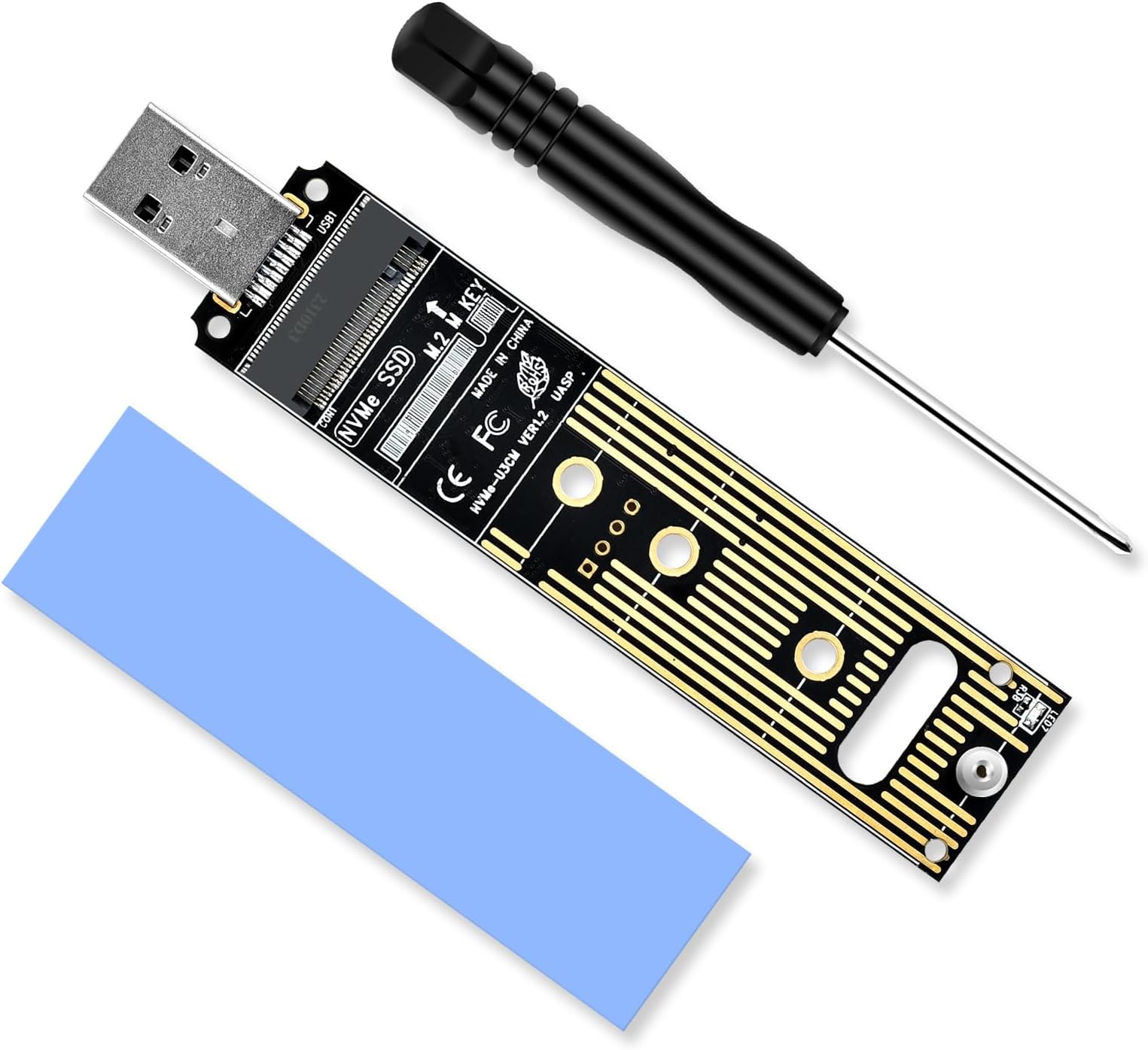
The ELUTENG NVMe to USB 3.1 Gen 2 Adapter delivers blazing 10Gbps transfer speeds for M-Key M.2 NVMe SSDs up to 4TB. Featuring advanced heat dissipation with copper and silicone materials, it ensures stable performance during heavy data transfers. Compatible with multiple SSD sizes (2230/2242/2260/2280) and major OS platforms, this plug-and-play adapter includes a screwdriver and thermal pad for easy installation and optimal cooling.


| ASIN | B0CB45PRMF |
| Best Sellers Rank | #33 in Computer Memory Card Adapters |
| Brand | ELUTENG |
| Built-In Media | CD |
| Color | Black |
| Compatible Devices | M.2, NVME, SSD |
| Connector Type | USB Type A |
| Customer Reviews | 4.4 out of 5 stars 994 Reviews |
| Finish | Silicone |
| Finish Type | Silicone |
| Item Weight | 32 Grams |
| Manufacturer | ELUTENG |
| Mfr Part Number | ELT_NVME_TYPEA_USB_BK |
| Model Number | M.2 NVME to USB |
| Number of Items | 1 |
| Number of Ports | 1 |
| Package Quantity | 1 |
| Power Plug Type | No Plug |
| Smart Home Compatibility | Not Smart Home Compatible |
| Specific Uses For Product | Laptop |
| Unit Count | 1.0 Count |
| Warranty Description | 12 months |
L**C
Great Value!
This worked perfect and my SSD fit with no issues. Didn't notice and heat will connected and data transfer speed and connection has not been an issue. This adapter is very minimalist with no covers or casing, so I would try to careful not to bend it and break it. I don't use it often so I keep it in storage while not in use.
A**W
Simple, Effective, and Affordable – Great Adapter!
After just one year of use, my LG Gram laptop's monitor developed a colored line across the screen and eventually went completely blank. I do not recommend this computer, especially considering that Costco refused to honor the supposed two-year warranty—very frustrating. In search of a budget-friendly solution to recover my files, I found the Eluteng NVME to USB Adapter (USB 3.1 Gen 2 to M.2 NVMe SSD). Thankfully, it worked exactly as described. It was simple to use, reliable, and more than sufficient for transferring my data. The included small screwdriver was a thoughtful touch and made the process even smoother. Overall, this adapter was a lifesaver. If you're in a pinch and need to access files from an NVMe SSD, this product is a solid choice: - Easy to use - Works as advertised - Great value for the price - Handy screwdriver included Thank you, Amazon.
S**T
Works with Samsung 980 Pro 2TB
I've been having a problem with my Samsung 980 Pro 2TB drive lately that I can't figure out. After a few seconds after booting Windows I get a "device does not exist" error and the drive is inaccessible. Thing is, the drive works in other PCs, but its not working in my main rig. I pulled it from the M.2 slot, plugged in into a PCI-E to M.2 adapter, and the same problem happens. It makes no sense to me unless its an issue with the motherboard. It worked for over a year, started flaking out, then worked for months, now its flaking out again. I just don't get it. At least with this adapter, I can actually use my drive on my main PC for now until I figure out what to try next. I'd blame some kind of compatibility issue but it worked for over a year without issue. I may need to get my hands on another NVME drive to see if the same kind of issue happens when plugged into the PCI-E bus. When plugged into this adapater, the drive functions without issue, albeit at 1/6 the normal speed (1024.25 MBPS reported by CrystalDiskMark) but that is completely expected. Overall, 5/5 product. It does what it's advertised to do and I wouldn't expect more.
W**Z
Impressive Compatibility & Performance - Assembly Could be Easier - No Instructions
Worked perfectly with a new Western Digital SN850X Gen4 NVME, a Micron 3400 Gen4 NVME, a WD SN730 Gen3 NVME and for an old Toshiba SATA m.2 drive. Very fast cloning and file copying! ASSEMBLY: As others have said, attaching the SSD to the adapter is a pain. You have to juggle 2 VERY tiny parts. A screw that come up through the bottom of the adapter and a standoff that sits on top of the board. The standoff is a spool that features a groove that secures the SSD. Easiest for me was to: 1: Insert the SSD into the adapter at a 25-35 degree angle. 2: Keep the SSD vertical and drop the standoff into the notch at the end of the SSD. 3: Push the SSD and standoff into position against the adapter. 4: Continue to apply pressure to keep the standoff in place, flip the adapter over and install the screw. 5 stars for this product as far as performance and compatibility. My thought is that ALL of these bare bones M.2 to USB adapters should have a permanently attached or press in thread on the PCB that stays in place and should use a grooved THUMBSCREW to secure the SSD. The thumbscrew would be the only loose part. How convenient would that be?!?! Haven't found one yet. :( Functionally, this is a FANTASTIC product once you get it all put together!!!
A**N
Hard drive
I'm thrilled with the ELUTENG NVME to USB Adapter! This device is an absolute game-changer for anyone looking to maximize the potential of their M.2 NVME SSD. The USB3.1 Gen2 10Gbps interface ensures lightning-fast data transfer speeds, allowing me to effortlessly transfer large files in seconds. The build quality of this adapter is top-notch, with a sturdy construction that feels durable and reliable. Setting it up is a breeze, thanks to its plug-and-play functionality. I appreciate the UASP support, which optimizes performance for even faster data transfer rates. The versatility of this adapter is another standout feature, as it supports various M.2 NVME SSD sizes including 2280, 2260, 2242, and 2230. Whether I'm using it for upgrading my laptop's storage or for external storage needs, it handles the job with ease. Overall, the ELUTENG NVME to USB Adapter exceeds my expectations in every aspect. It's a must-have accessory for anyone who wants to unleash the full potential of their M.2 NVME SSD. Highly recommended!
A**R
Inexpensive and easy to use
this M.2 PCLe "card reader" was extremely easy to use Used twice - once to pull off data from a laptop's OEM SSD when it would not boot up properly. This enabled recovery of the data files form the SSD prior to restoring the OS from the SSD's "D drive" Windows backup. A Windows restore erases all data files so it was necessary to pull off the existing data prior to resetting the laptop. 2nd use was for cloning the restored OS & SSD from & replacing it with a new much larger 2 TB SSD , also from Amazon. This too worked perfectly. A small Philips screwdriver is included to lock down the SSD while it is the reader. The screwdriver worked fine for this purpose but was too small to remove the screw holding the OEM SSD to the motherboard. This required a larger jeweler's Philips screwdriver The box also included a blue heat sink strip but it wasn't used and wasn't a problem w/o it. The adapter has a blue blinking light to indicate data tranfer. HIGHLY recommended.
D**.
FLAMING HOT GARBAGE
Ever hear about a violin shaped object? IE, an object looks like a violin, but is unplayble and doesn't actually work right? This SSD mount is basically that. A false representation of an SSD mount. It works just long enough for you to right a good review saying that it functions. The good news is that it does indeed at least initially load onto my computer with no fuss. However it runs DANGEROUSLY HOT. Getting a message that says FATAL READ ERROR when opening the file system on your drive like how I got is absolutely terrifying! The good news is that when I first got that message, I was totally freaking out! Thankfully, it didn't actually kill my drive on the first go. I grab the SSD to pull it and give it a hard restart, and I noticed that it was SCALDING HOT. Once I yanked out the drive and let it cool down, it was good to go again in a few minutes. Still, it basically got hot enough to make the memory not readable. I'm pretty sure that with protracted use, it really will kill a drive. Especially given the other reviews where people complain that this mount actually DID kill their memory stick. At least in my case, it doesn't even seem to need to actually be running anything. Just having it plugged in, and it gets hotter and hotter all on it's own. I'm glad I checked it when I did, otherwise, it might have killed my drive, with lots of valuable sensitive information on it. This mount seems to lack a limiter or something so it seems to be always running at full blast. Comparing this SSD mount with the one I replaced it with, it does appear that there are 2 IC elements that are missing. The issue with my old drive is that the actual USB connector element came loose. Otherwise, everything else on the old mount worked a treat. I feel like I would have been better off resoldering the connector on the old one rather that buying this hunk of junk. It was a waste of twelve bucks. Tl;dr It can work in a pinch, if you need a few small files but only for using ~5 minutes at a time. 0/5 stars. Don't leave it plugged in, or IT WILL PROBABLY KILL YOUR DRIVE. MAJOR FATAL FLAW OVERHEATING. AVOID PRODUCT, DO NOT RECOMMEND AT ANY PRICE. Why can't you just build something properly? The design was so close to be usable.
R**R
Only works on M2s with 2 slots in the connector
It claims to work on both types of M2 but really only worked on the newer two slot connector M2s. I tried it on a one slot M2 and at first Windows didn't see it and then after awhile claimed it need to format the drive before it could use it. I moved the drive back to an older adapter designed just for the one slot M2 and Windows had no problem with the drive. Installing an M2 into the adapter takes a lot of fumbling with a little screw. (There is also a nut included in the package which is not needed.) There is a piece of plastic or rubber that comes with it but not sure where it should go. Since I only use the adapter on a temporary basis I have started using a wooden clothespin instead of fumbling with the screw.
S**N
Solid. Works well. Perfect for grabbing quick files / technician must have
Had to recover some files from a NVME drive from a dead system before we rebuilt, re-using the old drive. Popped the NVME into the USB adapter, plugged it in and I was up and running. Please note, I did have to assign a drive letter to the NVME drive using Windows Disk Management. - if you plug it in and you don't get anything happening, please look up how to do this. Obviously the read and write speeds are terribly slow compared to what an actual drive can do, but thats what you get over USB. Grabbed a couple thousand files with ease, works as described. I would buy again and recommend this item. Lastly, yea... there is no enclosure, and yes the drive is exposed. These are NOT designed for long term usage. It is literally a tool you use to grab or drop the data you need and then put away for your next repair. If you need something long term and more durable please consider a NVME to USB that comes with an enclosure. The build quality on these is more than sufficient, additionally they provide a small screwdriver and everything you need for any sized NVME.
R**D
Fonctionne avec Windows 11
Fonctionne très bien même sur Windows 11
S**L
Produit d'une qualité équivalente au produit plus dispendieux
Excellent produit et la livraison a été rapide. Je l'utilise quotidiennement pour tester et récupérer des données sur différence m.2 et il fonctionne toujours à la perfection.
B**E
Good product
Good product
R**C
WOW! This SSD to USB ELUTUNG M.2 is fantastic and it is fast enough for data tranfer!
I have managed to see what's in my other SSD storage without opening my laptop to performe the same procedure! This device even has a blue light indicator. Also that's pretty cool because I can even see that there's a red light source flashing on my SSD. This is a great buy for $15.99. Now I can retrieve my data without wasting my time opening the laptop and unplug the battery, remove the original one and get what's in my spare SSD.
Trustpilot
1 month ago
1 month ago