Buy anything from 5,000+ international stores. One checkout price. No surprise fees. Join 2M+ shoppers on Desertcart.
Desertcart purchases this item on your behalf and handles shipping, customs, and support to Seychelles.
🎥 Elevate your video game — be seen, be heard, be unforgettable.
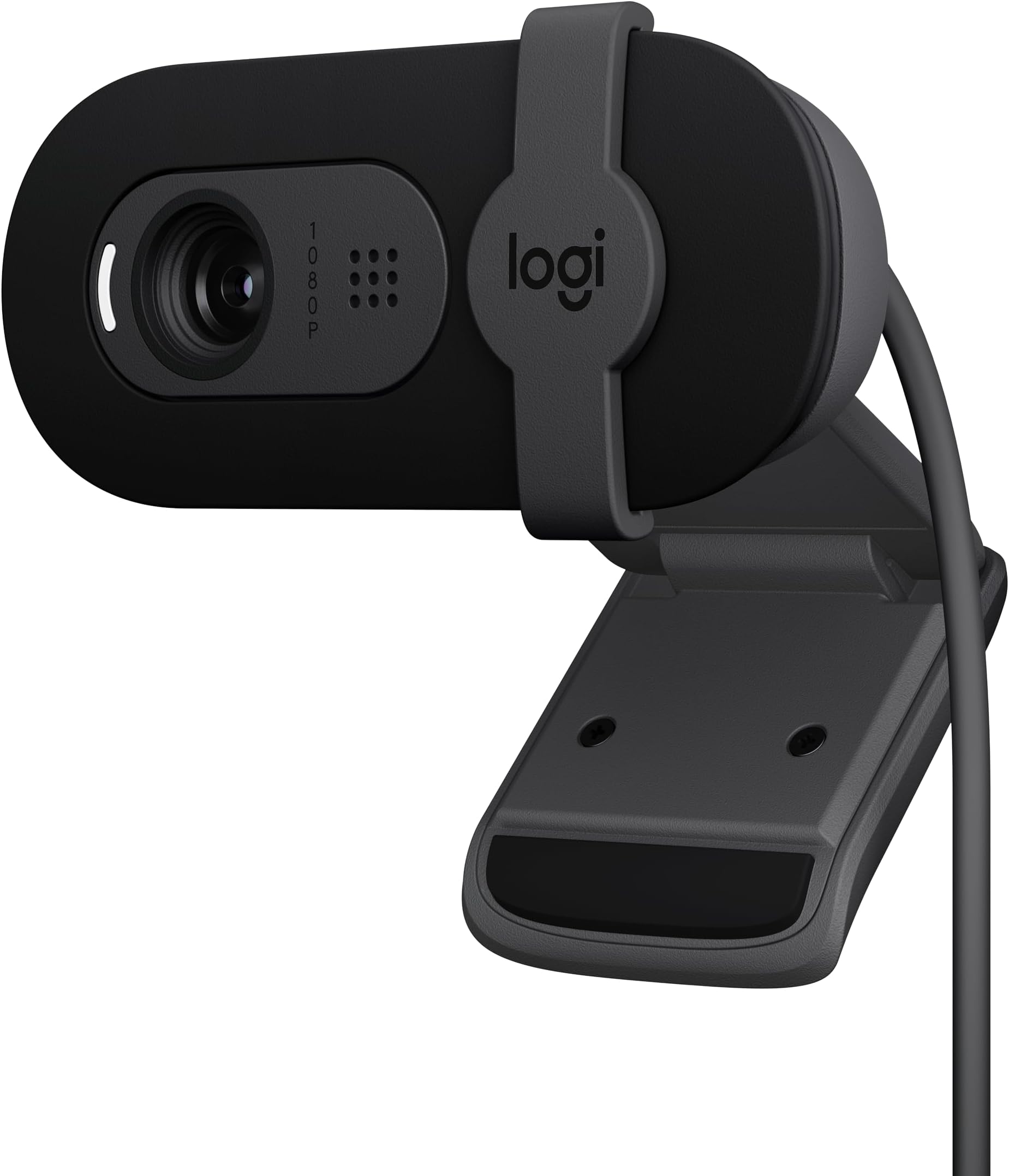
The Logitech Brio 101 is a sleek, Full HD 1080p webcam designed for professionals and streamers who demand clear video and reliable audio. Featuring RightLight technology that boosts brightness by 50%, an integrated privacy shutter, and broad platform compatibility including Zoom, Microsoft Teams, and Nintendo Switch 2’s GameChat mode, it offers effortless plug-and-play use. Made with 77% recycled plastic, it blends performance with eco-conscious style, making it the perfect upgrade for your home office or streaming setup.


| Antenna Location | video conferencing, streaming, and remote work |
| Are Batteries Included | No |
| Asin | B0BXGFFSL1 |
| Best Sellers Rank | #1 in Webcams |
| Brand | Logitech |
| Built In Media | Privacy Cover |
| Camcorder Type | Webcam |
| Color | Black |
| Compatible Devices | Windows 7 and up, macOS 10.10 and up, Chrome OS |
| Connectivity Technology | USB-A |
| Customer Reviews | 4.4 4.4 out of 5 stars (6,901) 4.4 out of 5 stars |
| Display Resolution Maximum | 1080p Full HD |
| Effective Still Resolution | 0.9 MP |
| Effective Video Resolution | 1080 Pixels |
| Exposure Control Type | Automatic |
| Features | Low Light |
| File Format | MP4 |
| Flash Memory Speed Class | C10 |
| Flash Memory Type | Micro SD |
| Flash Memory Uhs Speed Class | 3 |
| Flash Memory Video Speed Class | V60 |
| Focus Type | Fixed Focus |
| Form Factor | Rectangular |
| Global Trade Identification Number | 00097855188915 |
| Has Image Stabilization | No |
| Image Aspect Ratio | 16:9 |
| Image Stabilization | false |
| Item Dimensions D X W X H | 1.26"D x 2.87"W x 2.62"H |
| Item Weight | 0.31 Pounds |
| Lens Type | Zoom |
| Manufacturer | Logitech |
| Maximum Aperture | 2 f |
| Maximum Focal Length | 4 Millimeters |
| Model Name | BRIO 100 |
| Model Number | 960-001589 |
| Operating System | Windows 7 and up, macOS 10.10 and up, Chrome OS |
| Optical Zoom | 5 x |
| Screen Size | 0.01 |
| Sensor Type | Fluid crystal |
| Shooting Modes | Low Light |
| Style Name | 1080p |
| Supported Audio Format | Mono |
| Supported Image Format | JPEG |
| Unit Count | 1.0 Count |
| Upc | 097855188915 |
| Video Capture Format | H.264 |
| Video Resolution | 1080p |
| Viewing Angle | 60 Degrees |
| Warranty Description | 1 Year Limited Hardware Warranty |
| Water Resistance Level | Not Water Resistant |
| White Balance Settings | Auto |
| Zoom | Digital |
User
Great for home office—clear video and solid mic
Picked this up for my home office setup, and it’s been a really solid webcam for everyday use.Setup was simple—plug-and-play with no issues. Works right away with Teams and other meeting platforms.Video quality is clear and consistent for a 1080p camera, and the built-in mic has actually been better than expected. I’ve had no complaints from anyone on the other end of a Teams call, which is really what matters.It’s not a high-end streaming camera, but for meetings and day-to-day use, it does exactly what it should without any hassle.Privacy shutter is a nice bonus, and overall it’s been reliable.Bottom line:If you need a dependable webcam for a home office, this gets the job done with good video and surprisingly solid audio.
User
Made My Video Calls Instantly More Professional
The video quality is sharp and clear at 1080p, making a big difference compared to my laptop’s built-in camera. Colors look natural, and the image stays smooth and stable even in lower lighting conditions, which is perfect for Zoom and Microsoft Teams calls. I also like the privacy shutter—it’s a small but important feature that gives peace of mind when the camera isn’t in use. The mount is sturdy and works well on both monitors and laptops.Overall, this is a reliable, no-fuss webcam that delivers solid quality for work, streaming, and video calls. If you want a simple plug-and-play upgrade from a built-in camera, the Logitech Brio 101 is definitely worth it.
User
Great Choice
Was looking for a lower cost webcam for Zoom meetings. Very pleased. Audio and video quality have been great. Simple plug and play with my PC (just needed to give system permission to use it.) Note: It is slightly weighted and just kind of sits on the top edge of my monitor. Works great in this application, but doesn’t really “clamp” on if that’s important in your situation.
User
Great very basic camera
Nice camera for the price, great quality picture and sound and easy to set up. My only issue is that you cannot adjust the camera to zoom in/out, but again, it’s cheap and very basic. I’d go up a bit in quality/price if I were to do it again just for that feature. Otherwise, great for basic zoom calls etc.
User
So clear I discovered pores I didn’t even know I had
I bought this thinking:“Nice, I’ll look a little better on Zoom calls.”What I got:HD video ✔️Professional look ✔️A full dermatology consultation I didn’t ask for ❌This webcam shoots Full HD 1080p video with auto light correction, so it adjusts brightness and makes everything super clearTranslation:👉 It sees EVERYTHINGFirst time I turned it on:Joined a meetingLooked at myselfImmediately leaned back like👉 “WHY is it THIS clear??”I’m talking:PoresFine linesThat one spot you thought no one could seeThis camera said:👉 “We’re not hiding anything today.”To be fair, the quality is actually great:Super sharp imageGood lighting even in darker roomsBuilt-in mic works fine for callsAnd it’s super easy to use—just plug it in and you’re ready to go, no tech headache requiredThings I love:Clear, crisp videoMakes you look professional (and honest)Reliable for meetings and streamingThings I wasn’t emotionally prepared for:Seeing my face in 1080p truthAdjusting my lighting like a movie setConsidering skincare upgradesUnexpected side effects:Sitting farther away from the cameraTurning the brightness down just a littleSaying “it’s just the lighting” (it’s not)Final verdict:Amazing webcam, does exactly what it’s supposed to do…just be warned—this level of clarity comes with emotional damage.
User
Great purchase
Works ok with my Mac mini. Too close 😅
User
Trusted brand that does not break the bank
This webcam works great for video meetings, online calls, and everyday use. The picture quality is clear, setup was quick and easy, and it worked right out of the box without any hassle.One of the reasons I chose this webcam was the Logitech name. They have a strong reputation for making reliable computer accessories, and this webcam lives up to that expectation.For anyone looking for a budget-friendly webcam from a respected brand, this is an excellent option. It delivers solid performance without spending a fortune.Highly recommended!
User
Nice for $25 not for full price.
Picture quality is good, camera works well. It feels super cheap. The front face plate popped off almost immediately. Something tells me it shouldn't have. Makes me nervous to carry it in my backpack. I know you get what you pay for, but even at a discounted sale price of $25 I feel a little let down.That said, everything works as it should. Auto focus works well for the price. Picture quality is fine in decent light, the auto exposure isn't mind blowing.It sits nicely on the lid of my laptop, and it tilts up and down nicely. That's something neither my Anker nor Logitech C920 do. Unfortunately it's versatility ends there. It can't be attached to a tripod like the my other cameras.I've only used it in tandem with nice external mics so so I can't speak to the audio quality, but based on everything else, I'm assuming it's not great.Worth $25 but $40 might be a bit much especially since the Anker PowerConf C200 2K frequently goes on sale for $50.Bottom line:4 stars for $253 stars for $40
User
Great webcam
I have used a lot of webcams & this one is most definitely one of the best - especially for the price! The picture is crystal clear, microphone is crisp and the shutter is a great addition!
User
Excellent Webcam — No Need to Open My Laptop
The Logitech Brio 101 is a very good webcam with clear Full HD 1080p video quality. I use it for meetings and streaming, and it works perfectly with Zoom and Microsoft Teams. The built-in microphone is clear, and the privacy shutter is a great feature. The best part is that I don’t need to open my laptop anymore—I can keep my laptop closed and still get great video quality using my external monitor setup. It’s easy to plug in, works instantly via USB-A, and feels well built. Overall, a reliable and high-quality webcam that does exactly what I need.
User
Works great
Works great. Nice quality. Sound good. Easy to install.
User
Little camera packs big bang for small buck
I was really impressed with this lil bad boy. It does a great job for the price it is. It has a fixed lens, so no zooming in and out, but outside of that no complaints. You can download Logi Tune for your computer to adjust general settings on it, too. It has an adjustable neck with limited mobility.I currently use mine for streaming, so it’s connected to OBS for video display only. I have not tested the mic on it, so I can’t say whether or not it’s any good. The camera is plug-and-play and has a privacy shutter. It was very simple to set up (and Logi Tune was also very simple to use). In terms of the actual video capture, it’s pretty smooth, and does well when live streaming and recording, and it’s 1080p.I’ll be using this until it finally craps the bed. Definitely recommend for office use or for streamers/vodding on a budget :)
User
Good webcam, but not ideal for frameless monitors
I’ve been using this webcam for a while, and it works really well for everyday calls and meetings. The image quality is sharp, and it handles lighting nicely even when the room isn’t very bright. Setup was quick and easy — just plug and go. The only downside is that it’s not the best fit for frameless monitors since it covers a small part of the screen. Other than that, it’s a solid, reliable webcam for the price.
Trustpilot
3 days ago
2 months ago