Desertcart purchases this item on your behalf and handles shipping, customs, and support to Seychelles.
🚀 Triple your screen, not your clutter!
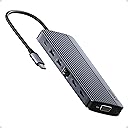
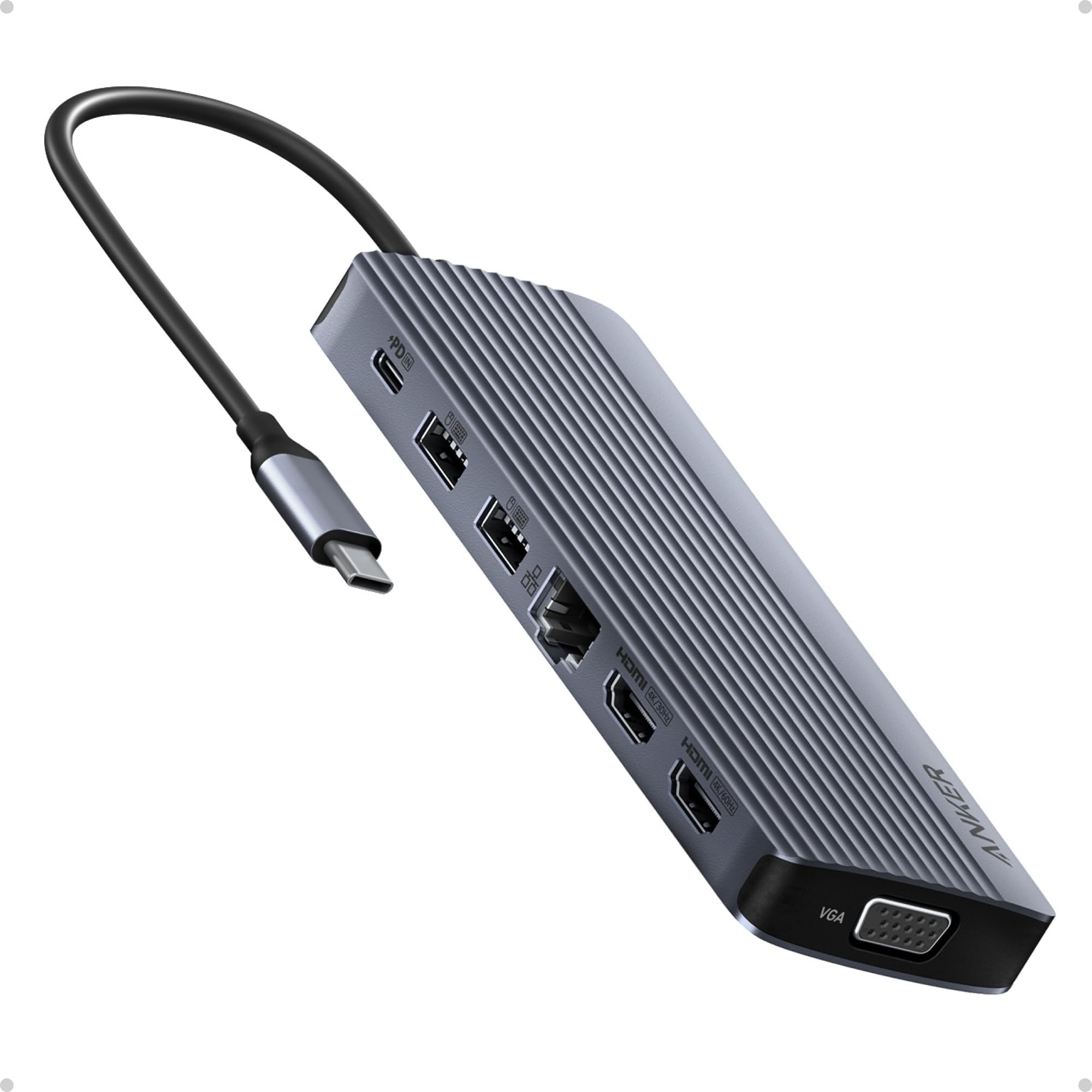
The Anker 14-in-1 USB-C Docking Station is a powerhouse hub designed for professionals craving ultimate productivity. It supports triple display setups with dual 4K HDMI and 1080p VGA outputs, offers 14 versatile ports including high-speed USB and Ethernet, and delivers 80W pass-through charging to keep your laptop powered. Compatible with major OS platforms, this sleek grey dock transforms any workspace into a multi-screen command center.


| ASIN | B0CF52HF6D |
| Best Sellers Rank | #447 in Computers & Accessories ( See Top 100 in Computers & Accessories ) #51 in Laptop Docking Stations |
| Brand | Anker |
| Color | Grey |
| Compatible Devices | Laptops |
| Customer Reviews | 4.2 out of 5 stars 1,347 Reviews |
| Global Trade Identification Number | 00194644155513 |
| Hardware Interface | USB 3.0 Type C |
| Item Weight | 0.13 kg |
| Manufacturer | Anker |
| Mfr Part Number | A83890A1 |
| Minimum Required Operating System Version | Windows 10 |
| Model Number | A8389 |
| Number of Ports | 14 |
| Total Number of HDMI Ports | 2 |
| Total USB Ports | 6 |
| Total Usb Ports | 6 |
| UPC | 194644155513 |
J**N
Updated Review
I will leave my original review at the bottom. After I posted my original review Anker reached out and offered me a refund or a replacement. I opted to take the replacement and give them another chance to see if maybe the first one was just a bad unit. I'm an glad that I did. I have put the replacement in place exactly as I had the original and have been running it for a day now. It is driving two 1080p monitors and so far has not had a single issue. I have a 100w Anker USB C charger going into the hub and it is supplying power to my laptop. The hub does get warm to the touch, but that is expected and clearly noted as normal in the documentation. So I can give this a thumbs up and also have to give Anker a big thumbs up for standing by their products and having great customer support. Old Review: I guess I should have looked at the reviews a bit closer. I got this to drive 2 monitors. Something my machine is more than capable of doing with a RTX3070 in it. Hooking it all up the two monitors will come on and work but then randomly drop out. Sometimes it is just one sometimes it is both. They go black and stay blank. Sometimes they come back after a second. Sometimes they stay gone till I unplug the hub and plug it back in. The device is getting plenty of power as it is connected to an Anker 100w usb c power supply. In addition to the going blank, I have also noticed watching videos that now the video will get out of sync with the video on the monitors. This is very disappointing.
S**A
FANTASTIC for using multiple VGA displays with PC that doesn't support VGA
I have DUAL VGA monitor setup that I could no longer use when a bought a new laptop with HDMI ports only. The hub was a perfect solution plus providing several handy additional USB ports for earbuds, phones etc. I never turn my new laptop off because its cooling fans never run when I am not using it . . . so the laptop has no moving parts when not in use. I had to replace my older Thinkpads that were running for several years without turning them off because they couldn't be upgraded to the current version of Windows 11 so NO MORE UPDATES from Microsoft. My only concern with the Anker docking station is that it runs fairly warm when the computer is ON but not in use. Wondering if it will last for several years at its elevated temperature. OVERALL, THIS ANKER PRODUCT IS FANTASTIC.
J**T
One of life's simple pleasures.
Running two monitors, a printer, power cords for other devices via USB and this thing has worked flawlessly. I have had to unplug it from my laptop to get my monitors to register again after putting the laptop to sleep but I think that's a function of my computer and not this docking station. Anker always pleases! For an economical option with full function, smash that buy button now!
G**E
Short cable
Works fine for now two weeks in and has more ports and quality than it should have at that price point. especially if you need two HDMI ports. the cable is really short though
I**E
Defective
I just got a brand-new Asus Vivobook S14 with Intel Core Ultra 7, 32 GB of memory, 1 TB storage. I have two (an Asus and a Samsung) 1920 x 1080 displays and an older Dell (1280 x 1024) display using VGA or DVI-HDMI cable. I used to connect the Asus laptop to the Asus display and the old Dell display using another Anker USB C hub with one ethernet port and one 1 HDMI port for the Dell display. The Asus display connected to the laptop using a built-in HDMI port. This old three-display setup worked well. When I received this new Anker four-display device, I first connected the Dell (via DVI-HDMI cable) to one HDMI port and the Asus display to the other HDMI port. After a short moment, the Dell display started going off and on. The interval was around 15 - 20 seconds. Windows still showed the laptop connected to two external display. I thought the DVI-HDMI cable may be incompatible with this new hub, so I used a VGA-VGA cable to connect to the VGA port on the hub. I then connected two other displays to the two HDMI ports. I only got visual on the laptop, the Asus, and the Dell displays. The Samsung display was dark. When I selected the option to extend the laptop display to the 4th display (Samsung), the Samsung display showed the visual, but the laptop display went dark. In other words, I only got three displays at once, not four. I checked the photos on the product page again and confirmed that the unit should have shown different visuals on all four (laptop, Dell, Asus, and Samsung) displays. By the way, I was unable to screw the two VGA cable thumbscrews to the device. It appears the holes were too deep inside the unit so the screws could not reach them. I have been using a bunch of Anker products. This one damaged Anker's reputation for sure.
S**N
Bad network port
Edit: gotta say that Anker support is top notch. They replaced the unit with no hassle and got me a new working unit. No issues with the new one, another win from Anker Original review: Form is great, but the function is lacking. Not sure if I got a bad unit, but the network port drops connection constantly, and I've experienced some erratic behavior with USB devices (nearly RMA'd a perfectly functioning $1000+ webcam due to poor connection. Tested into another computer as a last effort and found the cam working perfectly). The unit runs my dual monitors perfectly, so all good there. That said, other hubs from Anker have been great. I needed this one for the network connection, but it seems to be defective or just poorly configured.
V**T
Excellent Dock for a Clean, Powerful Workstation Setup
The main reason I purchased the Anker 14-in-1 USB-C Docking Station was to create a single workstation where I can easily swap between my home and work laptops while using the same peripherals—two monitors, keyboard and mouse, audio headset, and several external storage devices. It met all my needs and has exceeded my expectations. It instantly transformed my laptop into a full desktop workstation with just one cable. Setup was completely plug-and-play—no drivers needed—and everything worked right out of the box. Power delivery has been excellent. It charges my laptop while driving all connected accessories without any problems. The build quality is exactly what I expect from Anker—solid, well-designed, and premium-feeling—and it remains stable even under heavy use. That said, there are a few important things to note. Without a power input connected to the hub, only one HDMI output can be used for an external monitor, and the second display must remain on the laptop. I also use a Logitech USB-A Unifying receiver through the hub, and occasionally the keyboard and mouse performance is not as responsive as when plugged directly into the laptop. The dock can also get warm to the touch, which is expected with higher workloads, current, and power draw. Since the beginning of the pandemic, I’ve been working from home and do everything I can to preserve the life of my equipment, including running a small USB-A fan 24/7 to keep things cool—and I’ve had no issues so far. This dock has been a huge productivity boost and keeps my desk clean and organized with a simple single-cable connection. For the price, it offers excellent value compared to many other docks that cost much more and offer less.
T**C
Great product. Documentation non-existant.
Update: Contacted by Anker and given a 30% discount for the difficulties. The customer support deserves 5 stars. The product itself deserves 4.5 stars (If it weren't for tiny black lettering on a gray background it would have been 5. The setup and product support deserves 0. Updated from 2 stars to 3 stars due to the contact. The original review follows and it stands as written. Original Review: The good news. Great design and heavier than I expected. I expect this will last quite a while. There are plenty of ports. The USB is very fast to transfer data. Very durable, high quality item that worked with all the components I need. The bad news. Anker did not put any instruction in the box...NONE. They thought they were being so cute and high tech with the little phone scan thing instead. NEWSFLASH! I do not want to read the instructions on my phone. Not today, not tomorrow, not ever. I went to the website and instead of giving any good documentation there, all they are interested in is selling product. Thanks a ton, but I already bought the product, now I need some documentation on how to use it. The black writing against a grey shell defining each port was a horrible choice. It should have been white or red lettering ... anything but black. I basically had to figure out by trial and error and testing how to get everything to perform like I want. I have no doubt this is a superior product, but this is the sort of negligence that drives customers to other brands.
M**R
Anker USB C Hub
It is an excellent product and works very well.
D**E
ok
En temps et en heure, Ok.
M**G
Great connectivity
As the title says, great connection. I connect my laptop to this which charges quickly. Also connected are two screens, a mouse speakers and internet. Had for over a year now and still working.
C**H
Good but connecting cable is poor
Support wise it is good, all ports works no lag used 2 display at a time. Connecting cable is weak, within 6 months outer layer is started coming out. Getting too hot sometimes
D**.
Hub com muitas opcoes
Solucao compacta com 1usbc de carregamento e outra de 5gb, 4usba e 2 saídas de vídeo para monitores
Trustpilot
2 weeks ago
4 days ago