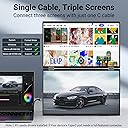
๐ Elevate your workspace, triple your impact!
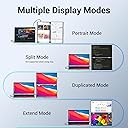
The InnoView 15.6" dual portable monitors offer a foldable, stacked design with 1080P IPS screens, automatic 90ยฐ/180ยฐ rotation, and compatibility with Windows and Mac. Powered via USB-C or HDMI with recommended 30W+ power supply, it boosts productivity by enabling seamless multitasking on the go. Lightweight at 1.59 kg, it includes an 18-month warranty and easy driver installation for a professional-grade mobile workstation.
| Additional Features | 1.Support screen expansion, copy, merge mode 2. The upper and lower structure saves space. 3.Multi-angle adjustment |
| Asin | B0CHYHY9TJ |
| Aspect Ratio | 16:9 |
| Best Sellers Rank | #81,611 in Computers (See Top 100 in Computers) #2,120 in Computer Monitors |
| Brand | InnoView |
| Brightness | 300 Candela |
| Color | Grey |
| Compatible Devices | Laptop |
| Connectivity Technology | HDMI, USB Type C |
| Contrast Ratio | 1000:1 |
| Customer Reviews | 3.4 3.4 out of 5 stars (115) 3.4 out of 5 stars |
| Display Resolution Maximum | 1920 x 1080 Pixels |
| Display Technology | LCD |
| Display Type | LED |
| Hardware Connectivity | USB, mini HDMI |
| Has Color Screen | Yes |
| Included Components | 15.6'' Dual Stacked Monitor*1, Adapter(30W)*1, Full-featured USB C cable(silver head)*1, USB A to USB C Cable*1, USB C cable(black head)*1 |
| Is Electric | Yes |
| Item Dimensions D X W X H | 39.8D x 26W x 6.1H centimeters |
| Item Weight | 3.5 Pounds |
| Manufacturer | InnoView |
| Model Name | INVPM009 |
| Model Number | INVPM009 |
| Mounting Type | Wall Mount |
| Native Resolution | 1920x1080 |
| Number Of Component Outputs | 1 |
| Picture Quality Enhancement Technology | IPS |
| Refresh Rate | 60 Hz |
| Resolution | FHD 1080p |
| Screen Finish | Matte |
| Screen Size | 15.6 Inches |
| Series Number | 9 |
| Shape | rectangular |
| Specific Uses For Product | Personal |
| Total Number Of Hdmi Ports | 1 |
| Total Usb 2 0 Ports | 2 |
| Total Usb 3 0 Ports | 2 |
| Total Usb Ports | 2 |
| Viewing Angle | 178 Degrees |
| Voltage | 5 Volts |
User
Still alot to improve
When i search for dual monitor in amazon it shows me this one and the one from Ingnok . Because this one has alot more review (ingnok only got 90 something) so base on this i though this should be a good choice. However when i get it i found few issue with this monitor.1) it needs to install a software before i can use two monitors.2) when computer went to sleep mode , the upper monitor is not completely off. It is in black but binking. Until you power off the monitors by press and hold the power button.3) both monitors has to been same setting (brightness, sharpness..etc) when i power off all setting is gone.4) cant use those two monitor from different computers. Cause its only one usb-c control two monitor and no choice for separate input.End up i return it and get "Ingnok Folding Dual Computer Monitor, 15.6" IPS FHD" this one solve all the problem i mentioned above.
User
Took a few reboots to work, been working great!
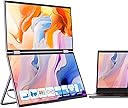
First off, the Innoview can work without connecting the external power-supply. IF your laptop USB-C port can provide enough current to power both screens -- but its less stress on your laptop USB-C pulling all that current if you use the external power-supply, and the dual-screens are brighter doing it too.Also, I had some initial issues getting laptop to to recognize Innoview & let Innoview autorun its driver-installer, so I recommend first thing, plugging Innoviews power supply in its top USB-C connector & letting the Innoview fully boot up with "Innoview" splash screen, before connecting Innoview to your laptops USB-C.Another thing you'll notice from the pic is I have all 3 connectors used, I was unable to get both screens running from the same USB-C port as the documentation showed, I needed a USB-C pory for bottom screen & HDMI port for the top.The other thing you will notice is that even though my multiport USB-HDMI hub has USB-A, usb-c & HDMI ports, I was unable to run both displays through it no matter what combination of ports I tried.Perhaps if I used a full external-powered docking-station I could run both monitors from the docking station, but this hub at least would not run both.What this means is if you are running out of USB ports, a hub like mine would be good to let you run 1 display + give you extra USB ports for things that aren't displays. But even though this hub had USB ports & an HDMI port I could not run both screens through the hub.
User
drivers are terrible, doesn't work
The Good: The hardware seems to be high quality. The screens are sharp and bright, and the unit feels solid and durable.The Bad: The drivers were a huge pain to install. Just when I thought it was working correctly, it stops. Here's what happens:- Both screens come on. You can even move apps or browser windows onto them.- As soon as you try to *do* anything on screen 2 (top) like play a video or scroll the browser window, the driver crashes and it enters an endless loop of crashing and restarting. Both monitors cycle off and on throughout this process. All you can do is unplug it or disable the monitor in Windows display settings.- If you disable just screen 2, screen 1 works normally. But why would I buy this product for only half of it to work?Also, it only works this much with the USB-C cable connection. It's also supposed to work with HDMI+USB, but Windows never even recognizes screen 2 with this cable configuration. There's a USB cable with wall power adapter in the box, but nothing in the instructions tells you when or why to use it. The documentation clearly claims "single-cable connection".If they update the drivers to fix this critical problem, I'll also update my review. I would give it 1 star, but the hardware really does seem to be quite good. I just wish it worked!Update (May 2025) - New ThinkPad laptop and now it doesn't work at all. I'm taking off another star. Don't waste your money.
User
Unreliable Product โ Fails Over Time, Poor Support
Avoid this product. One of the screens on my InnoView extender stopped working not long after purchase. When I contacted support, I was met with a long string of emails asking me to change cables, try different laptops, and jump through unnecessary hoops โ all to confirm what I already knew: the screen was defective.Eventually, they offered to send a slightly used replacement, but only after I shipped mine back. Thatโs not acceptable for a product that clearly has recurring quality issues. This feels like a company that knows their hardware is unreliable and hopes customers will give up during the support process.For a supposedly plug-and-play monitor, this has been nothing but wasted time and money.
User
Beautiful Machine. Easy to use
Worth every penny. Great machine.
Trustpilot
4 days ago
3 days ago