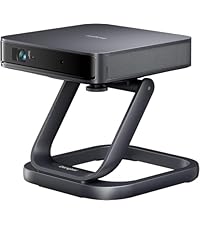
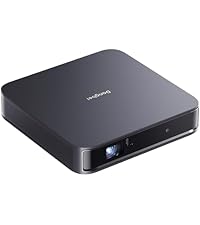
Desertcart purchases this item on your behalf and handles shipping, customs, and support to Seychelles.
🎬 Elevate your home theater game with laser precision and endless streaming—because ordinary just won’t do.
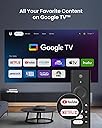
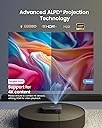
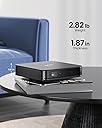
The Dangbei Atom Portable Laser Projector combines 1200 ISO lumens laser brightness with a stunning 180-inch 1080p Full HD display and Dolby Audio dual speakers. Featuring built-in Google TV with official Netflix access and over 10,000 apps, it offers a seamless streaming experience. Ultra-thin and lightweight at 1.87 inches and 2.8 pounds, it’s designed for portability and quick setup with autofocus and keystone correction. 3D-ready capabilities and HDR10 support make it a versatile home cinema powerhouse perfect for gaming, business, and entertainment.


| ASIN | B0CLP5WMXC |
| Additional Features | 3d-Ready, Auto Focus, Built-In Speaker, Built-In Wi-Fi, Digital Keystone Correction |
| Antenna Location | Business, Education, Gaming, Home Cinema |
| Best Sellers Rank | #865 in Video Projectors |
| Brand | Dangbei |
| Brightness | 1200 lm |
| Built-In Media | AC Cord x 1, Bluetooth Remote Control x 1, Dangbei ATOM Portable Laser Projector x 1, Power Plug 120W (19V/6.32A) x 1, User Manual |
| Compatible Devices | Gaming Console, Laptop, Smartphone, Speaker, Tablet |
| Connectivity Technology | Bluetooth, HDMI , USB, Wi-Fi, Wireless |
| Contrast Ratio | High |
| Control Method | Remote |
| Controller Type | Remote Control |
| Customer Reviews | 4.3 out of 5 stars 302 Reviews |
| Display Resolution Maximum | 1920 x 1080 pixels |
| Display Type | Laser |
| Display resolution | 1920 x 1080 |
| Form Factor | Portable |
| Global Trade Identification Number | 00795847572017 |
| Hardware Connectivity | HDMI |
| Item Dimensions L x W x H | 7.68"L x 7.68"W x 4.92"H |
| Item Weight | 2.8 pounds |
| Lamp Wattage | 5 watts |
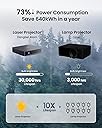
| Light Source Operating Life | 30000 hours |
| Manufacturer | Shenzhen Dangs Science and Technology Co., Ltd |
| Maximum Image Size | 180 inches |
| Maximum Throw Distance | 16.6 feet |
| Mfr Part Number | DBOD02 |
| Minimum Image Size | 40 inches |
| Minimum Throw Distance | 5.3 feet |
| Model Name | DBOD02 |
| Model Number | DBOD02 |
| Mounting Type | Front, Rear, Front Ceiling, Rear Ceiling, Wall Mount |
| Native Resolution | 1920 x 1080 |
| Number of Items | 1 |
| Picture Quality Enhancement Technology | HDR 10, HLG |
| Projector Maximum White Brightness | 1200 ansi_lumens |
| Recommended Uses For Product | Business, Education, Gaming, Home Cinema |
| Special Feature | 3d-Ready, Auto Focus, Built-In Speaker, Built-In Wi-Fi, Digital Keystone Correction |
| UPC | 795847572017 |
| Unit Count | 1 Count |
| Video Encoding | [Multiple] |
| Warranty Description | 1 Year |
| Wattage | 5 watts |
E**E
Great laser projector, poor 3D menu interface
This is the best projector that I have ever had. The automatic focus feature is neat. The images are bright and clear and saturated and in focus across the entire screen for both text and movies. There is no laser speckle. I could do work on the projected screen as an external monitor. I recommend getting a camera tripod that is about 3 feet or 1 meter high. You might also want to buy a projector screen if you do not have one, because a projector screen is not included. I purchased the Dangbei Atom projector and Dangbei 3D glasses combination. The package includes 2 AAA batteries that you have to put in the remote control by sliding down the back of the remote control about 3 millimeters and then pulling the back of the remote control off to reveal the battery compartment. The 3D movie viewing experience, once you get it working, is better than using the PlayStation VR headset on the PlayStation 4. Unlike the PlayStation VR headset, there are no screen door video artifacts when you view 3D images projected by the Dangbei Atom projector. That PlayStation VR headset is heavy and squeezes my head like a vise while the Dangbei 3D glasses are comfortable and light and feel like a pair of sunglasses. The only downside is the totally unintuitive multi-step process for viewing 3D videos or movies. You have to first charge your 3D glasses by plugging the small end of the USB cable under the nose piece and plugging the bigger end into a powered USB A port in a computer, a powered USB hub, or a USB AC adapter. The light in the white button on the 3D glasses will be red at first and will eventually go off when it is fully charged. After the glasses are charged, you press the white button on the glasses once to turn it on. You hold down the button for 3 seconds or so to make the button blink 3 times and turn the 3D glasses off. The glasses also seem to turn off automatically if they do not see a 3D image for a while. You have to hold down the Home (white house) button on the right side of the remote control, navigate to Projector / Image Correction / Reset to Default Image. You can then press the white left arrow button until you exit the menus. I don't understand why the user has to do this. This should be done automatically for the user any time they attempt to activate the 3D setting. You make selections by pressing the center depression of the circular control on the remote control that lets you move up, down, left, or right in the menu. Dangbei also recommends holding down the Home button, selecting the cog symbol to enter the settings menu, selecting Projector / Focus / Advanced / Auto Focus When Moving. This will turn off Auto Focus When Moving. The selection is off when it is white to the left instead of blue to the right. The presence of the 3D mode option in the Home / Picture menu gave me the incorrect impression that I had to set 3D mode first before viewing a 3D video or movie. I was wondering why the 3D mode setting selection that I made in the menu never worked and kept changing back to Off. Instead, what you have to do is start to view the 3D video or movie first. When you see double images side by side or one image on top of another, you have to hold down the Home button that has a white house symbol on the button. That will then reveal a menu on the right side of the screen where you can select the Picture menu option and scroll almost all the way down to select the 3D mode. There are 3 options for turning on 3D mode where the images are on top of each other, side to side, or coming from a Blu-Ray player (such as a PlayStation 4 connected to the projector via an HDMI cable). After changing the 3D mode, you have to press twice the button that has the white arrow pointing to the left on the remote control. The Dangbei video on YouTube does not seem to show this last part, which is necessary or your 3D mode selection will return to Off. The PlayStation 4 requires some changes on the PlayStation 4's menu on the far right side for Settings / Sound and Screen / Video Output Settings / TV Size to specify the size of the projected screen. If you are off by 1 inch, the 3D image might not look right, as if you were crossing your eyes. For some scenes, I have to select 80 inches, and for other scenes, I have to select 81 inches. When you go back to viewing the video or movie after selecting the screen size, the 3D mode will be Off again, so you have to go through the process of holding down the Home button on the remote control, going into Picture, and selecting the 3D mode again after each try of adjusting the screen size in the PlayStation 4 settings. That is a really tedious and time-consuming process of trial and error. The reward is a clear 3D image.
S**L
Incredible Projector!!! Works decent for large screens and 3D is nice!
This is a very high quality projector. I took a chance on the dangbei atom as I was looking for something for my home theater and I was also very curious about having 3D in my home as well as I thought that would be fun for me and my friends to enjoy. I can say that the dangbei atom is 100% worth the money. Just keep in mind of 1 thing before you buy this projector and that is it is a 1080P projector. 1080P looks great on smaller screens up to 120 inches. After 120 inches you will start to lose brightness and you'll start to loose pixel density. Things will also start to look blurry in perticular smal objects and items on screen will be blurry until more pixels can get to them making them appear clear. If you notice some blur you can wipe the lens with a lens cleaner like you use for glasses but you may still see this. It's not the projectors fault this is happening but the laser technology and quality helps keep it to a minimum for large screens so if you can't afford 4K I would say this is the BEST value for the money. The 3D is amazing but I must tell you that in order for you to be able to make it work the image MUST be set to default keystone no change must be made even with the zoom do not change it. 3D Bluray will give you the best effect possible and you will need a 3D bluray player to accomplish this. If you don't plan to be watching 3D constantly day to day I would buy a used one on ebay that is working well. I got an LG one for 25 dollars and had to buy the replacement remote but it was not that expensive so I went ahead and did that and it worked fine. This projector will not stream any video you want it doesn't support 3D properly for any content you stream on a stick or on google TV that isn't rendered for side by side viewing or top and bottom viewing. in the 3D mode the SBS and TAB options other than Bluray 3D are only going to work is a video is rendered for 3D so the projector can merge the 2 side by side images for each eye making the 3D effect. That is how u get those effects to work. As far as the 3D Glasses goes just charge them up and press the button on the top of the glasses to turn them on. Make sure the room is dark as light will make it hard for the glasses to do their job. I am not sure why this is but the way they work light probably confuses the glasses on what to visually work on.. Overall for the money this is a great value and I think you should consider it if you're on a budget and want something of high quality. The build quality on the unit is really nice too so that is also another plus. This will work well for screens up to 180 inches but just remember anything past 120 inches is not the projectors fault that's just 1080P so if you don't want any blurriness or pixel density issues go for a 4K projector. But as far as 1080P projectors go for handling images of large scale like 180 Inches which is what I have. This works pretty well! Better pixel density than competitors.
K**8
It's almost perfect but not "portable" enough
Great projector overall. I'm not an expert but I own 5 projectors and owned the Atom for close to a year. Pros I was kind of worried not seeing the word "ansi" in front of lumens but this is very bright!!! I used in on Eco and movie mode. Speakers good enough for a small bedroom but I recommend using a Bluetooth speaker or soundbar. Picture quality looks great at 1080p. Google TV OS runs smooth. It's portable but this brings me to my only con Con Portable for me means form factor. Yeah it's small. You don't need a streaming stick. It connects flawlessly to Wi-Fi and Bluetooth. But what if you're somewhere without access to Wi-Fi? Took me a year to find a way to connect my flashdrive. Download CX File explorer. When add the flashdrive you see a pop up window "Always open Cx File Explorer when Type-C is connected". " Clear default in System settings Apps > Downloaded". Check that box, open file manager APPS, check the CX File manager. This will take to Atoms settings. Press Clear Default. Your done. All my movies showed up. HOWEVER, movies kept buffering, Atom kept freezing on home menu, and projector started rebooting. As soon as the projector gave me permission to eject l, I removed and everything went smooth again. So much for portability!!!!!! Leave it alone. No problem with my other projectots. If you're camping this defeats portability. At night I can't tell the difference between this and my Wemax Go Advance. In the day time with a little light shining through, the Atom blows it away. Backyard? Atom. Camping? Go Advance. I would still recommend this for a first projector but not as a take along. It's Almost perfect
E**.
Amazing projector!
I've been using the Dangbei Atom Laser Projector for a few weeks now and I'm very impressed. I'm coming from those budget LED projectors and this is my first laser unit. Some pros and cons: Pros: + Surprisingly small form factor + Crisp, sharp 1080p image thanks to built-in auto-focus + Buttons on remote give quick access to focus adjusting settings + Internal fan isn't too noisy + Handles color and contrast better than budget projectors + Picture is quite bright and viewable even in some reasonable ambient light + Google TV apps and features work perfectly once connected + Usually has a coupon you can use to lower the price Cons: - Since it's using DLP tech you will see a kind of "rainbow effect" in your vision - Speakers are kind of weak, but no biggie if you've got external audio means - Only one HDMI port - Switching inputs (Home screen to HDMI) seems like it takes too many actions Overall, this is a fantastic projector and it was a great upgrade
D**B
Best laser projector under $1,000 in 2026! Semi-loud fan but superb quality.
11/10! For the price, you cannot beat this absolute BEAST of a projector. The built in sound is not bad but the Bluetooth pairing is simple and doesn't have a delay. The power this little thing has is outstanding. In daylight with the blinds open it is still a clear image. The sharpness is great and the keystone correction is best used in manual mode. This is by far the best projector in 2026 under $1,000! The only thing I wish was different was the fan noise. Its not super loud but just loud enough to be distracting even with surround sound.
M**R
No customer service. One year and major issues
I was very impressed with the clarity and smart platform, at first. The fan quickly be and much louder. And after almost 1 year exactly, there is a dead Pixel in a terrible place. Center and 1/3rd down. Right on characters faces. And randomly, the bottom 25% of the screen become dark. I need to go to the keystone adjustment and do nothing. Then it corrects itself. For the price, one year is nowhere near worth the price. Also, I can't even find a customer support option here to get it resolved. Get the protection plan! I did not.
R**.
Mighty Mouse of sub $1000 bang for the buck projectors
I'm not a projector expert but I have owned a few projectors throughout the years. My first projector was a Optoma 720 dlp. It weighed nearly 8 lbs and had manual focus and no keystone correction. It took FOREVER to get it just right. God forbid if someone moved it. But in those days, you would be wise to stick with the big names like Sony, Optoma, BenQ, Epson. Nowadays, these newer brands are breaking barriers. This is my second Dangbei brand projector. I purchased a Dangbei Mars 1080p last year and have enjoyed it. Now I am in love with this Dangbei Atom projector. lightweight about 3 lbs and compact about the size of a tissue box this thing packs a visual punch. 1080p is realistically all most people need as most streaming services still tend to stream in 1080p, great sharpness, the 1200 max lumens is bright -- decent daytime viewing and obviously even better at night with lights off movie watching ( my supplied sample pic was 100" and it still looked fantastic) . I love the remote control because I'm used to amazon firesticks and it is same design. I love the fact it comes loaded with Netflix, Amazon, and Google/Youtube. This means no need to buy a separate firestick. Just connect to wifi and you have unlimited content. This was also the first projector that I did not have to read the manual to set up and use. Everything is intuitive and simple. It has autofocus and keystone correction (auto works 'okay' but you WILL need to manually tune for best picture) . And the sound...not bad. Definitely useable as a standalone if you don't have exterior speakers....the built in speakers are fine. One thing to note...some online reviews will show a tilt stand. The stand does not come with this projector (small bummer). So you have to make due --I put it on a box to elevate it. Positioning is very flexible due to keystone correction and the ability to shift the picture directionally so you many options on placement. What I would have liked to see: I wish it was cordless. That would have been awesome if it had a internal battery. I also would have loved to see the power brick inside the unit instead of outside but obviously that would increase the weight and size of the already compact footprint. Lastly I would love the autofocus and auto keystone to work better--it gets it close but you still need to manually fine tune to get it perfect. Overall impressions is that I am amazed at how far along Projectors have come. This thing is slimmer than a box of tissues, lightweight, tons of media and wifi built in, easy to use and set up, 5 stars.
B**B
Love it- not enough reviews on it!
I find it sad that there wasn’t as many positive reviews for this product as it deserves. This is my first ever projector at 36 and I love it. I am picky when I buy something, I’m not rich at all but am willing to pay extra for quality if it is worth it in the long run. It took a few purchases to find the right one, there aren’t many reviews out there for this and this brand was unknown to me. Dangbei has been making projectors for awhile now and was my favorite. I compared it to 4 other popular portable projectors. 2 were on the pricier side $1k + , 1 in the middle price (Atom was one of them) and 2 cheaper in price range below $500 but quality should be as good. I’m not going to name the brands bc my review is for this, I kept one on the cheaper side for ultra portability but quality not as solid Finding the right projector for me was tricky and what’s right for me might not be for you. You can Google, what are the best portable projectors? It’s really what is important to you, to me cost, screen brightness and clarity, focus and screen adjustment, short throw, portability, ease of use were important. Also important to have Netflix and YouTube apps on it I found so many cool nice and really impressive portable projectors but if all I can do is project what is from my phone or need a dongle connected to it for it to play Netflix, it is not portable enough for me. I thought paying for a more expensive bulkier one had great picture but I want to be able to play my picture on the ceiling or wall whenever I want with ease Dangbei’s Atom hit all the marks and I love it. It is very easy to use, less than 3lbs, bright picture that is good enough for me to use in my room with 3 semi-opened windows. It is a little more than I would’ve wanted to pay but really worth it They have a case, 3D glasses and projector stand, I personally recommend them all. If you are on a budget buy a compatible case for half the price but invest in their gimbal stand made for their Atom projector. You can play video at almost any angle, I was hoping to find one similar and wish it folded into it itself otherwise it’s very good quality, sturdy, holds the picture and projector well at most angles. Connecting it was easy, the remotes control took minute to get used to with the two side buttons but love it, one is to adjust the focus and the other for settings. *Although it’s considered portable it does not have a rechargeable battery- most small projectors with rechargeable batteries sacrifices certain qualities to make up for the battery space
R**A
Pós-venda ESPETACULAR
Quero deixar registrada a minha imensa gratidão pelo excelente atendimento e suporte no pós-vendas. Fiz a compra do projetor Dangbei Atom aqui no site da Amazon.com e com apenas dois meses de uso ele parou de funcionar. Entrei em contato diretamente com Nothing Projector e fui maravilhosamente atendido. Tentamos juntos verificar o que havia acontecido e depois de alguns testes e tentativa de atualização de software, foi constatado que o problema era no hardware. De imediato fui informado que o aparelho seria substituído por outro sem a necessidade da devolução do aparelho com defeito. O novo projetor chegou em menos de dez dias em pleno funcionamento. Deixo aqui, mais uma vez, o meu profundo agradecimento e admiração. Muito obrigado, Nothing Projector!
V**M
Great Projector and amazing customer service
The Atom projector is amazing value for the money. It outperforms considerably higher priced projectors. The brightness and picture quality are outstanding , and the built in android TV make it a breeze to set up and use. Its incredible how good it is in such a small package which can easily be placed anywhere. I had a small issue with mine, but the Dangbei customer service team was extremely responsive and helpful, and helped me resolve the issue in no time. Super happy with my purchase as it provides me hours of entertainment, and very confident in the dangbei customer service team. Bill
M**K
Good quality product
Great picture and sound quality, nice compact size, good brightness. Offers good value
T**O
Dangbei Atom Laser TOP
Adquiri o Dangbei Atom Laser recentemente e posso dizer que me surpreendeu bastante pela qualidade e portabilidade do equipamento. A tecnologia Laser + 1200 ISO Lumens entrega uma imagem muito nítida em Full HD, com cores vivas e excelente contraste, principalmente em ambientes com pouca luz. Mesmo projetando em tela grande (testei próximo de 150” a 180”), a definição continua muito boa para filmes, séries e até esportes. Outro ponto positivo é o sistema inteligente: o Wi-Fi e Bluetooth funcionam bem, permitindo espelhamento rápido do celular e conexão com caixas de som externas sem complicação. O ajuste automático de foco e keystone também facilita muito a instalação praticamente plug and play.
B**E
Super projetor , se fosse 4k natural e com alto falantes separados seria perfeito.
Super projetor , se fosse 4k natural e com alto falantes separados seria perfeito. E a surpresa que aceita também filmes em 3D nao só via HDMI, também via USB, mas tem que desabilitar algumas configurações automáticas de trapézio, etc, só assim é possível o 3D que é maravilhoso com esse projetor de FULLHD original de 1080p.
Trustpilot
2 weeks ago
3 weeks ago