Desertcart purchases this item on your behalf and handles shipping, customs, and support to Seychelles.
๐ Unlock ThinkBook 16+ Power with PCIe 3.0 Precision!
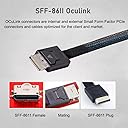
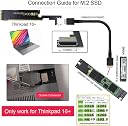
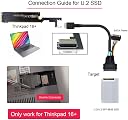
The xiwai Oculink SFF-8612 to PCI-E 3.0 M.2 M-Key Host Adapter is a high-performance expansion card designed exclusively for ThinkBook 16+ laptops. It delivers up to 32 Gbps data transfer speeds using the NVMe protocol over PCIe 3.0, enabling stable and reliable connection of external SSDs or graphics cards via the SFF-8612 interface. Perfect for professionals seeking to boost their laptopโs external GPU or storage capabilities with rock-solid signal integrity and plug-and-play ease.


| ASIN | B0BZHZ7B5Q |
| Best Sellers Rank | #8,858 in Computers ( See Top 100 in Computers ) #18 in Computer Memory Card Adapters |
| Brand | xiwai |
| Compatible Devices | Laptop |
| Compatible devices | Laptop |
| Customer Reviews | 3.7 out of 5 stars 67 Reviews |
| Manufacturer | xiwai |
| Mfr Part Number | SF-058-XY |
| Model Number | SF-058-XY |
| Number of Items | 1 |
| Style | Oculink for ThinkBook 16+ |
| Style Name | Oculink for ThinkBook 16+ |
| Unit Count | 1.0 Count |
| Unit count | 1.0 Count |
K**N
RockโSolid Performance for Oculink Builds
Really impressed with this Xiwai Oculink SFFโ8611 PCIโE 3.0 cable. The build quality feels solid, the connectors click in firmly, and the signal stability has been perfect. Iโm getting full PCIe 3.0 bandwidth with zero dropouts, even during heavy transfers. The cable is flexible enough to route cleanly inside tight cases, but still sturdy enough that it doesnโt feel cheap. Once connected, everything just works โ no errors, no negotiation issues, no random disconnects. For anyone using Oculink for eGPU setups, NAS builds, or highโspeed internal links, this is great value for money. Reliable, stable, and exactly what you want from a data cable. Highly recommended.
I**E
Works great for a DIY eGPU setup (stable on Linux/Kubuntu)
I bought this to build a DIY eGPU setup and it ended up working better than expected. I was able to connect an NVIDIA Quadro M4000 without any issues. My setup involves a PSU, this OCuLink adapter, and an OCuLink-to-NVMe adapter chain that I routed through an NVMe-to-USB-C enclosure and then connected into my laptop. Despite the number of adapters involved, the GPU was detected immediately on my system running Kubuntu Linux, and everything worked as expected. Once configured, the GPU showed up normally in Linux and performed reliably. I didnโt run into any major detection or stability issues during use, which is often a concern with DIY external GPU setups. This setup would likely be even simpler and more stable if used with a direct OCuLink port instead of chaining adapters like I did. Overall, it has been solid and reliable for my use case, and Iโve had no issues so far under Linux.
U**Y
ููุฃุณู ูู ุชุนู ู
ููุฃุณู ูู ุชุนู ู ูุง ุฃุฏุฑู ุฃูู ุงูู ุดููุฉ ูููููุง ูู ุชุนู ู.
ใช**ใก
ๅ จ้จใ็กฌใ็ด ๆใงใ
M.2ใฎ้ทใใใ้ทใ้จๅใใใชใณใใฑใผใใซใฎใใใซๆใใใ็ด ๆใใจๆใฃใฆ่ณผๅ ฅใใพใใใใใฏใใใใฏใใพใงใกใใใจ็กฌใ็ด ๆใงใใ้้ใใชใใใใซใๆณจๆใใ ใใใ
้ธ**ใ
ใใใใๆฑ็จๅใๅคใชๆฉ่ฝใคใใฆใชใ
ATX24ใใณใๆฐดๅนณใซใคใใฆใใใฟใผใณใฎใใผใใงใใ ๅ ๅทฅใ่ชฟ็ฏใๅฟ ่ฆใงใใใๆ่ฃฝไฝๆใฎGPUในใฟใณใใจไฝต็จใใใใจใง็ฐกๅใซๅคไปใGPUใใงใใพใใ
K**L
Voller Speed 4x PCIe Gen 4
Tut was es soll! Und bekomme fast volle Leistung von PCIe Gen 4 mit 4 LANs
Trustpilot
2 months ago
3 weeks ago