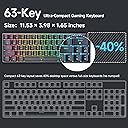
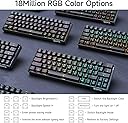
🎮 Compact power, endless style — own your desk, own the game!
The DIERYA DK63 is a modern 60% mechanical keyboard featuring 63 keys with full functionality via FN key, equipped with silent, smooth red linear switches rated for 600,000 presses. It offers versatile 3-mode connectivity (Bluetooth 5.0, 2.4G wireless, wired USB-C), a robust 3000mAh battery supporting up to 90 hours of use without backlight, and a fully customizable RGB backlighting system with 16.8 million colors and 18 modes. Compatible across Windows, Mac, and Linux, it’s designed for gamers, typists, and professionals seeking a stylish, space-saving keyboard with premium performance.


| Keyboard Layout | QWERTY |
| Hand Orientation | Ambidextrous |
| Button Quantity | 63 |
| Keyboard Backlighting Color Support | RGB |
| Number of Batteries Required | 1 |
| Power Source | Battery Powered |
| Switch Type | Linear |
| Compatible Devices | PC |
| Connectivity Technology | 2.4GHZ, Bluetooth, USB-C |
| Special Features | Ergonomic, Backlit, Customizable Display Keys |
| Number of Keys | 63 |
| Style | Modern |
| Color | Black |
| Material | Acrylonitrile Butadiene Styrene |
| Item Dimensions L x W x H | 11.5"L x 4.02"W x 0.98"H |
C**N
Perfect unless you care about brand name which is weak
Works really good and surprised especially for its price. Super easy set up and good quality and design.
A**W
Great First Value Mech Keyboard For Macbook Pro
So far a great keyboard! Have had it for a week now and it works great for Macbook Pro. Granted this is my first mechanical keyboard but it has a great feel and nice click to the key actuations. Easy to change out the keys and customize the layout however due to sizing for a 63% keyboard not all custom keys will fit where they’re supposed to like conventional Shift-FN-ALT key on the right side of the layout. The lighting is very nice, bright and easy to change, though there is no custom software this works out better for mac where software compatibility is sometimes an issue. There are plenty of lighting options though it would be nice if there was an explanation in the box for all of the different settings. Battery life isn’t the best when using the brightest RGB settings but it still gives you a few days on a full charge. I’ve heard the longevity on this keyboard isn’t the best but that remains to be seen for me, so far it’s great. The only issue I had when pairing this keyboard was a Mac OS pop up saying it did not recognize the keyboard however if you ignore this the keyboard works perfectly with all the keys corresponding to their designated functions correctly so far as I’ve seen. I’m not a gamer, i’m a photo retoucher/video editor and this serves me perfectly.
M**Y
Good keyboard, but no CTRL on the right side.
Awesome little keyboard for the price. Same great mechanical feel as my full size keyboards. Fits nicely in my backpack, even sideways.Two negatives. 1) The lack of a CTRL key on the right side, which I happen to use a lot for the SQL editors I use. I didn't notice that it was missing from the layout when I purchased it, might have been a deal breaker for me, but I was able to re-map the right ALT key to CTRL in Windows using Powertoys so that worked out. 2) The lack of a physical DEL key (have to use FN+DEL). This I did know when I purchased it and figured it was an ok sacrifice to get the smaller size and great price. Also, if you get a separate travel wireless number pad that includes a physical delete key, the issue goes away entirely.
O**Y
Malfunctioned, but customer service is good and I am so so happy now.
Original Review:Absolutely loved this keyboard, but it stopped bluetooth pairing for some reason this morning and will not communicate with any devices. I deleted it and attempted to re-pair, it still doesn't work.Don't waste your money. Cute but ultimately worthless. Extremely disappointed.UPDATE:Unprompted, Dierya reached out to me because of this review and they made it right. They were able to supply me with a working keyboard, and offered me the opportunity to try a different set of switches to see if that was more to my taste. I am extremely pleased - I have a cute AF keyboard, I adore the loud clacky sound (I feel so productive when writing!!), and it is compatible with custom keycaps. I also noticed a huge difference with the ease of pairing with the new keyboard (it went way faster and without hiccup, as opposed to taking several tries).I would genuinely recommend this keyboard to someone interested in something they can carry in their purse and use with their phone on the go. Paired with a fold 4 and a dollar tree phone stand, it becomes a luxury mobile experience.Update: now a good month or so in with the keyboard, and still in love. New keyboard does not have any of the connection problems, and consistently switches between three Bluetooth devices and wired use. This has proved to be an all around upgrade to my digital life. I consider this a quality product with exceptional service. At this moment my computing needs are met, but I will be looking to Dierya next time I have a need.
S**S
Great Value, Great Feel, Great portability, Here's the color modes
**Key Take Away**: This is the most portable mechanical clicky keyboard I have found at half the price I paid for larger, name-brand keyboards (that had less than half the features).**Most Useful to You**: If you buy one of these, I have listed the 8 preprogrammed RGB patterns, and backlight colors at the bottom of the review.-------------------# My ReviewThis winter I went crazy looking for the "perfect" keyboard to write a book. For a variety of reasons, I had to reduce my office to a backpack, meaning everything went onto my MacBook Pro, and my iPad Pro as my second screen. The butterfly keyboard on the mac is tragically bad, but the new scissor keys won't be out until mid-2020. I tried making the switch to a windows laptop - Love the Lenovo X1 Carbon, but as I am heavily invested in the Apple eco-system, it was just too painful. So my MacBook stays. As a result, I proceeded to try, seven keyboards. That's right. 7. I am very picky about my key feel. I prefer clicky keys - Red Switches are smooth but don't provide that satisfying click. Brown switches, while quiet, and have a tactile bump, are too subtle for my taste. I like the blue switches. I want to HEAR and FEEL the click.While I found keyboards I love, most are too big and heavy to take on the road. Then I found the DIERYA. Why this was the LAST keyboard I tried, I don't know. But, I have to give Dierya credit. This keyboard nailed all my requirements. They have a blue switch (clicky) version which I LOVE. The keyboard supports Bluetooth to THREE devices - which means I can work on my MacBook Pro, my iPad Pro, or my iPhone. That is awesome. It has a USB-C connector, which I thought would let me connect USB-C to USB-C with my Mac! But as of yet, the keyboard has only worked with the cable it came with :-( and I'm not sure why.My cons for the keyboard are mostly minor. The Shift and /? are not where I expect them, but with such a compact layout, I will make the effort to adjust. I just have to pay attention and make sure I don't press 'up' when I mean to shift.Finally, I wanted to share the lighting pattern on the December 2019 version of the keyboard:## Lighting InfoThe keyboard has 8 programmed RGB light modes, and you can switch the backlight (Static) color!You change modes with FN+/## Here are the preprogrammed RGB modes:1. Solid color - no key response. When you type a key it stays in that color.2. Chaser - fills in keyboard with colors racing/chasing across the keyboard.3. Wave - a wave of rainbow colors wash across the board. The keys do not respond to your keypress.4. Ripple - keys go to your solid color, then when you press a key, a rainbow effect spreads out from the center. **Note**: You can slow down the ripple using FN+← to slow it down and FN+→ to speed it up.5. Row ripple - this pattern keeps the keys in the default color, but when you type the row ripples.6. Single Key Flash - (Footprints?) This mode the keys you type flash RGB, but do not affect the keys around them. (I kind of like this mode because it gives feedback when you type. **This is my favorite mode**7. Splash - This mode does a rainbow ripple to only the adjacent keys you have typed. _this is my second favorite mode_8. Breathing - in this mode the keys do not respond (visually) to your typing, but the whole keyboard breaths the RGB color cycle.You can change the backlight (static) color with FN+Enter- Red- Blue- Green- Purple- Yellow- Turquoise- White- Black. OffI am super impressed with this keyboard, and I highly recommend it. I don't have any experience with its durability as I just unboxed it, but I am so impressed that I literally sat down to write this review with my new keyboard.
Trustpilot
3 weeks ago
5 days ago