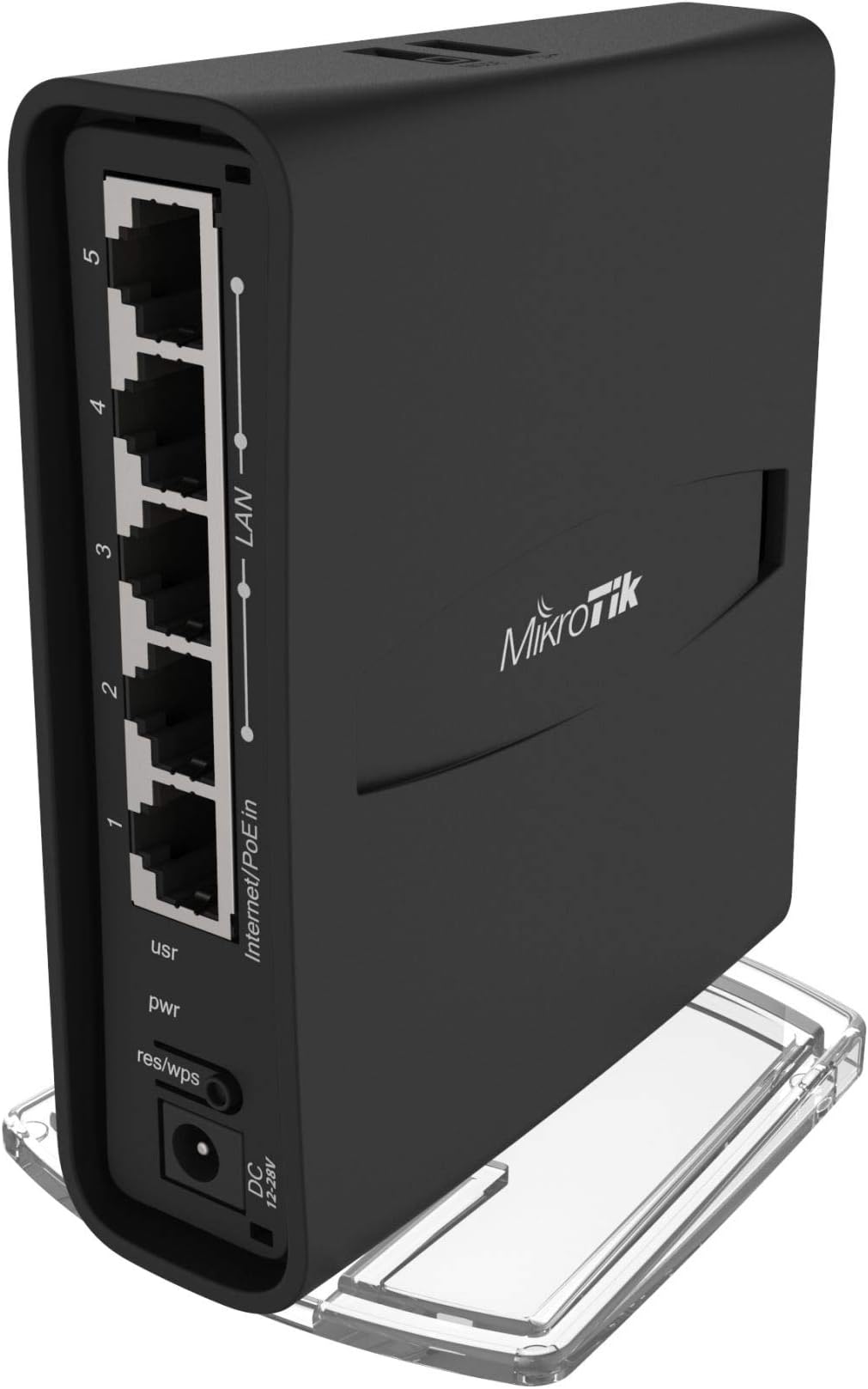
🚀 Elevate your WiFi game with the ultimate power-packed access point!
The MikroTik hAP ac² is a compact, dual-band WiFi 5 access point featuring a quad-core ARM CPU and Power over Ethernet support. Designed for both home and professional use, it offers enterprise-level performance and versatility at an unbeatable price point, delivering stable, high-speed wireless coverage on 2.4 GHz and 5 GHz bands simultaneously. Its Linux-based RouterOS enables deep customization, making it a favorite among tech enthusiasts and managers seeking reliable, scalable networking solutions.
| ASIN | B079SD8NVQ |
| Antenna Location | Home |
| Antenna Type | Internal |
| Best Sellers Rank | 29,972 in Computers & Accessories ( See Top 100 in Computers & Accessories ) 84 in Wireless Access Points |
| Box Contents | RBD52G-5HacD2HnD-TC |
| Brand | MikroTik |
| Brand Name | MikroTik |
| Colour | Black |
| Compatible Devices | Laptop |
| Compatible devices | Laptop |
| Connectivity Protocol | Wi-Fi |
| Connectivity Technology | Ethernet |
| Control Method | App |
| Controller Type | Switch |
| Country of Origin | Latvia |
| Coverage | Provides WiFi coverage for 2.4 GHz and 5 GHz frequencies at the same time |
| Customer Reviews | 4.5 out of 5 stars 823 Reviews |
| Data Transfer Rate | 12 Gigabits Per Second |
| Frequency | 2.4 GHz |
| Frequency Band Class | Dual-Band |
| Frequency band class | Dual-Band |
| Is Modem Compatible | Yes |
| Item Dimensions L x W x H | 9.8L x 3.4W x 11.9H centimetres |
| Item Weight | 0.3 Kilograms |
| LAN Port Bandwidth | 12000 megabits_per_second |
| Manufacturer | MIKROTIK |
| Manufacturer Part Number | RBD52G-5HACD2HND-TC |
| Maximum Upstream Data Transfer Rate | 6000 Megabits Per Second |
| Model Name | RBD52G-5HACD2HND-TC |
| Model Number | RBD52G-5HACD2HND-TC |
| Model name | RBD52G-5HACD2HND-TC |
| Number of Ports | 5 |
| Operating System | RouterOS |
| Other Special Features of the Product | provides Wifi coverage for 2.4 GHz and 5 GHz frequencies at the same time |
| RAM Memory Installed | 128 MB |
| Security Protocol | WPA2-PSK |
| Special feature | provides Wifi coverage for 2.4 GHz and 5 GHz frequencies at the same time |
| Unit Count | 1.0 Count |
| Voltage | 30 Volts |
| Wi-Fi Generation | Wi-Fi 5 |
| Wireless Compability | 802.11ac |
| Wireless communication standard | 802.11ac |
A**R
The must have router for 2020
I still can't believe this exists, it's incredible. A sub £100 device (typically £60!) that is so fast, powerful and reliable that even enterprise flocked to it. Routing, switching, access point, and even ac wifi. All in one. Completely customizable, and can even be used as a home router, a dedicated VPN client, a managed switch, a hardware firewall.. your imagination is the limit. Anyone and everyone in the know recommends this for consumers, or fit it themselves, as it's so reliable you can set it up and never touch it again. No more unstable or slow wifi. No more overheating, overpriced consumer routers. Absolutely brilliant. This beats pretty much everything out there. Unify routers devices are nearer the £130 mark. Consumer junk like Asus, Huawei (Virgin Home Hub, BT Smart Hub etc.) are given to you by default but are around £80-£200 to buy new, have countless unhappy customers with huge wifi problems, overheating issues, and so forth. The whole world should be using the hAP AC 2 in 2020. Also, all the reviews bout this not being easy to set up or non-consumer friendly aren't true. It's literally working the moment you connect a power cable and ethernet cable. However, it's STRONGLY recommended that you set a wifi password, and admin interface password. Indeed that isn't as easy as it could be. It's just a case of visiting http://192.168.88.1 in a web browser like Chrome, login with username 'admin', then type a password in the WiFi password box. You can also set the Wifi ssid/Network name in the boxes at the top. To change the web admin password (recommended), then click the Password button at the bottom right. Finally, click Apply Configuration at the bottom right.
E**E
One of the best all round quad core micro routers, with twin band radios usb and 2+2 mimo
super good device, very powerful config options, more technical folks will love this, lots of hp with its 32 bit quad core arm cpu (broadcom) Ipq solid reliable, powerful, mega feature set. enough ram but the with USB you can run containers get a pi hole on it as well. its a Swiss army knife kinda device, its Linux based, with command line or GUI config tool, if you check there range this is a standout as a travel router, as you can use 2.4 and 5g, so line to hotel wifi on 2.4 and have your wifi net share on 5g with a VPN so you can be safe and stable.
M**M
An affordable WiFi enabled switch or router
MikroTiks although relatively affordable for their features are not for the novice to configure. A good working knowledge of RouterOS and networking are required to get the best out of this device. That being said the default config is a good starter for ten. The default config will get you going if you just want a single WiFi access point with some ethernet ports. I use two of these as part of my home network, where the WiFi is controlled by CAPSMAN and in this mode it work very well with devices seamlessly roaming between access points around the house. Once you have got a decent working knowledge of RouterOS this can become a very powerful and capable device. It can make a decent router or switch and it is easy to integrate into existing networks.
C**0
What a beast...!!!
I only post reviews for purchases that really deserve it and this certainly does. This device along with a 8 port Netgear managed switch has replaced AND replicated my Cisco Meraki network which consisted of 1x security appliance (router), 1x switch & 1x access point (obtained freely from CMNA course). My 3 year license for the Meraki stuff had come to an end and I didn't fancy paying £1000 or whatever daft amount it is to keep it going for another 1-3 year(s). Instead I spent just under £90 (including the Netgear switch) I did a fair amount of research prior to buying this, trying to find an all in 1 'cheap' solution that could do VLANs/multiple SSIDs/VPN/etc. proved a lot more difficult then I thought it would. I didn't want something bulky and I have no need/space/money for rack mounted kit. I almost went with Ubiquiti (Dream Machine) but in the end couldn't justify the cost. I had heard MikroTik mentioned at work, I think if it wasn't for this I probably still wouldn't have discovered this Latvian goodness. Be warned though, RouterOS has very sharp learning curve if you are not familiar with networking (as has been said by many people already). If you are doing anything other then a simple home network be prepared to spend many hours learning, configuring & tweaking things - Especially if you are new to MikroTik, which I was. If I had to state 1 criticism, it would be that the wireless side is lacking in terms of keeping up with the latest WiFi technologies (I think this rings true across all the home MikroTik products). That being said, this pretty much matches the throughput of my Meraki MR33 when I'm near it, the coverage is obviously no where near as good as the MR33 (dedicated AP) and I can no longer get WiFi in the garden for instance (at least on 5Ghz) but with our British weather it is hardly an issue! I have the device hidden out of the way downstairs behind a sofa and have no problems with getting wireless upstairs from it so it'll do for me. I still awarded this product 5* for WiFi signal due to the form factor alone.
S**A
Superb wired Gigabit router with useful dual band 2x2 WiFi support
★★★★★ (5/5) 𝐖𝐢𝐫𝐞𝐝 𝐭𝐡𝐫𝐨𝐮𝐠𝐡𝐩𝐮𝐭 ★★★★★ (5/5) 𝐖𝐢𝐫𝐞𝐝 𝐬𝐭𝐚𝐛𝐢𝐥𝐢𝐭𝐲 ★★★★☆ (4/5) 𝐖𝐢𝐫𝐞𝐥𝐞𝐬𝐬 𝐭𝐡𝐫𝐨𝐮𝐠𝐡𝐩𝐮𝐭 ★★★☆☆ (3/5) 𝐖𝐢𝐫𝐞𝐥𝐞𝐬𝐬 𝐬𝐭𝐚𝐛𝐢𝐥𝐢𝐭𝐲 ★★★☆☆ (3/5) 𝐂𝐨𝐧𝐬𝐮𝐦𝐞𝐫 𝐮𝐭𝐢𝐥𝐢𝐭𝐲 ★★★★★ (5/5) 𝐒𝐎𝐇𝐎 𝐮𝐭𝐢𝐥𝐢𝐭𝐲 𝐑𝐞𝐯𝐢𝐞𝐰 𝐑𝐨𝐮𝐭𝐞𝐫𝐎𝐒: 𝟔.𝟒𝟐.𝟑 (𝟐𝟎𝟏𝟖-𝐌𝐚𝐲-𝟐𝟒). 𝐑𝐞𝐯𝐢𝐞𝐰 𝐟𝐢𝐫𝐦𝐰𝐚𝐫𝐞: 𝟔.𝟒𝟐.𝟑 Looks like Mikrotik have been working hard on this device. RouterOS 6.42.3 brings significant wireless performance and stability updates. The 5GHz performance has dramatically improved and stabilized. It is now inline with strong 2x2 standalone routers with a peak of 420Mbits/sec. The 2.4GHz performance is now remarkably high for both upload and download, peaking over 150Mbits/sec for download. Perhaps the 2.4GHz upload stability could use a little more work, but I did not spend much time testing that, since 5GHz is the priority these days. All in all, with RouterOS, excellent wired performance and good WiFi performance for a router, the hAP ac2 is shaping up to be a useful little device to have around. I have upgraded my 2-star rating for Wireless Throughput to 4-stars and upgraded my 2-star rating for Wireless Stability to 3-stars. If you are going to get it, get it soon while it is cheap due to previous ratings! Also, if you are lucky, your device may have more memory than the specification (early batches had 256MB RAM and reported as the IPQ-4019 CPU instead of 128MB and IPQ-4018 CPU). 𝐑𝐞𝐯𝐢𝐞𝐰 𝐑𝐨𝐮𝐭𝐞𝐫𝐎𝐒: 𝟔.𝟒𝟐.𝟏 (𝟐𝟎𝟏𝟖-𝐀𝐩𝐫-𝟐𝟑). 𝐑𝐞𝐯𝐢𝐞𝐰 𝐟𝐢𝐫𝐦𝐰𝐚𝐫𝐞: 𝟔.𝟒𝟐.𝟏 This 2x2 WiFi Mikrotik hAP ac2 router is a better performing wired router than the wired-only Mikrotik hEX (RB750Gr3) in everything except IPSEC, where it trails by up to 15% with multiple tunnels - not a concern if you're not a business. H̶o̶w̶e̶v̶e̶r̶,̶ ̶i̶t̶s̶ ̶w̶i̶r̶e̶l̶e̶s̶s̶ ̶p̶e̶r̶f̶o̶r̶m̶a̶n̶c̶e̶ ̶i̶s̶ ̶i̶n̶c̶o̶n̶s̶i̶s̶t̶e̶n̶t̶,̶ ̶u̶n̶s̶t̶a̶b̶l̶e̶ ̶a̶n̶d̶ ̶v̶e̶r̶y̶ ̶s̶l̶o̶w̶ ̶i̶n̶ ̶b̶o̶t̶h̶ ̶b̶a̶n̶d̶s̶ ̶w̶i̶t̶h̶ ̶s̶o̶m̶e̶ ̶d̶e̶v̶i̶c̶e̶s̶ ̶a̶n̶d̶ ̶s̶l̶o̶w̶e̶r̶ ̶t̶h̶a̶n̶ ̶e̶x̶p̶e̶c̶t̶e̶d̶ ̶5̶G̶H̶z̶ ̶i̶n̶ ̶g̶e̶n̶e̶r̶a̶l̶,̶ ̶d̶e̶s̶p̶i̶t̶e̶ ̶i̶t̶s̶ ̶W̶a̶v̶e̶ ̶2̶ ̶8̶0̶2̶.̶1̶1̶a̶c̶ ̶c̶h̶i̶p̶ ̶a̶n̶d̶ ̶p̶o̶w̶e̶r̶f̶u̶l̶ ̶C̶P̶U̶.̶ ̶I̶f̶ ̶y̶o̶u̶ ̶n̶e̶e̶d̶ ̶W̶i̶F̶i̶ ̶b̶u̶t̶ ̶d̶o̶ ̶n̶o̶t̶ ̶n̶e̶e̶d̶ ̶G̶i̶g̶a̶b̶i̶t̶ ̶E̶t̶h̶e̶r̶n̶e̶t̶ ̶n̶o̶r̶ ̶w̶a̶n̶t̶ ̶t̶o̶ ̶t̶e̶s̶t̶ ̶o̶r̶ ̶p̶l̶a̶y̶ ̶t̶h̶e̶ ̶g̶u̶e̶s̶s̶i̶n̶g̶ ̶g̶a̶m̶e̶,̶ ̶y̶o̶u̶ ̶m̶a̶y̶ ̶e̶v̶e̶n̶ ̶b̶e̶ ̶b̶e̶t̶t̶e̶r̶ ̶o̶f̶f̶ ̶a̶t̶ ̶t̶h̶i̶s̶ ̶t̶i̶m̶e̶ ̶w̶i̶t̶h̶ ̶t̶h̶e̶ ̶m̶u̶c̶h̶ ̶o̶l̶d̶e̶r̶ ̶M̶i̶k̶r̶o̶t̶i̶k̶ ̶h̶A̶P̶ ̶a̶c̶ ̶l̶i̶t̶e̶ ̶o̶r̶ ̶o̶t̶h̶e̶r̶ ̶m̶a̶n̶u̶f̶a̶c̶t̶u̶r̶e̶r̶s̶.̶ ̶I̶ ̶o̶n̶l̶y̶ ̶h̶a̶v̶e̶ ̶t̶h̶e̶ ̶m̶o̶r̶e̶ ̶c̶o̶s̶t̶l̶y̶ ̶3̶x̶3̶ ̶W̶i̶F̶i̶ ̶h̶A̶P̶ ̶a̶c̶ ̶r̶o̶u̶t̶e̶r̶ ̶f̶o̶r̶ ̶c̶o̶m̶p̶a̶r̶i̶s̶o̶n̶,̶ ̶n̶o̶t̶ ̶t̶h̶e̶ ̶l̶i̶t̶e̶.̶ Notable differences to other popular SOHO Mikrotik devices: ► this ARM device can run the nice and free The Dude for management and monitoring, unlike the Mikrotik hAP ac. It only has a USB port for it, not an additional SD card slot like the Mikrotik hEX, in case you want to use the USB for something else ► it comes with a flexible plastic mount for vertical stand and wall mounting kit ► the LED lights are far more discrete than either the hAP ac or hEX ► it has no system health monitors like PCB temperature and voltage on the hAP ac and the hEX ► it has a unique, smooth rubber case finish with no gratings, unlike the nondescript, grated, white plastic cases of the others ► the WiFi can be disabled and this does reduce the idle power consumption by about 17%, making it almost equivalent to running a hEX at around 3W on average. Advanced functionality: ► unlike the Mikrotik hEX, you do not have to disable port bridging (logical switch) to get maximum bidirectional Gigabit Ethernet WAN-LAN routing performance ► it has an Atheros AR8327 switch chip which means it can support VLANs in hardware. The Mikrotik hEX only supports VLANs in software which, when VLANS are used, adds more load on the CPU and therefore lowers routing performance ► like many Mikrotik wireless devices, this International version of the hAP ac2 supports all 5 GHz channels, including DFS channels, allows setting any country regulatory mode or Superchannel mode for testing a huge range of channels. The US version does not support DFS channels, non-US regulatory modes nor Superchannel ► Mikrotik RouterOS WiFi devices do not have built in support for band-steering, nor roaming assist, nor enterprise roaming standards like 802.1r/k/v at this time It is important you upgrade your router firmware for security updates. Thankfully, not only are Mikrotik reliable for putting out updates in general, but they are by far one of the fastest at security fixes. Factory RouterOS: 6.40.5 (2017-Oct-31). Factory firmware: 3.43
A**1
Not the greatest WiFi, but very good as home router
Very good little router and extremely configurable, if you're a power user. If not, just use the quickset "Home AP dual" and you're set (plenty of documentation online on how to do this). A very good use case for this is private DNS, there are quite a few tutorials online on how to do this. Also, it has up to 2Gbit/s routing/bridging performance, which is more than adequate for most homes. Do not expect wonders in terms of WiFi. Being a small, compact unit, it doesn't excel in coverage as it doesn't have radio amplifiers. Decent WiFi performance, otherwise.
A**R
Excellent product for price
I work with Mikrotiks on a daily basis and this is the first Built in Wifi one I’ve had . Signal is good but just be aware of placement . Without Antenna on the unit , signal will degrade if frequency not analysed first.
C**Y
Fantastic AP and very stable
This will not replace your DSL router from your device provider because it doesn’t have a DSL modem inside. However, if you configure your SP router as the DSL modem then this device comes into its own. DHCP is stable as is performance. RouterOS requires some study but not outside the reach of most home users and there is lots of information and help online.
Trustpilot
1 month ago
3 weeks ago