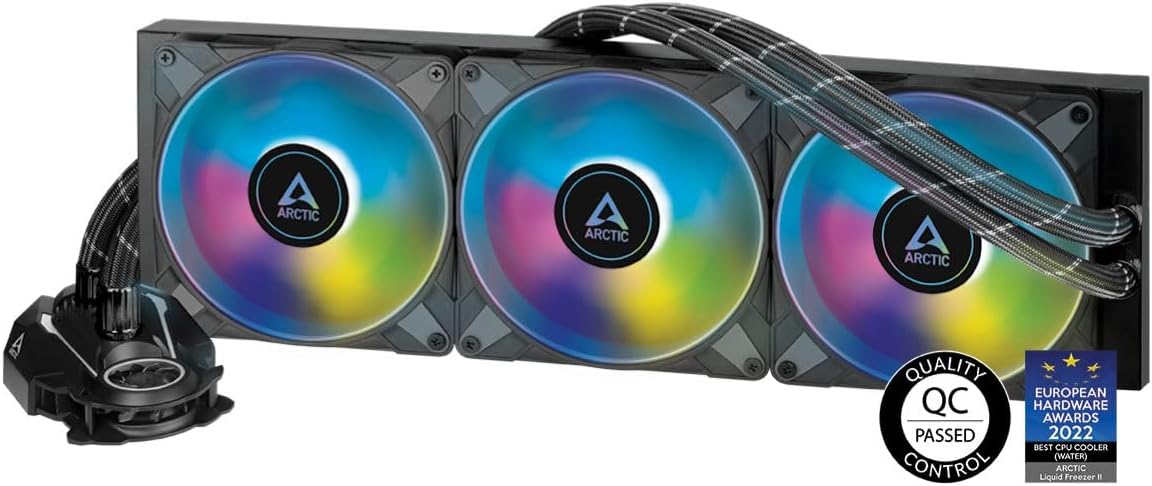
❄️ Cool like a pro, shine like a star — Liquid Freezer III 420 A-RGB keeps your build chill and lit!
The ARCTIC Liquid Freezer III 420 A-RGB is a high-performance all-in-one liquid CPU cooler featuring a large 420mm radiator, triple 140mm PWM fans optimized for static pressure, and 36 digital A-RGB LEDs for stunning customizable lighting. Compatible with the latest Intel LGA1700 and AMD AM5 sockets, it offers exceptional cooling efficiency with whisper-quiet operation at just 0.3 sones noise. Integrated cable management ensures a clean build, while a unique VRM fan enhances motherboard longevity. Backed by a 6-year warranty, it’s a premium choice for professionals and enthusiasts seeking top-tier thermal performance and style.


| ASIN | B09CKW8LJ6 |
| Air Flow Capacity | 68.9 Cubic Feet Per Minute |
| Best Sellers Rank | #280 in Water Cooling Systems |
| Brand | ARCTIC |
| Brand Name | ARCTIC |
| Compatible Devices | 1150, 1151, 1155, 1156, 1200, 1700; AMD: AM5, 2011(-3), AM4, Intel: 2066 |
| Cooling Method | Water |
| Customer Reviews | 4.6 out of 5 stars 1,155 Reviews |
| EU Spare Part Availability Duration | 6 Years |
| Global Trade Identification Number | 04895213703406 |
| Included Components | Liquid Freezer II 420 A-RGB |
| Item Dimensions L x W x H | 17.13"L x 5.71"W x 11.81"H |
| Item Weight | 2019 Grams |
| Manufacturer | ARCTIC |
| Material Type | Aluminum, Copper, Rubber |
| Maximum Rotational Speed | 1700 RPM |
| Noise Level | 0.3 Sones |
| Power Connector Type | 4-Pin |
| Product Dimensions | 17.13"L x 5.71"W x 11.81"H |
| UPC | 840033401210 |
| Unit Count | 1.0 Count |
| Voltage | 12 Volts |
| Warranty Description | 6 years |
| Wattage | 2.04 watts |
M**E
Fantastic 420 aio PUSH/PULL. Noise to performance king!
This AIO is installed on a 14900K in an Antec Performance1 FT case. Upgrading from a CoolerMaster ML280 with upgraded fans and contact frame. Results of testing and my impressions of the product below: Installed two more fans in push/pull and it dropped a few C and a few watts. Did not install a fan in the lower position because of clearance issues. Might get a slim fan, there is about 26mm of clearance on the inside in the Antec case. (Or potentially case mod.) // Running 56x in Cinebench, Open case, open front. 100% fans. 24C ambient. CoolerMaster ML280 w/ 2x Artic P140 Bionix and Thermalrite contact frame: (R23: 41216, 86C, 272W) Arctic LF3 420 w/ 3x stock A-RGB fans, front mount: (R23: 41153, 77C, 264W) Arctic LF3 420 plus 2x Antec Storm 140 in push/pull: (R23: 41228, 74C, 260W) (This result is very close to the "250W" benchmark performed by STS with his 6x push/pull on a 13900K. In his review he shows that a push/pull setup makes the LF3 best in class, especially when considering noise/performance.) There are 3x stock Arctic A-rgb fans on the outside, and 2x Antec Storm T3 fans on the inside. The Antec Storm fans are not really SP fans, but they have good specs otherwise and are 30mm. Overall 12C lower than what I had before with the upgraded 280mm and Thermalrite contact frame. With non-rgb SP fans in six positions it should do even better. I am happy with this. For $120 this is equivalant to other top performers like the EK Nucleus CR360 or Lian Li Galahad II. I have the option to run 57x or (maybe) 58x, or can probably tune a silent 56x profile. The RGB pump cover looks great and while it is not a spinning fan, it has the same look as RGB fans, so it doesn't introduce anything distracting. No infinity mirrors or weird "objects" in your case. Looks like just another fan and can be set to look like them. The tubes are quite a bit longer than the previous AIO and have no problem looping around to a front install. There is plenty of slack in the Antec Performance1 FT case. Gamers Nexus was critical of the Arctic Contact Frame, and did some sort of lazer scan to prove there wasn't even pressure everywhere (unknown how he came to this conclusion), but you have to take everything as a whole. The performance is good, and its idling 2C lower than it did before, so I think contact is good. If you didn't watch the GN video, you might think the installation is excellent, as do I. There isn't a separate bracket to install, just the contact frame, so this makes alot of sense to simplify installation. And nothing was janky or loose. It tightened down in a confidence inspiring way. You also get the vrm cooling which may help the lifespan of your motherboard. I won't claim this is best in class (it might lose to an EK 360 in push pull), but everything it gives you for introductory $120 price is a great deal. If you can fit a 420, this is almost a no brainer unless you plan to run direct die. When they raise the price back to msrp, I think thats the point you maybe consider an EK direct die aio, or maybe an EK CR360 if you can't fit a 420. Finally, there is the six year warranty from a company with a good reputation. I would recommend this. I had reservations initially, but after the install, seeing it in my build and the performance that it gives, makes me glad I took a risk. I was able to get the RGB wired correctly without an extension, but there is absolutely no extra slack and cable runs are not ideal. If they just made the RGB connection 2" longer it would alleviate the "head scratcher" everyone will encounter when doing a front mount. (When fans are front installed, the integrated RGB cable loops over the top of the radiator which makes it too short.) It will be interesting if Arctic improves this product in the future. Certainly, better fans would make it even stronger, but any performance gap is probably remedied by push/pull. And if you have a case that fits a 420mm AIO, you probably also have the space to make it push/pull.
B**H
Unbeatable Cooling Performance with Stunning Aesthetic - Highly Recommended!
Review: The ARCTIC Liquid Freezer III 420 A-RGB is hands down one of the best AIO water coolers I’ve ever used. From exceptional cooling to the mesmerizing RGB lighting, this cooler ticks all the boxes for anyone serious about maintaining peak CPU performance while adding a touch of style to their build. Cooling Performance: I installed this on my Intel i9-12900K, and the difference was night and day. My CPU temperatures have significantly dropped, even under heavy loads while gaming and rendering. The triple 140mm fans provide excellent airflow, and the pump design ensures efficient cooling. It’s quieter than my previous AIO, even when running at full capacity. If you’re looking to overclock your CPU, this cooler has your back with impressive thermal management. Installation: The setup was straightforward, with clear instructions included. It’s compatible with both Intel and AMD sockets, so there’s no need to worry about compatibility issues. The flexible tubes make installation easy, even in more cramped cases. Just make sure your case can accommodate the 420mm radiator size! RGB Lighting: The A-RGB lighting is simply gorgeous. It’s customizable, allowing you to create your desired lighting effects and match them with your other RGB components. The lights are bright and vivid but not overpowering, giving a subtle yet elegant glow to my build. Build Quality: The build quality of the ARCTIC Liquid Freezer III 420 A-RGB is top-notch. The fans feel solid, and the overall design exudes durability. It also comes with a VRM fan, which is a unique addition to keep the components around the CPU cooler, enhancing the longevity of your system. Conclusion: I’ve been using this cooler for a few weeks now, and it has exceeded my expectations in every way. It keeps my CPU cool, runs quietly, and looks stunning inside my case. If you’re on the fence about upgrading your cooling solution, I highly recommend giving this a try. The ARCTIC Liquid Freezer III 420 A-RGB delivers exceptional performance and aesthetics at a competitive price point. Pro Tip: Make sure your case can accommodate a 420mm radiator before purchasing, as it’s larger than most standard radiators. For the best RGB synchronization, use software from your motherboard manufacturer to manage the lighting.
B**R
Great performance, extremely quiet, great price.
- Effortlessly cools my Ryzen 9 5900x w/ PBO limits @ 200/185/130 - Idles at 40c , maxes out at 85c. For these power limits, that's impressive. - Extremely quiet... I actually had to look in the case to make sure the fans were spinning. Yeah, it's that quiet. Even when it's running max speed. Unreal! -It comes nicely cable managed and you can choose between 1 connection on the board or 3 in case you want to control the fans, pump and VRM fan separately. The VRM fan is a nice touch - keeping your VRMs cool can prevent little drops in voltage which in theory will keep your CPUs boost behavior more consistent. - Installation went okay, just make sure you have clearance. For what this is, I can't believe the price. I am very happy with my purchase. Just make sure you have a ginormous case with explicit 420mm radiator compatibility and enough verticality over the motherboard (if you are top mounting) to make room for the thick radiator on this thing. I even had some clearance issues (8-pin power for the VRM blocked the radiator) in my Thermaltake View 71 TG RGB. Had to get a little... creative. Another thing to bear in mind - that VRM fan that magnets to the pump/block - the blades visible from the front do not spin. Those just light up. The actual VRM fan is on that same part, but below and tucked away. Really, the only thing I can criticize is the length of the header cables... if they were longer you could more easily cable manage them.
S**N
Good luck stuffing it into a mid-tower, fantastic performance though
Replaced my motherboard, which moved the "main" PCIe slot (for my graphics card) one slot higher, and my Thermalright Le Grand Macho air cooler no longer fit. Replaced that otherwise faultless air-cooler with this triple-fan closed-loop cooler, and I've had no issues. Keeps my core i9-9900k slightly cooler (~3-5°C) during normal workloads (gaming), and idle temps are now around ambient vs ~5-8°C over ambient. No noticable difference in sound levels under heavy load, but all fans on both the old air cooler and the new liquid cooler are spinning so slow they're not noticeable over my home HVAC anyway. Both the radiator and the pump/coldplate/vrm cooler assembly (the chunk that mounts to the CPU itself) "feel" really high quality and durable. The braided hoses' sheathing feel cheap as hell, but that's entirely subjective and doesn't affect performance. Hoses are a little stiff, and more than long enough to put the radiator anywhere in the case. Installing into a Lian-Li Lancool III is an absolute nightmare to get the radiator mounted, but the coldplate/backplate/wiring is all entirely painless. Looks decent in my case, but it'd be properly gorgeous if it was offered in white. Speaking of white, the ARGB white balance is crap, but is fine for me in my system. The default "rainbow" display looks cool. Got it for a steal (~$99 at time of purchase) as Arctic seems to be trying to liquidate their old stock with the release of the Liquid Freezer III. At that price, it's a solid unit - IF you have the room for it.
S**M
ARCTIC Liquid Freezer II 420 A-RGB AIO: pretty good, almost perfect AIO
There isn't much I could say about this that hasn't been said already about the good regarding this thing. But to, in short, repeat what others have already said: its pretty much the best (for 2022 and early 2024 so far) over all AIO because it gives you FANTASTIC cooling while also keeping the noise levels very low and has a wonderful 6yr warranty and a good price. My previous heatsink was a Ice Giant Thermosiphon (old all aluminum one), which while pretty good, is absolutely whipped by this thing. My idle temps (with a 7800x3D) with the Ice Giant were around the high 30's while load temps tended to be around the high 70's (in C). With this AIO, with the same settings, now my idle temps are around 18-21C and load temps around 58-62C. Its also quieter by a fair margin to due to the 140mm fans. What I will say that I disliked was how flimsy the mounting hardware felt for the block itself. The metal is very thin and flexy. Also seems to screw into the plastic housing of the pump block which IMO is, while not terrible, is also not very good. Its very easy to strip out a plastic hole with a metal screw so be careful with that! There are good online directions for installing this thing but I wish it also came with decent paper directions too. There was nothing in the box! Just a link QR code on the outside of the box. Other thoughts: ---the install is pretty simple and while I'm disappointed with the mounting hardware I don't think the block is going to come loose or whatever, just be careful with it ---the LED fans look great but aren't very bright, I don't mind this but YMMV a whole lot here ---airflow is great while the noise is lower than most 120mm fans! At full blast all you hear is a low pitch muted whooshing sound. Love this! ---you NEEEEED a big case for this, I have a old Thermaltake Core X9 so it was easy for me to mount but in anything less than a large full tower it WILL be obnoxious to mount, will largely be a no go (without modding) in most mid tower cases ---the tiny 40mm fan on the waterblock does basically nothing for VRM temps (7800x3D's when properly tuned typically use around 90w at peak load on avg. so the VRM on even cheap mobos will NOT be getting stressed, you need something that pulls 150w+ to stress even cheap AM5 VRM's, the good ones don't get stressed until you get over 300w) but is also basically silent and doesn't hurt anything so I don't care ---included thermal paste appears to be Arctic's MX-5 which is decent stuff, better stuff (Kryonaut, PK-3, metal, etc) can drop the temps a degree C or 2 more though ---the tubing is actually a lil' on the short side IMO, would be great if it was a few inches longer, as is there is some lateral stress placed on the waterblock from the tubing pulling on it in my case, could be a quirk of how large it is (Thermaltake Core X9) ---pump/fans use a 4 pin PWM connector, the RGB fan connector is a 3 pin 5v "VDG" type ---Gamers Nexus has a vid doing a teardown on the internals if you want a good review, its definitely a "cost optimized" unit but its not badly made either, and does actually sell for a low price so its fine IMO ---some RGB on the waterblock would be cool
A**R
Great performance and a fan near the cpu socket, nice touch
After running a 360mm EK AIO for a while, I decided to upgrade to the ARCTIC Liquid Freezer II 420 A-RGB — not because of thermal issues, but to improve airflow throughout my HAVN case. I wanted all fans to be 140mm for consistency, better aesthetics, and improved internal airflow. Why I Chose This Cooler The standout feature for me was the small VRM fan built into the pump cap. It’s a thoughtful design — that small fan helps circulate air around critical components like the VRMs, RAM, GPU, and NVMe drives. In a tightly packed system, that airflow matters more than people give it credit for. Real-World Performance I was especially curious to see how it would perform with higher power BIOS settings, which used to push my EK 360mm into thermal throttling. The difference was immediate: • The 360mm would quickly throttle under high load, catch up, then throttle again. • The 420mm kept up from the start — no thermal throttling, even under sustained high-power workloads. Under long-duration CPU stress, the ARCTIC 420mm still ran about 3°C cooler than the 360mm. That part I expected. What I didn’t expect was how much better it handled rapid temperature fluctuations — scenarios where the system goes from idle to load instantly. The ARCTIC simply reacted faster and more effectively. Final Thoughts This cooler isn’t just about raw thermal performance — it’s about thermal control and stability. The build quality is solid, the 140mm A-RGB fans are quiet and efficient, and the integrated VRM fan adds practical cooling benefits in real-world builds like the HAVN. If you’re pushing high power settings or want maximum cooling headroom without going custom loop, this is an excellent upgrade.
R**.
Artic Chiller FTW - Insane Performance for Unbelievable Value
First of all - Check the Compatibility with your processor and get the newer version of this if you can. I am using an older I7 6950X and its uses the 2011-V3 CPU Socket. Unboxing was easy and super user friendly. Got the manual on the web via a scanned code. Watched the installation videos and what NOT to do. Installed following the online user manual. I used a Corsair 900D case that supports a 420MM Radiator and fan setup at the top of the case. Hoses and the CPU cooler were a bit of a pain to squeeze into the case, I had to remove my front cover; remove all my 5.25" bays and was able to slide in both the radiator (fans come pre-installed), CPU cooler and hoses with a couple of inches to spare. Check the fan orientation if you need to change your push/pull configuration. Fans are amazing, but the lighting isn't compatible with my motherboard. So you'll need to get a separate Aura lighting controller ($10 on Amazon). The thermal paste is top notch and they provide you at least enough for 2 applications. Fan speed is all controlled via Bios, and performance decimates my legacy Corsair AIO cooler that was 280MM and 3 years old. Temperatures on my I7 6950X while overclocked from 3.0ghz to 4.4ghz are lower than running my previous cooler at stock speeds. It used to be 49º C under load before and now its a chilling 38º C under load. This cooler definitely works well if you can fit it. Overall, my original go to wasn't compatible with my CPU Socket, it was the Asus ProArt 420MM since it didn't support my older CPU, this Artic Cooler was $160 cheaper, and had better lighting features. Overall, I'm extremely satisfied with the following features: 1) packaging and installation 2) compatibility and video content for support 3) performance and value What can be improved? 1) Include a controller for the lights for those users that don't have the Artic Controller or the compatible plug on their motherboard.
R**D
Fantastic CPU Aio Cooler!
I recently built a high end system with a intel Core ultra-9 285k cpu. I paired this with Artic's 420mm Aio which uses a contact frame and 3 140mm fans for cooling. The installation was very easy and I really liked the contact frame instead of using Intel's regular cpu holder that has had many issues with deforming the cpu. Artic provides their Mx-6 thermal paste and it works great. I also really liked the vrm fan they use in combination with the pump system. The 140mm fans are very quiet, mine also had the Rgb lighting, a nice touch. After completing the build, the cpu temps are very good, 28-30 deg C at idle and only 60-65 deg C running Cinebench-23 to test the system. The overall build quality is very good and I would highly recommend this aio cooler to anyone building a high performance system that has a large case using the latest intel processors. Great job Artic!!
Trustpilot
1 week ago
3 weeks ago