


Desertcart purchases this item on your behalf and handles shipping, customs, and support to Seychelles.
🚗 Upgrade your ride’s touchscreen game — flawless control, zero compromises!
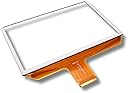
The Upgraded 8” MyLink IntelliLink Touch Screen Digitizer (OEM DJ080PA-01A) is a precision replacement part designed for Chevy and GMC trucks and SUVs. Featuring an ultra-responsive chipset and anti-glare electroplated glass, it eliminates common touchscreen issues like ghost touches and dead spots. This DIY-friendly kit includes a step-by-step installation video and pre-applied adhesive, ensuring a perfect fit and easy upgrade. Supported by a lifetime warranty and dedicated Florida-based engineering support, it guarantees long-term performance and reliability.


| Manufacturer | Ultima Industries |
| Brand | Ultima Industries |
| Model | Cuescreens |
| Item Weight | 6 ounces |
| Product Dimensions | 11 x 8 x 2 inches |
| Item model number | CS-MYL-01 |
| Exterior | ElectroPlated Glass |
| Manufacturer Part Number | CS-MYL-01 |
| Position | Center |
H**R
Excellent replacement
Once I figured out how to take my car apart to install this, it was very easy! Definitely follow the videos to a T! A heat gun/ hair dryer is a must to get all of the old glue off. But this replacement screen has been amazing! It’s been on for a few months now and I have had no issues what so ever! Value is good too, seeing as the auto shops wanted to charge $500+ to fix it. Took me half a day and a few extra tools I had to buy. But overall way better than a mechanic. Seems very durable too!
G**Y
Digitizer is exactly what i needed!
Easy to install, good video for installation. Told me what tools I needed. Bought a heat gun and exacto knife, the old glue came off moderately well. Try acetone or goo gone. Works perfect! No more ghost taps, no more dash board info glitches. Thank you for such a wonderful product!
F**O
Easy to change with basic knowledge skills.
Works like new. I took it slow and easy and it was a two hour job. I spent 20 minutes just removing glue residue from display bezel. Highly recommend it. Online video covers all the important points. Be very careful with the ribbon cables. They need a delicate hand and good vision to remove and reinstall. I wore thin white cotton gloves to keep skin oils off the display. The display screen unit is pretty robust so don't be afraid to grip it firmly when you working on it. Clean rubber pad on a clean work space is good if you have it. The glue on my 2017 was not dried...kind of stick gooey.
P**.
This touch screen was a great replacement and works perfectly.
This Intellilink Touch Screen replaced the factory installed unit. It came well packaged and protected in bubble wrap. The original screen in my Silverado was ghost scrolling through radio stations, across my driver’s information screen and had started flashing across screens when trying to use GPS making it very difficult to find my way around on a trip to a high traffic city. I did not want to pay a dealership $500 to $1k to replace it, knew I could do it myself and only wanted to replace the touch screen and not the whole display. YouTube has good DYI videos. Most reviews say it took only 45 minutes to an hour to replace. It took me two and a half. Thirty minutes to get the infotainment system and A/C controller out of the truck. Disassembly of the infotainment system was easy. The hardest part was getting the touch screen off its frame because removing the old mounting tape of the original screen from the frame took an hour and a half of trying different solvents to get the old tape off. I used a heat gun on low heat to soften the mounting tape and work the old screen off. The only thing I could find to remove the old tape glue was mineral spirits. I then cleaned the metal frame with alcohol before mounting the new touch screen to its frame. Re-installation of the system into the truck was easy. I’ve had the new touch screen in the truck for almost three weeks and it has worked perfectly and has saved me a lot of money and cost me only a few hours of work. I would definitely recommend this part.
R**S
Perfect Replacement – Works Like New!
I purchased this replacement touch screen because the touch function on my original MyLink screen had stopped working. After installing this digitizer, everything worked perfectly again. I've had it installed for about a year now, and it's still working great. The touch response is accurate and responsive, and I haven't experienced any issues since replacing the old screen. It fit well and performed exactly as advertised. If you're planning to do the installation yourself, one piece of advice: be very careful when removing the old glass. It can shatter, and the metal support underneath has sharp edges that can easily cause cuts. This isn't a problem with the replacement product—it's simply something to be aware of during the installation process. Overall, this is an excellent replacement part that restored my infotainment system to like-new condition. I would definitely recommend it to anyone whose original touch screen has stopped responding.
S**E
wish i'd have found this sooner
was here overnight and worked exceptionally well. So pleased and can't believe i didn't know about this longer. i've been living with the phantom touches for a year now. Installation was a breeze with the video tutorial and took an hour at most. make sure you have an exacto knife, that's a must.
Z**8
I wish I did this sooner
Absolutely best money ive ever spent. My display was driving me nuts with ghost touch. I was ready to bring the car to the stereo place and pay 2k to have the stereo done. But I love how the factory setup works. Just by chance, I came across a video on youtube of a guy replacing his digitizer, and figured I'd give it a shot. I took my time and did the replacement while watching the video. And it went smooth. Make sure you read the directions and details and watch a video before you even remove the display. Definitely, have a hairdryer, and a exacto knife to start the cut on the glue. But it is self explanatory with the help of the video. If you know how to use a screwdriver, then you can do this job, just take your time..
C**D
Buy with confidence
2018 Colorado, started having "Ghost touching" on the screen. Screen had inputs even though I didn't touch it. This replacement did the job well. If you're mechanically inclined and have all the tools, give yourself an hour. Most of that time is spent on removing the old glue/tape off the LCD screen to set the new one. If you're not, read the list, go to harbor freight and get a few tools for less than 20 bucks. Give yourself a few hours and you can do it too. It's a grand total of 4 bolts in the dash, and a dozen screw to take the radio apart. You'll have to do some "prying" to get dash parts off too. Watch the video the seller supplied. I was impressed by the clarity and detail of it. Not much of that left on AMZ any more. A few important notes.. it's okay if your old glass breaks while removing the old glue and tape. It's trash. Also, make sure your connectors go in well when you put everything back into the dash. Mine didn't and screen was black... my heart sank for a second before realizing human error. I recommend this product. Good shipping, well packaged, well described, good value. Buy with confidence.
D**D
Solves Chevy/GMC radio ghosting issue!
This fixed my GMC ghost screen issue! Authentic replacement part by cuescreens, QR code to guide you through stereo removal, how to remove old digitizer screen and install the new one, and reinstall in vehicle! Hardest part is the tedious task of removing old glue from screen before affixing new one. 20 minute install with a 1.5hr glue removal process in between…but worth it!! 2018 GMC Sierra SLE
T**Y
Perfect fit.
I purchased this in this in the summer to get rid of the ghosting problem on my touch screen. This fit perfectly and the screen works amazing after the install. No more ghosting or phantom button pressing. The screen is responsive and clear. The install wasn't too bad if you know what you are doing and believe anyone mechanically inclined or tech savvy could do.
B**Y
Recommend. Works perfect.
This is exactly the screen needed. Fit and work perfectly in my 2015 GMC SIERRA HD 2500. Took me 2 hours to replace. 1.30 hour was to unglued and clean the old glue from the metallic frame. The rest was really easy and forward. Works perfectly. Phantom problem fixed.
A**A
Ghosting is Gone!
2015 GMC Canyon-fixed the issue! Ghosting is gone; however, it’s only day 1, but I’m hopeful it’s fixed for good. Just a tip…golf divvet repair tool worked great to get the outer cover off. All the comments were pretty consistent with our experience as well and we used 100% pure acetone to get the glue off. No instructions with the new cover, but the yellow/orange tape comes off the back to reveal the glue part. Not sure why that wasn’t obvious to us, but noting it here for others.
A**E
Dash screen
Difficult to install .Doesnt come with instructions. Seems to work ok
Trustpilot
1 week ago
3 weeks ago