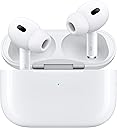
🎧 Elevate your audio game with AirPods Pro 2 — Hear it all, block it out, and own your space.
Apple AirPods Pro 2 combine cutting-edge H2 chip technology with active noise cancellation, personalized spatial audio, and a pioneering hearing health feature. Designed for all-day comfort with customizable silicone tips and IP54 water resistance, these wireless earbuds deliver up to 6 hours of ANC-enabled listening and 30 hours total with the MagSafe/USB-C charging case. Perfect for professionals seeking immersive sound, seamless connectivity, and advanced hearing support in one sleek package.


| ASIN | B0D1XD1ZV3 |
| Age Range (Description) | Adult |
| Batteries | 3 Lithium Ion batteries required. (included) |
| Battery Life | 6 Hours |
| Bluetooth Version | 5.3 |
| Cable Feature | With USB-C Cable |
| Compatible Devices | Cellphones, Desktops, Gaming Consoles, Laptops, Tablets |
| Connectivity Technology | Apple H2 Chip, Bluetooth, Wireless |
| Control Method | Voice |
| Control Type | Call Control, Volume Control, Media Control, App Control, Voice Control, Noise Control, Siri |
| Controller Type | Siri |
| Customer Package Type | Standard Packaging |
| Date First Available | April 23, 2024 |
| Earpiece Shape | Oval |
| Included Components | Cable, Wireless Charging Case |
| Item Weight | 1.6 ounces |
| Item model number | MTJV3LL/A |
| Manufacturer | Apple |
| Material | Plastic |
| Model Name | AirPods Pro (2nd Gen, 2023) |
| Noise Control | Active Noise Cancellation |
| Number of Items | 1 |
| Product Dimensions | 0.94 x 0.86 x 1.22 inches |
| Recommended Uses For Product | Calling, Exercising, Gaming, Recording, Running |
| Special Feature | Lightweight, Microphone Included, Phone Control, Sports & Exercise, Volume Control |
| Specific Uses For Product | Gaming, Music, Sport |
| Style | Without AppleCare+ |
| UPC | 195949704529 |
| Units | 1.0 Count |
| Water Resistance Level | Water Resistant |
| Wireless Communication Technology | Apple H2 Chip, Bluetooth, NFC |
G**E
These Are a Good Option
I’ve tried several hearing aid substitutes over the years, my past favorite being the now unavailable Bose Hearphones and costing $500. Rather than just a sound amplifier, these had several functions allowing you to filter and focus sounds in various ways and for various situations. They were pretty good. But now Apple has added some great features to their AirPods 2—features that function like far more expensive hearing aids and at less than half the price of the Bose product. I’ve owned these for a month or so and am now just getting the hang of how to use them. If there is a downside to these earbuds it is the rather deep and confusing tech included in them (or, at least confusing for a grandfatherly type like me). Once they are Bluetooth connected to your iPhone (They connect very easily with the button on the front of the EarPod’s charging case.) they should automatically connect every time you put them in your ears. You will then be able to access all the functions by tapping the “settings” app on your phone. You will find a heading near the top of the list just below the box with your name and iCloud options. Tapping on this will allow you to drill down through several pages of options. There are a lot of options there and it can be confusing, but experimenting with the various functions will help you figure out their purpose. The key here is to drill down to find the hearing test. This will quickly test for hearing loss by leading you through a series of tones of varying in pitch and volume. The end result will be an audiogram that can be used to program your EarPods as hearing aids. As stated before, it took me several weeks to find and activate this feature, but when I did a whole new experience dawned. Just be patient and search around for this function. It works very well. Of course, these things also serve as EarPods to listen to music or podcasts. (May I recommend “Pat Gray Unleashed!” if your bent is conservative commentary and just plain fooling around). The quality of sound is phenomenal and the buds are more comfortable than most to keep in your ears for an extended time. To control the volume for this function you can TRY to use the external control buttons located on those silly looking stems that hang out of your ears (good luck) OR just open the “Control Center” page (slide one finger upward on your iPhone screen to access this page) where you’ll find the volume slider. If your EarPods are connected and in your ears you’ll see the slider is marked as controlling the AirPods. I really like these things now that I’m a little more familiar with them. The quality and value are exquisite. If I discover more, I’ll edit this comment. 4 MONTHS LATER: Apple has improved the controls for these in their latest iOS update. The functions I had to dig around to find are now more easily accessed. Getting to the hearing test is now fairly straight forward.
S**L
Durable and customizable fit with great sound
Great earbuds! Very durable and high-quality. I love that you can adjust the size of the silicone tips for a perfect fit. The sound is clear, the active noise cancellation works well, and the comfort makes them perfect for daily use.
M**.
Perfection at its finest
These AirPods Pro 2 are outstanding. The sound quality is excellent with deep bass, clear mids, and crisp highs, and the active noise cancellation works incredibly well in everyday situations. Transparency mode sounds natural and makes it easy to stay aware of your surroundings without taking them out. They’re comfortable to wear for long periods and stay secure during workouts and daily use. Battery life has been great, and the charging case is convenient and compact. Pairing with Apple devices is seamless and everything just works the way you’d expect. Overall, these feel like a refined, well-thought-out product that delivers on every front. Easily one of the best wireless earbuds I’ve used.
D**N
These are fantastic! First pair of AirPods. I use the hearing aid functionality
A couple months ago I got “commercial” hearing aids from the VA. However, I didn’t like how they operated so I gave them back, and they’re going to order a different brand/model, which I’ll have in about three months (!) So I went in search of quality, inexpensive hearing aids to fill the gap. (My hearing loss is considered mild, at -32db on one side and -39db on the other.) I got the AirPods last Friday, and the software for hearing aid support rolled out last night (iOS 18.1) So this will be a two part review. Part one is the overall operation as earbuds for music and calls. These are my first ever Apple branded sound devices. Once I got the correct tips installed and the buds fitted, I was ready to go. OMG! The sound quality overall is the best of any earbuds I’ve ever owned, and by a huge margin. Astonishing bass, and crisp high range. (My hearing loss is in the upper ranges.) I’m beyond happy. Overall, the only thing I’m dissatisfied with is the battery life at 5-6 hours, but the extremely fast recharge speed eases that compliant. Voice quality when on a call is crystal clear. Controls are easy, though a bit hard to operate considering how small they are. Part two is the hearing aid function. The first thing I had to do was take a hearing test with the included software. (However, if you prefer to use a third party hearing test, you can import that profile and use it.) The hearing test takes about 5 minutes, after which the hearing aid sound enhancement profile is set automatically and they start up. I was totally gobsmacked at how well these things work! They boost the exact freqs I need. They actually work considerably better than those $7000 (egads!) hearing aids that I returned. Now for the ANC. At home, I sit right in front of a large, noisy window air conditioner. On the opposite side of the room is a dehumidifier (I live in south central Texas, where it was 91° yesterday.) Between these two pieces of equipment, it’s pretty noisy here. I turned on ANC and the room went absolutely silent. So silent that I thought I’d popped a circuit breaker and everything had stopped running. I removed one of the AirPods, and the noise returned. Amazing. In short, everything I’d hoped the commercial hearing aids would do, the AirPods actually DID. I consider this the smartest purchase I’ve made in years. Only one negative, and that’s the ear tips. None of the provided sizes are a good fit for me, so I’m now looking to memory foam replacements. But that’s a very small gripe. If you’re looking at these, either for music or hearing, don’t hesitate. You’ll be glad you got them. EDIT: I had to go to a doctor appointment across town today. Part of the route is on a toll highway with an 80 mph speed limit and heavy traffic. I got up to speed and turned on noise cancel mode. INSTANTLY the car was completely silent at 80 mph. No road rumble, no engine noise, no wind noise, no traffic noise. It was an amazing and invigorating experience. Oh, for those wondering about recharge time, if you take them all the way down to 0% battery and they shut down (I’ve now ascertained that 6 hours is about what you get with all the options turned on), it only takes about 15 minutes in the charge case and you’ll easily get another 3-4 hours out of them. EDIT2: Okay, I’ve had these for almost a month, and I just keep liking them more and more. I didn’t mention pairing in my original text above, so I need to mention it here. There is, in effect, no pairing that you need to do, at least in the Apple-verse. By the time I’d opened the charging case and looked at the buds, they’d already paired with both my iPhone and iPad. I didn’t have to go into settings on my iOS devices, or press any buttons on the case. Just open case and it’s done. As a computer engineer for 40 years, I have never seen a faster or more seamless pairing of anything. One more word on recharging: just today I took them all the way to zero. Dropped them in the charger and in FIVE MINUTES they were at 24%. I am in love with the hearing aid functionality. I hear sounds in movies that I’d never heard before in my life, even when my hearing was perfect. And I can adjust amplification either by going into settings on my iPhone, or sliding my finger up or down on the stem.
M**E
Dies sollte jeder Handybesitzer haben,er kann besser in Ruhe alles hören und verarbeiten. Alle anderen Mitbewohner bleiben ungestört !
C**C
Mein Sohn mag die Pods, tun ihren Dienst, er meint es muss nicht immer die dritte Generation sein.
Trustpilot
1 week ago
2 weeks ago