


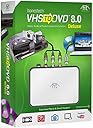

VIDBOX VHS to DVD 8.0 Deluxe
Product ID: 632385728
💾Direct USB digital transfer
📼Multi-format capture (VHS, Beta, 8mm)
🎞️HD video editing & special effects
🎥 Turn nostalgia into now — digitize, edit, and share your memories like a pro!
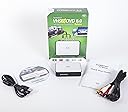
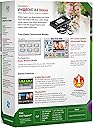
The VIDBOX VHS to DVD 8.0 Deluxe is a versatile USB video capture device designed for professionals and enthusiasts alike. It supports multiple legacy formats including VHS, Beta, and 8mm tapes, enabling seamless conversion to digital files or DVDs. With built-in editing features, users can enhance videos with music and still images, then upload directly to social platforms. It also digitizes audio from cassettes and LPs, and creates photo-video slideshows, all compatible with Windows 7 through 10.


| ASIN | B00ND0E7BW |
| Customer reviews | 3.9 3.9 out of 5 stars (885) |
| Is discontinued by manufacturer | No |
| Item model number | 8.0 Deluxe |
| Product Dimensions | 5.63 x 13.65 x 19.05 cm; 303.91 g |
C**N
Lo regale a una persona mayor y su funcionalidad es bastante sencilla, sirve perfecto para grabar casettes de 8mm en la computadora, para editar videos, etc. Lo recomiendo bastante
D**N
The VHS to DVD converter works well with all formats of media. The unit function better then the ones that I was using.
R**N
SMOOTH AND EASY, thats the way I like it and that's what this delivers. I work in an edit studio where quality is important. I have had a couple converters that give just kinda grainy, shaky transfers (SOny Media Tower, I'm looking at you). This one, if you take the time to just read the instructions, installs beautifully first time and does a slam-bang job of transferring whatever I've fed into in. Some old Hi-8 was first, and it looked pretty darn good. Guys in the room were like, whoa! We're in business! We used S-video cable (not the supplied RCA jacks) for that. Did some VHS, and found that it gives a good transfer, but of course, its not a miracle worker. I had some garbage that is still garbage BUT its not editable in our pro machines where it wasn't just seconds before. Good VHS looks really good. The audio is very good too. No extra hum or hiss added. Operationally its a breeze. Sorry but those reviewers who have reported problems, I just don't get it. This thing does the job with a VERY easy to use interface (duh, push de button get de video). You see the video in the small viewing screen. Controls beneath that. Rewind, well, that's to rewind. Free updates. Sorry, its that simple and works great and stable every time we duh, push de button. Simple! Awesome. Exactly the way I need it to be because I function on a lot of levels with a ;lot of different equipment and just don't need a lot of fussy particulars. Good video from old stuff at last! The version we got, works on both the Mac and windows PC (have 8.1 and Windows 10 here, a disk was provided for each format). By the way, and this will be obvious, make sure you are buying for your type computer (PC or WIndows) if you don't get the one that does both because it absolutely will not work on the wrong system. Sorry for me, first time I didn't push de right button. But they took care of me which is something else I really liked. Real people at work behind the screens and phones. Buy with confidence.
M**U
Dors what it I sas looking for, copy VHS and DVD contents to files which can be read by a computer. I was able to start copying contents vers quickly upon receipt; only problems I got were related to VHS reader ( somme cassettes could not be read) or PC configuration (missing codecs to read mpeg files) and unavailability of blue ray reader.
M**R
This met a need for a fraction of the price sending it out to a service for conversion would have. The bad thing is you HAVE to have a VHS machine to convert VHS movies (this is a "duh" for many of you, but I had no idea how this worked). My in-laws asked me to convert their VHS movies of my husband and his brother to DVD. We borrowed his grandmother's VHS machine. This kit consists of two main things: a conversion box and software. The conversion box connects to your line out on your VHS machine and there is a USB cable that goes from the box to your laptop or computer. The software installed easily. I like that you can see the movie playing on a little box in the software. I thought I would just be licking my finger and sticking it in the air to see when I thought it was time to stop the VHS so this is really handy. The quality of the video is just OK and be careful about the volume you choose. I really wish I had just kept it at 0. I put it to 1 and I think it created some white noise that is minorly annoying. Not sure if that noise was already on the VHS, though, honestly. My father in law had a movie he was in as an extra and wanted me to make a DVD of the VHS he taped from TV. The sound didn't have the white noise which makes me think maybe it was just the amateur video of my husband's Eagle Court of Honor that caused it. At any rate, the quality is ok and good enough for preserving memories. Not HD by any stretch, but our kids can now see daddy with a full head of hair and can hear him. It's pretty neat for me as I had never seen any videos of my husband that young. Mission accomplished. I only took off a star because the quality is just so-so, but that isn't fair since VHS quality is just so-so. I would rate this a 4.5. We used this on our laptop running Windows 7 with no issues. I am not even close to an A/V professional. I am a homeschooling mom with an engineering degree, but I don't think that degree gave me any leg up on anyone else in hooking this thing up. I am glad we bought it. I guess the only bad thing is you pay $60 and then copy your 5 DVDs from VHS and just have this useless device and software :). But, $60 is much cheaper than the quote I got from one of those services!
Trustpilot
1 month ago
2 weeks ago