Desertcart purchases this item on your behalf and handles shipping, customs, and support to Seychelles.
✨ Build Bold, Cool Smart, Show Off Proudly 🖤
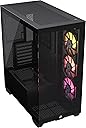
The CORSAIR iCUE LINK 3500X RGB Mid-Tower PC Case combines sleek panoramic tempered glass with high cooling capacity, supporting motherboards from Mini-ITX to EATX. Featuring 3 pre-installed RGB fans and compatibility with reverse connection motherboards, it offers a clean, cable-free aesthetic. Its spacious interior supports large GPUs and multiple radiators, while the iCUE LINK System Hub simplifies RGB and fan control, making it an ideal choice for professional-grade, visually stunning PC builds.


| ASIN | B0CZV112KZ |
| Antenna Location | Gaming |
| Best Sellers Rank | #143 in Computer Cases |
| Brand | Corsair |
| Case Type | Mid Tower |
| Color | Black |
| Compatible Devices | ASUS BTF, MSI Project Zero |
| Cooling Method | Air |
| Customer Reviews | 4.8 out of 5 stars 1,333 Reviews |
| Enclosure Material | Tempered Glass |
| Fan Size | 120 Millimeters |
| Global Trade Identification Number | 00840006688389 |
| Hard Disk Form Factor | 3.5 Inches |
| Internal Bays Quantity | 7 |
| Item Dimensions D x W x H | 19.92"D x 9.45"W x 18.11"H |
| Item Weight | 20.3 Pounds |
| Light Color | RGB |
| Manufacturer | Corsair |
| Material | Tempered Glass |
| Mfr Part Number | CC-9011280-WW |
| Model Name | iCUE LINK 3500X RGB |
| Model Number | CC-9011280-WW |
| Motherboard Compatability | ATX |
| Number of Fans | 3 |
| Other Special Features of the Product | Built-In Fan, Dust Filter, RGB Lighting |
| Power Supply Mounting Type | Bottom Mount |
| Recommended Uses For Product | Gaming |
| Supported Motherboard | ATX |
| Total Expansion Slots Quantity | 7 |
| Total USB 2.0 Ports | 2 |
| Total Usb Ports | 2 |
| UPC | 840006688389 |
| Warranty Description | 2 Year Manufacturer |
S**S
Cleanest, easiest, and solid case, best $ spent
Love love LOVE this case. All panels come off except rear, two large side panels pop off at rear first and have a little metal track to rest on bottom. Front glass is only push pin held on all four, so be very careful removing that one or you’ll drop it and break it. Top is the same but no glass. Copious amounts of ventilation build in with dust screens on the bottom, top, and panel side for cooling. The screens are removable if desired. Very roomy case and easy to build inside, comes with three Corsair ARGB fans. I’m running them off the MSI motherboard, Mystic Light WILL control them. Cable management is great, tons of room to tweak and get it to how you like. There’s also hooks all around the top for management as well so nothing hangs. See photos, mind you I haven’t finalized wiring yet. Top of case has x2 USBs and x1 USB-C, as well as audio jack and reset with power. Great case for beginners and veterans alike. Very crisp white color, true bright white. Absolutely solid case and great price for what you are receiving. Zero regret purchase.
N**R
Simple but beautiful case (both in classic black and crisp, stylish white)
Got the white ARGB version of this for my wife and love how it turned out and how easy it was to build in. When my case had unforeseen issues soon after, I decided to get the black iCue Link version when it went on sale to match hers, and I absolutely LOVE it! The case is roomy enough to build in for its size, airflow seems adequate (see explanation below) , and it looks incredible when set up with RGB. My only primary complaint is build quality feels a little flimsy, but it’s not like I’m moving the thing around a lot or making constant changes to the build. Other than that, it doesn’t try to do too much, but what it tries to do, it does well for the price! I will attach pictures of both the white ARGB and black iCue Link builds! For reference, I took the included RX120 fans in the black case and swapped them with the QX120 fans that came on my h150i 360mm AIO cooler, since the RX fans have better static pressure for a rad (and the QX fans look better as case fans). Note about my airflow comment: I will never understand all cases refusing to include a rear exhaust fan, but that’s not a knock on this case… just the industry as a whole. Back to this case, I came from a case with a lot more options for 140mm vs this with just one (not including the top exhaust where my 360mm rad goes), so the airflow felt slightly limited at first but good enough. However, once I got a 140mm intake at the bottom, it’s essentially the same CFM airflow as my old one, and it cools beautifully now! Can’t hate on the case too much if the expansion options make up for what the “default” configuration lacks, just wanted to mention it.
B**B
Great upgrade
So far this tower was very easy to set up, cables were very neat and iCUE link was easy to manage. Lots of space to work with and perfect for rear connected motherboards. Cable management is not as easy or clean on front connected motherboards but is still decent. The preinstalled fans are quiet and easy to manage with iCUE software. Definitely a great buy and highly recommended for anyone upgrading from an older setup and needing more space for the motherboard and bigger GPUs. I would recommend getting a PSU with side connections instead of typical location as the area for the PSU can get cramped but has much more space and ability for cable management if using a side connected PSU. Also recommend getting iCUE link fans for exhaust as it makes linking the fan colors and speeds easy and setup less of a hassle. Otherwise cooling is great! Make sure, wherever you plan on putting it, has enough room as it is sort of big and would not want to risk hitting the glass. Hooks on the bottom part of the glass make it easy to keep in position and prevent it from falling straight down and breaking. Just make sure you have it hooked correctly or the glass can fall off pretty easy.
M**L
Excellent Case with Great Airflow and Looks
ought this a while ago and it’s been great. Build quality is solid and sturdy without being overly heavy, airflow is excellent and keeps temps low, and the case looks amazing. It’s easy to build in with plenty of mounting options, cable management is clean with lots of space, and the included RGB fans work well with iCUE and were easy to set up. Highly recommend it for any PC build.
E**S
Awesome buy especially on sale
LOVE THIS CASE. its easy to use and works really well for the icue system. And it looks great it ties everything together. It's a good size, not too heavy, and the dust filters do a pretty good job and are easily removable.
J**E
Top tier price and quality. Have bought several now and recommended to friends.
Build quality is top notch, and the glass panels give it a sleek, premium look without feeling fragile. Plenty of space for cable management, airflow is excellent, and everything fits like a glove, along with having many fan mount spots for easy customization. 3 bonus fans included as well, absolute chef's kiss. Love the ease of access to the inside with the design of the glass panels. Honestly, it exceeded my expectations. Setup was smooth, and the final build looks stunning. If you're looking for a case that delivers both performance and aesthetics, this one nails it. The best case on the market right now in my opinion, both for the price point and quality of product.
A**R
Good value for icue link ecosystem.
This case has been on my radar since its release in June. I finally took advantage of a Prime day sale and I was not disappointed by this case at all. Pros - Very easy to build in, lots of space for radiators up top and plenty of places for fans. - good air flow esp with icue link RX fans included in. - Future proof for project zero or BTF motherboards - Supplies all the hardware you need to add extra fans to the bottom PSU shroud that are long radiator screws. - if you’re interested in going the new icue link route, the case with those style fans is a good value. The 3 pack of fans by itself is $99. This case without those fans is $89. It’s a good value to get you started in the ecosystem, it includes two cables plus the hub. So you’re saving 40$ getting this case with the icue link fans. - tool-less entry to the case. All panels snap on so it’s really easy to have the case broken down completely in a few seconds. Side panel glass also comes out so you can have full access while building. Cons - no rubber grommets on any of the openings on a $150 case is pretty interesting choice. I understand in some ways because it has back connect supports but it still would have been a nice choice. - Installing fans on the bottom row is pretty difficult to get just right. Leaving it hard to maybe get your headers or front panel IO installed. Also the two cables supplied for connecting the hub to the fans are very long. - order of operations while installing your components is super important and spacing needs to be considered for some parts. If you have a really thick AIO the top will be really difficult to get to your CPU fan headers//CPU power delivery cables. - cable management space isn’t ideal as well if you’re using BTF motherboard, some motherboards may not line up correctly with the cutouts. Overall I’m pretty impressed with this case, looks awesome with everything in it. It is bigger than I expected it to be and also a little heavier.
V**Y
Beautiful, Airflow Beast of a Case – Nearly Perfect!
This case is absolutely stunning — hands down one of the cleanest, best-designed PC cases I’ve ever built. The airflow is phenomenal, the layout makes sense, and there’s so much room for fans and a large GPU. The white finish is just gorgeous and really gives the whole setup a sleek, modern, and ultra-clean look. The only downside? The included GPU sag support wasn’t quite working out. It didn’t bolt on properly and felt awkwardly placed, so I ended up ordering a separate sag support to keep my GPU level. Not a dealbreaker, but definitely something to be aware of if you’re running a heavy card. Other than that small hiccup, this case is near perfect. The build process was smooth, cable management was easy, and the end result is as good as it gets — amazing airflow, a ton of space, and a setup that looks like a showpiece. Highly recommend if you want a case that performs as great as it looks!
E**.
Supero mis espectativas
Es muuuuy amplio y bonito., se siente de muy buena calidad y es muy personalizable a tus necesidades., su temperatura es buenisima, yo lo uso con 8 ventiladores va muy fría, además de tener espacio para 2 más así que con los 10 debe ser buenisima! Yo compré la versión que trae ARGB y vale completamente la pena, eso si llenarlo de ventiladores icue link sale caro pero son muy estéticos y prácticos de instalar pues casi no usas cables por su conexión en serie. Yo creo que está muuuuy bien para el 90% de usuarios así que no te arrepentirás., incluso en la tapa trasera trae dos bahías para un SSD y un HHD que quedan ocultos totalmente
R**R
Stunning design and excellent airflow
The CORSAIR iCUE LINK 3500X RGB case looks absolutely amazing. The panoramic tempered glass panels really show off the build, making it perfect for anyone who wants a clean, showcase-style setup. The three included RX120 RGB fans provide strong airflow and vibrant lighting right out of the box. Cable management is much easier thanks to the iCUE LINK system, and the reverse connection motherboard compatibility helps create a super clean interior look. Build quality feels premium, with plenty of space for components and smooth installation overall. If you want a stylish mid-tower case with great airflow and modern features, this is a fantastic choice.
D**D
Bardzo dobra obudowa
Dobry dostęp w trakcie montażu.
じ**ん
細身のピラーレス
白PCピラーレスケースとして購入。デュアルチャンバーでないのでケースの幅がスリム。机の上にPCを設置してウルトラワイドモニターを隣において使用できる。各パネルは工具なしで外す方ができる。電源ユニットがケース下部に来るので、その部分が盛り上がっているが、その気になれば電源ユニット装着部にも底面ファンを設置できる。グラボステーも付属しつっかえ棒方式でないのでスタイリッシュ。裏配線スペースも十分広い。ファンが付属していて質感も作りもよく、それでいてそこまで高い値段ではないので、白くて光る、見栄えの良いゲーミングPCを作りたい人にオススメします。あと、グラボの縦置きにも対応。
I**S
Goodbye thumb screws
The case was very easy to disassemble and put back. While there are grooves and slots to manage cables, there might not be enough for the neatest of neat freaks (if this is you, consider the 6000D.) As a novice, it only took me 5 hours to disassemble my old and put it into this case. The aesthetics are very pleasing. The iCUE Link Fans were plug and play with my pre-existing iCUE installation. The improved airflow also solved my overheating problems from my previous mATX case so I’m very happy. The box came with a QR code to Corsair’s online manual but it was intuitive enough that I never referred to it. In the picture, I’ve deliberately turned off the RGB lighting on the Link fans because I’ve found that they have a different white balance and it’s a bit jarring compared to the rest of my setup. The only true problem I had was that I had some overly thick HDMI/DP plugs, and use slot 1 for the GPU. There was a slight difficulty plugging the cables in. The easy way to solve that problem was to remove the plastic casing of the troublemaking plugs with a flathead.
Trustpilot
1 month ago
3 weeks ago