


Desertcart purchases this item on your behalf and handles shipping, customs, and support to Seychelles.
🚀 Upgrade your desktop Wi-Fi game — stay connected, stay ahead!
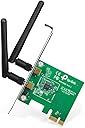
The TP-Link TL-WN881ND is a PCI Express wireless adapter delivering up to 300 Mbps speed with MIMO technology for enhanced signal strength and coverage. It supports a wide range of operating systems including Windows 7 to 11 and Linux, features easy WPS setup for secure connections, and includes a low-profile bracket for versatile desktop compatibility. Backed by a 3-year warranty and trusted by thousands, it’s the smart upgrade for reliable, high-speed wireless networking.
| ASIN | B0079XWMEI |
| Best Sellers Rank | #1,727 in Computers & Accessories ( See Top 100 in Computers & Accessories ) #1 in Network Interface Cards #2 in Graphics Cards |
| Box Contents | Wireless Adapter,2 Detachable Omni directional antenna,Resource CD |
| Brand | TP-Link |
| Brand Name | TP-Link |
| Color | Black |
| Colour | Black |
| Compatible Devices | Desktop |
| Compatible Operating System Family | Linux |
| Country of Origin | India |
| Customer Reviews | 4.2 out of 5 stars 5,486 Reviews |
| Data Link Protocol | Ethernet |
| Data Transfer Rate | 300 Megabits Per Second |
| External Testing Certification | Grau 1, Não aplicável |
| Global Trade Identification Number | 00080850499360, 00845973050573 |
| Hardware Interface | PCI |
| Importer Contact Information | TP-Link India Private Limited Office No.1, Tower 2, Level 2, Raiaskaran Tech Park, Andheri Kurla Road, M.V Road, Andheri East-400072 Contact: Toll Free 1800-209-4168, [email protected] |
| Item Dimensions L x W x H | 12L x 7.9W x 2.2H Centimeters |
| Item Type Name | Wireless Adapter |
| Item Weight Unit of Measure | 0.3 Pounds |
| Manufacturer | TP-Link, TP-Link Systems Inc. 10 Mauchly, Irvine, CA 92618, USA or TP-Link India Private Limited Office No.1, Tower 2, Level 2, Raiaskaran Tech Park, Andheri Kurla Road, M.V Road, Andheri East-400072 |
| Manufacturer Contact Information | TP-Link Systems Inc. 10 Mauchly, Irvine, CA 92618, USA or TP-Link India Private Limited Office No.1, Tower 2, Level 2, Raiaskaran Tech Park, Andheri Kurla Road, M.V Road, Andheri East-400072 |
| Manufacturer Part Number | TL-WN881ND |
| Minimum Required Operating System Version | Windows 7 |
| Model Number | TL-WN881ND |
| Number of Items | 1 |
| Number of Packs | 1 |
| Packer Contact Information | Pacific Technology Private Limited Survey No, 57/3/55, 57/2/56, 57/1/57, Silver Industrial Estate, village Bhimpore, Nani Daman, daman Dadra and Nagar Haveli and Damn and Diu, India 396210 |
| Product Dimensions | 12L x 7.9W x 2.2H Centimeters |
| UPC | 012304979722 745449835683 080850499360 803983008458 666674962534 350112759830 731215277047 807030505907 565564869055 758399150058 112840006255 809186281605 809185824988 845973050573 723856183641 842674790227 809385676455 634392761067 |
| Unit Count | 1 Count |
| Warranty Description | 3 Years Warranty |
S**I
Best
Good
S**K
Great way to add wifi capabilities to your old computer
I have been using it for 5 years in my office and it still works ok. The connection is solid once it is connected to the Wi-Fi network and there is no real latency issue or speed issue upto 50mbps. The only problem is that it sometimes fails to recognize networks and it needs to be turned off and on in the taskbar so that it can find a new wifi network. Also, sometimes it fails to auto-connect to the previous connected network but that has happened very rarely. It is still a very solid Wi-Fi network just be aware that there are certain quirks to it. Certainly, gets my recommendation.
N**L
Stable signal, speeds upto 55 Mbps on a 75 Mbps connection
Okay first thing, first, I see many here unable to locate latest drivers for windows 10, check the below link https://www.tp-link.com/in/download/TL-WN881ND.html#Driver Now, let's get started. I never faced internet speed issues on my laptop, mobiles, tablet or tv on my 75Mbps connection. But when I purchased my desktop, placing it near the router was out of question, thus I purchased a USB wifi adapter, and it was a tight slap on my face, considering the speed it was offering at mere 8 mtrs distance. Signal was not stable, frequent disconnection, and meagre download speeds of 0.5 Mbps, lol that's like 0.0625 MB/s, i.e. 62.5 kB/s. I literally was annoyed, thus did some research, and planned to purchase this PCIe wifi adapter. It is a boon, at 8 mtrs distance, with 2 walls in between, I'm getting speeds upto 55Mbps, if no other devices are connected on my wifi network, that's like 74 % of my ethernet LAN speed, that too on wifi, truly amazed. The card supports windows 10( both 32 and 64 bit), and it comes with drivers cd, but still if, you're like me without DVD-WR/R, head over to TP-link's website and download the drivers, it's that simple. Hope, this review, might be of some help to you guys, adios !!! PS. my router is D-Link DIR 600 L, it's a single band 2.4 to 2.4835 GHz, 802.11 b/g/nn wifi protocol, single 5 dbi antenna router. Obviously, if I would've switched to ASUS routers, with 9dbi dual antennas, it would've been enough even with USB adapters. Thus, choice is yours, if you're willing to switch to bigger range routers with bigger antennas, even USB adapters will work fine.
S**R
Excellent
Excellent
P**R
Excellent network adapter for daily use.
Excellent network adapter for daily needs. Would absolutely recommend this for daily WFH, Online educational or daily internet streaming. As the description suggests, the adapter supports 802.11n, 802.11b, 802.11g standards and is single band i.e 2.4Ghz. The adapter also supports Linux, Windows which can be a game changer if you are a linux user Box contains Adapter, two antennas low profile bracket, installation CD-Drive (Drivers) and a instruction manual. Adapter is very easy to install as well, just plug it into your PCI-E port, and you’re done. It also includes a low profile bracket for smaller form factor CPU’s so it should work for almost all CPU cases. It also has a status light which blinks when in use, and two omni directional antennas which can be very useful if your router is in other room or in different direction from your PC. Would not recommend for high performance gaming as it tops out at 300 Mbps or 35.8 MB/s or If you require 5Ghz band or 802.11ac standard/ Wi-Fi 5 as your requirements.
T**I
Care!
Be careful. This only supports 2.4GHZ and not 5GHZ frequency. Else great product.
K**D
Best product
Easy to fit in cabinate but in box not any screw is given for tight 😞 connectivity and range is good Tp link WiFi is good in quality 😊
S**H
Does not list wifi bands
There was no mention that it is not compatible with jio fiber modem Jio gives two bands 2.4 and 5 , how come this card does not pick and show any of the bands? But if I use mobile tether, it lists that wifi I can't use this, could not see return option Purchased dual band USB based wifi adapter, works very well Never buy this
A**D
Great card totally worth the money.
I have gone through 3 (this is my fourth wifi adapter purchase in about a year) wifi adapters for my PC that I upgraded to windows 10. The three other ones all supposedly supported win10 or there were drivers for windows 10 that were really for windows 8. All three of the previous ones I spent many times getting different drivers trying to get the adapters to work. All of them suffered from similiar problems...the internet just cuts off for no apparent reason or the wifi adapter disconnects for some reason. I was skeptical because after 3 adapters you get that way. Also, the other three adapters were all usb and I have not eliminated that the adapter was not to blame but instead the usb ports and bad drivers. That is a big possibility however I have bluetooth usb, xbox controllers, usb storage, all work fine and without a problem. I have even hooked up 3tb internal hdd with a usb kit and transfered about 2tb worth of steam games over usb and (while taking many hours) never had a hitch. So I don't know. This one is a PCIe card and after 3 adapters, this one works great. With my other adapters, if I wanted to install a 10gb game from steam it would start out at ok speeds but would randomly cut off for no reason. I once started a download of Diablo 3, left to go to the store (5 mins away) and came back and it only downloaded about 600mb. This card downloaded GTAV at max speed without ever disconnecting or stopping. Steam gave me a time it would download in and I set an alarm for that time (plus 5min) and sure enough the game had started when I came back to check on it. So far I love this card. Speed is great. I can stream HD video and download and still get top speeds from steam.
J**Z
Facil y funcional
La compre para usar en mi computadora de escritorio que se encuentra en las egunda planta y el unico modem esta en la entrada de la planta baja, esto quiere decir, como una distancia vertical de 2.6m y una distancia horizontal de 4m y la señal en windows 10 es Buena, no es perfecta, porque en el simbolo le falta rellenar una rayito para alcanzar el 100% pero no siento diferencia en la velocidad de navegacion y transmicion de datos, por lo que para distancias y situaciones similares la recomiendo ampliamente. Por cierto, es solo inserter en la tarjeta madre y windows 10 la detecta y la instala automaticamente.
L**E
Recomendo
Funciona perfeitamente.
J**E
Ok
Ok
D**F
Good product, easy to install.
Product worked well. Was recognised and installed by Windows 10 with no issues. Connects easily to WiFi.
Trustpilot
2 weeks ago
2 months ago