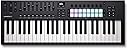
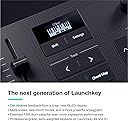
Without a doubt THE best controller for Logic Pro. Short of Apple releasing their own controller, this is easily the most beautifully carefully thought out DAW controller I've ever used. Period. I have the 88 key Arturia Mk2. It's great for Arturia Plugins I have the 61 key Komplete Control Mk2. It's great for NI plugins I also have the Maschine Mk3. I was going to get the Kontrol Mk3, the update to my 61 key. It has Poly After Touch. But as I sat back and thought about it, I absolutely hate Komplete Control. For one reason. Old sessions will lose their patches. I have lost count of the number of sessions I've loaded up, to be presented with a blank patch because Komplete Control has been updated, and I need the old version back to reclaim my patches. I refuse to use it going forward. It's that simple. Even Native Instruments themselves have relegated it to second class citizen on their new keyboards (It's Kontact first). And yeah, great, it's got a bigger screen. Whoooh. So what. I have a 39 inch widescreen. Why do I need a screen on my keybed. What I need is the keyboard to be able to control my DAW. Not just that manufacturers plugins. Step forward Novation. On the 49 key and above, you have three different sections. * Faders * Knobs * Pads You can assign each of these independently to various functions to control your daw. It took me around an hour to memorise the on keyboard shortcuts. ** Faders ** + Your basic Mixing volume control + 7 other user defined profile for all 8 faders ** Buttons below the faders ** + Track Select (That match the colour you assign the track, BTW!!) + Arm/Select The faders are great. Granted, they're not the best I've used, but they are very very good for the price. I wasn't expecting much from them, but they are decent enough to use. ** Pads ** This is where the genius lies. You hold shift and the top row of pads to select what the knobs do. You hold shift and the bottom row of pads to select what the pads do. * Shift + 1st pad = Smart controls * In this mode, you can control the plugin via Logics Smart Controls So you have control over ANY plugin. No more NKS nonsense. So with one controller you can control Korg, NI, Arturia, U-He, basically any and all of them. Don't forget, YOU get to decide what the smart controls do, so you have better integration of plugins than both Arturia and NI combined. * Shift + 2nd Pad = Mixer * This changes the function of the knobs to mixer, in three levels. 1st Level = Volume (similar to the faders) 2nd level = Panning 3rd level = basic EQ Tell me, what other midi controller on the market allows you to use faders to mix, and knobs to change the panning. Just out of the box. That's just great. The knobs are very very decent. On par with the 750 pound NI Mk2. * Shift + Pad 3 = Sends * That's right, the knobs now control the send values. Page down for the next level of sends. You have more than two levels of sends. No problem, just press down again. I'm sure I could create a template for the KK mk2 to do this. Likewise the Arturia. But not this easy. And I certainly couldn't change on the fly with just the press of shift and a pad, like I can here. * Shift + Pad 4 - Transport * Want to change the star of your cycle, or the end position, or skip to markers. This is where it's at. I often use the cycle range to edit various parts of my tracks. Using this, I can now do so without reaching for the mouse. You even have a dedicated zoom knob. That's just great * Shift + Pad 5 onwards * These you can set yourself, or use a dedicated template from the Novation app. They have a KK template. Basically, it turns your keyboard into a Komplete Kontrol. I have lost NONE of the functionality of my MK2! Zero. Sure, I don't have the screens. But I don't sit playing hunched over my keyboard looking at screens. Not when I can look forward to the big screen right in front of me. It has templates for Serum. Or you can easily roll your own, and store up to 24 of them. Sooo much easier than the klunky Komplete Knontrol way of doing it *** Pads *** There are 16 pads, with poly after touch. Arranged in two rows of 8. They are VERY Sensitive. And work great. They feel like a smaller version of my Maschine. And beat the Arturias into a cocked hat. Using shift and the SECOND row of pads you set the pads to various modes (remember, top row of pads, sets the knobs) * Shift + 1st Pad = DAW mode * Now you can select a track using the top row of pads that are colour matched to the colours of your tracks. The second row of pads are record/arm. As an aside, I've been going back into my old sessions, and actually assigned colours to the tracks. Because it wasn't that important before. As neither the KK or the Arturia made any use of them. Apparently the update of K Mk3 is able to do so on the screen. Great. I have a screen. What I now have are easily identifiable colours directly on the keyboard itself. Yellow for drums. Blue for bass. Purple for Pads. Lime for leads. You get the drift. Now if you page down in this mode. You get solo and mutes, for the first 8 tracks. Press the next page to go to the next 8 tracks. Etc. This is AWESOME. This has saved me immense amounts of time. Yes, I know you can do it on the KK, and the Arturia, but not on the pads (the KK doesn't have any). They even match the yellow and the blue of Logic. That's just fantastic. * Shift + 2nd pad * Drums. Do you know how hard it was to route my Maschine Pads to map to Logic. And then to map back to themselves. Put it this way, I had to create TWO templates, and even know I'd have to look it up to remember all the steps on how to do this. In this mode, I can control Dummer, or ANY VST that uses the standard drum pad options that use a 4x4 grid) (The pads also match the colour of the track!) * Shift + 3rd Pad = User Chords * This allows you to create ON KEYBOARD user chords that DOES NOT REQUIRE any additional software of plugins. It's as simple as holding down a pad, and playing all the notes you want in a chord, and then letting go. If you want do delete a chord, hold down the function. You can even transpose the chords you've entered. And then you have the arp section, which is something else entirely... I've gone on long enough. Seriously, just go and watch the videos. It's soo much easier to describe the chords and the arp section with a video. But you get the idea. You can literally fly around the keyboard using the shift key and setting the pads into various modes. There's even a template where you can set the pads to keypresses. They even have a basic template. You know, E, B, V, etc. You can set your own. You can move your keyboard out of the way. You can even do combos. So you can have cut, copy, paste, right there on your keyboard. It gets saved to the keyboard memory. You can colour code them. And don't forget, it's got a little screen. Just hold shift before you change a knob or fader, and it will tell you what you're changing. ------------------ Build Quality Reasonable. For the price. It's excellent. It's not something you can take around with you. It's plastic. And around average quality. It exceeded my expectations. I purchased this because my E key on the 4th octave of my KK is starting to lose its velocity sensitivity. It's around 6 years old. It probably needs a clean. I got a 50 quid voucher from Brsk Broadband. And bought this used (like new). So I ended up getting it for around 138. ** Keybed ** It's semi weighted. Not by much. But I grew up on synth action, so it's akin to a good quality synth action. Again, the materials used lets it down ever so slightly. It's as responsive as my KK, for sure, but the quality of the materials used is a slight step down. For example, the edges of the keys are aren't as chamfered as they are on the KK. So if you press down a key, and move your finger to the edge of the key so the side of your finger is touching the next key, It's rather sharp compared to the KK. This COULD be a deal breaker depending on you play. I myself have noticed that I play to the right of each key. No fault of the keyboard, just my own bad habits.