Buy anything from 5,000+ international stores. One checkout price. No surprise fees. Join 2M+ shoppers on Desertcart.
Desertcart purchases this item on your behalf and handles shipping, customs, and support to Seychelles.
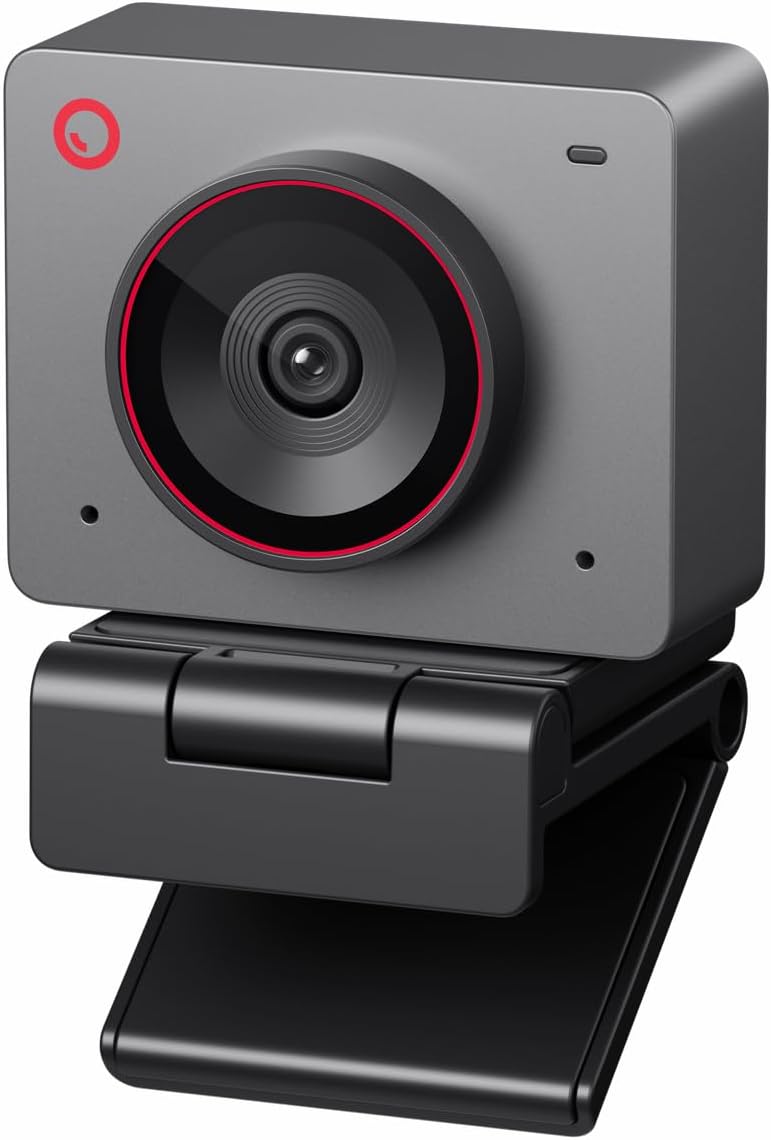
🎥 Elevate your presence with AI-powered 4K clarity — because your image deserves the spotlight!
The OBSBOT Meet 2 is a sleek, space grey 4K webcam featuring a large 1/2" CMOS sensor for superior image quality, AI-driven framing and autofocus, and intuitive gesture controls. Designed for professionals and content creators, it offers plug-and-play USB-C connectivity, dual noise-canceling microphones, and a lightweight form factor ideal for streaming, meetings, and gaming. Backed by a 2-year warranty, it’s the official camera partner of the 2025 Esports World Cup, delivering pro-grade video and audio performance in a compact design.


| ASIN | B0D9W7J9SK |
| Antenna Location | video conferencing, streaming, and content creation |
| Are Batteries Included? | No |
| Best Sellers Rank | 4,511 in Computers & Accessories ( See Top 100 in Computers & Accessories ) 34 in Webcams |
| Box Contents | USB-C cable |
| Brand Name | OBSBOT |
| Camcorder Type | Webcam |
| Colour | Meet 2 Space Grey |
| Compatible Devices | Personal Computer, Laptop |
| Country of Origin | China |
| Customer Reviews | 4.4 4.4 out of 5 stars (1,617) |
| Digital Zoom | 4 x |
| Effective Still Resolution | 48 MP |
| Effective Video Resolution | 48 MP |
| Exposure Control Type | Automatic |
| File Format | MP4 |
| Flash Memory Speed Class | C10 |
| Flash Memory Type | Not available, rely on your PC/Mac |
| Flash Memory UHS Speed Class | 3 |
| Flash Memory Video Speed Class | V60 |
| Focus Type | Auto Focus |
| Form Factor | Compact |
| Has Image Stabilization | No |
| Image Aspect Ratio | 16:9 |
| Image Stabilization Type | Digital |
| Item Weight | 40.5 Grams |
| Lens Type | Prime |
| Manufacturer | OBSBOT |
| Maximum Aperture | 1.8 f |
| Maximum Display Resolution | UHD |
| Maximum Focal Length | 26 |
| Minimum Aperture | 2.8 Millimetres |
| Minimum Focal Length | 10 |
| Model Name | MEET 2 Space Grey |
| Model Number | MEET 2 |
| Network Connectivity Technology | USB |
| Operating System | Recommended PC configuration: CPU: 7th Gen Intel® Core™ i5 Processors or later, RAM: 8GB, Windows® 10 or later, macOS 11 or later |
| Optical Sensor Size | 1/2-inch |
| Product Features | AI Framing and Auto Focus and Gesture Control, Experience Stunning 4K Clarity, Multiple color options, Plug and Play Simplicity, Sleek and Lightweight |
| Product Warranty | 2 Year Warranty |
| Screen Size | 2 Inches |
| Sensor Type | CMOS |
| Shooting Modes | AI Framing and Autofocus |
| Style Name | Minimalist |
| Supported Audio Format | AAC, MP3, PCM |
| Supported Image Format | MJPEG |
| UPC | 783970236326 |
| Unit Count | 1.0 count |
| Video Capture Format | MP4 |
| Video Capture Resolution | 4K |
| Water Resistance Level | Not Water Resistant |
| White Balance Settings | Auto |
| Zoom | Digital |
A**R
Buy for clear picture and no issues.
Great webcam. Fantastic quality. Looks smart. Attaches to the magnet clip and is very sturdy. Good privacy cover also magnetises on. AI hand gestures a bonus
T**H
Decent quality for a webcam
Good quality, nice and small. The magnetic stand is a clear weak point though. Because it snaps to "horizontal" it's basically impossible to make it point slightly down, which is what you want if it's on top of your monitor. I'll probably have to wedge something under it or something. Otherwise, pretty good for a webcam. Don't expect *actually good* quality though. This isn't anywhere near e.g. an iPhone or even a cheap Android phone to be honest. But to get that in a webcam you have to spend at least double the price of this.
S**S
Amazing quality for the price
The Meet is a handsdown awesome little camera for the price. There's no comparison to anything below £100. I have 2 Nexigo £70 1080p cams, a Ugreen 1080p cam and an Elgato Facecam in my streaming setup and I upgraded one of the Nexigos to this Osbot cam. Picture quality at 1080p is a radical improvement on all my other cams, notably including the Elgato. 4k blows it away. The comparison with the Elgato Facecam is the important one because it's similar-ish price and is frequently talked about as being good in low light. The Osbot picture is clearer and in low light, well, ... you wouldn't know you're in low light. Gesture and Beauty modes, I can happily do without but they work fine. The other things that's important to me are the Autofocus and AI autoframing, which work brilliantly. As far as the camera's build is concerned, it's cute and tiny! You can immediatly tell that the build quality is superior to lower cost webcams and is on a par or better, than the Elgato Facecam. The only downside I have with the Osbot is that I used to use the Snapcam application on my pc to pass the footage through and use some lens on, before consuming that footage in OBS Studio. I noticed that as soon as I told Snapcam to use the Osbot as it's source, it's CPU usage spiked to 33% of my total available. .. I have Overclocked AMD Ryzen 9 5950X 16 Core CPU so this was unnaceptabe and I simply uninstalled Snapcam and forgot about the lens. (Didn't make any difference whether the Osbot gave it 1080p or 4k footage, Snapcam just basically F'd).
S**N
Mostly Good quality camera and software
It’s seems to be very well built and very small which is great . The quality of the picture is ok for general use. Without good lighting it does suffer a little, and in darker light does struggle but does a fairly good job compensating considering. As with all camera setups you need a lighting setup to get quality image but even without it’s much better than you bog standard webcamera that’s for sure. The software works well too when you are able to use it. On my personal device it’s easy to install and setup and lots of features. It’s a shame that some features are all dependent on the software though as if, like me, you use it for work, the software cannot be installed on my work device due to company policy. So you just have basic controls from within whichever apps you use on work device. The only downside is the stand which has a very weak arm which is not particularly good for sitting sturdily on my pc the monitor. It’s quite flimsy which I would have expected something a bit more robust.
A**R
Highly Recommended for Anyone Looking for a Mid-Range Webcam in Multiple Colors
I bought this webcam after doing a lot of research on YouTube, and honestly, I don’t regret it at all. I feel like there aren’t many products in this price range that deliver this level of satisfaction. I was also specifically looking for a white version, which I managed to get at the perfect time. The software is also surprisingly high quality. I would confidently recommend this webcam to anyone without hesitation. There are no connection drops or stability issues, and the built-in software features like beauty settings are really good. The only minor downside is that when you use the beauty settings, you need to manually enable the virtual camera every time. I checked Reddit and saw that the company confirmed there is currently no feature to auto-enable it, which is a bit inconvenient but still manageable. If you don’t care much about webcam quality and just need something basic, this might be overkill. But if you want extra features and decent image quality for work or calls (without going into expensive streaming gear), this is a great choice. Overall, I’d recommend it for people who want to look reasonably good on camera during work or meetings, without spending a premium price. 👍 Pros - Excellent value for the price - Stable performance (no disconnect issues) - Good software features (beauty settings, etc.) - Clean white design option available 👎 Cons - Virtual camera must be manually enabled when using beauty mode, Slight inconvenience (no auto-enable feature yet)
S**Y
Couldn't Be Simpler
I won't pretend I've gone through every feature this camera has to offer. I recently purchased a rather expensive gaming PC that had an in-built webcam. The in-built webcam wasn't awful, but for my streams I needed something of higher quality. I have some impulsivity issues which make me seek out the most expensive gadgets I can find, assuming more expensive = better quality. This webcam however is a decent price and really packs a punch. Setting the webcam up with insanely easy. The stand fits on my laptop well and is literally plug and play. It's miles better than my laptop webcam and the sound quality is also so much better. I am so impressed with this little gadget, I don't think spending significantly more would change a whole lot.
D**R
This webcam has been an absolute game-changer for both my podcast recordings and daily Zoom calls. The 4K image quality is incredibly sharp and professional, and the larger 1/2" sensor really makes a difference in low light, my video looks clean and natural without needing a bunch of extra lighting. Setup was quick and painless, and it works flawlessly with my PC and recording software. What impressed me most is how polished everything looks on camera. Whether I’m recording a podcast episode or joining a meeting, people constantly comment on how clear and high-quality my video is. The autofocus is fast, colors are accurate, and it feels like a huge upgrade from typical webcams. If you want broadcast-level quality without the hassle of a full camera setup, this is an outstanding choice. Highly recommended for creators, professionals, and anyone who wants to look their best on video.
K**K
Bought 1080p version as a webcam for online meetings (it's enough, don't need 4k as it will be resized to 720p anyway). I use Macbook m4, and wanted to have a webcam which can blur background on its own - and this device did that great. Can't judge a picture quality - it's enough for online meetings. IT IS plug and play (despite other reviews) - single button click turn on/off framing (green light), double click - background blur (blue light) - no need to install anything at all. I'm fully satisfied with this webcam.
M**D
This web cam is tiny but mighty! The image quality is very good. I'm planning on starting to stream and this was a key piece of the puzzle. The low light image is impressive. I don't use the onboard microphone as I have a Yeti Nano for that. I think the mic would be fine for meetings or calls but for streaming it's not the best quality. Pro's: -Image quality -USB C to A connection (into the monitors USB B hub) -Size -Magnetic base Con's: -It tends to get a little warm after using it for a while Recommend if you are looking for a good quality streaming web cam.
M**N
fantastic quality, plug and play
I**N
Support très pratique: magnétique, donc pas de vis à serrer, très facile à orienter et à placer. Conception astucieuse qui s'adapte à tous les écrans. Seul le petit rebord de la face avant dépassera un peu sur l'écran des moniteurs récents à bords fins, comme sur mon MSI par exemple. La caméra est lourde, car en métal en partie, pour se fixer au support. Le logiciel est bien fait, même si sur ma machine, il plante la première fois qu'on le lance et qu'on allume la caméra. Il faut le relancer, et là, plus de problème! Curieux, mais cela fonctionne ensuite. Espérons qu'une mise à jour corrigera cela plus tard. Les filtres sont là pour les accros de TikTok, Youtube et autres instagram, qui seront ravis de montrer leur faux visage au monde entier. Personnellement, je trouve cela trop artificiel, donc mon visage avec ses défauts, c'est parfait. Ceux qui ne sont pas contents de cela, eh bien, tant pis! 😁 Le cadrage automatique sur votre beau visage fonctionne très bien, et vous serez toujours sur l'image, jusqu'à un certain point, bien entendu! La led blanche indique que la caméra est active, le blanc clignotant, qu'elle est en cours d'activation, le jaune clignotant, que la mise à jour est en cours, le rouge clignotant, que la mise à jours a échoué. Les 2 micros sur les côtés sont assez sensibles, et captent très bien les sons. La fonction atténuation du bruit semble fonctionner correctement, même si ce ne sera jamais parfait. Le bouton du dessus permet entre autre de mettre la caméra en veille en appuyant 3 secondes dessus. Un clic permet d'activer le floutage du fond, derrière vous, et cela fonctionne assez bien, je dois l'avouer. Le niveau de floutage est réglable dans l'application OBSBOT à télécharger. Bref, une bonne caméra en 1080p, qui n'a rien à envier aux autres marques plus connues et plus chères également, notamment une certaine marque suisse très connue pour ses périphériques. Le seul bémol pour moi, elle a tendance à chauffer, car toute fermée, sans ouvertures d'aération, ce qui semble être la mode. Le design, c'est important, mais la durée dans le temps aussi. Ce sera un point à voir sur la durée. Les vidéo en 1080p 30FPS produisent, avec le logiciel de la caméra, des .mkv d'environ 16 mbps, et en 60 FPS, à peu près le double. La qualité est donc tout à fait acceptable.
Trustpilot
1 month ago
2 months ago