Buy anything from 5,000+ international stores. One checkout price. No surprise fees. Join 2M+ shoppers on Desertcart.
Desertcart purchases this item on your behalf and handles shipping, customs, and support to Seychelles.
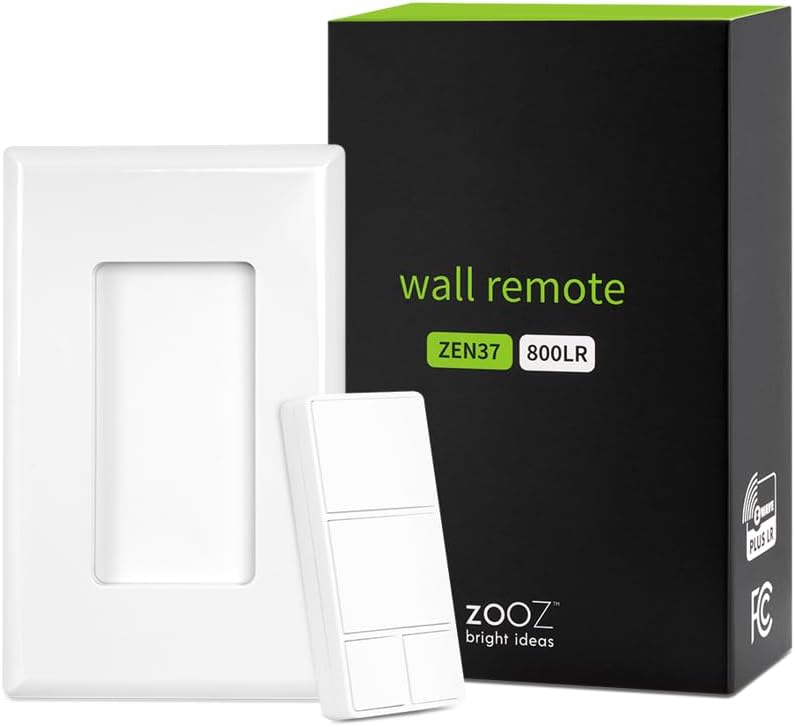
NOTE: This is an advanced Z-Wave device. Check hub compatibility before purchasing this product.SPECIFICATIONS:Model Number: ZEN37 800LRZ-Wave Region: US/CA/MXPower: 1 x LIR2032 rechargeable batteryOperating Temperature: 32-104ยฐ F (0-40ยฐ C)Installation and Use: Indoor onlyWill it work with my smart speaker?Smart speakers are not Z-Wave controllers so you will need a compatible Z-Wave hub to program this Wall Remote. Review: Easily connects to HomeSeer 3, and battery lasts a long while - Iโm using this as a wireless light scene controller that also can be removed for portable use. That is, the switch is magnetic, and they give you a mounting bracket so itโll clip onto the wall as if it were hardwired like a regular paddle light switch. You can then detach it and attach it as desired. I was a bit nervous because my home automation system is an older HomeSeer 3 setup, with an older Z-NET Z-Wave interface. My concerns were unfounded. It was easily included into my network, and events can be set up so when you press or hold press a button a command is sent to a device (or multiple devices, like the old MiniMotes). Reports battery life remaining 1-2 times a day, even if you donโt use the switch. Iโve attached a picture of the battery life graph that I track with the โDevice Historyโ 3rd party HomeSeer plug-in. Looks like the battery will last a reasonably long time on a charge (USB-C port โ so standard), too. Great flexibility, too, in that there are Z-Wave parameters to control the control of the light. Iโm planning to see if I can set it up so that when the battery is reported at, say, less than 20%, the light turns red when you use the device so you know you need to plug it in soon. The light works as follows. First, until you include it in the network, it doesnโt really work (tho my memory may be fuzzy on this point). Once included, pressing it causes the light to illuminate when it sends an event to the controller. Better yet, when you hold it down, the light doesnโt illuminate until a โlong pressโ event has been sent. You know, in other words, that once you see the light, you can let go. This is an improvement over my old MiniMote Z-Wave remotes (the form factor of which I still prefer, but after 10 years the batteryโs shot)l which would blink regardless of whether it sent a command. They also have a simple on/off variety that works off battery as an FYI. Pleased as punch that I found these! Review: perfect for smartthings - easy instructions
| Brand | ZOOZ |
| Colour | White |
| Compatible devices | Home Assistant, HomeSeer, Hubitat, SmartThings, Z-Box Hub |
| Connectivity technology | Z-Wave |
| Max number of supported devices | 1 |
| Special features | Remote Access |
M**D
Easily connects to HomeSeer 3, and battery lasts a long while
Iโm using this as a wireless light scene controller that also can be removed for portable use. That is, the switch is magnetic, and they give you a mounting bracket so itโll clip onto the wall as if it were hardwired like a regular paddle light switch. You can then detach it and attach it as desired. I was a bit nervous because my home automation system is an older HomeSeer 3 setup, with an older Z-NET Z-Wave interface. My concerns were unfounded. It was easily included into my network, and events can be set up so when you press or hold press a button a command is sent to a device (or multiple devices, like the old MiniMotes). Reports battery life remaining 1-2 times a day, even if you donโt use the switch. Iโve attached a picture of the battery life graph that I track with the โDevice Historyโ 3rd party HomeSeer plug-in. Looks like the battery will last a reasonably long time on a charge (USB-C port โ so standard), too. Great flexibility, too, in that there are Z-Wave parameters to control the control of the light. Iโm planning to see if I can set it up so that when the battery is reported at, say, less than 20%, the light turns red when you use the device so you know you need to plug it in soon. The light works as follows. First, until you include it in the network, it doesnโt really work (tho my memory may be fuzzy on this point). Once included, pressing it causes the light to illuminate when it sends an event to the controller. Better yet, when you hold it down, the light doesnโt illuminate until a โlong pressโ event has been sent. You know, in other words, that once you see the light, you can let go. This is an improvement over my old MiniMote Z-Wave remotes (the form factor of which I still prefer, but after 10 years the batteryโs shot)l which would blink regardless of whether it sent a command. They also have a simple on/off variety that works off battery as an FYI. Pleased as punch that I found these!
M**G
perfect for smartthings
easy instructions
C**2
Connects rock solidly to Homae Assistant
This has stayed connected and working in Home Assistant now for a couple of months with no problems.
K**T
Good functionality with Home Assistant.
Happy with this purchase as the product works perfect connected to my Z-Wave network using a ZOOZ Stick connected to a Raspberry pi 5 with Home Assistant. I literally found no issues other that the plastic used for making the product (I would prefer the plastic offered by Shelly, Aeotec, Phillips or Sonoff) Loocks cheap. But I can't use this as a negative review as this is only my opinion and I'm a bit perfectionist. Other members of my family likes it. Easy of use, good compatibility, good battery life - rechargeable, overall this product offers plenty of goodies. Not sure if the value for money is a good one - as for the cheap plastic used, however, I'm overall happy with my purchase and I'm still a happy user of this product.
G**G
Never let me down
Love the range of customizations! Easy to use and never let me down.
Trustpilot
1 month ago
1 month ago