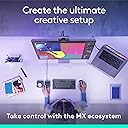
🎨 Elevate your creative command center — because your workflow deserves the MX touch!
The Logitech MX Creative Console in Graphite is a two-piece customizable keypad and dialpad designed to accelerate creative workflows. Featuring Bluetooth connectivity, included AAA batteries, and integration with Adobe Creative Cloud and other popular apps, it offers a durable aluminum dial and programmable LCD buttons. Perfect for professionals seeking precision, speed, and style in one sleek accessory.


| ASIN | B0D5FRQXWZ |
| Are Batteries Included | Yes |
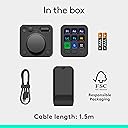
| Batteries | 2 AAA batteries required. (included) |
| Best Sellers Rank | #8,611 in Computers ( See Top 100 in Computers ) #257 in Computer Mice |
| Brand | Logitech |
| Color | Graphite |
| Customer Reviews | 4.1 4.1 out of 5 stars (283) |
| Date First Available | 24 September 2024 |
| Item Weight | 572 g |
| Item model number | 920-012660 |
| Manufacturer | Logitech |
| Number of Batteries | 1 |
| Power Source | Battery Powered |
| Product Dimensions | 27.41 x 13.41 x 6.91 cm; 571.53 g |
| Series | 920-012660 |
J**I
Absolutely amazing! Made my workflow atleast 3 times faster.
L**U
I recently got the Logitech MX Creative Console, and it’s been a game-changer for my editing workflow. This two-piece console features a customizable keypad and a dialpad, both easy to set up with the Logi Options+ app. It’s especially useful for Adobe Creative Cloud users, with dedicated integrations for Premiere Pro, Photoshop, and others, plus additional apps coming soon. I am personally not a creative cloud user and still find it very useful. I have created my own profiles for Capcut, Davinci Resolve, Krita, and, for the fun of it, even an old Quake 1 map editor. I fully expect to add more profiles for random and obscure apps in the future. The hardware is sturdy, with an aluminum dial and customizable LCD buttons on the keypad. You can create your own graphics to fully customize all the buttons. My only gripe is the current limited selection of third-party apps in the Options+ marketplace, but I’m optimistic this will grow over time as users and developers contribute. A little surprised Blender wasn't on the list at release. I fully expect that and various cad software support soon. Overall, it’s a fantastic addition to any creative setup. But could see the usefulness in Excel, PowerPoint, and other such productivity applications as well. Color matches with my actual computer, bluetooth connectivity is great. Definitely worth its price, highly recommend!
L**G
Elevate your creative workflow with a state-of-the-art device designed for digital artists, graphic designers, and multimedia enthusiasts. The sleek console boasts 9 customizable LCD keys and a control dial that seamlessly integrates with your favorite software, ensuring an efficient and intuitive user experience. Whether you're editing photos, designing graphics, or mixing audio, this tool is engineered to enhance productivity and unleash your creativity. ☑️ 9 Customizable LCD Keys allow for instant access to your most-used functions, simplifying your workflow. ☑️ The Control Dial offers precise, tactile control over various adjustments such as brush size, zoom level, and more, making it an indispensable tool for creators. ☑️ Seamless integration with popular software like Adobe Photoshop, Premiere Pro, and others, enabling a more efficient creative process. ☑️ Robust build quality paired with an elegant design not only ensures durability but also adds a touch of sophistication to your workspace. ☑️ Easy setup and customization through the accompanying software, allowing you to tailor the device to your specific workflow needs. ⭐⭐⭐⭐⭐ Finding the right tool to aid in the creative process can be challenging, yet this device proves to be a game-changer. Its thoughtful design, combined with empowering technology, optimizes your creative endeavors, making every project more enjoyable and less time-consuming. The ability to personalize every aspect of the console ensures it adapts to your workflow, rather than the other way around. For creative professionals and hobbyists alike, this console is not just a tool but a catalyst for unlocking new levels of creativity and efficiency.
A**R
It works great, a little time consuming at first to configurate but once configured it's a great tool. I use it in Photoshop but they still have no Bridge or Adobe Camera Raw support, that means that you'll have to create your own personal profiles. The setup software works really well and it's very intuitive, so the learning curve is not steep and wont require much time to learn how to configure. The bluetooth connection also works really well. Logitech is constantly updating the controller, so I expect it to work even better and have more usability in the future
C**D
For the nonce, I am giving this 4 stars. For the last month, I have been using it for mostly Lightroom Classic editing. I do quite a bit of PS work too but I wanted to focus on one thing. Therefore, the rating may change. First things first... about the device. Being a mechanical keyboard user including task pads, this feels super cheap. YMMV. The buttons on the pad are super squishy with little to no tactile response. The wheels and buttons on the dialpad are good however I find that piece mostly useless. The most irritating thing is that the device loses what app it's in even though I haven't changed apps nor have windows popped up. ALT + Tab is your friend to get things back. Note that all LR features are not available in every or all layouts. This is super annoying. The features that aren't available, you have to create custom actions which are not well documented and clunky to create. Also, common actions sometimes don't work or they do the wrong thing. I do quite a bit of batch processing and that is very limited. The sync feature has no UI by default which is dumb since you may not want all attributes synchronized. You have to create your own action for that. The crop overlay is terrible and the dialpad, for me, is worse than a mouse. It does, once you setup the button flow, increase the speed of edits. The self labeling buttons is awesome. This beats out nearly every custom pad. I plan on putting my PS workflow to the test with this and perhaps I will update the review. The implementation is via Adobe's API. In theory, if you are a dev, you can get an API key and make your own button pad the way you want. I may do that if and when I feel plucky enough. I agree that this could be implemented better and perhaps it will mature. I hope that other apps will create profiles but since I use LR/PS a significant amount of time, this is worth keeping though it's not the greatest. I wish this was, overall, just better... YMMV
Trustpilot
4 days ago
2 weeks ago