Ride Smart, Capture Every Moment! ๐ธ
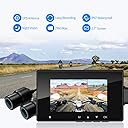
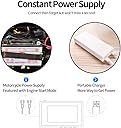
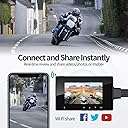
The HaloCam M1 is a professional-grade motorcycle recording camera system featuring dual 1080P lenses for front and rear video capture. With advanced night vision capabilities, WiFi connectivity, GPS tracking, and a waterproof design, this dash cam is engineered for safety and convenience on every ride.


| ASIN | B07D371DRF |
| Are Batteries Included | Yes |
| Auto Part Orientation | Drivers Side |
| Auto Part Position | Front |
| Battery Cell Type | Lithium Ion |
| Brand | HaloCam |
| Built-In Media | Memory Card |
| Color | Black |
| Compatible Devices | Motorcycles |
| Compatible with Vehicle Type | Motorcycle |
| Connectivity Technology | Wi-Fi |
| Control Method | App, Remote |
| Customer Reviews | 3.8 out of 5 stars 265 Reviews |
| Display Type | LCD |
| Field Of View | 155 Degrees |
| Flash Memory Supported Size Maximum | 256 GB |
| Flash Memory Type | SD |
| Frame Rate | 30fps |
| Manufacturer | HaloCam |
| Maximum Aperture | 1.8 f |
| Mfr Part Number | M1 |
| Model Name | M1 |
| Model Number | M1 |
| Mounting Type | Motorcycle Mount |
| Optical Sensor Technology | CMOS |
| Other Special Features of the Product | Loop Recording, Night Vision |
| Real Angle of View | 155 Degrees |
| Screen Size | 2.7 Inches |
| Special Feature | Loop Recording , Night Vision |
| UPC | 608119411221 |
| Unit Count | 1 Count |
| Vehicle Service Type | Motorcycle |
| Video Capture Resolution | 1080p |
D**A
Excellent "Dash" Cam
I have been using a helmet camera from a different manufacturer for years now. It is on its last legs. Ninety percent of the time, I was using this helmet camera as a "dash" camera, in case I was run off the road, got into an accident, or whatever. So I was looking for a trouble-free solution where I could get video from the front of my motorcycle as well as the rear. I wanted something that would be powered by the motorcycle and not have a limitation of two hours as so many "action" cameras have before the battery runs out. And I wanted something discreet so I wouldn't have to worry about it being stolen. After doing a lot of research, I decided on the HaloCam M1. I highly recommend it. What attracted me to the HaloCam M1 was a couple things. First, it has 1080p cameras on the front and rear. I don't know much about the cameras, but I do know that Sony is a good name brand, and they are using Sony cameras. That's a plus. The other big plus in my mind, was the wi-fi capability. Trying to aim your cameras without being able to see what you're doing in real time is a pain. The HaloCam M1 comes with a nice app for a smartphone that allows you to see what the cameras see in real time. You can also download your videos without touching the DVR unit, and even make changes to the settings from the app. It's slick. I was impressed with the HaloCam M1 from even the time I opened the box. These people have spent a lot of thought in how they package their product, and from using the camera, that extra thought has gone into the design as well. When you open the box, you'll see the DVR unit along with the two cameras and the manual switch neatly arranged. They look like quality equipment even then. Lift that packaging up and you'll see the cords neatly tucked away underneath. They use a short cord attached to each item like the cameras with a longer section to run from that camera to the DVR unit. Everything is color coded. You can't mess this up in the installation. Even the color coded plugs have only one way to plug them in. You can't mess it up. And they include heat shrink tubing that you can use to guarantee the connections are waterproof. They have thought of everything. Installation is straight-forward. Mount the front and rear cameras. Mount the GPS device they include. And mount the manual switch. Then find places on your motorcycle to hide the wires and plug them into the DVR. The last thing is to find a good power supply. You'll want a power connection that turns off when the ignition is turned off. Otherwise, the camera will continue to record and you'll run your battery down. I connected mine to the tail light circuit. I have a BMW, and there's a lot of concern about the CANBUS system having errors when you do this. I had no problems with mine. There's also a USB power connector that you can use to power the camera. Again, very well thought out. One note. The DVR does not have any built in memory storage. You'll need to supply your own SDHC memory card. Use a high speed memory card for this, since you're recording from two cameras and with sound. What is it like in use? I've attached three screen captures. The sequence might be off when this is posted, so let me explain what is happening. The rear camera shows a white vehicle merging behind me on the freeway. Another picture shows the blue car that was behind it, moving up fast. He could've easily merged behind me, but instead he accelerates to cut in front of me with little room to spare. You can see the entire sequence of events being captured as the car moves from the rear camera to the front one. If there had been an accident, that sequence of events was captured. This is not an "action" camera, yet one of the sales people at Cycle Gear mentioned that the video I showed her was as good or better than her Go Pro. I don't know if I'd go that far. As an "action" camera, I'd rate it as "very good", but I don't believe this was designed as an action camera. As a "dash" camera though, I'd rate it as exceptional. The quality of everything is excellent, and the price is great. I have only one nit-pick... When you mount the cameras in their mounts, they are still a little lose when the screw is tightened all the way. The "fix"...just use another washer on the inside of the two arms of the mount that holds the camera and it'll tighten just fine. That is really minor. You'll see what I mean when you mount yours. Lastly, I have to make a comment about the HaloCam customer service. It is exceptional. I notice that of the previous reviews, one person had issues with his camera. I did too initially. I contacted them and they were outstanding in resolving my issue. I don't know when I've had better customer service. They definitely stand by their product. Pros: * This is plug and play. Install it, and forget about it. * If you want the videos for sharing or for evidence in case of an accident, you can download them with your smartphone. * There's nothing left out. This includes a GPS unit to share with your friends where you were riding. It even seems to have a vibration sensor so that if you are in an accident, it will "lock" that video segment from being overwritten for evidence. * The quality of all the components is first class. I don't see where they cut any corners in delivering a great camera system. * Installation is easy. They have thought out how to make this fool-proof for you. * The videos are excellent. Even at night. * The price is great for what you get. Cons: * An extra washer would be nice. (I had to come up with something!) :D * The DVR is not waterproof. Just the cameras, GPS and manual switch are. So if you have the DVR unit mounted somewhere that it can get wet, put it in a plastic bag.
D**.
Close to being a premium product
I bought a pair of HaloCam systems for Xmas - one for my motorcycle and one for my girlfriend's. The packaging is excellent. The camera system itself is quite good, as other reviewers have mentioned. I know it's not an "action cam" (like a GoPro) and I wasn't looking for that functionality. However, it does capture some great video from both the cameras. I've really been pleased with the videos. If you mount the microphone/control button out of the windstream - like behind your windshield if you have one - you'll get nice engine noises, too. Otherwise it's mostly wind blast. There are still several things HaloCam could do with this product to make it match its premium packaging. I'd want one for my car if it the device were a bit more flexible. I'll separate my thoughts into several groups. ***** The Small Things ***** The documentation and app would benefit from the attention of a native English speaker. The printed manual is pretty decent, though not without its chuckles. The phone app, however, has numerous confusing and awkward messages, particularly related to syncing gps trip data between the device and the phone. ***** Build Quality ***** The microSD card slot makes it difficult to both insert and remove the SD card. (It's called a TF card in the literature - I understand it's known as that in some markets outside the US.) I have normal size adult hands for a 6' 2" man, but I was unable to "click" the SD card into place without the assitance of the tip of a tiny screw driver. The card-slot-to-case-exterior clearance isn't dialed in. It is impossible for me to "unclick" the SD card to remove it unless assisted by a tiny screw driver. I don't have this problem with other devices. One of my units arrived with a control button that worked for 2 button presses then felt perceptably much different. Having worked with and on electronics for over 20 years, it felt that the plastic button cover (the thing you push) in the case was no longer interfacing with the micro button on the circuit board. Turns out, two of the anchor pins on that micro button were not soldered down. Rather than RMA it, I simply soldered the button down and got on with having a happy Xmas day. After that, it works fine. The ease of disassembly is something that could also be addressed in future product revisions. As in, a more premium-feeling product is more difficult to disassemble. The hoop that attaches each camera to its adhesive base would benefit greatly from a single tiny piece of hardware that should have been included. As other reviewers have mentioned, regardles of how much you tighten the single screw, the camera can still tip. A tiny star washer is all that was needed on each of our camera hoops to completely eliminate the tipping. ***** The Usability Things ***** *** Phone App *** The phone app has connection bugs. My phone (android - Samsung S7) is able to connect to the HaloCam wifi hotspot (the seemingly intended way for transfering trip data and videos) without a problem. However, the app stays on the connecting screen indefinitely when I attempt to "Connect DVR" (to view/transfer videos from the camera system to the phone app). I know I can take the SD card out of the device, but I've talked about that already. When I force quit the app and re-launch it, "Connect DVR" is usually successful within seconds. Sometimes though I need to force quit the app two or three times for "Connect DVR" to work. This behavior began after I used my phone to connect to each of the two HaloCam systems in my household (mine and my girlfriend's), at separate times of course. I've tried all the usual tricks of rebooting the camera system and rebooting the phone, etc. I'm certain only my HaloCam system is powered on and that my phone is connected to it via wifi. It seems like the app needs much more thorough quality assurance testing. HaloCam is building a motorcycle video community, which the app features. However, more attention should be devoted to QA and bug fixes, focusing on basic usability instead. *** Control Button *** The control button is super tiny and not usable with gloved hands on a motorcycle. Not that I plan to use it often. I might try to use it more if the button was actually big enough to press with a gloved finger. Also, better wind protection or a foam wind filter for the microphone (located in the control button) would be useful. *** The Silicone Rubber Cover *** The cameras are waterproof. The control unit is NOT waterproof and makes no claims to be. HaloCam did provide a "dust cover" or "scratch cover" in the form of a silicone sleeve that the control unit fits into. This is fine for under the seat where I have mine installed. However, to access the microSD card the sleeve must be removed. My silicone sleeve survived three removals before it tore in half. *** Entirely Missing GPS data *** Some trips in ideal conditions are entirely missing their GPS data. Clear sky. GPS receiver facing upward. Not in a city. Still, the GPS data is missing. It may exist on the SD card and the app is simply failing to retrieve it or sync it. I think route tracking might be a very interesting feature for me and my friends if it reliably works. *** Small Capacity Built-In Battery *** The control unit will operate on battery power for a very short period of time - approximately five minutes. This is not enough time to transfer very much video to my phone using the HaloCam app. The alternatives are (1) power the device by leaving the motorcycle key on, (2) power the device with a USB battery pack (which requires disconnecting the power lead - while sturdy, it is susceptable to breakage since it fits quite tightly), and (3) remove the microSD card. ***** Missing Features ***** *** Forced Branding *** The only way to disable the "HaloCam" watermark on the video is to also diable the timestamp on the video. It would be nice to not be forced to have the HaloCam logo on my videos. *** Missing Speed *** The timestamp (and brand watermark) is the only thing that can be displayed on the video. Car dashcam systems can display the speed on the video, for instance (and disable the speed if going faster than a certain threshold set by the user, say 30mph). This is missing from the HaloCam system. *** Unmovable Timestamp *** Specifying a position for the timestamp would be nice. Bottom left/center/right. Top left/center/right. Something user configurable. *** Missing Nickname *** Car dashcam systems typically allow you to set a "nickname" and display that on the video. This, too, is missing from the HaloCam system. Since I already have two systems in my household (and would consider getting additional units for my other bikes and cars), a burned-into-the-video nickname (set by the user) for the originating device would be nice. *** Setting the Time *** The system will set the time from the GPS signal, though that isn't mentioned in the documentation. I discovered it by accident. When first experimenting with my HaloCam system, I found the menu entry to set the time. So I did. I did that before attaching the GPS receiver (which is included, so that's nice). My girlfriend, however, attached her GPS antenna before digging into the menus. So her HaloCam system had the correct time. Mine was off by a couple of minutes. However, there was no obvious way to force the device to set its time from GPS. With two camera systems in the household and a strong possibility of editing ride videos, having synchronized timestamps between the systems would be useful. I manually adjusted the time on my system to match the time on her system. It would have been nice, though, to have a "force time update from GPS" menu button. *** Wifi Network Name *** Each HaloCam system has a unique SSID, which is good. However, that name is not easily distinguishable - it seems to be generated from the CPU ID of the control unit. If both of us return home and want to view/download videos to our phones, we naturally have to connect to the correct wifi network for our personal HaloCam system. Being able to specify our own wifi network names for each device would be a very nice feature. *** Connectivity from a Laptop *** I connected my laptop to the HaloCam's wifi hotspot. I wanted to see if perhaps an http server was embeded that might allow for an alternative way to download videos other than using the HaloCam app. It looks like there might be (the HaloCam phone app does communicate with the control unit, afterall), but I wasn't able to find a usable interface. I might look into that some more. So far, the only reason I have transfered videos from the HaloCam control unit to my phone (using the HaloCam app) was so I could then sync them to my laptop from my phone. It is orders of magnitude faster (though much less cool) to simply remove the microSD card from the HaloCam control unit and insert it into my laptop. I would use the phone app only for route syncing if there were some other way to wirelessly retrieve videos. Perhaps HaloCam wants to encourage usage of the phone app, though, to help build their motorcycle video community. ***** IN CONCLUSION ***** Though I've enumerated the deficiencies, many of these things are pretty insignificant individually. The missing features could probably be addressed with a firmware update, for instance. I went on at such length because I actually like the product a lot and I want to see the company succeed. They are quite close to having a category-leading product for motorcycle dash cams, especially at this price point. A little more time and care with the device firmware and phone apps, and better quality control (no more unsoldered buttons, okay) would make this camera system really spectacular.
D**E
Best one so far...
01/28/22 - UPDATE: The Dash Cam has fsiled and is now useless. 2021 - I researched a lot of these "Dash Cams" and this one has the clearest cameras of all the ones I could find sample videos and install reviews of. Yes, the brain is NOT waterproof but, most bikes have room under the seat for it. That said, the wiring that comes with it is quite ample! There was more than enough length in the cables for my 2012 Suzuki V-Strom. You CAN NOT the Camera, Brain, or GPS cables. You have to coil the excess which could be an issue for bikes with not a lot of space. My V-Strom luckily has lots of room under the seat to in the rear side covers to coil it all up. The only issue I have experienced is when the card fills up it does not always start over from the beginning recording over the files. So, have to format that card once and a while manually from the App. The apps work pretty good, could use some refinement. I am planning to go up to a larger SD card to stretch the fill up time of the card. Video quality is what you would expect from inexpensive 1080 cameras with small sensors. Usually License plates are readable in daylight, at night they not. BUT it is still the best quality of any of the motorcycle Dash Cams I have seen so far. The quality is more than good enough to protect yourself from fault in an accident (providing you are not actually at fault LoL).
D**N
This unit has MAJOR issues with it that you won't notice at first, but buyer beware...
This review is going to be in a โThe Good, The bad, and the uglyโ format. So please do not skip the bottom part of my review, that is the meat and potatoes here and this unit has serious problems [and yes the video I included really does show it stop recording at the 4 second mark check the ugly for why]. I originally purchased this camera system around May 20th 2019, i purchased one for myself and one also for my girlfriend a few days later while the first unit was in transit. The reviews on Youtube seemed pretty good so i trusted them. My own experiences make me wonder about the "validity" of those reviews, but that's another story altogether. The Good: My first impression when the M1 system arrived, was that its product packaging is done *very well*. The box it comes in looks very sleek and professional; the cameras themselves are protected in white foam sleeves, same with the DVR and the cables. There is a magnet included if you want to easily mount the DVR i assume, along with 3m mounting tape. I loved how it is shipped and if it didn't have its issues; it would be a nice fancy looking gift for a motorcycle enthusiast friend. So this is good. The Bad: Now onto the bad. The bad would be that the DVR is not waterproof. Remember before that i mentioned that there is a magnet to mount the DVR unit onto the bike right? ... Well, what good is mounting it if rain will destroy it? That wasn't a problem with me as i never intended to have a fancy looking DVR visible to begin with; i don't want to risk vandals at all. But others may understandably feel differently and want a water proof DVR for their bike. The Ugly: Here is the ugly. The unit itself has a horrible bug with it, either in its software or with its hardware, where it literally will stop recording video at the 4 second mark. It does this roughly 1 out of 3 times that you power on the unit with your bike, it will only record 4 seconds of video then it freezes at the 4 second mark - though it will continue to record audio forever [ie- until you turn the bike off]. So if you had a nice 6 hour ride planned and you got unlucky when turning the bike on and got that 1 out 3 "freeze" bug, and something happened during your ride....Well too bad, it stopped recording video 4 seconds after you left your drive way, you will have only hours of audio that recorded the engine noise and red light sounds during your ride. This happened on both my girlfriend and my own units btw, at the same 1/3rd rate and both of us using high quality Class U3 SD cards. So this was not limited to just me. other people have it and a fellow reviewer here on Amazon has mentioned that he has the same problem also [Darrell D. is that reviewer]. More Ugly: Another ugly issue is that the unit does not record video consistently the 2/3rds of the time that it doesnโt get the 4 second freeze bug. If you set the unit to record in 5 minute intervals, the recorded video will be *extremely* stuttery, many times it will record video for 3 seconds then it will stop for a full second or two, then record smoothly for 10 seconds and repeat that. Again, if an accident happens and you have that *stutter* - you missed what happened. I noticed upon messing with the settings though, that setting it to record at any interval besides 5 minutes helps it out immensely in this area. But even when set to 1 minute recording, you will still get random *stutter* stops at times. It is not consistently smooth and for the price it should be. I would have included a video of the stuttering but you can only upload one video per review, and between the two issues, the 4 second issue is worse since it is just on a whole other level of broken. As far as recommendations go, I now have the VSYSTO P6F instead of this, it is actually slightly cheaper and I have had no problems with it at all. Even the video quality is better.
M**N
Great camera for a Kawasaki Concours 14 or 10
I bought this after my Vivitar GoPro knock-off kept running out of power and batteries were not available. The reviews were good, the price even better because I got it on Prime Day. The video quality is great!. Installation was long for me because I keep agonizing over the perfect place, cable runs, etc. I did have to make some cuts on my motor. They were small. As far as the video system goes, it beats the heck out of GP. The system runs off of the motor's electrical system. It is wired to come on when the key is turned to ON. It doesn't come with any recording media, but it takes up to a 256Gb microSD. I took a fairly long (7 hours) round trip on the first test run. I had the system set to record 1-minute loops. It recorded 858 of them. 429 for the front camera and 429 for the rear camera. The total space on the SD used was 43Gb. Can a GP do that? What's best is that you never have to worry about it. It starts when you start. The nighttime video is very good. There is an app that you install on your cell phone and you can manage the system without removing it from your motor. The cameras are waterproof, but the DVR is not. I installed the DVR under the seat in the little toolbox. It fit perfectly on top of my insurance and registration. I carry a tool roll in one of my saddlebags anyway Update: It's been about 9 months since I've had the system. The camera still records just fine. However, I have not gotten any audio since day one. At first, I thought it was something that I was doing wrong. Later, after extensive Google searching I found out that some units had defective microphones. I tried to contact the company. It's been about 6 weeks now and I haven't heard back from them yet. Overall, I still like the system, but I had to take away 2 stars because of poor customer service. I had read that some else had a bad microphone and HaloCam sent him a replacement. It's a separate unit and easy to replace. If I ever get a replacement mic I will put the 2 stars back.
J**N
UPDATED!!! decent video test, but paid full/new price for a previously opened / missing parts unit?
**UPDATE** first and foremost, I want to thank Amos for being such a great customer rep! As soon as I reached out to the company, he responded immediately with assistance. He not only sent out new mount brackets and USB cable that were completely missing from this unit, but since the package wasn't supposed to arrive until very late, he shipped a brand new unit straight from Amazon so I could get it fitted before this weekend's ride. He's been outstanding to converse wit. The company seems to be doing very well with several projects that keep them very busy. Even though they may be busy, Amos always found time to respond within 24 hours of any emails from me. Multiply this by several thousand, and you can guess just how busy the company stays! They are truly a company that stands behind their product, no questions asked! Now, on to the review of the product: Camera: the IMS323 CMOS chip is a 2 Megapixel sensor. This doesn't seem like a lot by today's standards of 4K+, but think about not only price point but also quality of the sensor itself. The sensor has been proven to be VERY clear and clean, even at speed (as long as the mount isn't vibrating at a horrible rate). Although it does seem to warm during use, the mount helps to reduce this heat by acting like a snap-on heatsink that cools as the wind blows around it. Just be careful when mounting the camera; although they are close, the little white dot doesn't QUITE line up with 90 degree vertical. Pro Tip: Keep the mount screw loose and turn on the camera recorder screen for proper positioning of the sensor while watching the screen itself. Screen/recorder unit: Oh boy. If this unit had a downfall, it might be the recorder unit. Here's the lowdown: It's made of flimsy plastic with a gloss screen that covers the whole front area. It's also easily scratched (noted from the first-bought unit that had a scratch across the screen itself that didn't have a screen protector on it when it initially arrived). This year's model is still not waterproof. Being a motorcycle (and an adventure bike at that), it's bound to get very wet throughout. I stashed it under my rear seat with the tool pouch and OBD2 connector, but I'm afraid that it'll still get wet at times of riding through rain or deep stream crossings. Seeing that it has no other mounting capability than the magnet that is sticky-taped to the back of the recorder, I decided to wrap the whole thing in plastic wrap to aid it from getting wet, dirty, grimy, or dust inside. I then laid a small square of towel for it to lay inside while under the seat. This should help to keep any moisture from going inside the unit by filtering, as well as giving the unit somewhere soft to reside while on bumpy gravel trails. The interface is decent. Not the greatest, but it gets the job done. Simple, basic, and no real frills. But you're not paying for frills at this point! The wiring harness leaves much room for bettering. It comes with two different power cables: One USB power cable, so it can be powered straight from a USB port or external battery. I use this the most, since I stash a battery under the seat with the unit itself. Nothing further. Simple. Not very elegant, but it gets the job done. The other power cable enables to wire straight into the harness on the motorcycle. There's only two wires: red and black. As soon as power is provided to those two cables, the unit powers on. This, again, is simple but not very elegant. The cable also has a new shunt system that deletes the use of an inline fuse. I can't say I agree with this, since if the shunt goes bad, there's no way to replace without replacing the whole power line. Although Amos assured me that they use only the finest electronics in the circuit, I still don't like putting an unfused line onto the bike. A mini blade fuse or inline cylinder fuse would have been best. I am in the process of creating my own circuit that uses not only an inline fuse, but has three wires going into a circuit that uses a silicon-controlled relay system. This way, it can be wired to battery through a fuse, then have a third wire to use as a switched line to power on the relay. To me, this would be much more elegant to implement, but at this price, I can't argue. The camera extension cables are very long. Long enough to stretch twice down my motorcycle (Triumph Tiger 800). I had a good sized bundle to deal with under the seat, but it's dealt. Better to have too much than not enough! It's guaranteed to stretch down the length of those huge Harley or Indian baggers! Total score: All in all, I have to give this unit a 5-star rating. The customer support ought to get 20-stars, though! They have gone above and beyond what other companies would have done to help their customers! Kudos and good luck to them!!! **initial post** I just received this unit today. I rushed home to open and being installation to my tiger 800. I have to admit, I am impressed with the REPACK of this system. It looked close to brand new. If it weren't for the fact of a finger smudges/grime inside packaging, wear marks/scuffs on items, lack of sealing tape, and completely missing items in the package, I would have never known that I had bout a used piece of equipment for full new price! As much as I wanted to close it up and issue a return for the item ASAP, I decided to leave it as is and see if the company might be willing to work with at least getting the missing items replaced, if not replacing the damaged items. I will be contacting them as soon as I figure out how. I did do a quick check of the video quality with one of the two cameras (and to make sure that at least the camera is functioning). The system seems to be in working order. The video quality is very good for a 1080p stream. If I can get this mounted to my Tiger 800, I think I'll be very happy with any video results! **What is missing** Before diving into this, let me be clear: The documentation is sorely lacking in pretty much every way. The only way I figured it out was the pictures/cartoons on the Amazon posting and YouTube videos posted reviewing the item. 1) Mounting brackets for the two cameras: According to all review postings, there is supposed to be some cheap metal clamps to mount the circular cameras with. Seems they decided to come up missing in the open package. 2) USB dongle: Again, according to the cartoon/picture on the amazon advert as well as on the YouTube review, this thing is supposed to come with a dongle system to allow either battery/switched power with inline fuse protection, or a USB battery charging port. What did I get? two bare wires. And that's a NO GO / FAILURE. Sure, I could spend an hour soldering up an inline fuse that runs to a switched power supply on the bike, but it'd look janky (I'm no pro here!) and I was getting ready for a couple of lines that I didn't have to do such a thing, since I could just wire straight to a USB battery pack for now. But there wasn't any. Nada. Zero. 3) this thing is supposed to come with a silicone sleeve to go over the head unit. There was nothing of the sort in the package. 4) again, just a pick, but if it's supposed to come in the package, it's missing: the darn cable shrink wrap. supposed to help with waterproofing the connections that much more. But no shrink wrap was in the package. That's not a big concern, since I have plenty in the shop. But it's just another hitch that I have paid full price for a used piece of equipment. I'll report back if the company responds with any good news. I'm hoping that they'll support their product and I can go ahead with the install soon.
O**U
Great camera, installation depends a lot on your bike.
The camera itself is really nice, and I have been using it now for about 4 months. You can read license plates and most of the image is crisp and clear, vibrations form the bike while it's moving mean that this is probably not movie quality, but otherwise very good. I'm using the provided power adapter and it appears to be robust and reliable, I have had no problems with it. After 4 months I had to replace one of the sticky pads, so I would recommend bolting the cameras down if you can do. It took me three hours to install this on a BMW G310R. Mostly it's all about pulling wires through small spaces. I found that the 3M sticky pads aren't quite tough enough to hang the camera from, although they seem OK if the camera is on top. I ended up bolting the front camera down. I had to drill a hole for the bolt and bend it in half, but it seems a lot more robust that way. Result from camera very good, although you can not read the SD card on a Mac. Not sure why, but it works just fine on Windows and Linux machines. I have figured out by now that you can read the card on a Mac if you install a Virtual Machine, which is useful.
B**L
Not dependable !!
Received Halo cam a couple of months ago and installed it on my 2015 Street Glide. really not hard to install but instructions did not specify front cam or rear cam on wires, so I initially had to switch the two camera wires after installing. Not a big issue. I installed the screen monitor in my saddle bag so it wouldn't get wet or stolen. It worked great right after installation. Now comes the problem. As I was riding, the unit would not work/record/operate sporadically. I checked the screen monitor and it would not turn on. It did feel a little warm, so I thought that it was over heating. (My bike is black, maybe bag was holding the heat.) So now I moved it to a small compartment on my fairing were it gets ventilation due to the wind and stays dry. I did not see any improvement. Still cuts off intermittently. So I don't know what to do... Like I said.... Not dependable. It probably will not work when I need it most.
Trustpilot
1 week ago
1 month ago