Desertcart purchases this item on your behalf and handles shipping, customs, and support to Seychelles.
🖨️ Print smarter, live freer — the future of home printing is here!
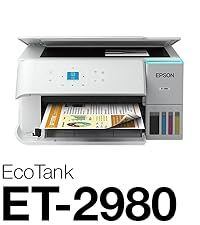
The Epson EcoTank ET-2980 is a wireless all-in-one color printer designed for home and everyday use, featuring cartridge-free printing with supersized ink tanks that provide up to 3 years of ink. It delivers fast, high-resolution prints at 15 ppm, supports auto two-sided printing, and offers seamless connectivity through USB and Wi-Fi. With borderless photo printing and the Epson Smart Panel app, it combines convenience, cost savings, and eco-friendly innovation in a sleek white design.


| Additional Printer Functions | Copy, Scan |
| Asin | B0F1F2XRW9 |
| B W Pages Per Minute | 15 pages_per_minute |
| Best Sellers Rank | #2,827 in Office Products (See Top 100 in Office Products) #4 in Ink Tank Printers |
| Brand | Epson |
| Built In Media | EcoTank ET-2980 all-in-one, manual, power cord, 1 bottle of 502 Black (127 mL) and 1 bottle each of 502 Cyan, Magenta, Yellow (70 mL) |
| Color | White |
| Color Pages Per Minute | 8 pages_per_minute |
| Compatible Devices | Laptops, PC, Smartphones, Tablets |
| Customer Reviews | 4.1 4.1 out of 5 stars (907) 4.1 out of 5 stars |
| Duplex | Automatic |
| Eu Spare Part Availability Duration | 1 years |
| Hardware Interface | USB |
| Ink Color | White |
| Item Dimensions D X W X H | 13.7"D x 14.8"W x 7.4"H |
| Item Type Name | Inkjet Printer |
| Item Weight | 11.5 pounds |
| Manufacturer | Epson |
| Maximum Copy Resolution Black And White | 4800 x 1200 dpi |
| Maximum Copy Resolution Color | 4800 x 1200 dpi |
| Maximum Copy Speed Black And White | 15 pages_per_minute |
| Maximum Media Size | 8.5 x 14 inch |
| Maximum Print Resolution Black And White | 4800 x 1200 dots_per_inch |
| Maximum Print Resolution Color | 4800 x 1200 dots_per_inch |
| Maximum Sheet Capacity | 100 |
| Model Name | EcoTank ET-2980-W |
| Model Number | C11CL41202 |
| Model Series | EcoTank |
| Number Of Trays | 1 |
| Other Special Features Of The Product | Auto-Duplex, Borderless Printing, Display Screen, Energy Star, Refillable Ink Tank |
| Output Sheet Capacity | 100 |
| Paper Size | 3.5" x 5", 4" x 6", 5" x 7", 8" x 10", 8.5" x 11", 8.5" x 14" inches |
| Power Consumption | 13 watts |
| Print Media | Envelopes, Glossy photo paper, Paper (plain) |
| Printer Connectivity Type | USB, Wi-Fi |
| Printer Output Type | Color |
| Printer Type | Inkjet |
| Resolution | 4800 x 1200 |
| Scanner Type | Flatbed |
| Specific Uses For Product | Home |
| Total Usb Ports | 1 |
| Unit Count | 1 Count |
| Upc | 198390000554 |
| Warranty Description | 1-Year Limited Warranty |
| Warranty Type | Limited |
| Wattage | 13 watts |
User
Good product.
Wow. This is the first printer I’ve bought in maybe 10 years…. I’m amazed at the quality of the printing. And the eco tanks….. no more buying expensive cartridges every 6 months for me. The set up was simple and well guided with either the included printed instructions or via the app. It has good, consistent wireless connectivity, which is so nice to be able to print wirelessly. No paper jams, and ink seem to be lasting a long time, considering the amount of printing I’ve been doing. I am very happy with this purchase.
User
The Eco tank is a good printer excellent
It is a very good printer I'm sorry I didn't buy one of these a year ago before I bought that HP piece of crap that I got that don't work half the time but I guess when you spend 50 bucks for a printer you can expect too damn much this printer does excellent photographs too I have everybody that I printed photos out on it for say it's excellent so it's a good bang for the buck beats the heck out of pain $1,000 for a photo printer if you buy one of these good luck with it you can't go wrong it's a good printer I'm going to stay away from Hewlett-Packard I'm about to Hewlett pack of laptop and it didn't last but about a week and a half before it caught on fire and burnt my arm take care of everybody JP Jones Dayton Ohio
User
Nice printer for family
This is a great printer for family. I bought this printer for my kids to print their homeworks. It is easy to install and fill in the inks, and you can download the app for your phone and pad, making it easy to connect with the printer via wifi. The color printing is good quality and fast with very small noise. It is value for money and good for family.
User
Should hqve bought this long ago!
Excellent all-in-one printer... the ink reserve supplied is incredible, I should have replaced my HP OfficeJet Pro 6978 with this unit a long time ago... perfect size for my home office and does everything I need. Works very well with my ancient Paint Shop Pro 7 software to print my backyard air gun targets... Easy to setup and the USB connection is plug n play...at least for windows 10 64-bit...Very satisfied!
User
If you're as dumb as me, maybe you should stick with paper & pencil.
Here's what happened when I replaced my Epson ET-4750 with a new Epson ET-2980: I've had the 4750 for a couple of years. I believe I've only tried using the colored ink once when it was new. Since then, I've used the printer exclusively with black ink to print letters, etc. A couple of times, it was necessary to use the onboard print-head cleaner to bring back acceptable print quality. The last time, no luck after multiple attempts; unreadable blurs. I considered trying to find a local computer geek who could repair my old 4750, but figured I'd be out a C-note or so and still have an old printer. Why not just order a new machine and figure that's the way it will have to be every couple of years? Hence, the acquisition of the ET-2980. OK. An admission: I don't understand how these electronic gizmos work in detail. I'm closer to 100 than 50 but still breathing with an I.Q. a bit over 30 (I think). Anyway, I referred to the "Start Here" page of instructions and proceeded to Step 5 "Install software". That's where my stupidity came into play. Using the Internet specified, I brought up a 'support' person on the Internet who transferred me to a 'Tech' (Class 1, I believe). I was a bit suspicious right from the start because the voice sounded just like a foreign male scam caller that I hear on a regular basis. [Probably because of my age, I get both Human & A.I. (Artificial Idiot) callers daily. Another Story.] To continue: The 'Tech' said he would have get control of my computer in order to Install the Software. Reluctantly, I went through the process to allow this 'tech' to get my printer up and running. According to this 'gentleman', as I understand it, my Apple Computer was OK (apparently harder to 'hack' than other brands) but my system was compromised due to a new TV and/or my phone which operated thru the Internet. He also inferred that the printing problem with my old ET-4750 may have been due to the connectivity with my other devices. Did I buy a new printer that I didn't need?? I was advised that he would have to pass me on to another 'Tech' (Class 3, I believe) who could clean up my system - - however, I would have to subscribe to a security system to guard against this type of activity. And guess what, he could sign me up with a 'security company' I never heard of for just a few hundred dollars for one, three, or five years!! I finally had a lady friend with more technical knowledge get my ET-2980 up and running. I managed to get ONE letter printed on the new printer. Second try would print 3 or 4 lines, then blur two!! My old ET-4750 made provision to clean the print heads which proved worthwhile a couple of times. No such option with the ET-2980 (as far as I know). Now I'm in possession of two Epson ET printers that I can't use; can't mail letters except in my hand-written scribbling; can't record (on paper) organized charts with important information I wish to maintain. It's rough being a dummy!!! [My first review didn't meet Amazon's "community guidelines" so I've edited & resubmitted it.] I like the idea of ink tanks instead of those ridiculous 'cartridges', but I still give it a 1-star rating. When does the patent on tanks expire??
User
Fast dry prints with no smear
I really like this printer.Granted, the ET-2980 may not be the most economical printer of choice, but has the features and print options that I desire.Setup is a bit time consuming. However it is straight forward and easily accomplished. When finished, add the last remaining ink.Connection through WIFI_Direct took two tries with each of our two phones.Windows 11 took multiple tries but eventually cooperated. On line help not much help. Tip: After downloading all the support files and driver ZIP file. Extract the driver files. Then burn all executable files to a CD.Most documents to be printed come from either of our phones. The process is easier and quicker than in the past. Printing options/settings are handled easier through the phone app than through Windows. Settings are preset through Windows Settings. Not through the print driver. Documents need to be PDF.Great printer!
User
Nice job Epson!!
I bought this to replace my old ET-4550 Epson inkjet printer after reading lots and lots of reviews from Canon, Brother and Epson inkjet printer purchases. Ultimately I decided to stay with the Epson brand and I am glad I did. Features I really like about this model include a more compact footprint, rear paper feed, retractable paper output tray, easy setup using Epson app on the phone, easy access to the ink tanks whose fill lines are visible from the front of the printer, and seamless wireless connectivity. I have been able to print wirelessly from my laptop and cell phone without any problems. Great design with no issues so far. Nice job Epson. The only downside I can see so far is the smaller color screen display.
User
Printer seems great, setup should have been better
Setup is a very easy with a smartphone wizard. Filling the tanks is easy and there is no mess at all because of a very well designed filling system. Print quality is crisp. Connecting to WiFi required multiple attempts even with the correct SSID and password. Multiple tries failed, eventually I enabled the 2.4 GHz band and after another 3 attempts it connect and to the 5 GHz band as I had expected and wanted.One big surprise after the wonderful phone setup, the wizard provides a link to setup a Windows 11 computer. You would think that they would have the driver for the specific model there yet is was troubleshooting instructions that wasted my time. Looking around the Epson site, I found the printer section. They listed a number of common printers yet not this one. I did a search and wound up on a page that looked similar to the first one the smart phone app provided. I searched for ET-2980 and landed on a page designed to sell the printer. In small print was support and that lead to the printer downloads. Come on Epson, you can do better! At least the installer ran a wizard and took care of everything.Update after 6 months of ownership. This printer has a tendency to drop off the wireless network. It can work on 5-Ghz yet only if using WPA2. On Unifi network, using WPA2/3 does not work!Printer started displaying error message "Power off and on. If this does not clear the problem contact Epson Support. " Wow, this is not in the FAQ! All it means is there is a paper jam and that you must open the printer to check. Learned this from a support rep that could not guide me how to reinstall the roller assembly and did not know what a roller assembly is. In her mind, it's just the back panel. No documentation from Epson on this. Resorted to Youtube and fixed it my self quickly. Very frustrating. Such a nice printer yet too many issues for me to recommend.
User
Very easy to install
Great price, excellent results. Lots of ink. Recommend highly.
User
Contente de l'achat pour le moment l'avenir va dire le reste(;
Pour le moment je trouve que c'est une bonne imprimante mais au tout début je la trouvais un peut spéciale contrairement à HP ENVY 4520 mais depuis j'ai photocopier quelque feuilles et elle m'a vraiment surpris je trouve qu'elle est plus vite plus silencieuse et fonctionne très bien avec mon cell.
User
Much better than the 2850 before it.
So much better than the 2850. I was constantly having to fight with the old machine, restarting my computer, restarting the printer, checking internet connections, and so many more issues. Sometimes it would take me an hour of fighting with it just to print a single page. This newer one is fantastic. I rarely have to fight with it, and only like a minute when I do. It prints red much better as well. It also prints quite a bit faster. If you have a large print job it's still going to take a bit of time, but definitely only about a third of the time. I have not tried the scanner yet, but I'm very impressed with print speed. It prints on both sides, with the option to flip on the long side and the short side. The printing is sharper, more clear, than the last model I had as well. The only downside is that the tray pushes out when you print, but it doesn't go back in when you're done printing unless you go to the machine and press a button. No big deal for most people, but we have a few cats, and I'm worried one day they'll jump on it and break it before I get a chance to go to the machine and do so because the tray doesn't look overly sturdy. Otherwise the machine is very well built, very sturdy, and feels like it will last several years.
User
Nice printer
No issues yet with these printers. Have put cardstock, and vinyl through as well as paper, and photo paper. Ink is easy to fill, and it has a self cleaning maintenance mode I haven’t had to use yet.
User
Excellente imprimante!
Très bien emballé. Facile à installer et à configurer. Fonctionne très bien et très silencieuse. Bon rapport qualité-prix. Très satisfaite!
Trustpilot
2 weeks ago
1 month ago