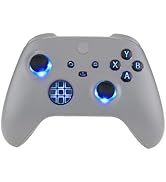
🎮 Light up your controller, level up your style!
The eXtremeRate Custom Home Guide Button LED Mod Stickers offer 40 precision-cut stickers in 8 colors, designed specifically for Xbox Series X/S and Xbox One controllers. This kit includes installation tools and detailed video guides, enabling gamers to personalize their home button’s LED glow with a clean, residue-free finish. Perfect for millennial pros who want to showcase their unique style and stand out in every gaming session.


| Best Sellers Rank | #8,256 in Video Games ( See Top 100 in Video Games ) #24 in Xbox One Faceplates, Protectors & Skins #204 in Xbox Accessories |
| Brand | eXtremeRate |
| Color | For Xbox Controller Universal |
| Customer Reviews | 4.0 out of 5 stars 1,641 Reviews |
| Item dimensions L x W x H | 3.15 x 2.17 x 0.79 inches |
| Material | Metal, Plastic |
| Recommended Uses For Product | xbox controller |
| Surface Recommendation | Plastic, Metal |
D**C
ABSOLUTELY AMAZING!!
This was SO easy to put on. I have worked on computers before so that might have been part of why it was so easy for me. You do have to open up your controller to put this on correctly. It does NOT go on the outside. Everyone who says it is too small, this is why it isn't fitting for you. It goes UNDER the button, not ON the button. There is a video on YouTube (link in description) but their are also other videos who talk you through EVERY step for taking apart the control and putting it back together. I highly recommend "How to Disassemble & Reassemble the Xbox Series X/S Controller" by Modded Warfare. He VERY clearly describes how to take it apart and put it back together. If you aren't real comfortable with the process, watch his video and see if that helps and definitely watch the video by eXtremeRate on how to put the part in. There video is good but there is more explanation on Modded Warfares site. I really appreciated his site because it was the first time I had ever opened a controller before. EXtremeRate has great products and I highly recommend!
T**S
If you're willing to open up your device(s) and void any warranty, this works beautifully.
All the 1-star reviews just try to place the sticker on top of the button itself, which is NOT how to install it. I've written a quick little guide on how to install for a One S controller, and console. I was looking at guides in how to do this and was never able to shake the idea of actually doing it. I have friends who also want this, but I'm other colors than what I want, so it's great that it comes with 8 colors. For a One S controller, there's a button membrane on the inside of the controller for the home button. This membrane has a hole in it for the LED to shine through, I just put the tiny sticker covering that hole and re-assembled the controller. For a One S console, there is no video documentation. **Note: this product is not advertised to work with a One S console, but it can be done, as proved by my picture** Similar to the controller there is a plastic spring mechanism for the power button with a hole for the LED to shine through. Again, just cover the hole with the selected color and re-assemble. I'm in love with this modification, even though it's a bit tricky and technical, all to tint your home button.
A**S
Too small to function
Didnt fit xbox series s/x controller at all. Too small for full coverage of the button. The film was a little hard to peel.
M**N
Great product! Love my green button! Controller disassembly required
It did not come with the shade of green I wanted, but I was able to achieve it by using one teal and three yellow stickers. So if they don’t have the color you want you can try mixing different stickers and stacking them. To test out my sticker combination, I stacked them on top of my phone’s flashlight and set the Xbox button on top of it to see what the color look like shining through. The controller must be disassembled and the stickers need to be stuck on the rubber piece I’m pointing to in one of the pics. The instructional video was very clear and easy to follow. Just take it slow and pay attention and you shouldn’t have an issue. I also used these on my Xbox console as well. I just stuck the stickers on the back of the power button! It looks great! I love how it matches my controller Check out my controller I greened out! Green is beautiful!
J**S
Disassembly required for pretty home button!
TL;DR: I struggled until I got my glow-up. Actual review: I watched the instructional videos and rewinded it several times over going over the steps. There were many profanities tossed around while taking the Xbox controller apart, plus peeling off the clear film to apply the colored stickers to the conductive rubber pad for the buttons. It was easier for me to remove the film using my fingernails than trying to use the white stickers that were provided. The end result was worth it, and the home button light is no longer bland with the choice colors. I paired one red and purple sticker together to closely emulate the magenta on the controller (the last photo properly shows it in the dark through manual color correction). You can do a quick “preview” by putting the desired colored stickers on your phone’s flashlight while the home button sits on top. A word of caution: your flashlight will be brighter than the LED on the controller’s circuit board, so this will affect the color accuracy you’re going for. Also, two or more colored stickers are needed to get the effect you want. Another thing is they will slightly dim the home button light (if you’re into that), as opposed to the invasive white light by default. One thing I would personally like to change is if the colored stickers were either on a thin clear sheet, or having thin tabs on the film to make the removal and application easier. Other than that, the product works as intended.
E**Y
Need to double up for similar effect as depicted
First, this is more of an expert level modification. Need to take 2 seperate board off and leave some wires connected. Not hard for me but time consuming. Don't let any buttons fall out or turn on you. Second, save yourself some time and double up the lenses they provided if you want the color to look similar to what the film looks like in your hand (at least with Xbox Series controllers). I'm honestly not sure how so many have the nice color image without doing so! Attached is the lovely pink color I got from 1 red lense on my red controller. As well as the slightly bluish hue on my black controller using the darker blue lense. I went back and doubled up the red on my red controller and it's red now, but very bright with the series x led so it's not going to be the same as the advertised image. Also did so on my first go around with our purple/blue controller. Doubling the purple lenses privided gave the desired effect. Don't do it twice like I did. Double up or expect it washed out.
J**Z
PERFECT! but... be warned if you have a X/S remote
So I ordered this for my series X/S remotes and I mean... the picture speaks for itself 🔥 One thing to be cautious of is the actual rings themselves since they're smaller than the xbox logo I had no choice but to install it inside the rubber grommet inside the remote. (You'll have to open the whole remote by the way, but with patience you can do it yourself.) After the install because of where I installed it the home button is hard to turn on now and u need to press is hard. I did it this way instead of leaving it on the logo because of white light shining on the outside. They're perfect fits for Elite controller home buttons but not X/S... but I still love the look just look at em 😍 ⭐️⭐️⭐️⭐️⭐️
G**3
Pain to apply, cheap plastic
Worth like 1/3rd of price
Trustpilot
5 days ago
1 week ago