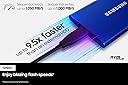
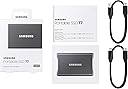
🚀 Speed Meets Durability — Carry Your Data Fearlessly
The SAMSUNG T7 Portable SSD 500GB combines ultra-fast USB 3.2 Gen 2 transfer speeds up to 1050MB/s with a shock-resistant, compact design. Featuring Dynamic Thermal Guard technology to prevent overheating, it ensures reliable, high-performance storage for professionals on the move. Compatible across Android, Mac, and PC, this lightweight SSD is engineered for seamless, secure, and speedy data management.


| ASIN | B0874YS2N7 |
| Amazon 売れ筋ランキング | パソコン・周辺機器 - 16,936位 ( パソコン・周辺機器の売れ筋ランキングを見る ) 外付SSD - 103位 |
| HDD容量 | 500 GB |
| UPC | 887276410784 |
| おすすめ度 | 5つ星のうち4.8 6,362 レビュー |
| カラー | グレー |
| デジタルストレージの容量の測定単位 | 500 GB |
| デジタルストレージ容量 | 500 GB |
| データ転送速度 | 10 ギガビット毎秒 |
| ハードウェアインターフェイス | ソリッドステートドライブ |
| ハードウェアプラットフォーム | Android, Mac, PC |
| ハードディスク 種類 | ソリッドステートドライブ |
| ハードディスクのフォームファクター | 2.5 インチ |
| ハードディスクインターフェイス | USB 3.2 |
| ハードディスクフォームファクタ | 2.5 インチ |
| ハードディスク回転数(rpm) | 500 |
| フォームファクター | ポータブル。 |
| ブランド | サムスン(SAMSUNG) |
| ブランド名 | サムスン(SAMSUNG) |
| メーカー名 | Samsung |
| メーカー型番 | MU-PC500T/AM |
| モデル名 | SAMMUPC500TAM |
| 互換デバイス | テレビ, デスクトップ, ノートパソコン |
| 付属品総数 | 1 |
| 取り付けのタイプ | 外部ハードドライブ |
| 同梱商品 | USBケーブル |
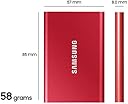
| 品目の寸法(長さ x 幅x 厚さ) | 8.4長さ x 5.6幅 x 0.8厚み cm |
| 商品の用途 | パーソナル |
| 商品の追加説明1 | 256ビットAESハードウェア暗号化。, 最大1,000MB/秒の書き込み速度。, 最大1050MB/秒の読み取り速度。, 熱制御。, 耐衝撃 |
| 商品の重量 | 0.13 ポンド |
| 商品外装素材 | 情報はありません |
| 型番 | MU-PC500T/AM |
| 接続技術 | USB |
| 搭載済みキャッシュメモリサイズ | 1 不明な修飾子 |
| 書き込み速度 | 1000 MB per second |
| 梱包タイプ | FFP |
| 特徴 | 256ビットAESハードウェア暗号化。, 最大1,000MB/秒の書き込み速度。, 最大1050MB/秒の読み取り速度。, 熱制御。, 耐衝撃 |
| 読み込み速度 | 1050 メガバイト毎秒 |
| 通信・接続インターフェース | USB |
R**1
Real World HP Backup File Transfer Speed For Samsung Portable SSD
Recently I purchased two 500G SSD drives in order to create more reliable back ups for my two computers. My objectives included reasonable price, reliable brands, and USB C connections. The two drives were: SanDisk 500GB Extreme Portable SSD - Up to 1050MB/s - USB-C, USB 3.2 Gen 2 https://www.amazon.com/gp/product/B08GTXVG9P/ref=ppx_yo_dt_b_asin_title_o02_s00?ie=UTF8&psc=1 SAMSUNG T7 Portable SSD 500GB - Up to 1050MB/s - USB 3.2 External Solid State Drive https://www.amazon.com/SAMSUNG-Portable-SSD-500GB-MU-PC500H/dp/B0874XJL6M/ref=sr_1_1?dchild=1&keywords=Roll+over+image+to+zoom+in+SAMSUNG+T7+Portable+SSD+500GB+-+Up+to+1050MB%2Fs+-+USB+3.2+External+Solid+State+Drive%2C+Blue+%28MU-PC500H%2FAM%29&qid=1612032896&s=electronics&sr=1-1 The Sandisk was used for creating a time machine back up on my Imac; late 2017 vintage, Intel Core i5-7400, 7th Generation, 16G RAM, 500G SSD with Thunderbolt 3 ports. The Sandisk came nicely packaged. It is very small and the opening through the back of the drive makes it easy to “hang” on the back of the imac so that it is out of the way. The Samsung was used for backing up a new HP Pavillion, Intel Core i7-1165G7 11th Generation, 16G RAM and 500G SSD hard drive with Super Speed USB A and Super Speed USB C ports. The Samsung was beautifully packaged, similar to what you might expect from an Apple product. It was also very small but slightly larger than the Sandisk. The Sandisk was able to do a 129G time machine backup in 40 minutes on the mac. It became noticeably warm but performed flawlessly when connected via its USB C output to the Mac’s thunderbolt input….3.3G/minute The Samsung was able to do a 229G file transfer in 60 minutes from the HP. This was accomplished using a right click and then the "send to" command. It became very warm but performed flawlessly when connected by it’s USB C output to the HP USB C input….3.8G/minute Although neither drive performed anywhere near their rated speed, they were much faster than the conventional HDD drives I own and light years faster than thumb drives. I would give both drives two thumbs up. I prefer the Sandisk for the Mac because of the ability to easily hang it off the back. As for the Samsung, it is so nice looking and feels so good and is so nicely packaged that you would probably prefer this drive if it is going to be setting out and visible all the time. Realistically, you wouldn't go wrong with it either. Highly Recommended.
M**D
ممتاز
وقت التوصيل مثالي كان تاني يوم على طول
A**M
ممتاز
ممتاز
M**L
Great, portable, fast SSD useful for many different things
I've apparently bought 3 of these over the past year or so (just recently realized this). Each one has been for a different use. The first time I bought one was for the most basic of uses - backup storage for family photos. We of course have cloud storage, but for some reason also like to have a physical backup just in case something ever happened with our online accounts and the pictures are of course irreplaceable. The second time I bought one was for a Tesla Model 3 DashCam. I had been using some other flash drives, but the Tesla requires fairly fast write speeds. So this has been plenty fast for that use (I had tried other drives which I thought met the write speed requirements, but maybe those were peak). I didn't want to have any recording issues if something were to happen. The most recent time I bought one of these again, was to actually improve my 2019 iMac that has an absolutely atrocious 5400rpm old fashioned hard drive. Considering I don't use my iMac for much besides internet and MS office, I never thought it would be a problem. But once Catalina came, it fell off a cliff. It should never, ever take 2+ minutes to load MS Excel. So I used this SSD to flash a backup copy, installed the newest OS on it, and instructed the iMac to load from this external SSD (there are articles on how to do this). And wow, it's like having a new computer. Runs plenty fast and loads all my apps rapidly. One of the easiest fixes I could've ever imagined (no way was I going to take the iMac apart myself, and I didn't feel like paying the $$$ for Apple to upgrade it). Hard lesson learned on hard drive quality, but glad I found an easy, relatively cheap fix.
J**N
Huge speed increase for my old iMac
I bought this drive with plans to resurrect my increasingly slow 2013 iMac. As with others who have written reviews my goal was to use this as an external boot drive. It does this job wonderfully! I attached it to my iMac and it was recogized immediately. I used Disk Utility to format it with the default Mac file system. I didn’t bother making a backup of my old installation, I just went to the App Store and found MacOS Mojave (I was running Yosemite) and I ran the install. When doing so it allowed me to choose the external drive as my target drive so I did that and the installation ran smoothly, rebooting a couple of times. After it installed, when it rebooted the last time, it booted into the old install on the hard drive, so I rebooted again, holding down “Option” and it gave me the choice of which drive to boot from, and I chose the Samsung and it booted quite quickly into the new installation. Everything runs and loads MUCH faster. The SSD drives are just so much faster than the old 5400 hard drives. It really feels like having a new computer. I also have a 2020 MacBook Air and my old 2013 iMac now runs about the same speed. I am very satisfied.
Trustpilot
2 months ago
2 weeks ago