Desertcart purchases this item on your behalf and handles shipping, customs, and support to Seychelles.
💼 Elevate your data game with storage that works as hard as you do.
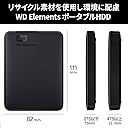
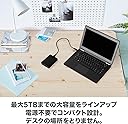
The WD Elements Portable 5TB external hard drive offers massive storage in a sleek, compact design. Featuring USB 3.0 for fast data transfer and broad device compatibility, it’s powered via USB bus for true portability. Ideal for professionals needing reliable, high-capacity backup with a 2-year manufacturer warranty.

| ASIN | B07X41PWTY |
| Amazon 売れ筋ランキング | パソコン・周辺機器 - 666位 ( パソコン・周辺機器の売れ筋ランキングを見る ) 外付ハードディスクドライブ - 8位 |
| HDD容量 | 5 TB |
| UPC | 718037871899 |
| おすすめ度 | 5つ星のうち4.2 271,954 レビュー |
| カラー | ブラック |
| デジタルストレージの容量の測定単位 | 5 TB |
| デジタルストレージ容量 | 5 TB |
| データ転送速度 | 1 メガバイト毎秒 |
| ハードウェアインターフェイス | USB 3.0 |
| ハードディスク 種類 | メカニカルハードデイスク |
| ハードディスクのフォームファクター | 2.5 インチ |
| ハードディスクインターフェイス | USB 3.0 |
| ハードディスクフォームファクタ | 2.5 インチ |
| フォームファクター | 2.5インチ |
| ブランド | ウエスタンデジタル(Western Digital) |
| ブランド名 | ウエスタンデジタル(Western Digital) |
| メーカー名 | ウエスタンデジタル(Western Digital) |
| メーカー型番 | WDBU6Y0050BBK-WESN |
| モデル名 | WD Elements Portable |
| 互換デバイス | Win ; Mac |
| 互換性のあるゲーム機モデル | microsoft_xbox_360, sony_playstation_4 |
| 付属品総数 | 1 |
| 保証内容 | 2年保証 |
| 取り付けのタイプ | 外部ハードドライブ |
| 品目の寸法(長さ x 幅x 厚さ) | 11.1長さ x 8.2幅 x 2.1厚み cm |
| 商品の用途 | パーソナル, マルチメディア |
| 商品の追加説明1 | ポータブル, 下位互換性 |
| 商品の重量 | 0.52 ポンド |
| 型番 | WDBU6Y0050BBK-WESN |
| 接続技術 | USB |
| 搭載済みキャッシュメモリサイズ | 5 不明な修飾子 |
| 特徴 | ポータブル, 下位互換性 |
| 読み込み速度 | 50 メガバイト毎秒 |
| 通信・接続インターフェース | USB |
C**1
ハズレなし
PCのバックアップ用に購入。 信頼と実績のWD(ウエスタンデジタル)製で、安定して読み書きができています。 付属のケーブルはUSB3.0に対応しており、大容量のデータでも結構素早くやり取りが可能です。 ケースもコンパクトでかさばりません。 今後何年も使っていく予定ですが、できれば長持ちして欲しい。HDD大手のWDの信頼性に賭けます。
た**ん
小型軽量の大容量HDD
旅行でかなりの量を録画して撮りためるので この容量が必要で 大きさ的にこれくらいが持ち運びに最適化と愛用しています。作動も早く 接続にも手間取らず 今までで一番と思っています。
R**A
Good
nice items
S**N
安心して使い続けられる、信頼性の高いポータブルHDD
WDのポータブルHDDは、会社と自宅で合わせて5台ほど使用していますが、これまで一度もトラブルが発生したことはありません。認識しなくなったこともなく、安定して使えているため、個人的にはとても信頼している製品です。 価格が手頃でコストパフォーマンスが良い点に加え、本体がコンパクトで場所を取らないのも気に入っています。持ち運びや設置のしやすさは日常使いにおいて重要ですが、その点でも不満はありません。 「普通に、当たり前に使え続ける」――それが一番難しくて、一番価値がある。そう感じさせてくれるHDDです。今後も同シリーズを選ぶと思います。
け**ん
容量は気に入ってますが
ちょっと書き込み速度が遅いのがフラストレーションが溜まりますね 2Gぐらいのバルクで買ったHDDに外付けのケースで使っているHDDの方がはるかに書き込みが早い・・・ 容量が大きいから?と思うところはありますが、それにしても書き込みが遅いので、使うときは時間に余裕がある時に使うのが・・・
ケ**ヨ
Pixel8aで使用しております
Pixel8aに接続する為に「SUNGUY USB C to Micro B 3.1 ケーブル 1M 最大10Gbpsデータ転送 金メッキコネクタ USB 3.1 外付けHDD/SSD ハードドライブ/MacBook (Pro)/Galaxy S5 Note 3など対応 マイクロB変換ケーブル 1m グレー」や「UGREEN USB C to Micro B (3.0) ケーブル 1m USB 3.1 10Gbps高速データ転送 外付けhddケーブル マイクロB (3.0)変換ケーブル 外付けHDD/SSD ハードドライブ/MacBook Pro/Galaxy S5 Note 3/カメラなどに対応-1m」といったケーブルを購入しました。 HDDの出荷時のファイル形式はNTFSになっておりますので、そのまま接続してもPixelは全然認識してくれませんのでパソコンを使用してexFAT形式にフォーマットする必要があります。 exFATにフォーマットすれば問題なくHDDを認識してくれて全く問題なく使用できております。 WD製のポータブル外付けHDDを購入したのは今回が初めてなのですが、他社製のポータブル外付けHDDと比較してもとても静かなのでWD社のクォリティーの高さが実感されました。 耐久性については未だ使用し始めたばかりで何とも申し上げられませんが何かありました追記してまいりたいと思います。
岡**道
コンパクトなHDD
時代はSSDっていうけど、コストパフォーマンスを考えるとこっちでしょう。安価で大容量を使いこなせるなら言う事無しです。
R**A
不良品
The item I received was not working at all. I already returned it since March 13 but never received a refund.
I**A
Spełnia wszystkie wymagania
Bardzo pojemny magazyn pamięci
M**K
Excellent Value and Performance
I recently purchased the WD 4TB Elements Portable USB 3.0 High Capacity Hard Drive and I am extremely satisfied with my purchase. The drive is compact and easy to use - just plug it into my computer's USB port and I'm good to go. The 4TB of storage is more than enough for my needs, and the transfer speeds are reasonable for a standard 5400rpm HDD.. One thing that initially concerned me was the drive's tendency to get hot during use. However, I have used it extensively over the past few weeks and have not experienced any issues with overheating. In terms of value, I believe the WD 4TB Elements Portable USB 3.0 High Capacity Hard Drive offers excellent value for the price and the high capacity and decent transfer speeds make it well worth the investment. If you need a lot of storage on the go and are looking for a reliable and high-performance option, I highly recommend the WD 4TB Elements Portable USB 3.0 High Capacity Hard Drive.
P**A
Excelente, me salvó la vida!
Excelente producto! Lo compre y decidí usarlo como respaldo dónde guardé muchas fotos y documentos y me olvidé de él por completo. Este mes decidí descargar todos esos documentos de otra memoria externa que tenía y descubrí que todos mis archivos se habia perdido. Me puse muy triste hasta que me acordé de esta memoria externa y gracias a Dios todo estaba ahí intacto! La verdad si vale la pena tener memorias externas de excelente calidad, y varias, por si acaso. Me salvó la vida!
G**9
Excellent disque de grande capacité
Utilisateur, depuis plusieurs décennies, d’informatique et par voie de conséquence de disques durs ; dans cette catégorie, je considère les WD comme le top des disques « classiques » à plateaux. Leur fiabilité et leur durée de vie sont parmi les meilleures du marché ( je n’ai jamais eu un disque dur WD crashé !). Cette version « Elements » est compacte, légère et silencieuse, et ne nécessite pas, comme les gros disques 3.5 pouces, d’alimentation externe. Commandé et reçu très vite (Bravo et merci Amazon pour le service). L’emballage du disque est parfaitement d’origine, scellé et protégé, accompagné d’une notice et du câble USB 3. Ce type , micro B, étant surtout utilisé avec ce type de disque dur, je recommande de le laisser connecté en permanence au disque, ce qui évitera de l’endommager. Sitôt reçu, testé : Déjà formaté en NTFS Windows, il y a juste à le brancher. Attention, si destiné au MAC, il faudra le formater par le MAC avec l’utilitaire disque si on ne l’utilise qu’avec un MAC. Si destiné à être utilisé à la fois sur PC et sur MAC, il faudra un logiciel de « conversion NTFS » sur le MAC (comme Paragon ou Tuxera) et le laisser en NTFS (c’est ce que je fais). Les tests : vérification état du disque avec outil Windows, du SMART avec AIDA, et des vitesses avec CrystalDiskInfo. Tous les tests sont OK, on voit que le disque n’a été allumé que 2 fois, ce qui prouve le contrôle des disques après fabrication (NB : made in Thailand et non China !). Pour la vitesse en USB3, les valeurs sont de 120 MB/s, ce qui est très correct. J’ai sauvegardé 580 Go de photos en 3 heures, en silence total et sans échauffement important. Je voudrais ici, apporter quelques informations complémentaires, contre-vérités destinées à certains utilisateurs insatisfaits, notamment concernant les capacités de ces disques. J’ai vraiment l’impression que certains « découvrent » les disques durs externes ! Il ne s’agit en aucune façon de tromperies, mensonges ou arnaques. Il faut simplement savoir qu’il s’agit d’une différence de langage et de mathématiques ! Tous les fabricants de disques ( classiques, SSD, clés USB…) comptent la capacité en DECIMAL ( Base 10 ). Un Téraoctet (To) est l’équivalent de 1 000 000 000 000 octets. Les programmes, comme les système d’exploitation, cas de WINDOWS, utilisent les système de numérotation binaire ( Base 2) . Dans ce système, 1 To est équivalent à 1 099 511 627 776 octets. En fait, les 2 équivalent à la même capacité réelle. C’est comme si on mesurait une distance en Km et en Miles : les valeurs sont différentes, mais la distance réelle est la même. Pour les usagers MAC, les valeurs sont bien indiquées en décimal, Base 10, ce qui fait que la capacité donnée par le fabricant se retrouve réellement sur le MAC. C’est surtout Windows qui aurait dû modifier son « Go » dans l’unité standardisée en 1998 : le Kilo Binaire. Exemple : Un Gibioctet (Gio) = 1 073 741 824 octets Un Tébioctet (Tio) = 1 099 511 627 776 octets Si cela avait été modifié en Gio et Tio, il n’y aurait plus d’interrogation et de doute. En fait, si on regarde dans les « Propriétés » des disques la valeur en octets est donnée et correspond bien à la capacité du disque. Pour confirmer ceci, par exemple un fichier de 25 Mo sur MAC, devient 23,4 Mo sous windows. Autres bizarreries dans les commentaires : Une dizaine de films enregistrés, remplissent complètement un disque de 5 To. Cela semble impossible, car si on prend les plus gros films en 4K UltraHD+ BluRay, ils font au maxi 90 Go. Soit environ 1 To la dizaine !! on est loin de la saturation. Egalement, quand je lis « impossible de formater en FAT32 un disque de 4 To…… bien sûr que cela n’est pas possible , ce système est limité dèjà à moins de 4 Go pour les fichiers. Il faut être en NTFS ou en ExFAT, qui n’ont pas les mêmes limites. Je fais généralement peu de commentaires sur ce que j’achète, mais au vu de ces commentaires « négatifs » je souhaitais intervenir. Je n’ai aucun lien avec WD et autres fabricants, mais j’utilise pas mal de disques ou autres procédés de stockage, mais tous sont des fabricants reconnus et fiables. En résumé, ce disque de grande capacité est d’un excellent rapport qualité/prix et mérite ces 5 étoiles. Je suis souvent étonné que certains mettent 4 étoiles et qq fois 3, alors que leur commentaire est positif. A partir du moment où un produit réuni TOUTES les qualités attendues : Livraison, emballage, utilisation, fiabilité, etc SANS réserves, il n’ y a pas lieu de mettre autre chose que 5 étoiles. Désolé d’avoir été un peu long, mais le sujet en valait la peine.
I**A
It works great. Enjoy a huge amount of storage for a reasonable amount of money.
TL;dr – it works great. Treat it with respect, be prepared to toss the cable it comes with (because they fail) and enjoy a huge amount of storage for a reasonable amount of money. You’ve probably read a ton of reviews on external drives and have arrived here. I’ve been in the tech biz over 44 years and was there when 128Kbyte 8” floppy disks were considered advanced. I’ve used a LOT of different drives. Let’s put this drive into perspective: it is NOT a “portable drive”, it’s an external drive that you can choose to move from place to place. AS WITH ALL SUCH DRIVES, it contains precision moving parts; if you drop it, it will likely break. If you move it around when it’s operating, it probably won’t like it. If you drop your laptop, it will likely break. If you want an external drive that you can really move around, get an SSD. I purchased one of these drives for cloud-storage and archival purposes. Simply put, I needed somewhere to dump large data collections for essentially read-only access as well as having a buffer area for cloud storage synchronization purposes (lots of r/w access to the drive). It worked so well I purchased another and might even get a 3rd. Cloud storage is great for frequently accessed data, but for your video collection, your vast music collection or the 130GB of pictures your spouse took last month, you might want off-line storage. This is a great choice. Is it fast? Slower than an SSD but faster than many external hard drives out there. If you want speed, use the local SSD in your device or get an external SSD drive. If you don’t want that expense, this is still a great drive. In operation the drive is whisper quiet and runs slightly warm. You may have read about the “click of death”, well, yeah, it happened to me too. It won’t run on an overloaded unpowered USB hub (click, click due to lack of power). The cable it comes with is frankly troublesome and honestly you should invest in a replacement. Yup, click, click, click because the cable failed (fortunately I had another to hand, doesn’t everyone?). All that will happen with other drives too, so it’s nothing unusual. My system: Win10 Pro and Win10 Home on Lenovo, Surface Books and Surface Pro; works out of the box just fine. For those complaining that the drive doesn’t work with some backup software; that’s not the drives fault. For those complaining about the speed for gaming purposes, that’s not the drives’ fault either, you should have purchased an SSD. Yes, it will work with Onedrive; just create a junction from your Onedrive folder to the required folder in the external drive. mklink /J srcFolder destFolder Since you have a large capacity drive for large data sets, robocopy (part of Windows) will be your friend as well as mklink to create junctions from your main drive to connection points in external drives filesystems. What happens if the drive goes down? As with any other drive, you might have lost your data. The solution is to (gasp) purchase two drives and sync one with the other. Pro’s: 5TB of storage for <$100. Quiet, fast and gets the job done. It’s a disk drive, it’s not there to be exciting. Con’s: I didn’t like the cable; invest $6 on a better one. As with ALL DRIVES, you need to treat it nicely.
Trustpilot
1 day ago
1 month ago