


Desertcart purchases this item on your behalf and handles shipping, customs, and support to Seychelles.
🚀 Upgrade your connection, secure your future!
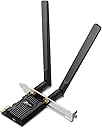
The TP-Link Archer TX20E is a PCIe WiFi 6 adapter delivering AX1800 speeds (1201 + 574 Mbps) and Bluetooth 5.2 support. Compatible with Windows 10/11 (64-bit), it features WPA3 security and backward compatibility with older WiFi standards. Designed for easy installation, it includes both standard and low-profile brackets, making it a top-tier choice for professionals seeking fast, secure, and reliable wireless connectivity.
| ASIN | B0BWRXZZC8 |
| Amazon 売れ筋ランキング | パソコン・周辺機器 - 9,838位 ( パソコン・周辺機器の売れ筋ランキングを見る ) ネットワークカード - 11位 |
| GTIN (Global Trade Identification Number) | 04897098688809, 04897098688816 |
| おすすめ度 | 5つ星のうち4.1 2,990 レビュー |
| カラー | ブラック |
| データリンクプロトコル | IEEE 802.11a |
| データ転送レート | 1800 メガビット毎秒 |
| データ転送速度 | 1800 メガビット毎秒 |
| ハードウェアインタフェース | PCI Express x16, ブルートゥース |
| ハードウェアインターフェイス | PCI Express x16, ブルートゥース |
| パック数 | 1 |
| ブランド | TP-Link |
| ブランド名 | TP-Link |
| メーカー名 | TP-Link |
| メーカー型番 | Archer TX20E |
| 付属品総数 | 1 |
| 保証内容 | メーカー保証に準ずる |
| 同梱商品 | Archer TX20E |
| 品目寸法(L x W x H) | 7.9長さ x 2.1幅 x 12高さ cm |
| 商品の寸法 | 7.9長さ x 2.1幅 x 12高さ cm |
| 商品の重量 | 100 グラム |
| 商品種別 | PCIe対応 アダプター |
| 型番 | Archer TX20E |
| 外部機関認定情報 | Não aplicável |
| 対応するオペレーティングシステムファミリー | Windows |
| 必要な最小オペレーティングシステムバージョン | Windows 10 |
| 色 | ブラック |
一**人
安定して接続できてます
木造戸建ての1階から2階へ、こちらのWi-Fi受信機を使ってWindows 11 PCでインターネット接続しています。動画視聴もストレスなく楽しめる速度が出ており、通信のロスも少なく非常に安定しています。 Amazonで購入してから約2年経過しましたが、不調やトラブルもなく快適に使用できています。
M**H
取り付けはサクッと完了。音割れは別問題だったかも
自作PCにPCIeで増設するWi-Fi/Bluetoothカードとして購入しました。 取り付けは特に詰まることなくスムーズに完了。付属のCDからドライバも問題なくインストールできました。Wi-Fiもbluetoothもちゃんと認識してくれて、接続は安定してる感じです。 USBドングルから乗り換えたんですが、期待してたBluetoothスピーカーの音割れは改善されませんでした。まあこれはカードのせいっていうより、電波干渉の問題も絡んでそうなので、カードを変えただけで全部解決するのはそもそも無理があったのかもしれません。
コ**郎
マザボの取り付け位置大丈夫?
2年ぐらい使ってから書いてます。 スロットにうまく差し込めず認識したりしなかったして、非常にクセのある製品であると思っていました。 そこでTP-Linkに問い合わせを行い取り付け方等コツがあるのか伺ったところ、特になくいため製品不良として新品と交換すると言われました。ただ、製品の形状に問題があると思い新しいのに変えても意味がないと思いますお断りしました。 スロットにしっかり刺すためによく書かれている解決方法は無線LANカードのブラケットのネジを緩めるあるいは取り外してしまうことで、解決することがあるそうです。当方もそのような方法で今に至るまで使ってきました。ただ、ここ最近になってその手法でも外れてしまうことがあり、ブルスクが頻発するようになりました。 そして今日、PCケースを変えるためにマザーボードを付け直したら特に細工しなくてもしっかりスロットに刺さって使えるようになりました。 何が原因だったかというとマザーボードの取り付け位置が悪かったという結論に行きつきました。I/Oパネル側にしっかりと押し付ける感じでマザボを取り付けてマザボと背面の拡張スロットとの隙間を極力無くすようにマザボを取り付けるようにしてみてください。おそらくそれで解決すると思います。 とても満足のいく商品です。
た**き
Bluetoothのドライバが…
PC自作経験などは無いが、挿すのは問題なくできた。レビューを参考にWEBからドライバーをインストールし、Wi-Fiはすんなり使えるようになった。しかし、Bluetoothは問題あり。イヤホンやスピーカーを多数設定し、設定を切り替えて使用する想定だったが、何故か3台目以降をオーディオ機器として認識しない事象があった。キーボードやマウスのBluetooth使用は問題無かった。
A**ー
良好
自作PCのパーツで買いましたが必要十分取り付けも簡単でした
T**A
Avoid using it with Windows 10
This card was a pain in the butt to get to work properly in my gaming PC. There are apparently 3 revisions of the card and this Japanese one is ver1.0 Once I found the correct driver, it started working and I was able to install it to Windows 10 and got good connectivity by both Wi-Fi and Bluetooth. I mostly used the card to stream video to my smart TV wirelessly or to listen to music and using a game controller by Bluetooth. At first, it would work fine, but then I would start to notice lagging in the input. Then during some games, the USB components would just stop working. The keyboard, which is wired, would stop working and the Bluetooth Radio in Windows would constantly keep getting stuck in a connecting and disconnecting loop. Eventually, I just had to disable to Bluetooth radio to stop the problem, but now I have to use my controller and headphones by wired connection, which defeats the purpose of getting this card in the first place. I truly regret getting this card because it's been nothing but a headache to work around. To be fair, this could be a Windows 10 and it may work better in Windows 11, but I'm not upgrading to test it until I absolutely have to.
A**ー
有線が難しい環境での選択肢として十分アリ!
自作したサブ機のゲーミングPCに取り付けて使用してます。 取り付け自体はPCに詳しくない初心者の方でもネットなどで調べれば、比較的スムーズに設置できるかと思います。 Bluetooth機能は今回は使用していないため評価できませんが、Wi-Fiの動作はとても安定しています。 有線接続が困難な環境に設置したPCで使用したかったので、面倒ではありますが、別のPCでドライバーをダウンロードし、USBメモリ経由でインストールしました。 正直ダメ元で、オンラインFPSゲーム(OW2のクイック)を5戦ほどプレイしてみたところ、意外とPINGは有線時とあまり変わらず、快適にプレイできました。 ただ、15分に1回程度、PINGが一時的に150ぐらいまで上がる瞬間(3~5秒間)がありました。 その後はすぐ安定し、プレイに支障は感じませんでした。 使用頻度や本体の温度などによっても影響するかと思いますので、今後もし不具合があれば、こちらに追記いたします。 当たり前ではありますが、オンライン対戦ゲームは有線でのプレイを強く推奨いたします。 なので「どうしても無線で!」という方のみご参考程度によろしくお願い致します。 長々とした文章になりましたが、Wi-Fi接続でここまで安定するなら、LAN配線が難しい環境でも十分に選択肢になると感じました。
凛**凛
ホットスポットでとても快適です
PCに取り付け簡単で、公式からドライバーインストール後スマホでホットスポットWi-Fiを使用できるほうになりました PCに少し疎くドライバー解凍に戸惑いましたが大丈夫でした PCから部屋中ならとても快適な速度で通信できるようになって満足です
T**T
Parfait
S'adapte parfaitement, installation facile et rapide. Juste la prise supplémentaire a brancher sur la carte mère ou j'ai du réorganiser mes ports USB. Fonctionne parfaitement bluetooth et wifi
A**V
Great Wifi Card
Plugged into my AM4 motherboard, worked with no problems
A**.
Delivers very well
I purchased this product as I was upgrading my desktop. I still have not switched to a WiFi 6 capable router as the current plan with my ISP would not give a better value return against the hefty investment. With my 300 MB plan, my previous usb adaptor ( Archer T4u) manages to give me a consistent 230-240 MB bandwidth. However, in comparison, I do notice the PCIe card manages to give 250 MB+. So downloads are just a little bit faster and it's future proof for at least next 5 years. Windows setup on this is a breeze. Just go to the product page, download the drivers and you're good to go. One of my concern was that the product page on Amazon as well as tp-link's official website does not list which chipset it uses. It means Linux users would need to figure it out themselves. I called and emailed TP-link India support to know about the chipset model and I still have not heard an answer in over 3 weeks. Finally I reached out to TP-link US support and they responded within 24 hours. The chipset is AX200NGW. Furthermore, this device is listed EOL on TP-link US, but not on TP-link India. TP-link India support proves their incompetence and ignorance yet again!! Now, if your kernel detects this OOB, that's great. But I can confirm that Arch, ubuntu 22.04 LTS and openSUSE 15.4 did not detect this card out of the box for me, so only Bluetooth worked, but not wifi OOB. I'm going to save fellow Linux users some frustration and give the kernel module needed for this device: rtw89_8852be. If you can manage a line of sight with your wireless router, the signal is great. For me, there's half a wall in between and about 25 feet distance, so I get about 70% signal strength. But like I said, I find no issues with it. Happy with the product, but crappy support from TP-link India.
M**O
MEJORA NOTABLEMENTE MI CONEXIÓN
📝 DESCRIPCIÓN Tarjeta Wi-Fi PCI Archer TX20E, con Wi-Fi 6 (AX1800) y Bluetooth 5.2, ideal para mejorar la conectividad en PCs de escritorio. 📶💻 Modelo nuevo en Amazon: https://amzn.to/3CBEIVZ 🧾 ESPECIFICACIONES - Velocidad Wi-Fi: AX1800 (1201 Mbps en 5 GHz + 574 Mbps en 2.4 GHz) - Bluetooth: 5.2 (4x más cobertura y 2x más velocidad que Bluetooth 4.2) - Antenas: 2 antenas externas de alta ganancia - Seguridad: WPA3 - Compatibilidad: Windows 11/10 - Interfaz: PCI Express - Dimensiones: 7.9 x 12 x 2.1 cm 📦 CONTENIDO 1 - Tarjeta Wi-Fi TP-Link Archer TX20E 2 - Antenas externas 1 - Manual de usuario 💶 PRECIO - 24 de Enero de 2025: 21,90€ 🟢 PROS • Velocidades Wi-Fi 6 de hasta 1800 Mbps, ideal para conexiones rápidas y estables. • Bluetooth 5.2 con mayor cobertura y velocidad para dispositivos periféricos. • Antenas externas de alta ganancia para una mejor recepción de señal. • Seguridad WPA3 para proteger tu red y datos personales. • Fácil instalación es sistemaas con Windows 11/10. 8️⃣ VALORACIÓN Cogí esta tarjeta Wi-Fi TP-Link Archer TX20E para mejorar la conectividad de mi PC de escritorio, y ha sido una gran mejora. Anteriormente tenía un dispositivo usb que también era wifi 6 y conseguía velocidades entorno a 250 mb. Con esta tarjeta, llegué a tener la misma velocidad que haciendo las pruebas de velocidad en el router. Además de por mejorar la velocidad, me gustaba esta tarjeta ya que también tiene implementado Bluetooth 5.2, ya que me permite conectar auriculares, teclados y otros dispositivos con mayor estabilidad y menor latencia. Las dos antenas externas aseguran una cobertura amplia y estable, incluso en zonas de mi casa donde antes la señal era débil. La instalación fue sencilla, aunque es importante asegurarse de tener una ranura PCI Express disponible en la placa base. Una vez instalada, la tarjeta en un Windows 11 tuve que descargar los drivers para que la reconociera. En cuanto a la seguridad, tiene soporte para WPA3. ✅ CONCLUSIÓN Es una tarjeta Wi-Fi de alto rendimiento, ideal para PCs de escritorio que necesitan una conexión rápida y estable. Con Wi-Fi 6, Bluetooth 5.2 y seguridad WPA3, es una excelente opción para gamers, streamers o cualquier usuario que busque mejorar su conectividad. 👍 RECOMENDABLE. ✳️ Espero que mi comentario ✍️ te haya podido servir de ayuda 😃
A**H
جيد
كويسة
Trustpilot
1 month ago
4 days ago