Desertcart purchases this item on your behalf and handles shipping, customs, and support to Seychelles.
🚀 Elevate your workspace: Quad displays, rapid charging, and ultra-fast data—dock like a pro!
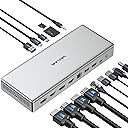
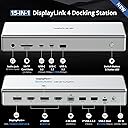
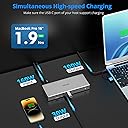
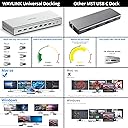
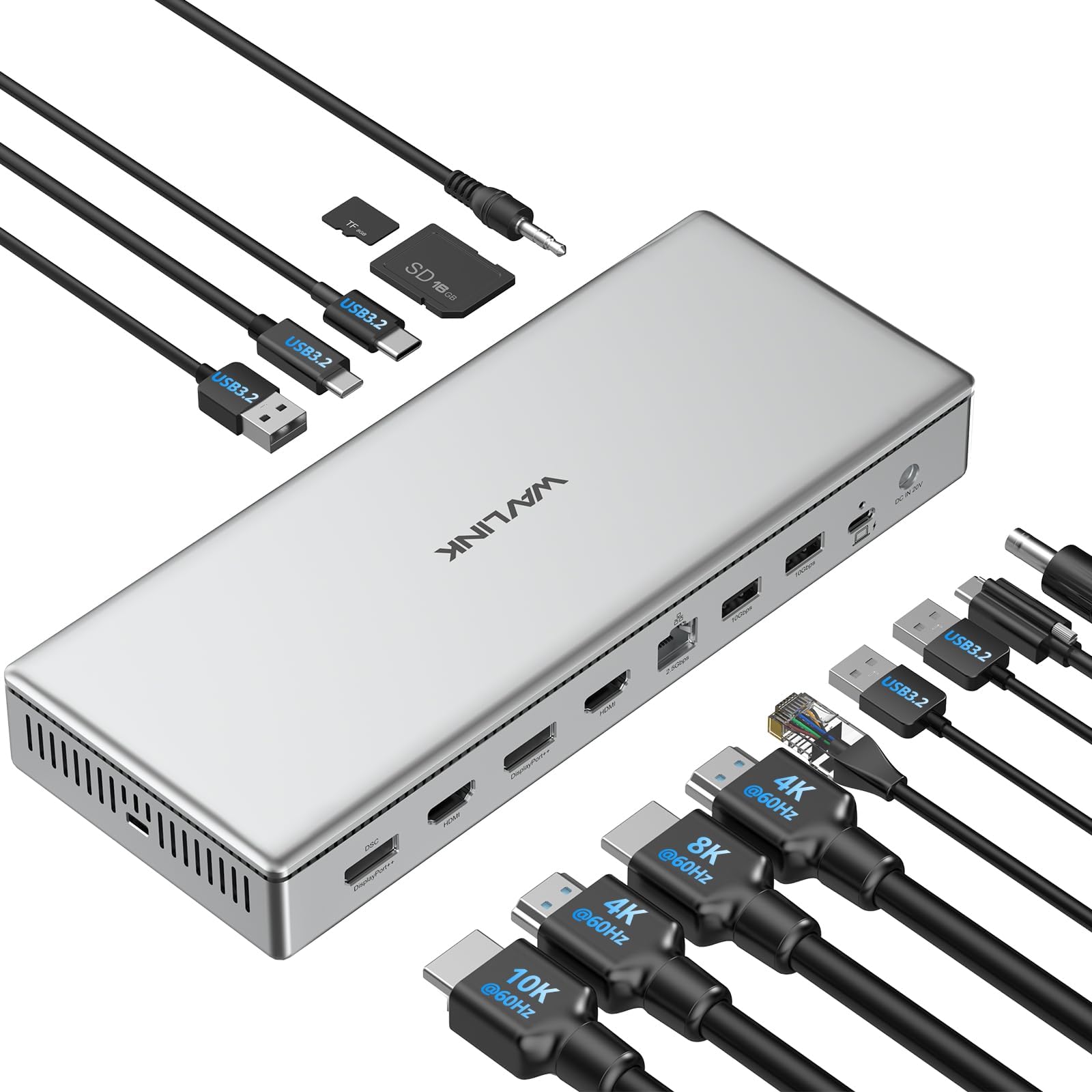
The WAVLINK USB C DisplayLink DL7400 Premium Docking Station redefines multi-display setups with support for dual 8K@60Hz or quad 4K@60Hz monitors. Equipped with 15 versatile ports including 2.5G Ethernet and USB 3.2 Gen 2, it delivers ultra-fast data transfer and seamless connectivity. Its 100W power delivery ensures your laptop stays charged while powering peripherals. Compatible with Windows 10/11 and Mac M1/M2/M3 systems, this docking station is the ultimate productivity hub for professionals demanding high resolution, speed, and power in one sleek silver design.


| Asin | B0DH1XC33Z |
| Best Sellers Rank | #31,726 in Computers (See Top 100 in Computers) #191 in Laptop Docking Stations |
| Brand | WAVLINK |
| Color | Silver |
| Compatible Devices | Camera, Google Pixelbook, MacBook Air, MacBook Pro, Microsoft Surface Book, Microsoft Surface Go, Microsoft Surface Pro, iPad, iPhone, iPod Touch |
| Customer Reviews | 4.2 4.2 out of 5 stars (51) 4.2 out of 5 stars |
| Hardware Interface | USB 3.2 Gen 2 |
| Manufacturer | Wistars Technology Limited |
| Mfr Part Number | WL-UG75PD1-DH2-US |
| Minimum Required Operating System Version | Mac OS 11 Big Sur, Windows 10 |
| Model Number | WL-UG75PD1-DH2-US |
| Number Of Items | 1 |
| Number Of Ports | 15 |
| Total Number Of Hdmi Ports | 2 |
| Total Usb Ports | 5 |
| Unit Count | 1.0 Count |
| Wattage | 100 |
User
Excellent Docking Station!
Excellent docking station!! This solved all of my laptop hookup challenges and delivers flawless sound and video for my X-Plane 12 airplane simulator setup. I just added a USB splitter to connect some extra accessories. I literally pull up and plug in my laptop to a usb C cord and I am ready to go.
User
WAVLINK DL7400 USB-C Dockingstation – Die ultimative Multimonitor-Lösung für macOS & Windows
Ich habe schon viele Dockingstationen ausprobiert – besonders für mein MacBook Pro mit M1-Chip war die Auswahl bisher immer etwas eingeschränkt, vor allem wenn es um echtes Multimonitor-Setup geht. Die meisten USB-C-Docks unterstützen maximal ein oder zwei externe Bildschirme. Mit dieser Dockingstation von WAVLINK wird das Limit gesprengt.Quad-Display-Unterstützung mit DisplayLink DL7400Der größte Vorteil dieser Dock ist die Nutzung des neuen DisplayLink DL7400-Chipsatzes, der in der Lage ist, die bekannten Limitierungen von macOS (M1/M2/M3-Chips) zu umgehen. Damit kann ich problemlos vier externe Bildschirme gleichzeitig betreiben, jeweils in 4K@60Hz, oder auch zwei Bildschirme in 8K@60Hz. Die Bildqualität ist kristallklar, ruckelfrei, und besonders bei kreativer Arbeit wie Videoschnitt, Grafikdesign oder Softwareentwicklung ein echter Boost für den Workflow.15-in-1 Anschlussvielfalt – Alle Ports, die man brauchtDie Dockingstation ist mit einer enormen Anzahl an Ports ausgestattet:• 4 Displayausgänge: 2x HDMI 2.0, 2x DisplayPort++ 1.4 – das erlaubt viele Kombinationsmöglichkeiten (HDMI + DP oder vier gleiche).• 5 USB-Ports mit 10 Gbps: 2x USB-C und 3x USB-A – ideal für externe SSDs, Maus, Tastatur, Kameras.• 1x USB-C PD 100W: Für das Laden des Host-Laptops – mein MacBook wird zuverlässig mit voller Geschwindigkeit geladen.• 1x USB-C PD 30W (Front): Zum Schnellladen von Handy oder Tablet, ebenfalls mit 10 Gbps Datenübertragung.• 2.5G Ethernet-Port: Doppelt so schnell wie klassisches Gigabit-LAN – perfekt für schnelle Backups oder große Dateiübertragungen.• SD 4.0-Kartenleser: Lesegeschwindigkeit bis zu 312 MB/s – deutlich schneller als die meisten integrierten Slots.• 3,5 mm Audio-Kombi-Port: Für Headset oder Mikrofon, praktisch und stabil.• DC-In Anschluss mit 160W Netzteil: Starke Stromversorgung für alle angeschlossenen Geräte.Leistung im AlltagIn der Praxis habe ich die Dockingstation an ein MacBook Pro M2 mit macOS Sonoma angeschlossen. Nach der Installation des aktuellen DisplayLink-Treibers (schnell und unkompliziert über die offizielle Seite) lief alles sofort rund. Ich betreibe daran derzeit:• 1x 4K Monitor in 144Hz• 2x 4K Monitore in 60Hz• 1x 2K Monitor als Vorschau-DisplayZusätzlich habe ich mehrere USB-Geräte angeschlossen (externe SSDs, Kamera, Mikrofon), eine kabelgebundene Maus und Tastatur, sowie eine SD-Karte für den schnellen Foto-Import. Alles funktioniert einwandfrei und ohne merkbare Latenz oder Leistungseinbußen.Design, Kühlung & VerarbeitungDie Dock ist hochwertig verarbeitet, das Gehäuse besteht aus massivem Aluminium – optisch und haptisch ein echter Hingucker. Das Gehäuse wird bei Dauerbetrieb angenehm warm, aber nicht heiß. Lüfter oder andere Geräusche gibt es nicht, was mir als Home-Office-User besonders wichtig ist. Die Status-LED ist dezent und nicht störend hell.Wichtige Hinweise zur Nutzung• HDCP wird nicht unterstützt – das bedeutet, dass Dienste wie Netflix oder Amazon Prime Video über Apps (nicht über den Browser) eventuell nicht korrekt funktionieren, da sie Kopierschutz verlangen.• DisplayLink-Treiber ist Pflicht, sowohl unter Windows als auch unter macOS – ohne den geht keine Videoausgabe über die Dock.• Nicht geeignet für Gaming mit G-Sync/Freesync, da es sich nicht um native GPU-Ausgabe handelt.Fazit: Für wen ist diese Dockingstation geeignet?Diese Dockingstation ist meiner Meinung nach ideal für:• Professionelle Nutzer, die mehrere Monitore gleichzeitig benötigen (Trader, Entwickler, Videoeditoren, Fotografen).• Mac-User mit M1/M2/M3-Chips, die endlich mehr als 1 externes Display nutzen wollen.• Windows-Nutzer, die maximale Performance, Anschlussvielfalt und Ladeleistung suchen.• Power-User, die auf Performance, schnelles Laden und stabiles Multitasking Wert legen.Bewertung:10/10 – Eine der leistungsfähigsten und zuverlässigsten Dockingstationen auf dem Markt.Sie ist nicht ganz billig, aber wer maximale Performance sucht, bekommt hier ein Premium-Gerät mit vielen Extras.
User
Magnifique
Un produit magnifique en aluminium argenté qui ira à merveille avec un bureau pommé.La qualité de fabrication est de très haut niveau. L’appareil fonctionne dans un silence absolue et ENFIN la prise hôte est à l’arrière !De nombreux ports, des lecteurs de cartes en façade, de l’ethernet 2,5 Gb/s…Quasiment un sans faute. Malheureusement à ce prix j’aurai aimé du Thunderbolt. Même si les possibilités de l’USB-C sont multiples et que les performances sont de haut vol, il m’est impossible de brancher mon écran Thunderbolt…C’est plus que dommage sur un produit de cette qualité avec un tarif premium.Néanmoins ça reste un excellent produit qui alimentera en plus votre ordinateur jusqu’à 100W.Je recommande ce produit qui répondra à de très nombreux usages
User
A versatile, comprehensive and powerful multi-port and multi-monitor high-end docking station
Attention to detail and a high-end finish were clearly on the agenda when Wavlink sat down to talk about developing this multi-port docking station. Even the retail packaging feels satisfying to open. From a design perspective this highly functional and pro-grade docking station is an aesthetically attractive and impressive versatile device.The universal dock is a satisfyingly weighty gadget and is supplied with a power adapter that’s provides silent operation and it runs cool too. Encased in an aluminium body the dock looks right at home sat beside a silver MacBook Pro and doesn’t look out of place in any computer setup; home or professional.The provided thunderbolt cable and the ports offer generally super fast transfer speeds across the board and transferring data from connected devices should be fast enough for all but the most data-transfer-intensive power user.The dock was tested using a 2018 Intel i9 MacBook Pro 15.6 and an M2 MacBook Pro 16, both of which had no troubles running a quad of external monitors, which felt like an impressive feat, especially whilst connected with the 6-7 year old laptop.Whilst there’s a wide variety of connectivity options I will admit I’d have preferred it if a couple more USB-A and USB-C ports were included, but that’s just my presence and definitely not a deal breaker. I was pleased to see mounting screws on the reverse of the dock, and there’s a lock point for securing it down to the desk if required.With lots of ports and power, good ventilation, great looks and functionality this docking station is a fantastic bit of kit that should serve my needs for years.
User
Best Dock I have used, looks good, 4 monitors on a Mac, power users need faster ports though
Wrapped in its silver aluminium finish this Wavlink USB-C docking station looks great alongside a silver MacBook pro. It works with my MacBook with a thunderbolt 4 cable, though the dock itself doesn’t have any thunderbolt ports. On the front you will find two 10Gb SS usb-c 3 ports these are 40Gb ports but will deliver unless you need the highest speeds. If you are a videographer or photographer the SD card slots are UHS-II so read far faster than any other dock, I have tried.Aside the higher speed usb there are 3 usb-a ports you can use for keyboard and mouse dongles. An ethernet port that delivers 2.5 GB/s on my home network. Though if you load up those Superspeed USB and 4 monitors at the same time you get some speed reductions across the board. It would be better if the dock used USB4 or 5 or thunderbolt to deliver the best performance.It’s powered by a big (160w I think) power adaptor that has about 3m of cord between the two halves. This big power supply is a large for 2025 and needs some GaN technology to shrink it down. The upside is I can run my office laptop from the dock taking power over the thunderbolt cable. It can’t deliver the 140w high power that my development MacBook needs though; it can only push 100w – if you aren’t editing huge videos or programming tasks this shouldn’t be a limitation for you. This does mean there is power in the dock for peripherals; it fast charged my iPhone when it’s plugged into a usb.The party trick in this dock is the Synaptics Display link DL7400 chipset. This lets me and you plug up-to 4 4k screens via 2 HDMI and 2 DisplayPort sockets, or some very high-resolution displays into my MacBook; where Apple say the limit is 3. You can’t play protected content on the screens as the dock doesn’t do HDCP.This works: I was able to plug into my 4 LG 28” dual up monitors, though I couldn’t run them at full resolution – needing to reduce the resolution down. It works reasonably well though not without the odd glitch on screens I wasn’t actively working in. I needed to carefully set the screen resolution and refresh rate to make it work.It’s a very versatile dock; if you need lots of monitors on your mac it’s a great choice; though just be aware it won’t do high refresh rates on 4 screens, and I had the odd glitch.If you don’t need all high-speed features I yearn for; the silver finish looks good on your desk; and matches nicely to silver laptops. It is quite wide, though sitting under a big monitor it doesn’t make much of a difference. It’s the best dock I have tried; in finish and performance; and being able to drive that 4th screen is a big step forward.
Trustpilot
1 month ago
3 days ago