⌨️✨ Elevate your workspace with comfort and connectivity that keeps you ahead!
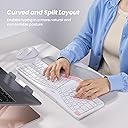
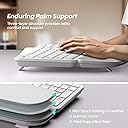
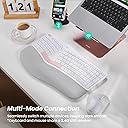
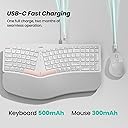
The Nulea KM75 Wireless Keyboard and Mouse Combo offers versatile multi-device connectivity (Bluetooth, 2.4G, wired), ergonomic design with memory foam palm rest and adjustable tilt, and a rechargeable battery system with power-saving auto-sleep. Compatible with Windows, Mac, and Android, it’s engineered for seamless productivity and all-day comfort.


| ASIN | B0F1T992MQ |
| Are Batteries Required | Yes |
| Best Sellers Rank | #1,144 in Computer Keyboard & Mouse Combos |
| Brand | Nulea |
| Color | A-White Pink |
| Compatible Devices | Laptop, Tablet |
| Compatible Operating System Family | Android, Windows |
| Connectivity Technology | Bluetooth, Usb |
| Customer Reviews | 4.0 out of 5 stars 82 Reviews |
| Item Weight | 1.95 Kilograms |
| Keyboard Backlighting Color Support | Single Color |
| Keyboard Description | Membrane |
| Keyboard Layout | QWERTY |
| Manufacturer | Nulea |
| Number of Batteries | 1 9V batteries required. (included) |
| Operating System | Mac OS, Windows XP |
| Other Special Features of the Product | Ergonomic |
| Power Source | Battery Powered |
| Special Feature | Ergonomic |
| Unit Count | 1.0 Count |
| Warranty Description | 1 Year |
V**Y
Comfortable
It’s beautiful, great if you type a lot.
W**1
Works great
Love my new keyboard.
G**Z
Functional
It works well keyboard is great
R**R
Good connection, badly designed space bar, keyboard difficult to get used to
Out of all the keyboard/mouse combos that I have tried, this ergonomic set stands out as one of the best, though there is room for improvement. Connections: The choice of connection standards is very flexible. You can choose to use the included dongle (found in the base of the mouse) that uses 2.4GHz RF radio signal (my recommendation), Bluetooth, or wired via a USB cable (USB C to USB C with USB A adapter is included for connection and charging). I did not experience any dropped connections while using this set (my computer is about 20 inches from the keyboard and mouse). Charging: Others have complained that the mouse or keyboard did not hold a charge. I charged the keyboard and mouse when I first opened the box and have not had to recharge them again several weeks later. Someone else complained that the keyboard is always on and draining the battery. This is not true. You may think so when you plug the keyboard in for charging, because the on/off switch seems to have no effect and the power LED is always on no matter whether the switch is off or on. This is only when the keyboard is plugged in for charging of when using a wired connection. Once you disconnect the keyboard then the power LED will turn off if the on/off switch is also in the off position. The Keyboard: The keyboard if fairly quiet, EXCEPT for the space bars. The space bars do not use the same key mechanism as the rest of the keyboard. They generate considerable noise when compared to the rest of the keys. It can take considerable effort to get used to a split keyboard. At first it does not seem natural at all, the key spacing doesn't seem quite right, but you will eventually get used to it. Having a built-in wrist wrest and four pop-out tilt legs helps. The Mouse: The mouse feels fairly good in my hand and it glides smoothly across my mouse pad. However, if you are going to buy an ergonomic split keyboard, I think the manufacturer should have spent some effort to develop a vertical mouse to truly ease the stress and pain of using a standard mouse. Summary: I recommend this keyboard/mouse combo, but be aware that it will take time to get used to the split keyboard. Pros: a) Ergonomic split keyboard (easy on your hands & wrists). b) Can be used wired (USB C cable with USB A adapter attached), wirelessly (Bluetooth and 2.4G RF). c) Rechargeable batteries built in (yeah)! d) A comprehensive and readable fold-out User Manual. e) Faux leather wrist wrest. f) Includes a set of 4 pop-out keyboard tilt legs. g) Multiple connection choices - 2.4G RF, Bluetooth, and wired (USB C to USB C with USB A adapter is included) Cons: a) Spacebar keys are very noisy when compared to the other keys. b) Split keyboard will take some time to adjust to.
N**O
Needs improvement
It worked great in the beginning, but now it’s starting to miscellaneous type on its own and formulate its own sentence. Also, the caps button doesn’t work. So all the words are in capitalized letters. I also have to push hard on the space. And some buttons I have to push multiple times for it to process..
M**M
Almost perfect but could use some clarification on instructions!
This rating is actually rounded up from a 4.5. The keyboard works perfectly. I previously had a PC with a Kensington split keyboard, which I loved, so I was looking to replace my Mac keyboard with a similar option. This definitely fits the bill. The split is comfortable, the wrist rest is nicely cushioned and the angle is perfect for me. The mouse is nice as well. It is quiet click, which I appreciate, and I've been able to program the accent buttons to improve my efficiency (show desktop, open specific app, show windows of the app I'm working on). No complaints here! The only drawback I've found, which is minor but annoying, is that the keyboard is deflated for Windows and it took me a couple of weeks to figure out how to change it to Mac. Now that I know how, yes it is obvious, but it was not included in any instructions and when I went to the Amazon page, there was nothing about that, either. Another similar complaint, I needed to connect it to bluetooth and while there is a very useful light on the face, the light has indicator symbols that match for the USB and 2.4G connections, however for some reason the bluetooth button doesn't have the same bluetooth symbol on it? I again had to go hunting for an answer for this. For those looking for the same answers: To switch the keyboard to Mac keys, you'll want to press Fn+Q. To turn on the bluetooth, you'll want to press the F3 button.
A**S
Missing pieces
The keyboard is missing the small UBS device to plug in that makes it wireless. It has a cord but that defeats the value of this style. The mouse came with its UBS device, but not the keyboard. I can see where it was originally, but it appears to have Ben removed before delivery. Very disappointing.
J**A
Great All Around Set with 3 Connection Modes
I am in love with this keyboard and mouse set! As a first time user of split keyboards, this is a great starter keyboard set. As a keyboard enthusiast who has around 10 keyboards at home ranging from entry level keyboards to high end gaming keyboards, what I care about is mainly a few things for generic-purpose keyboards like this one: -Keyboard response -keycap placement (experience will vary on how big your hands are) -Sound (Cannot bother people at home or in office) -Whether there is PrtScn key -Whether there is Fn lock key -Needs to look good with my setup -Has indicator lights to show which mode I'm on -Needs to connect via bluetooth, USB and Wired Well I'm glad to say that this keyboard hits al of those points! I especially like the wrist rest--it feels so much better than buying one separately since it's custom for this keyboard, and the touch is not too hard, and not too soft. Not sure about durability like other reviewers mentioned, but I type very lightly like playing a digital piano, and have never broken any keyboards, so I guess it depends on what kind of typer you are.
A**R
Aesthetically beautiful set, with nice features and a great price-point
I’ve been using this keyboard for about a month. I already have a smaller portable "split" design keyboard like this one for my phone, so getting used to this one was not as difficut for me, as it might be for other people who are accustomed to a more conventional keyboard design. If this style is new to you, just be aware there might be a little learning curve. Overall, this is a lovely keyboard. Aethetically, it's dowrnight beautiful (and the unboxing "experience" is something worthy of posting online). It's white and pink with a touch of grey -- very modern. But the build quality is also excellent. It feels solid and well-made, with a matte finish that resists fingerprints. Gorgeous. It has a soft-ish, built-in wrist rest. The keys are also soft and nicely responsive. Good tactile feel; makes typing a bit more fun. That said, they’re louder than I expected for a non-mechanical keyboard — more of a plastic clack than a soft tap — so if you're sensitive to noise, it's worth keeping in mind. The mouse fits well in my hand. It's comfy even after using it for a while. It may feel a bit bulky if you’re used to a sleeker mouse like Apple’s, and it does NOT have touch scrolling -- which might be important to some folks. It's got multi-device connectivity, which is great. I can connect to my laptop, tablet, and even my phone via Bluetooth. Options include a 2.4GHz dongle, or a wired USB-C connection. Both the keyboard and mouse are rechargeable, which I love. You can even charge while using them via USB-C, so there's no proprietary cord (which I hate). There's no battery-level feature on this as far as I can tell (via software), but that's okay. A couple of things I’d change if I could: I’d love a detachable wrist rest for cleaning or storage, especailly since this is white and will likely get grimy fast. I also wish it had backlit keys, especially for low-light work. But honestly, those are just nice-to-haves. For the price point and the aesthetics, this is a killer combo.
P**.
Decent set at a decent price
I like the ergonomics of the keyboard, it's quite comfortable but it did take a bit of time for me to get used to the slanted design. It's also cool that you can have it wired or wireless via dongle or bluetooth and it's easy to switch between the different options. The USB-C connectivity allows for quick charging and the batteries in both items seems to be more than adequate. Really solid for the money. I have to say that this setup isn't great for gaming. It's definitely designed much more for productivity. Also if buying as a gift you may want to make sure your recipient is a fan of the ergo-style slanted keyboard design. It's kind of a love or hate it feature in a keyboard. If these things aren't a concern for you give it a shot!
Z**S
A Reliable and Comfortable Combo – Perfect for Programmers and Power Users Alike
As a computer programmer with over 30 years of experience, I’ve gone through my fair share of keyboards and mice—but the Nulea Advanced Ergonomic Keyboard and Mouse Combo has genuinely impressed me. After two weeks of daily use, I can confidently say this set delivers on both form and function. The build quality is excellent—the materials feel solid and well-crafted, with a smooth matte finish that resists fingerprints. The clean white design adds a modern, professional look to my workspace. Typing on this keyboard is a pleasure. The ergonomic layout and built-in palm rest make long coding sessions much more comfortable. It feels natural and well-balanced, which reduces wrist strain over the course of a long day. The mouse is equally impressive: it fits comfortably in my hand and remains responsive and comfortable even after hours of use. One standout feature for me is the multi-device connectivity. I regularly switch between my desktop, laptop, and Android tablet, and the transition is seamless—thanks to the dual Bluetooth and 2.4G options. I haven’t had a single hiccup with connectivity so far. It's incredibly convenient and really adds to my productivity. Another big plus is the fact that both the keyboard and mouse are USB-C rechargeable. No more hunting for batteries or losing momentum mid-project. A full charge lasts a long time, and when it’s time to recharge, it's quick and painless. Overall, this combo hits the sweet spot for functionality, comfort, and style. It’s rare to find a setup that feels this good out of the box and continues to deliver after hours of daily use. For anyone in software development or other desk-intensive work, I highly recommend giving this set a try. It’s a solid investment in comfort and efficiency.
M**4
Beautiful ergonomic keyboard and mouse set
NULEA's ergonomic keyboard and mouse set is built perfectly to help reduce fatigue and strain. I love the pretty design that made me want to jump to my desk to get work done. It's white, pink and a little hint of grey design is beautiful and most importantly really felt great on the body to get my work done. They guarantee their design and encourage you to try it out a d if you don't like it after 180 days, they want you to contact them to find something else that you love (although I doubt you will have to ever talk to them because this set is perfect). It was easy to connect to my notebook and came with a charging cable that works for both the mouse and keyboard. My only thing I wish it came with which is completely unnecessary, is a backlight display color changing display, but that is gimmicky and doesn't affect the actual performance of the unit a d just my preference not a requirement. For what it is, it is a great value and elevates any office.
P**L
It's ok overall but keys are way noisier than expected.
This keyboard works nicely. The fact that the wrist pad up front is molded with the keyboard makes this a nice thing, but probably a not so nice thing in the long run. Those things tend to break and on my other keyboards, I could go through a few of those pads before having to change the keyboard. It's pretty much the same for cleaning, with the light colors, you can take it out to wash in since it's with the keyboard. You can still use a wet cloth but have to pay attention not to get water and soap inside the keyboard. It is simple to setup, you have a sync button on the mouse but not on the keyboard. I had to look it up in the instruction to find that you have to press FN+F3 to sync using bluetooth. Why no sync button? no clue, it's weird... but once it's synched you don't have to worry about this again. The there's the major issue, the noise... I'm used to having some noise, my main desktop keyboard is mechanical. I did not measure the decibel to compare but I can say that for a non-mechanical keyboard, the plastic sound that it makes it really annoying and loud. I was expecting a laptop kind of level of noise, but this is much noisier than that. Many people don't mind the keyboard noise so it's up to you to know if this is an important part of what you are looking for. As of the ergonomic element, you do have to get used to it, like most of the times when you change keyboard configuration, but I have used old wired ones with this split and always liked it a lot.
Trustpilot
3 days ago
5 days ago