Desertcart purchases this item on your behalf and handles shipping, customs, and support to Seychelles.
๐ก Light up your worldโno soldering, no limits!
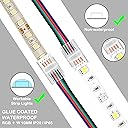
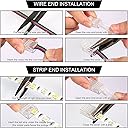
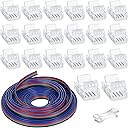
This 20-pack set includes clear, solderless 4-pin LED strip connectors plus a 16.4ft tinned copper wire extension, designed for quick, stable connections with 10mm LED strips and 22AWG wires. Compatible with 5V to 24V systems, it eliminates the need for soldering or insulation removal, making it perfect for professional-grade, customizable lighting installations in homes and offices.


| ASIN | B09Y8W7FVR |
| Brand | Zhengmy |
| Colour | transparent |
| Control Method | App |
| Controller Type | Button remote control |
| Customer Reviews | 4.2 out of 5 stars 413 Reviews |
| Enclosure Material | Copper |
| Included Components | 1 x LED wire extension, 20 x LED light connectors, 1 x connector lever |
| Indoor Outdoor Usage | Indoor |
| Indoor/Outdoor Usage | Indoor |
| Item Length | 16.4 Feet |
| Item Weight | 159 g |
| Light Color | White |
| Light Source Type | LED |
| Manufacturer | Zhengmy |
| Manufacturer Part Number | Zhengmy-Strip -11 |
| Model number | Zhengmy-Strip -11 |
| Number of Items | 20 |
| Number of Lights | 20 |
| Occasion | Christmas |
| Power Source | Corded Electric |
| Product Features | Clear, Solderless |
| Product Style | Compact |
| Special Feature | Clear, Solderless |
| Theme | Interior |
| Wattage | 72 Watts |
G**Q
Worked great on 2815 LED Strips
These worked great on 2815 LED strips. They make a solid connection on both the strip and to the wire. Need to make sure you line up the LED Strip connector. It bites in really solid, cuting into the connection. Not recommended if you want to only make a temporary connection as it bites into the pads on the LED Strip.
J**N
Works with WYZE Light Strip Pro
These worked perfectly for my WYZE Light Strip Pro! I've never worked with LED strips or connectors before, so if I can do it, you can too! IMPORTANT!! Make sure you either unplug the light strip from the wall outlet entirely, or at least the one strip that you are working on! First, cut the WYZE strip at one of the cut marks and carefully peel back the waterproof covering from the strip (see video) until you have enough to put into the connector. Slip the strip into the connector end (that doesn't have the three hole openings in it), and slip it in on the flat side away from the metal contacts. That way, when you close the connector end, the metal pieces will pierce the strip and make contact with the copper inside the strip. Then, take the red/green/white wire that comes with this and pull apart the three wires about half an inch or so, then put them into the other side of the connector (that has the three holes in it; see picture), then close that connector end. Do this same process with the other end. Note that you MUST make sure you match the colored wires to the strips on each end. So if the red wire is connected to the strip where it says "GND" on one end, then you need to make sure the red wire on the other end is connected to the "GND" of the other strip. I then reconnected the WYZE strip, and it worked the first time! The lights still cycle in the different modes (wave, flicker, etc.) as if the strip was connected normally. Really happy these worked out! It really wasn't difficult once I did it the first time. Hope this helps someone else!
I**S
Easy to connect
Very easy to make ยฐ90 corners.
G**.
Hooked them up in a snap
I bought these for a high school robotics team to be able to hook up LED strips in a robot used for the First Robotics competition. They struggled with cutting the pads and soldering wires to run them from one part of the robot to another. These snap on connectors turned an hour long struggle to a 10 minute breeze. I would recommend them to anyone! I have been a senior electronics tech for 38 years and I am going to retire my soldering iron for this task.
A**R
Easy to use.
This is a superior clip and easy to use.
Trustpilot
2 months ago
2 weeks ago