Desertcart purchases this item on your behalf and handles shipping, customs, and support to Seychelles.
⚡ Upgrade Your Home Network to Future-Ready Wi-Fi 6 Power!
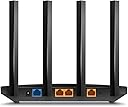
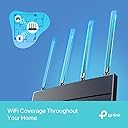
The TP-Link Archer AX12 AX1500 is a Wi-Fi 6 dual-band router delivering up to 1.5 Gbps speeds with advanced MU-MIMO and OFDMA technology. Equipped with 4 antennas and Beamforming, it ensures strong, reliable coverage for 2-3 bedroom homes. Easy to set up via the Tether app and secured with WPA3, it supports 15+ devices simultaneously while optimizing battery life with Target Wake Time.


| ASIN | B0C4SN9V5K |
| Antenna Location | Home and Small Business |
| Antenna Type | Fixed |
| Best Sellers Rank | #739 in Computers & Accessories ( See Top 100 in Computers & Accessories ) #13 in Routers (Computers & Accessories) |
| Box Contents | Wireless Router Archer AX12, Power Adapter, RJ45 Ethernet Cable, Quick Installation Guide |
| Brand | TP-Link |
| Brand Name | TP-Link |
| Colour | Black |
| Compatible Devices | Gaming Console, Personal Computer, Security Camera, Smartphone, Tablet |
| Connectivity Protocol | Wi-Fi |
| Connectivity Technology | Ethernet, Wi-Fi |
| Control Method | App |
| Controller Type | Push Button |
| Country of Origin | China |
| Coverage | 2-3 Bedroom Houses |
| Customer Reviews | 4.4 out of 5 stars 2,481 Reviews |
| Data Transfer Rate | 1201 Megabytes Per Second |
| Frequency | 5 GHz |
| Frequency Band Class | Dual-Band |
| Global Trade Identification Number | 04895252500875 |
| Has Internet Connectivity | Yes |
| Importer Contact Information | TP-Link India Private Limited Office No.1, Tower 2, Level 2, Raiaskaran Tech Park, Andheri Kurla Road, M.V Road, Andheri East-400072 Contact: Toll Free 1800-209-4168, [email protected] |
| Is Electric | Yes |
| Is Modem Compatible | Yes |
| Item Dimensions L x W x H | 11.7L x 21.5W x 3.2H Centimeters |
| Item Type Name | Router |
| Item Weight Unit of Measure | 150 Grams |
| LAN Port Bandwidth | 10/100/1000 Mbps |
| Manufacturer | TP-Link, TP-Link Systems Inc. 10 Mauchly, Irvine, CA 92618, USA or TP-Link India Private Limited Office No.1, Tower 2, Level 2, Raiaskaran Tech Park, Andheri Kurla Road, M.V Road, Andheri East-400072 |
| Manufacturer Contact Information | TP-Link Systems Inc. 10 Mauchly, Irvine, CA 92618, USA or TP-Link India Private Limited Office No.1, Tower 2, Level 2, Raiaskaran Tech Park, Andheri Kurla Road, M.V Road, Andheri East-400072 |
| Manufacturer Part Number | Archer AX12 |
| Maximum Upstream Data Transfer Rate | 1500 Megabits Per Second |
| Model Name | Archer AX12 |
| Model Number | EX1500 |
| Number of Antennas | 4 |
| Number of Items | 1 |
| Number of Packs | 1 |
| Number of Ports | 3 |
| Operating System | RouterOS |
| Other Special Features of the Product | Beamforming, Gigabit Ports, Parental Control, QoS, WPA3 Security |
| Packer Contact Information | Pacific Technology Private Limited Survey No, 57/3/55, 57/2/56, 57/1/57, Silver Industrial Estate, village Bhimpore, Nani Daman, daman Dadra and Nagar Haveli and Damn and Diu, India 396210 |
| RAM Memory Installed | 256 GB |
| Router Network Type | Hybrid |
| Security Protocol | WPA2-Enterprise, WPA2-PSK, WPA3 |
| Special Feature | Beamforming , Gigabit Ports, Parental Control, QoS , WPA3 Security |
| Unit Count | 1.0 Count |
| Voltage | 240 Volts |
| Warranty Description | 3 Year Manufacturer |
| Wi-Fi Generation | Wi-Fi 6 |
| Wireless Communication Standard | 802.11ax |
| Wireless Compability | 802.11ax |
A**R
Great value at affordable price
Great piece of equipment with easy setup, ability to remotely control and monitor with many different features. The range is great and the speed is also very good, ideal for any 100 to 200 mbps connections. Some options are there to improve wireless connectivity, make sure to turn them on.
G**S
Great Connection strength.
Best in class. Hands down. No issue. You should go for it. If u need a long ping connection with no packet loss.
A**K
Purchase it without hesitation!
Good product! OK price! But it could have been a little down! Purchased it to upgrade and future proof my Home Central WiFi! It was a massive upgrade from my decade old N300 Router! There are few Downsides to it which I noted! 1. Boot Up Time is very slow! It takes nearly 5-7 Minutes to Switch On and Connect to the WAN. My older N300 would do that only within 45 seconds. May be that's the technology today! 2. No significant difference with Beamforming and OFDMA switched ON. Speed and Connectivity remains same as before! 3. The LED lights are positioned in such way that if you hang the router in the wall, you cannot see it unless you have an Eagle's Eye. So keep it turned off! 4. Manufacturer supplied a CAT 5E (28 AWG) patching cable with it. At this pricepoint they could have considered a CAT 6 cable easily. Again personal opinion!
S**R
Must have if you have a high speed Broadband!
Exceptional performance. Feature loaded. Great coverage area. Ease of installation. Added plus is the app which helps you navigate through the installation process. Recommended.
A**G
Excellent Work TP-LINK ✌🏻
Excellent router by TP-LINK!! Excellent coverage with excellent top notch speed throttled to the highest speed of the package you opt for your internet connection. System is cool at highest connection without any drop. If you want to experience the premium speed then definitely go for it. TP-LINK excellent job! ✌🏻
M**N
Good Router
Good router range is good
S**F
Strong signal throughout
Working great as mentioned in the description. Easy to setup!
L**S
Good Speeds, but Average range on 5ghz.
Gigabit Speeds are an awesome given on 5ghz, but the range on 5ghz is just OK. It won't get through one room's wall without a significant drop in range (especially if you have a device like a smart tv in the other room, as tv 5ghz adapters are not as capable as a smartphones or laptops). However, the 2.4 ghz range is very good. The AX wifi 6, allows for good 2.4 ghz THROUGHPUT, way better than legacy 'N' wifi 4, 300 mbps routers. Meaning that despite limits of upto100 mbps speeds on 2.4ghz, this AX will give you uninterrupted 4k streaming performance on 2.4ghz. You won't need 5ghz for further away devices. Set up is easy, i got a pair. Using One as router, other as acess point. Tplink theter app is a piece of confusing junk. Just use android or windows Chrome to setup using its default ssid/password on the back sticker, and subsequently to login to your router, use 192.168.0.1 for device configured as Router and tplinkwifi.net for device configured as access point. I find using "auto connect" ( router chooses band for your devices automatically) is fantastic and convenient. NOTE: on android/windows chrome browsers if tplinkwifi.net page opening gets disallowed, due to chrome inbuilt security policy, simply clear the chrome browser history and refresh.
F**I
Great Wi-Fi router.
Working great. Had lo load app to create network, but then it was ok.
A**R
Good quality
Work hundred percent. Good value for money
Z**D
Ich empfehle Ihnen
Ein Gerät, das gut funktioniert
G**C
Kolay Kurulum, Mükemmel Hız, Wifi Genişletme ve Ethernet Kablosu Çoklayıcı
Kurulumu kolayca yapabildim, cihazı fişe takıp uygulamadan veya tplinkwifi.net adresine giderek cihazın kurulumunu yapabilirsiniz. Benim kurduğum sistemi ve kurulumu anlatayım, büyük ihtimal siz de aynı amaçla bu ürünü alıyorsunuz. Ana modemden gelen ethernet kablosunu bu cihaza bağlayıp eski olan modemin yetersiz wifi gücünü bu modemle arttırmayı hedeflemiştim ve çok başarılı oldu. Ethernet ile fiber modemimden gelen ethernet kablosunu arka odaya yerleştirdiğim TPlink archer ax1500 modeline bağladım, ayrıca bu modemin diğer girişlerinden de o odadaki masaüstü bilgisayara ve bir tane daha cihaza ethernet kablosuyla internet veriyorum. Wifi bağlantısını da telefonlar için kullanıyorum. 1000megabit/saniye indirme genişliğine sahip fiber interet var. Wifi üzerinden eskiden 20megabit/saniye hız gören odalar şu anda 250megabit/saniye. modemin bulunduğu oda ve yakın odalar 600megabit/saniye (saniyede 75-80 megabyte) hızları stabil şekilde alıyor. Kurulum için: (tplink tether uygulamasından yaparken hatalarla karşılaşanlar için kolay yöntem) 1 - Cihazın mavi renkli portuna modeminizden gelen kabloyu takın.Eğer bu modeme gelen interneti ethernet çoğaltıcısı olark kullanacaksanız lan1 lan2 yani sarı renkli portlara ethernet çıkış kablolarını takabilirsiniz. 2 - Cihazı fişe takınız, ve taktıktan sonra 10 saniye reset tuşuna basılı tutunuz. Tuştan elinizi çekiniz, 10-20 saniye sonra cihazın arkasındaki wifi ismi ve parolasını kullanarak bağlanınız. Tuşa basılmasının sebebi bu modemin access point modunda kullanılmesi ve bağlı olan ethernet kablolarını dağıtım için kullanılabilmesi için kurulum moduna geçiriyor. 3- Bağlandığınız cihazın internet tarayıcısından tplinwifi.net adresine gidiniz, google vb sitelere giremezsiniz fakat bu adrese ulaşabilirsiniz, yani internet yok diye girmemezlik yapmayın. 4- wifi parolasnı girin. 5 - Kurulum adımlarında ilk sayfada Dynamic IP, ikinci sayfada "Use default Mac Address" seçiniz, sonraki adımda ise mevcut evinizde bulunan wifi'in ismini ve parolasını giriniz. Smart connect seçeneği açık bırakınız. Bu sayede hangi odada bu cihaz çok çekiyor ise öncelikle bu cihaz kullanılacak, ve tek wifi bağlantısı üzerinden sizi otomatik 2g veya 5g üzerinden bağlayacak. 6- Bu adımı tamamladıktan sonra kurulum başlayacak ve bir sonraki sayfaya yönlendirleceksiniz, bu sayfada yine wifi parolası soracak veya devam etmenizi isteyecek. bu sayfaya geldiğinizde wifi bağlantınızın bağlı olduğundan emin olun ve sonrasında devam ete basın. 7 - Kurulum tamamlandı. 8 - Telefonunuza Tplink tether uygulamasını kurarak cihaza kimin bağlandığıyla ilgil ibildirim alabilir veya gerekli ayarları kolayca yapabilirsiniz.
M**Z
worth the money spent
works like a charm
Trustpilot
3 weeks ago
1 month ago