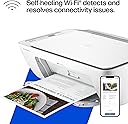
🖨️ Print smart, live smart — your all-in-one home office MVP!
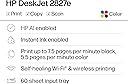
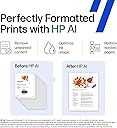
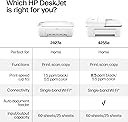
The HP DeskJet 2827e is a compact all-in-one inkjet printer designed for home use, offering wireless printing, scanning, and copying. It delivers up to 7.5 ppm in black and 5.5 ppm in color, supports mobile printing via the HP Smart app, and includes 3 months of free Instant Ink with HP+ activation. Built sustainably with 60% recycled plastic and Energy Star certified, it combines eco-conscious design with professional-quality output and user-friendly features.


| ASIN | B0F1NJ75D5 |
| Additional Printer Functions | All In One |
| B&W Pages per Minute | 7.5 ppm |
| Brand | HP |
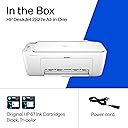
| Built-In Media | HP DeskJet 2827e All-in-One; HP 67 Setup Black Cartridge; HP 67 Setup Tri-color Cartridge; Regulatory flyer; Setup guide; Reference guide; Power cord [For ink volume and page yield information, visit http://hp.com/go/learnaboutsupplies ] |
| Color | White |
| Color Depth | 24 |
| Color Pages per Minute | 5.5 ppm |
| Colour | White |
| Compatible Cartridge | HP 67 Black Original Ink Cartridge 3YM56A; HP 67XL Black High Yield Original Ink Cartridge 3YM57A; HP 67 Tri-Color Original Ink Cartridge 3YM55A; HP 67XL Tri-Color High-Yield Original Ink Cartridge 3YM58A |
| Compatible Devices | Laptops, PC, Smartphones |
| Connectivity technology | Apple AirPrint; Google Cloud Print; USB; Wireless (Wi-Fi); Wireless direct printing |
| Control Method | App |
| Customer Reviews | 3.9 out of 5 stars 5,394 Reviews |
| Display Type | LED |
| Dual-sided printing | No |
| Duplex | Manual (driver support provided) |
| Hardware Interface | USB |
| Initial Page Print Time | 19 Seconds |
| Ink Color | Black; Cyan; Magenta; Yellow |
| Item Dimensions D x W x H | 30.4D x 42.4W x 15.4H centimeters |
| Item Type Name | Inkjet printers |
| Item Weight | 3.42 Kilograms |
| Manufacturer | HP |
| Maximum Copies Per Run | Up to 9 copies |
| Maximum Copy Resolution Black and White | Up to 1200 x 1200 rendered dpi |
| Maximum Copy Resolution Color | Up to 4800 x 1200 optimized dpi color |
| Maximum Copy Speed Black and White | 6 ppm |
| Maximum Media Size | 3 x 5 to 8.5 x 14 in |
| Maximum Print Resolution Black and White | Up to 1200 x 1200 rendered dpi Dots Per Inch |
| Maximum Sheet Capacity | 60 |
| Maximum print Resolution Color | Up to 4800 x 1200 optimized dpi color (when printing from a computer on selected HP photo papers and 1200 input dpi) Dots Per Inch |
| Model Name | HP DeskJet 2827e All-in-One Printer |
| Model Number | 6W7F5A#B1H |
| Model Series | DeskJet |
| Model name | HP DeskJet 2827e All-in-One Printer |
| Number of Trays | 1 |
| Other Special Features of the Product | 60% post-consumer recycled plastic, Scan to PDF |
| Output sheet capacity | 25.0 |
| Paper Size | 8.5 x 11;8.27 x 11.7;8.5 x 14;7.16 x 10.12; |
| Power Consumption | 2.8 Watts |
| Print media | Paper (plain) |
| Printer Connectivity Type | Apple AirPrint; Google Cloud Print; USB; Wireless (Wi-Fi); Wireless direct printing |
| Printer Output Type | Color |
| Printer Type | HP Thermal Inkjet |
| Printing technology | HP Thermal Inkjet |
| Processor Count | 1 |
| Resolution | 4800 x 1200 |
| Scanner Type | Flatbed |
| Special features | 60% post-consumer recycled plastic, Scan to PDF |
| Specific Uses For Product | Home and home office |
| Total Usb Ports | 1 |
| UPC | 198990334097 |
| Wattage | 100 watts |
L**N
My take
Perfect all-in-one printer for home use. I only had one issue with it; after several months of not using it, I went to print something and it wouldn't work. After googling the error code, it turns out the driver was no longer available. After several hours of trying to fix it myself, I contacted HP support (I was still under warranty), and after allowing the tech remote control of my laptop, they were able to reinstall the driver and my printer is once again working like a charm. From my very first use, wireless connectivity was a breeze, the printing and scan quality is perfectly fine, I haven't experienced any jams -- no issues at all other than the driver problem. Which probably never would have been a problem if I hadn't gone four or five months without using the printer.
R**I
Happy with my purchase
You know how printers sometimes just stop working and start giving you issues for no reason? This one doesn’t! It has been super reliable thank God. No random errors, no connectivity headaches. It prints, copies, and scans with ease, and the wireless setup was straightforward. Definitely a printer you can count on without the usual printer drama.
K**.
Power Cord Did Not Fit
I ordered the 2827e but 2800 was delivered. Apparently not much difference after research but it should have been mentioned in product info. Right off the bat there were problems. The power cord was too loose and fell right out of computer. That was kind of unbelievable . I had to use power cord from old printer which did fit better but could have been a little more snug. I had the other printer ( HP) because after 3 years it quit connecting to WiFi and hours spent trying to get it hooked back up.were fruitless. Apparently it is a known HP issue but not corrected by HP. New printer very easy to set up to WiFi once I got the power to cord to stay in. Unfortunately I could not get it to connect to desktop. I had to pay a tech support person and it took him a little bit of time to do that. From reading reviews on Amazon it seems like printer won’t work if you opt out of HP printer ink program. That seems like it should be a disclaimer in all Amazon ads for HP printers if accurate and not in tiny print somewhere it won’t be noticed. It seems to working fine after all the set up problems but don’t have much trust in HP products anymore and wouldn’t recommend them. First HP printer wouldn’t connect to WiFi after three years . Hope this one makes it theee years. .
N**E
Imprimante à jet d'encre
Bon produit pour qui un bac pour papier n'est pas important
J**Y
Perfect printer for at home use!
Perfect affordable printer for at home use! It was super easy to set up. HP support has a video on their YouTube channel of how to set it up, and it was really straight forward. After you take off the tape and plastic liners, it has you download the HP app and the app guides you through setting up the WiFi, paper, & ink. Overall from unboxing to printing my first sheet, it probably took about 15-20 minutes. Setting up my WiFi and connecting to my phone was a breeze. I don’t have a computer so I was worried about finding a printer that could easily print from my phone, but this was very simple and easy to do. I was able to print documents directly from my files, as well as photos from my photo app. It takes a little less than 30 seconds per sheet, which isn’t bad for an at home printer, but could be slightly irritating if you’re printing over 50 pages at a time. The ink is great, prints pretty true to color. The black is saturated, and the colored ink is slightly less vibrant but that’s not an issue for me personally. I added a photo of what it looks like printing via the HP app, as well as the printed page afterwards. As you can see, the black is nice and saturated, the red is slightly less saturated but nothing bad, and it prints very accurately. This is perfect for my homeschooling needs, & for less than $40 I’m very happy with it. Pros : - printer and copy machine in one - comes with ink both black and colored - black ink is nice and saturated - an additional 3 month free trial to their ink subscription - after the trial the ink subscription isn’t very expensive either which is great. - 1 year warranty included - affordable printer (bought on sale for $35) - set up took less than 20 minutes start to finish - prints fast enough for at home use - can print straight from my phone, either from files or photo library Cons : - colored ink is slightly dull, but not too bad as long as you’re not printing actual photos. - the print speed could be an issue for you if you’re printing over 50 pages at a time
Trustpilot
3 days ago
4 days ago