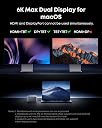
⚡ Elevate your workspace with the ultimate 14-in-1 Thunderbolt 5 powerhouse!
The Anker Prime TB5 Docking Station is a premium 14-port Thunderbolt 5 hub delivering up to 140W charging, ultra-fast 120Gbps data transfer, and dual 8K@60Hz display support. Designed for professionals and power users, it combines extensive connectivity options with an advanced cooling system to keep your setup sleek, efficient, and future-ready.


| ASIN | B0DSVVJXK5 |
| Brand | Anker |
| Brand Name | Anker |
| Colour | Gray |
| Compatible Devices | MacBook with M4 Standard/Pro/Max; MacBook with M1/M2/M3 Pro/Max; Thunderbolt 5/4 Windows Laptops |
| Compatible devices | MacBook with M4 Standard/Pro/Max; MacBook with M1/M2/M3 Pro/Max; Thunderbolt 5/4 Windows Laptops |
| Customer Reviews | 4.2 out of 5 stars 431 Reviews |
| Hardware Interface | Thunderbolt |
| Hardware interface | Thunderbolt |
| Item Dimensions L x W x H | 6.2L x 4.7W x 23.2H centimetres |
| Item Weight | 1.08 kg |
| Manufacturer | Anker |
| Manufacturer Part Number | A83B51A1 |
| Model Number | A83B5 |
| Number of Items | 1 |
| Number of Packs | 1 |
| Number of Ports | 14 |
| Product dimensions | 6.2L x 4.7W x 23.2H centimetres |
| Total HDMI Port | 1 |
| Total USB Ports | 8 |
| Total USB ports | 8 |
| UPC | 194644289171 |
| Unit Count | 1.0 count |
| Wattage | 140 |
D**E
Fast, Reliable, and Expensive
I’ve gone through a few docks over the years, and the Anker Prime TB5 Docking Station is easily the most capable one I’ve used so far. Setup was straightforward, and it immediately handled everything I threw at it — dual displays, fast data transfer, and consistent charging without hiccups. If you’re running a modern setup (especially with a newer MacBook or high-end laptop), this dock actually feels like it’s built for it, not something you’re trying to “make work.” What stood out most: • Performance: No lag, no weird display issues — everything just works • Ports: Plenty of flexibility without needing extra hubs • Build quality: Feels premium and solid, not plasticky • Power delivery: Keeps my laptop charged even under heavy use Also really appreciate how it helps clean up the desk. One cable in, everything connected — exactly what a dock should do. A couple minor considerations: • It’s not cheap, but you’re paying for performance and future-proofing • Make sure your laptop actually supports Thunderbolt at full capability to get the most out of it Overall, if you want a high-performance, no-compromise dock, this is one of the best options out there right now. Worth it if your setup demands it.
C**X
Must have for the work professional
This is a must have, I use it for a few different laptops I have (personal, work), the docking station works amazing, tooka bit of tinkering as there is only really one display port and i had to use one of the USB c ports on the back to connect a secon monitor up, but in the end once i did a bit of research and got the correct cable, it works amazing.
T**K
Recommended
Works as advertised and great. I also have the UGreen and this dock is more reliable than it.
D**E
Works well with TB4/TB5 Windows 11 laptops
I was initially worried about dropping this much money on a dock that needs to work with two different Windows laptops (a Dell and an Alienware). I needed something that could power the Dell and drive video to two monitors, but also support peripherals. (For the Alienware, I didn’t care about power delivery.) I have to say, it was easy to set up and worked without a fuss. The only “fuss” was needing to find a USB-C to Displayport adapter since there is only one HDMI/DP output (and you have to choose), but I didn’t need to do any fiddling to get the USB webcam, mouse, two monitors, keyboard, and SSD connected to either laptop. Anker has pretty much cornered the market for me on peripherals, chargers, and power banks. I think if I were needing to connect more monitors, I would be very annoyed with the limited options, but as I knew what I was getting ahead of time and only need the two displays (plus the laptop screens), I don’t feel like it warrants knocking a star off for that. The build quality feels solid and looks stylish, which is par for the course for Anker, and i love the way it looks. A bit steep of a price, but it sure beats the pants off of the old Dell TB dock I was using and feels more premium, too. I haven’t had any issues with heat or noise, and while it’s a fairly chunky unit, it sits rather securely in the desk and doesn’t take up much real estate.
O**E
Super-fast TB5 and USB-C ports, stylish, but terribly slow microSD and SD speed
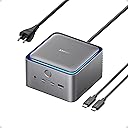
The best part about the Anker Prime TB5 dock is style. It looks really good on your desktop, unlike all the other docks you find which are just ugly. It also stays quite cool, although I don't use it to charge anything, just for data transfers. Function-wise, it has 2 downstream TB5 ports, meaning you can connect to up to 2 external drives or up to 2 external monitors via these TB 5 ports. It also has 2 USB-C 3.2 ports as well as 3 USB-A 3.2 ports, as well as 2.5Gbps Ethernet. Two video ports, one HDMI and one DP, are provided but you can only use ONE of the two at a time, not both simultaneously. The HDMI and DP one-or-the-other choice is one of the compromises Anker has made regarding this dock; the other compromise is more unforgiving given its price (unless the high price is explained by Trump's tariffs): the microSD (TF) and SDXC slots are only UHS-I with up to 104Mbps speed, which is 1/3 of what you get with fully compliant UHS-II SD slots. You can get a Mac-compatible strip hub with full UHS-II support for like 30 bucks, so it's unforgiving of Anker to include such lowly SD support in such an expensive dock. All in all, though, this is a worthy docking station because it looks pleasing! When you work hard in front of your Mac and multiple monitors, an eye-pleasing dock makes life more enjoyable. The LED light is more of a gimmick but maybe you're into these things so that's a plus in some way. The USB ports all perform as advertised, and the overall build quality is excellent, too. Comes with a very high-quality TB5 cable. BTW, it doesn't come with a manual but you can scan a QR code to get the manual online. It mostly deals with how to set up multiple monitors for Macs and other OSes. UPDATE (05.20.2025): Earlier this month I encounted, several times, an issue whereby after waking up from sleep, the SD and microSD slots are no longer functional; the dock needed to be turned off and back on to fix this (using the power button at the front). Originally I suspected it to be a bug with the docking station; later, when I restarted my MacBook, the problem went away and the SD slots have been working consistently since. So I'm bringing the rating back to the original 4 stars. Overall I'm happy with the performance of this dock -- save for its slow SD readers. As you can see from one of my attached photos, I actually use a Lexar UHS-II SD/microSD reader for my SD data transfer needs, as it's more than thrice (!) as fast as this dock's built-in reader.
Trustpilot
2 weeks ago
2 weeks ago