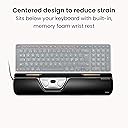
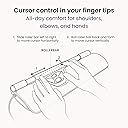
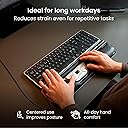
🖱️ Elevate your workspace—where precision meets pain-free productivity!
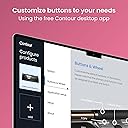
The Contour Rollermouse Red is an award-winning ergonomic mouse featuring a durable aluminum frame, 7 programmable buttons, and 2400 DPI optical precision. Designed for professionals, it includes a detachable leatherette wrist rest and adjustable keyboard risers to minimize strain during long hours. Compatible with Windows and Mac, it offers customizable cursor speeds and centralized shortcut functions to enhance efficiency and comfort in any workspace.


| ASIN | B00DE83RSC |
| Antenna Location | General Computing |
| Are Batteries Included? | No |
| Are Batteries Required | No |
| Best Sellers Rank | 118,337 in Computers & Accessories ( See Top 100 in Computers & Accessories ) 2,206 in Mice |
| Brand | Contour |
| Brand Name | Contour |
| Button Quantity | 7 |
| Colour | RED |
| Compatible Devices | Personal Computer, Tablet |
| Connectivity technology | USB |
| Customer Reviews | 4.6 out of 5 stars 284 Reviews |
| Embellishment Feature | LED |
| Enclosure Material | Aluminum |
| Global Trade Identification Number | 00743870006610 |
| Hand Orientation | Ambidextrous |
| Hardware Platform | Personal Computer |
| Included Components | USB cable |
| Item Dimensions L x W | 40.6L x 10.2W centimetres |
| Item Weight | 0.82 Kilograms |
| Manufacturer | Contour Design |
| Manufacturer Part Number | RM-RED |
| Minimum Required Operating System Version | Mac OS 13 Ventura, Mac OS 14 Sonoma, Mac OS 15 Sequoia, Windows 11, Windows 7 |
| Model Name | M-RM-RED |
| Model Number | RM-RED |
| Mouse Maximum Sensitivity | 2400 Dots per Inch |
| Movement Detection | Mechanical Roller |
| Movement detection technology | Mechanical Roller |
| Network Connectivity Technology | USB |
| Number of buttons | 7 |
| Operating System | Windows, macOS |
| Product Features | High Precision Laser Technology, Programmable Buttons, Ambidextrous Design |
| Product Finish Type | Smooth Plastic |
| Product Warranty | 2 year manufacturer |
| Range | 33 feet |
| Special feature | High Precision Laser Technology, Programmable Buttons, Ambidextrous Design |
| Style Name | RED Wired |
| Theme | Ergonomics, Computer Accessories |
| UPC | 743870006610 |
| Unit Count | 1.0 count |
R**N
Pain = gone
Okay, so it's expensive, annoying to use (still learning), the click bar is noisy and too sensitive (even on least sensitive setting) but none of that matters. I have used various mice for the last 18 years both left and right handed. Then I switched to trackballs about 6 years ago which gave a small rest bite before the pain in both hands and arms was intolerable (despite switching hands on alternating days). Even so, I've suffered finger, elbow, wrist and shoulder pain for the last 10 years at least. The shoulder pain has got to be especially painful. Endless ibuprofen only took the edge off. One week of using the Re:d and all the pain is GONE. That's why it's worth the 5 star rating. Everything else is meaningless against that fact.
H**N
Great mouse
Truly best mouse for work ever made, I truly enjoy this newest member of RollerMouse family best from the earlier models.
M**H
Excellent ergonomic product, but......
I spend hours each day at a desktop computer, primarily coding and maintaining databases. I am 55 years old and have had issues in the past with wrist and finger problems from repetitive working with a mouse and keyboard and I am always looking out for ways to reduce this strain. I saw this on Amazon and purchased to see if it could further help reduce the discomfort experienced after regular 12 hour days at the computer. First impressions were really good - although the whole set-up is vastly different to using a normal desktop mouse, anyone who also uses a laptop trackpad will find this item very easy to get used to. The build quality is excellent and the overall user experience was really very good. It was immediately recognised when plugged into a KVM switch and worked almost flawlessly on both Windows and MacOS. The buttons are very well placed for ease of use and the rollerbar is smooth and accurate. The scroll wheel is one of the nicest and most fluid that I have ever used. However, there was one flaw that I couldn't get around and ultimately caused me to return this item within 48 hours of receiving. TBH, if the product was much less expensive I may have persevered longer, but a price of slightly over £350 means this is a VERY expensive mouse and needs to be perfect to justify that price. I found on multiple occasions that when scrolling horizontally on either a browser page or a DB management screen, if the scroll was extensive the cursor would suddenly scroll rapidly and completely uncommanded off of the right hand side of the monitor. A few times would have been inconvenient but when this happened multiple times in a few minutes, it became a situation where the product was unusable for me. It is a great pity as it was very comfortable to use in all other scenarios and certainly meant arm and wrist movement was reduced significantly by not having to leave the area of the keyboard every time a mouse input was required. I will keep my eye on this product and hope that in future it becomes more reliable for my particular use-case.
A**N
Takes a bit of getting used to, but very ...
Takes a bit of getting used to, but very effective in spreading the load across the hand. You can use this in combination with a mouse, but I dumped my mouse to ensure I'm adjusting to the new system You can click the roll bar, which surprised me. Im actually really looking forward to becoming an expert with this.
D**E
Very good, yet flawed for wide screens
This alternative to a mouse or graphic tablet is flawed if you intend to use it on high-resolution screens, or multi-monitor setups. The reason being the relative x-axis positioning used by the device. The ingenious roller can only travel 10cm, which, on my 27" iMac just covers roughly half the width of the screen. To "access" the other parts of the screen (either left or right), the RollerMouse uses a technique whereby you bump into its left or right limit, and then the mouse carries on, as if gliding on ice. This may be OK on small horizontal resolutions, like 1024 pixels, or 1280 pixels.. but when you hit 2560 pixels (my iMac), or even worse, when you have a dual-screen setup where total horizontal pixels is 4000+, then this solution becomes a pain. What the manufacturer should allow, is for absolute horizontal positioning, like some other mouse alternatives (e.g. WACOM's tablets). The manual of the RollerMouse is very light on details, and doesn't mention absolute/relatieve positioning anywhere in its few pages. I would have given this product 4/5 stars if it could give me absolute positioning, and dispense with the "mouse on ice" hack.
D**E
and is a little better than a regular mouse for pain reduction
I bought this through the keyboard company. It's a massively overpriced product that promises more than it can give. Contour also didn't respond to an email I had about a loose USB connection which caused it to disconnect if i move it around. For the price they ask for it should really be wireless. It is an ok mouse, and is a little better than a regular mouse for pain reduction, but its also harder to make very accurate clicks if you're doing graphic design work or any sort of clicking on things that requires fine control.
H**W
Excellent, intuitive to use.
Responsive, clearly marked, easy to use device, resolving a pain issue from broken bones in hand. Excellent.
D**N
High quality
Great product, high quality, eliminated shoulder pain from desk work
R**5
Très bon article pour soulager le canal carpien
Il y a un an et demi, j'ai commencé à ressentir des fourmillements dans les doigts, une faiblesse général dans la prise en main (je lâchais les choses que je pensais tenir et me trouvais de plus en plus maladroite). Les mois passant, j'ai ressenti de grosses douleurs aux articulations dans les deux mains le matin au réveil : impossible de fermer les poings avant plusieurs minutes. J'ai consulté et on a suspecté de l'arthrose ou de l'arthrite mais les examens étaient négatifs. Suite à une visite à la médecine du travail, un simple petit coup de marteau à réflexes sur mes poignets ont suffit pour diagnostiquer le syndrome du canal carpien. J'ai alors essayé d'analyser les gestes répétitifs pouvant en être la cause : l'utilisation de la souris toute la journée au travail. J'ai commencé à porter des attelles la nuit ce qui est reconnu pour soulager et j'ai acheté une souris verticale. Les attelles soulageaient la douleur au réveil mais elle était toujours là. La souris verticale ne semblait pas avoir de gros impact. J'ai décidé d'investir dans une souris ergonomique : la roller mouse. Dernière tentative avant d'envisager de reconsulter car les symptômes s'accentuaient et j'ai dû renoncer au tricot, au jardinage, au coloriage, etc... car tout cela participait à amplifier la douleur. J'ai utilisé la Roller Mouse durant 3 semaines avec les patins pour surélever le clavier : pas d'amélioration, voire plus de douleurs qu'avant. J'ai fini par ôter les patins. Et en deux semaines, plus de douleurs le matin au réveil dans les doigts. Je continue de porter les attelles la nuits mais j'ai retrouver de la force, plus de maladresses, et plus de douleurs. J'ai repris le tricot et le coloriage, pas plus de douleurs ! Une vraie libération ! Alors si vous souffrez du canal carpien et travaillez beaucoup à la souris, l'investissement n'est pas anodin mais pour moi les résultats ont dépassé mes espérances !
D**J
Sehr empfehlenswert
Ich arbeite den ganzen Tag am PC, insbesondere muss ich nicht nur schreiben sondern auch sehr viel mit der Maus markieren, kopieren und einfügen und vieles geht nicht mit der Tastatur, d.h. ich brauche eine Maus unzählige Male am Tag. Im Laufe der Zeit hatte ich große Probleme in der rechten Schulter und im Nacken, sodass ich mich entschloss mir das Roller Mouse Pad anzuschaffen. Der hohe Preis war zunächst etwas abschreckend, aber auf youtube gibt es einige Berichte und die allermeisten waren positiv. Jetzt sind ca. 4 Monate vergangen, sodass eine Rezension gerechtfertigt ist. Angeschlossen ist es innerhalb weniger Sekunden, Windows 7 erkennt es sofort - habe keinerlei Probleme mit der Installation gehabt. In den ersten Tagen war die Umstellung relativ groß im Vergleich zu einer konventionellen Maus und Eingewöhnung, bzw. eher Abgewöhnung nicht spontan mit der Hand zur Seite zu fassen, nicht ganz einfach, aber man gewöhnt sich sehr schnell an den Komfort vor allem der Direkttasten copy und paste. Auch das Scrollrad ist genial: Damit kann man sehr schnell auf allen Seiten scrollen (auch im web). Die eigentliche Mausbewegung wird durch die "Stange" durchgeführt, sie funktioniert tadellos; auch wird mit einem Druck auf diese ein Klick (oder mit zweimaligem Drücken ein Doppelklick) durchgeführt.Zusätzlich gibt es aber auch eine Direkttaste für den Doppelklick. Die Tasten auf dem Pad sind ausreichend groß um sie immer sicher zu erreichen. Dadurch, dass ich mit beiden Händen die Roller Mouse bewege, bin ich im Arbeitsfluss gefühlt schneller als früher mit einer normalen Maus. Die Handballenauflage ist angenehm weich und man kann sie für die eigenen Bedürfnisse (Höhe) durch die Anpassungsstücke, die an der Tastatur befestigt werden können, einstellen damit man die angenehmste Höhe zur Tastatur hat. Anfänglich hatte ich das Gefühl nicht ganz so präzise eine Stelle im Text zu finden, ich bildete mir ein, dass es mit einer normalen Maus schneller und genauer wäre und habe spaßeshalber mal für einen Tag meine alte Maus angeschlossen. Nein, das Treffen eines bestimmten Punktes auf dem Monitor war mit der alten Maus weder schneller noch genauer. Als Fazit kann ich sagen, dass ich äußerst zufrieden bin und meiner alten Maus keine Sekunde nachtrauere. Meine Schulter- und Nackenschmerzen sind nach einiger Zeit verschwunden. Der hohe Preis ist das einzige Manko, aber wenn ich bedenke wieviel ich an Cremes und Wärmepads für meinen Nacken an Geld ausgegeben habe, in Relation verschmerzbar. Ich kann die Rollermaus jedem empfehlen der viele Stunden am PC arbeitet, viele Mausbewegungen hat und Schulter/Nackenschmerzen vermeiden möchte.
M**Y
Highly recommended
***************************************************************************** UPDATE: March 2021: ***************************************************************************** My original Roller Mouse was finally almost dead. The wrist pad was in a very bad condition. Most buttons did not work properly anymore, but I saw another review on Amazon about cleaning the roller. I had no idea this was even possible which means I never actually took the roller apart for years. I did that and cleaned everything. Buttons started to work again !!! Like the DPI one which was not responding anymore, it now works again. Unless you have the proper tools don't take it apart, you will have a hard time putting the buttons back without damaging something. But the middle button was still double-clicking as well the paste and copy ones which I did not use for the last 2 years anymore for that reason. Buttons seem to give up first but roller click and movement still work. My old device after a proper clean up and taking everything apart will keep going on, but I decided just to buy a newer one...I tried switching to a Kensington trackball, but I just want back my roller mouse back... I purchased this same product and received it a week ago. Installed it today. This is my impression about the RollerMouse Red in 2021. This new device is revision 3. The first model was 1. The only thing that changed hardware wise is the new model now has more DPI options. It has a green LED light that allows to switch between blue slower DPI and green faster DPI. It now can go up to 2800 DPI over the original which only had the blue options. The Amazon description is still for the old one and is listed as 2400 DPI which is wrong. The corners are now black matte instead of the previous black glossy, but now they are also plastic instead of metal. It does not look as premium, but it's probably better to avoid light shining on the back. The new device in general does look like materials are a bit cheaper of the original one. The old device came in a very premium box I still have. The new one came in a cheap trow away box, very ugly for a device priced this much. The old device came with screws to mount it to a desk, 2 short keyboard risers, 2 long keyboard risers and a rubber to hold the roller when boxed plus a rest key removal and other goodies. The new device only came with 2 long keyboard risers, short ones missing, even when the paper in What's in the Box said they are included. I have no idea if this was a mistake but looking at the cheap box its very tight, there is actually no space to hold anything else. No replacement screws or anything else included either. Just the roller mouse, the long keyboard risers and the removal key and the manual and guarantee registration card. This might be a problem if you have a keyboard that needs a different mount. Not a problem in my case as I have the older keyboard risers that came with the first device I purchased. The printed documentation is also now very cheap with no colors as the previous one. Price has not changed over the years. Plastic buttons feel the same and the roller feels the same which so far is a good thing. I cannot remember if this was possible with the old model as I never changed it, but the new documentation has instructions to change the click pressure of the roller. The default seems fine to me but maybe this is s new setting like the new DPI options... Do not install the official drivers or software from Contour's website. They are bad. They have not changed over the years and still bad in 2021 with the same issues. I installed again to test them, and they are still very buggy. This means if you click copy and then paste it lags and takes time to respond. You actually need to wait until it copies or pastes things. And the roller itself just moves VERY awkward and slow. DO NOT install their drivers and software if you are on Windows. Just let Windows detect the device on its own, and it will work perfectly with Windows. OLD REVIEW ***************************************************************************** I wanted to wait at least 3 months or more of daily constant use before rating this. It works. It just works better than I expected. If you are researching this product you may not understand how it works, it surely looks awkward but its amazingly comfortable to use. Its fast, it has several speeds, and the fast setting is really fast, you can go from one point to the other by just rolling the bar slowly, even on multiple monitors which was my biggest concern, but the bar is able to roll fine from one corner to the other without speed issues. Your productivity will triple with this device, since now you are very close to your keyboard and pointer, it allows you to switch from type to move and click and back as fast as just moving one finger down. This is worth every single dollar spend, the quality is great, the features work perfectly and I will surely never go back to any mouse, trackball, touch-pad or any other type of input device after using this mouse. Please, just do yourself some good and buy it today. You are going to make an investment for your health and your productivity since this is one of the best computer input devices made so far. I absolutely love it. It should be a norm for companies to implement them for their employees, not just because of health but productivity as well, you are so much faster while doing your job that it will boost productivity big time. ***************************************************************************** UPDATE: December 1, 2015: 2 years later I still love it. Believe it or not, the pain I had in my right hand is a thing of the past. This is no marketing gimmick people. I really don't experience any wrist and finger pain anymore. I yet have to find something similar for my back (a decent chair). But after trying all possible mouses, trackballs for years, my quest is over. This works. Pain is gone. Productivity is increased. This just makes so much sense for someone using mostly a keyboard. I also use this now on 4 monitors, I had that concern before purchase as opposed to more gaming or professional mouses. No problems. Even in the middle default speed, I can travel trough all monitors without a single issue. Fast and comfortable. Dragging things is a pleasure. When you need to send one Windows App from one monitor to the other, this is never going to be same for you, ever. The only bad thing is that it changes your computer habits, you get so spoiled you are never going to use another mouse again. I can't work in anything anymore, not a phone or tablet, I just need to turn back to my computer because there is nothing like this mouse. Clicking things, and moving your cursor comes natural and you don't have to take away your hand from the keyboard which means you will now use keyboard shortcuts for everything, something most people don't because taking your hand away from your mouse and then back is not a natural movement. If you are a power user, working for hours and hours a day in your computer. Purchase this. Combine this with a proper keyboard like Das Keyboard and you have a lethal combination. Roller Mouse + Das Keyboard and you will type at light speeds and be able to click and move your cursor at such amazing speeds that people are going to be shocked when they see you working. In terms of quality I can say I didn't had a single problem. I spelled things over, it has dirt in the bar, and it still looking almost like new. It could use some cleaning but hardware wise, its still working perfectly. This is not a cheap device but its worth every penny if its going to last a few years. Companies should get them for their workers. It will increase their productiviy and make their jobs so much easier.
T**Y
eccellente
A causa di una tendinite ai flessori, mi era diventato impossibile utilizzare il mouse per più di 30 min. Ho provato ad utilizzare svariati mouse, tutti rigorosamente ergonomici. Anche quelli con presa verticale. Tutto inutile. Finalmente grazie al Rollermouse ho potuto riprendere la mia normale attività lavorativa. L'usabilità è molto buona. L'impatto iniziale è meno traumatico di quanto mi aspettassi. Tuttavia per chi come me è abituato a usare molto le combo mouse+tastiera, non è semplice scrollarsi di dosso gli automatismi di anni e anni e abituarsi a questa nuova soluzione. Tasti, scorrimento del puntatore, scroll, etc. sono pienamente configurabili e personalizzabili, grazie all'apposito driver, scaricabile dal sito. La qualità costruttiva ed i materiali sembrano essere elevati. Spero che nell'uso a lungo termine si dimostreranno tali.
Trustpilot
5 days ago
1 month ago