
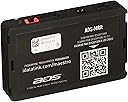

Maestro ADS-MRR Universal Radio Replacement and Steering Wheel Interface
Product ID: 78040851
📊Engine data display on touchscreen
🔄Universal compatibility with 2006+ major brands
🎛️Retains factory steering wheel controls & amp
Desertcart purchases this item on your behalf and handles shipping, customs, and support to Seychelles.
🎵 Upgrade your drive, keep your vibe — all controls, all data, zero compromise!
The Maestro ADS-MRR module enables professional-grade installation of new touchscreen car stereos in select 2006 and newer vehicles from top brands, preserving factory steering wheel controls, amplifiers, and convenience features while adding real-time engine data display for a smarter, connected driving experience.
| Asin | B00E4W1644 |
| Item Model Number | ADS-MRR |
| Manufacturer | Maestro |
| Product Dimensions | 7.32 x 10.62 x 1.91 cm; 22.68 g |
User
Fantastic (with minimal limitations) in Mk2 Audi TT
Very impressed with this module. This review is to give specifics of what does and does not work in this specific vehicle and hardware combo. Vehicle is a 2011 Audi TT-S (Mk2, 8J). Radio is Pioneer AVIC-W8500NEX. This module does not let you retain the factory amp, which my car had. There are at least 3 possible types of factory systems for this car: Concert radio without factory amplifier, RNS-E radio with factory amplifier, and Bose radio with factory Bose amplifier. I had the RNS-E with amp combo, so I had to manually bypass the factory amp (in the driver's side hatch compartment). Firmware setup was kind of difficult because you need Internet Explorer (not Edge, Chrome, Safari, etc.) and there are some specific Java and such updates that you need. During setup, you get to decide what your steering wheel buttons do. There are separate functions for press and hold for when you press each scroll wheel in and for the voice button. There are also ways to set a function for when you hold scroll up or hold scroll down, which doesn't really make sense, so I didn't set anything for those. Also, you can't program anything to the Mode button. I was able to make volume, seek, mute, source change, call answer, and Siri all work. Scrolling the volume is actually just as responsive as it is from the factory, except when you're on the gauge display, when there's a slight lag.Song and call information does appropriately display on the factory gauge cluster in the top 1/3 segment. HOWEVER, you have to set it to MFD type 2 in the settings menu on the radio, AND it doesn't scroll. The top line says the source type for awhile after changing it, then changes to the song title. The second line shows the artist, then changes to the album name. This all works regardless of the source type, interestingly including wireless CarPlay, which I didn't expect. The gauge display screen has a ton of options for gauges to show, and it can show up to 5 at a time. There's about a half second lag, but it's still very cool. I forget all of the options as you have to configure them when you set the firmware up, but there are two presets that I set as you can see in the pictures. You can have it record peak values and set indicator lights for when any parameters go out of range. The second screen that can be displayed isn't particularly useful. The door open indicators, battery voltage, and check engine light tool all work, but tire pressure analysis doesn't work on mine (it may on other trim/option levels). I had a check engine light and was able to see the specific code and clear it with ease. The section for climate control doesn't work (probably doesn't work on any TT's), and the parking sensor section doesn't work, but may if you have that option on your car. The unit also does some other things like allowing you to retain your factory Bluetooth functionality (so you can use the factory microphone and vehicle Bluetooth connection), but I preferred to use the Pioneer Bluetooth instead. The unit also provides +12V ignition, VSS, parking brake, and reverse light wires during installation, which drastically simplify things. Overall, I couldn't be more pleased with this unit. Many sites say they don't recommend replacing the radio in this car, but I see no detriment at this point as long as you know how to bypass the factory amp and use the Maestro module (VW1 harness is also "required" for use...I'm sure you could hardwire it somehow, but it GREATLY simplifies the installation...and there's a ton of space behind the radio to put modules, wires, harnesses, etc, FYI)
User
Used product with missing cables
Not happy. It was not advertised as a used product. It arrived with half of the cables missing.
User
Great product and great Support.
Great product and great Support.Hooked this up with DMX1037S and it goes along very well.The support personals via the 12voltdata forum are excellent. They are fast to attend to the queries and helps.Easy to install as long as you follow their installations and have a bit of knowledge on the radio wires.
User
Incredible Product
The factory stereo in my 2009 Ford Escape was very closely integrated with the medium speed CAN bus. There was no ignition +12V or illumination wires present in the connector, as both those signals were sent serially over the bus. The Sync (APIM) module, the Satellite Radio Receiver (SDARS) module, and the auxiliary display above the vents (FDIM module) are all only controllable via this bus.I was extremely pleased to find that this neat little product was capable of retaining ALL of those network functions with my new aftermarket radio. It provides the necessary switched 12V outputs for accessory and illumination, it can retain full Sync functionality (personally I have it disabled), full factory satellite radio (including channel names, artist/title of tracks, presets, etc), and it even displays the current time and date on the auxiliary display (time synced from the aftermarket radio, which itself syncs from GPS).It also provides a bunch of other useful feature, such as VSS (vehicle speed sensor) pulsed output, reverse lamp output, and parking brake output. The built in steering wheel control interface also works great.I love that you can flash the firmware and settings easily over USB, and all you need to do is create a free account.I found a minor bug/limitation with my specific aftermarket radio, where the auxiliary time display takes up to 60 seconds to "refresh". This means upon startup it spends up to 60 seconds displaying a completely wrong time/date. I contacted idatalink support, and within a day they had figured out what was going on, and they'll be releasing a patch to work around this limitation in the near future.If you want to upgrade your stereo, but your factory radio is CAN bus dependent, I highly recommend this product! I don't think any other competing product comes close to this level of integration (especially since most aftermarket radios have built in support for this interface).
User
Excelente, no para principiantes.
Una maravilla de integrador. Funciona a la perfección, aunque si requiere dedicarle un buen rato, y el cableado tambien requiere de atencion, pero bien vale la pena el esfuerzo
Trustpilot
1 week ago
2 weeks ago