Desertcart purchases this item on your behalf and handles shipping, customs, and support to Seychelles.
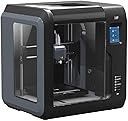
🚀 Elevate your creative flow with the Monoprice Voxel — print smarter, not harder.
The Monoprice Voxel is a compact, fully enclosed 3D printer featuring a quick-change nozzle system, a heated and flexible removable build plate (150 x 150 x 150 mm), and an intuitive touchscreen interface. With built-in Wi-Fi and 8GB of onboard storage, it offers seamless wireless printing and easy file management. Designed for professionals and enthusiasts seeking hassle-free, high-quality prints, it arrives pre-calibrated for immediate use and supports multiple OS platforms. Its user-friendly features and reliable customer support make it an ideal gateway into precision 3D printing.


| Brand | Monoprice |
| Color | Gray/Black |
| Compatible Devices | Personal Computer |
| Customer Reviews | 4.0 out of 5 stars 511 Reviews |
| Item Weight | 12.92 kg |
| Material | Polycarbonate |
| Product Dimensions | 5.91"D x 5.91"W x 5.91"H |
M**9
Loving it -- with some caveats
TL;DR: Great printer Pros: Great value. Super easy to use. Compact. Excellent print quality. Little to no leveling required. Cons: Small-ish print area. Crappy camera. Needs external spool holder if you want to use standard 1 kg filament. Uses non-standard .gx format. UPDATE 3 MONTHS AFTER PURCHASE: I still think this is a great machine. I have used it now for PETG, and it did fine. Bought a few replacement nozzles when they became available. I saw occasional clogging of the nozzle, more frequently than on my Wanhao DI3 with an all metal hotend, but somehow with the new nozzles this seems to occur much less frequently. Need to relevel bed every 10 prints or so. I went back from glass to the original bed because I really like how easy it is to remove the prints. The external I gave up completely on the inbuilt camera and use a Wyze camera instead to monitor prints. PolarCloud is garbage. My main issues are 1) The MAC address for Wifi changes every time you start the Voxel, so you have to look for the IP address to enter into the FlashForge software. Better to stick with Ethernet or set the Voxel up as a hotspot. 2) I wish it could read standard .gcode files. I actually like the FlashForge slicer. Loads so much faster than Cura and in Windows actually changes the .gx file icons to display the actual model. It's super easy to use and from a UI perspective much cleaner than Cura. But it doesn't offer the range of options that Cura does. E.g., there are only very few types of infill to choose from. But overall it does an excellent job. 3) Small print surface. Wish it was at least 20 x 20. I'm really happy I bought this machine. It has almost immediately become my go-to printer for any smaller-sized projects. The print quality is amazing -- after a few adjustments. It's a compact machine, not heavy, with full enclosure. Can print a wide range of filaments but I have only used it for PLA so far. I read reports of clogging when you change filaments so I'm waiting for the exchangeable print nozzles to become available again before I try PETG. This is actually one of the negatives. Very surprised that Monoprice doesn't have those exchangeable nozzles in store as this is one of the positive features of the system. Anyway. Initial setup was easy, included quick start guide had me up and running in no time. Unfortunately, the initial build quality didn't impress me. Lots of strings produced when the nozzle moved across internal areas. This was particularly visible with the included semi-translucent red filament, but also happened with other filament I tried. However, this was fixed easily by changing the retraction parameter in the included Flashprint software from 5 to 6 mm and by slightly lowing the print speed. Haven't seen any of these artifacts since. While I actually liked the included bendable print bed, I immediately replaced it with a glass plate (https://www.amazon.com/gp/product/B07BHG37PX) attached by placing a thermal pad (https://www.amazon.com/uxcell-400mm-Silicone-Thermal-Heatsink/dp/B007PPEW52) between the plate and the heated bed. Using glue stick, models stick perfectly. Highly impressed with the quality of prints using the default parameters of the included FlashForge software (with the above mentioned modifications). The simplicity of getting a print going should make this a total gateway drug for anyone new to 3D printing. Where my other printers require endless fiddling to level the bed, here you just select Print and you're on your way. With the glass plate, I had to relevel but it's very easy to do and doesn't require any tools. Leveling is done in the middle of the plate. This was one of my concerns about this printer as there is no way to level the bed along the x or y axis but I have not seen any issues at all. This is probably due to the somewhat small size of the print bed, which is one of the only knocks I have on this system. I wish it had a 20x20 print bed, as I frequently print models that exceed the size of the Voxel's bed. I have printed models across the whole bed, using a raft, and have not seen any warping. I was also intrigued by the camera that is built into the system but it actually turned out to be pretty awful. You can use it using the Polar Cloud software to watch your print, but the images are generally dark and lo-res, and it only works over local network. I ended up using a cheap webcam mounted on a small stand next to the printer and Youtube streaming to monitor prints when I'm on the road. Another problem is -- and that's just a stupid engineering decision -- you can only use the USB port or the camera. Huh? The "automatic" setting that should turn the camera on when a print job is active and the USB port on when not doesn't work in my hands. If I want to use the camera, I turn it on manually. A pity, because I found using a USB stick to be my preferred way of transferring files to the machine. The system uses .gx files, which are a variant of .gcode. I was initially concerned I couldn't use Cura to slice, but I'm now actually very happy with the included Flashprint software (which I understand is built on top of Cura). By and large it does what Cura does but feels more limited in what you can do with supports. But then again, for most of what I do, no problems. You can also use Polar Cloud as a web-based solution. I was at first very excited about it because I was hoping I could use a cheap chromebook I have lying around to control the machine but a) the cloud software is very convoluted, with lots of features that may be useful for schools that need to manage several printers and print queues in their print shop but only get in the way if all you want is slice and control your one Voxel, and b) I found the print quality produced by its slicer to be inferior to what comes out of Flashprint. Flashprint allows you to connect to your printer and shows you the print status but doesn't connect to the printer's camera. Be aware that this printer is not designed for tinkerers who want to mod their machine. It's for those of us who just want to get the job done. You can replace the print nozzle but that's pretty much it, and then again looks like nozzles are actually out of stock. Couple more observations: Loading and unloading filament is super-easy. However, the system is designed to mount small 0.5 kg spools on its side. So if you're like me sitting on 1 kg spools used in other printers, you will have to print either some spool adapters or use an external spool holder (which works fine). I guess this was a necessary design decision to keep a compact profile. I did at times notice some stuttering and knocking sounds when the filament is pulled in but I didn't see any impact on print quality. The system is easy to operate with the built-in touch panel. It's easy to read, with a logical menu system, but occasionally it takes a bit to register your touch. Plenty of internal storage so you can keep .gx files around on-board for repeat prints. All in all, I am very surprised by how much I like this system. I bought it as a backup system but ended up using it as my primary printer for anything smaller than 15 x 15 cm.
H**S
Easy to use, great print quality, inexpensive, and AMAZING product support.
I got this thing about a year ago, and it chugged along without issue from the very start. It's enclosed, so it kept my cats out - despite their best efforts. The printing software isn't bad at all (FlashPrint-MP) and has plenty of features for slicing models. I've tried a few other programs but frankly I think I like this one most. It also makes sending jobs to the printer extremely easy; you literally just get its IP address, plug it in, and after slicing it, click print. It automatically heats itself up and goes. The only downside is the leveling of the print bed - somehow mine became miscalibrated, perhaps because of extreme temperature fluctuations while printing (15 F at night to 75 F during the day). There isn't a way to recalibrate the leveling of the print bed; I ended up having to contact Monoprice, who simply gave me a shipping label and replaced the machine for free. By far the best customer service and device support that I've ever seen. In short: If you don't want to fiddle around with calibration or technical details, this is a great printer. Just pop in .stl files into the included software, point it to the IP address you get on the touch screen, and hit go. If it becomes miscalibrated, they support their device and will fix/replace it for you.
M**N
Good, but a couple minor flaws
First the good. It is VERY easy to setup. Basically take it out of the box, then use the correct power plug (mine came with 3 standard plugs for use in other countries) and start printing the test part. I like how it is a network 3D printer. I have an older printer (got it in 2017 probably, and another from 2016) that either had to be directly connected to a PC, or used a USB or MicroSD card to transfer files. And sine Neither one was connected to computers, I had to use portable media to transfer files. And it got pretty annoying. Especially when you slice a model, copy, transfer, copy again on to the printer, then wait to start the print, then found out there was a problem with the model you were printing. Now I have my Work laptop, and one of my personal laptops connected with the Voxel. No need to slice then put everything on to portable media, copy back and fourth, etc. You just do the work on the computer and start printing from there. Much simpler. The assisted bed leveling is a major plus. I can't tell you how much time I've spent just trying to keep the bed level on my other printers. when the bed isn't level, it screws up everything. and is a pain to fix. Especially when you don't have easy access to the printer. Keep in mind you do need to get the correct version of the slicer to work. this is a re-branded FlashForge printer. and that printer uses Flashprint. But the slicer software you need is "FlashPrint-MP" I wasn't able to connect my printer by just using flashprint. so I checked the Monoprice website, and it had the FlashPrint-MP software available for download. I haven't used the POLAR CLOUD connectivity for anything but looking at the camera (very low res camera, but it's not really needed) It may be useful to others though. Prints come out clean so far (been using it for the past 3 days straight) It is VERY quiet. You can hear my other printers from another room while the door is closed. Also keeping the printer encased is good, because it always keeps the temperature the same at all times. (We do a lot of tests at work, that require encasing some test equipment, because if the temp changes, that can warp parts. so It was a good idea to encase the printer.) Also the removable bed is nice. And it feels good. It grips the filament as it's being put down. And with it being removable (and flexible) it makes removing parts much easier. I have lass beds on my other printers and it can be very hard to remove parts. sometimes resulting in damaging the part you just spend 7 hours printing. Another cool feature is the timer on the screen that shows how much time is left on the print. Again, it's a feature my other printers don't have, and it's just a nice little extra. Now here are the parts that I feel could be improved. First, the build area. 150mmx150mm is Ok. I work in R&D, and I print a lot of prototype medical components. But some parts I simply cant print on the Voxel, because the print area is too small. So I have to print them on another printer. Next the amount of filament it can hold is relatively small. I still haven't gone through the free spool that came with it, so it's not that bad. I printed out a filament holder that would attach to the access door. The issue I have with that, is that I would have to drill a hole in the access door to feed the filament through. since the printer is a couple days old, I'm not ready to start drilling holes in it just yet. The new holder would allow it to hold 1Kg. spools. And I have a few of those laying around. Next, the camera should be placed in another place. It's hard to see what's being printed. Also, the camera is very low resolution. the framerate is also very low. still I don't use it for checking on the parts, or anything like that. The only times I've used it, is so that my kids could see themselves on the other side of the printer. It's nothing that would make or break any printer.
A**E
Not for beginners, and not worth the price
I got this printer a few years ago as my first 3D printer, and I went with this one due to it being a relatively affordable price point and the printer itself being simple and enclosed. However, I cannot discourage beginners from using this printer enough. While it's true that this printer works decent right out of the box (but required some z-axis calibration I realized several months later), in order to produce better quality prints it requires a lot of work that even after a few years I could not fully figure out. If you're looking to make one-off prints that don't require fitted parts, sure the print quality is good, but if you are trying to print anything that requires decent clearances and tolerances, this will not work for you. I tried to print so many models that just wouldn't fit together and I couldn't figure out why. The calibration tools don't work very well (why does the nozzle move more down than up when calibrating the z-axis?) and don't provide much guidance. The print bed itself is really never level and results in warped first layers. Despite many attempts at calibration and slicer tweaks, I could never get rid of the lip around the base of the prints either. However, there are even more downsides. Not only is this just a rebranded Flashforge Adventurer 3, but the printer requires that you use Monoprice-rebranded software for both the first-party slicer AND the printer's actual firmware, which are both out of date by sometimes a year. This means you can't use FlashPrint 5 and it's much better UI, you're stuck with the older version of FlashPrint that rarely gets updated, and will likely never be updated to the point of FlashPrint 5. Overall, this printer is just not good for beginners and, in my opinion, is not even worth the $400 I paid at the time even if I knew more about 3D printing. I've since upgraded to a Bambu Lab P1S which is slightly more expensive but the difference is night and day to me. Bambu Lab also now have the beginners A1 printer that's not only cheaper than this one, but probably works much better if it's anything like my P1S. Sure, a few years is a long time in the 3D printing marketplace, but that's all the more reason not to get this one right now. This printer almost made me quit 3D printing out of frustration because I just didn't understand why I was having so much trouble, so I cannot recommend against this printer enough.
B**6
Good starter printer with great support
I had been interested in getting into 3D printing for quite a while, but kept putting it off due to cost and fear of kids being around an open air printer. I found the Voxel on sale one day which fit well into my price range and, best of all, was enclosed and ready to go out of the box. It took some time to get used to 3D printing in general, but it wasn't too long before I was successfully printing all kinds of things. Unfortunately, a couple weeks in, my extruder's X-axis locked up and stopped working. I contacted Monoprice tech support who immediately helped with some recommendations and ultimately decided to replace the unit for me. Their tech support was fantastic, and despite the problem, I highly recommend this printer (which is why I'm giving it 5 stars). PROS: - Ready to go out of the box - Enclosed, so it is a *bit* safer around little kids - Wifi connected - Quality is good. Better than I expected at the price - Works well with both PLA and ABS (though best results with PLA) - The Flashpoint software is easy to use (this coming from a first time printer) - Touch screen works well - Great price point - Great customer service from the manufacturer CONS: - Extruder broke on first unit (immediately replaced by tech support) - Wifi range seems poor - The quick start guide should recommend doing a calibration. Their online docs cover this, so be sure to read through those and not just the guide that comes with it. My first unit was not calibrated well and prints kept coming loose from the bed. Other Advice: - If you are a first time 3D printer like I was, do some research online and watch a few videos. Be sure to understand what rafts and supports are and how to use them. I have had the best success with bed adhesion when using rafts on this printer. - The included spool holder only holds the Monoprice 0.5 kg spools. Be sure to get (or print) a full size spool holder if you want to take advantage of larger spools. - Prints did not stick well to the bed at first. Be sure to calibrate it before printing. I would also recommend putting some blue painter's tape on the bed for better adhesion. - If you are going to use wifi, this probably need to be close to a router or repeater. Mine could not connect from a room about 50' from a router but was fine from about 25' away. - The bed is on the smaller side. I haven't found too many models that don't fit, but if you want to print larger objects, you may want to consider a bigger printer. Overall, I'm very happy I got this printer. My experience with Monoprice's support has also reassured me that my investment was well placed and I will happily buy from them again. If you are looking to get in to 3D printing without breaking the bank, this is a great place to start. Happy printing!
A**R
Couldn't ask for more
I am completely new to 3d printing and got this as my first 3d printer. It's amazing to me how simple this was to setup and use. Simply removed it from the box, followed the simple quick start instructions and I had my test cube done in 15 minutes, no calibration. Entered my wifi password, downloaded the flashprint software, watched a short (less than 10 minute) video from Monoprice explaining the features of the Voxel, and printed a flexi-rex dinosaur I got off of thingiverse the same night I opened it, no problems whatsoever. I then went back and scaled the dinosaur up to 2x its original size and printed that with no problem as well. With no knowledge of 3d modeling (or printing) whatsoever and this product had me modifying models and printing functional objects straight out of the box. As I read more and more about 3d printers and the common problems, the more I learn how many advantages this printer has to a casual user. I haven't had a single failed print, not even any errors in any of the objects I've printed, and I've taken almost no precautions other than loading up the models in the software, using the default settings, and hitting print. I've removed the parts and reattached them simply out of curiosity, and everything is a breeze to disassemble and reassemble. It has multiple features that I can't believe come on a machine this much cheaper than the competition, like a camera inside the printer to take photos of your prints and a bendable base plate to print on that makes things just pop off it while everything I read online refers to glass plates that people constantly have trouble with in other printers. I've given one of the dinosaurs to my niece and she loves it, I printed a soap dish for my mother that she loves, I got a couple chip bag clips that are keeping my tortilla chips air-tight in the pantry, I'm using all my free time to browse more things to print. I've already started researching how to model things on my own. This is a great product for a gift and I can't think of a better way to introduce someone to 3d printing.
S**E
Too many caveats to be good overall.
So this is a shot for shot remake of the Flashforge Adventurer 3 or so it would seem. It's got Monoprice branding, and uses a special monoprice version of the slicing software (FlashPrint-MP). Where to begin.. I have a lot of mixed feelings on this box. To start, Amazon was offering it at $400 US when i ordered it, hours later I discovered that Monoprice was offering this exact same machine for $300 US. I contacted their customer service to see if they would credit me for the disparate $100 dollars but they said that they were not able to. I'd have to cancel the order on amazon, and reorder through them, and wait the intermediate time for more shipping days. Little disappointed with their service at that point. Totally my fault for not checking their website first but frustrating and i ended up just keeping the order on Amazon and biting the bullet for $100 in impatience. On to the printing: This box is pretty easy to set up, finding the correct slicer (FlashPrint-MP specifically) was a bit of a challenge, there's no download link in the box or any included software so you're in for a bit of a googling. Once you've successfully googled your way to a working slicer you'll find you have most of the general options you would in something like Cura but it's not quite as comprehensive. The supports are not nearly as robust, the fan control is not as complete, it just generally has slightly fewer options than you might want. Unfortunately the only option with this machine (for some reason) is to use FlashPrint-MP to slice with. You CANNOT use any other slicer (and good luck editing gcode from another slicer to make it print on this box, i've tried my hardest but couldn't do it). Pretty glaring negative right there. Secondly, this DOES NOT auto-level the bed. It does a single point calibration in the middle of the bed but no checks at the corners or sides. DO NOT BE FOOLED by the marketing. To get the level correct I have resorted to propping up or down each corner with bits of discarded print or paper to make the bed 1) more secure in it's bracket to prevent minute sliding, or 2) get each corner leveled as close to properly as i can. Very disappointed with this as bed level is the #1 factor in bed adhesion. On to that, bed adhesion. It's really really hit or miss. I've resorted to only using rafts when I print from this machine, the rafts 99% of the time, work great. If you don't use a raft, i've had maybe 20% success rate with brims instead. If you get this, i guess all i can say to help successfully print is, USE A RAFT. The touchscreen. The best i can say about it is that it's effective. It's responsive, but it gets the job done. The wireless. NOTE THAT EVERY TIME YOU POWER DOWN THIS MACHINE IT WILL FETCH A NEW IP FROM YOUR DHCP SERVER. this can be very annoying if the machine you print from is not directly next to this box. The stepper motor on the extruder is prone to skipping as many other reviews will say. I just let it power through it, it's annoying to listen to but it only happens for me on the rafts and only on corners where the bed is too high (like i said it's impossible to actually level this bed). The PEI sheet that it prints on is flexible so + for that. I can't really fault the sheet much. I have wedged paper on the sides of it to get a tighter fit on the bracket as it has about a millimeter of play in any direction which can affect print quality. Which i guess we can talk about now. For all it's annoying faults, the saving grace of this machine is that it's got pretty decent print quality, once you fix the many annoyances you're likely to have getting to that point. That said, it's .1mm and even .6mm prints turn out looking fantastic, if you dont have to use many supports. Prints that need supports are really hit or miss, I've had about 50-50 success for prints that have a lot of supports. it's kind of luck of the draw and the filament you use. That said, any prints i've done that dont require supports come out with a fantastic finish, it's really the saving grace of this box. So overall.... i guess overall i'd say this machine is disappointing. It has so many little things that it needs fixed, that seem like they'd be easy to fix, i just find it more annoying than anything else. The bed leveling i'd think could be fixed with a software patch to make the bed calibrate in multiple points. But thats just my thoughts, and obviously the devs aren't beholden to me... yet.... I'd say take your money elsewhere and either save up for a Prusa i3 mk3s (700 at the time of this review for the kit, and well worth the 300 more) or a comparably priced prusa mini which will at least give you upgradeability, reliability, a wide user base, and the ability to use any slicer you want. If you do get this machine, prepare for a lot of time spent babysitting.
C**I
Excellent Printer!
This is such a fun printer. It’s our first experience either an AMS and different colors. It is fast and relatively quiet. It doesn’t move around at all even though the printer goes a million miles per minute. After doing some research on settings we have a good set up for bed adhesion and successful prints. So much fun!
C**N
Oui mais pas en 2021
Cela fait maintenant plus d'un ans que je l'utilise est l'avis est mitiger -Déjà le bruit c'est un avion de chasse comment c possible d'avoir des ventilos aussi bruyant comme ca pour 350€ c impensable aujd en 2021 ca fait trop de bruit le caisson est inutile et impossible de travailler a coter comme montrer sur les image elle doit être dans une pièce appart ce qui est dommage -le truc wifi connecte tu envoie les impression a distance MDR une blague tout est en chinois et absolument pas fonctionnel la vidéo est en 10fps et de qualité 240p -Niveaux impression ca fait le job mais sans plus le plateaux est a nettoyer a l'acétone toute les 5 impression sinon ca accroche plus -MAIS SONT PLUS GROS POINT FAIBLE c'est que c'est propriétaire par chance je l'ai resus courroie correcte mais après 1 ans c'est détendue c'est inévitable et la bonne chance c'est des vis hexagonale déjà et puis aucune notice n'existe pour retirer la carcasse en plastoc car les courroie sont cacher dessous c'est malin (pas du tout hyper c*n) et les bobine mon dieux seule la bobine fournis rentre dans l'espace sur le coter sinon pour des bobine de 1Kg il faut faire un support sois même et l'avoir en visuel a coter de l'imprimante donc le coter esthétique tout en un n'est pas la -je voie qu'elle n'est plus dispo a la vente heureusement car c'est une honte pour 350€ ,pour 150€ on peux trouver plus modulaire est précis sans que ce sois propriétaire -Pour débutant ? de mon avis Non ,il existe aujd bcp mieux et surtout bcp moin chère l'idee etait bonne mais le fait que ce sois propriétaire gâche tout elle est aujd entièrement démonter et refaite -ventilateur changer pour du noctua -caisson poubelle il était juste inutile et en plus il transmettait les vibration et emplifiait le son -refroidissement de la tête d'impression refait car refroidissant juste par la droite
V**S
Ok
Ok
H**.
Top Anfänger Drucker
Ich finden den Drucker top, genau richtig wenn man mit dem 3D Drucken anfängt aber auch, so wie ich, die Erfahrung mit Industriedrucken von Alphacam hat. Der Drucker ist von der Baugröße 150x150x150 genau richtig. Die Auswahl von Filamenten im Netz ist schon gigantisch, diese hat man mit den Industriedruckern nicht. Das hat auch etwas mit der Gewährleistung der Druckköpfen zu tun, wenn anderes Filament wie vom Hersteller verwendet wird. Ganz wichtig auch bei diesem Drucker ist, die Reinigung der Bauplattform. Man muß auch hier eine Reinigungslösung auf Basis von Ethanol verwenden. Am Besten eignet sich hier ein Desinfektionsspray für die Fläche. Am Anfang hatte ich auch das Problem, das sich der Druck bei großen Teilen gelöst hat aber nach dem Entfetten war das Problem behoben. Die Druckqualität ist für den Ersatzteilbereich im Hobby- und Hausgebrauch ausreichend. Für die 1 Kg Filamentrollen gibt es genügend freiverfügliche Adappter auf thingiverse.com. Ich habe den Drucker ausgwählt, da er eine beheizte Bauplattform hat und auch ABS drucken kann und dadurch gekappselt ist. Für Anfänger genau richtig aber auch für Profis gut zum spielen und ausprobieren daheim. Der letzte Tipp, wenn man 3D Druckteile dicht und mit einer glatten Oberfläche haben möchte, ganz einfach in ABS drucken und danach kurz in Aceton tauchen aber vorsichtig immer gut belüften.
A**R
Calibration of this product
After getting very frustrated and not knowing the cause of the poor prints, I re calibrated the hot tip to the bed and wow what a difference this made, as you can see from the pictures linked the first 2 are epic fails, the 3rd if one of a test print i did and the result is way better and at the base slicer settings. I would most defiantly recommend this printer to any one wanting to starting 3d printing, just make sure you calibrate the hot tip, i used the tip leveling paper i got with my other printer,all you have to do is to move the hot tip from a negative number to a positive and then bring it down a bit at a time until the paper just grabs the hot tip. It should be around about +0.2-0.3 IMO. One other note one of the fans is a little noisy but not to bad. AAAAA+++
A**R
My first 3D printer - I like it!
Overall I'll give this printer 5 stars, it has everything I was looking for - enclosed (we have curious cats that would try to help) - prints PLA and ABS - almost fool proof design I have done about 10 prints, had two failures, but those were newbie mistakes I made. There are some small issues with this model which I'll point out. - The internal spool holder will only hold 500g spools which are hard to come by. To use the common 1Kg spools, you need to print an external spool holder and drill a small hole for the filament to go in. I've attached a pic of my spool holder which attaches to the side of the unit. Work great, no problems. - The touch screen is not as responsive as it should be. When you press the screen, wait a second for the screen to go to the next menu, otherwise it will queue up the additional presses and use them for the next screens. This tripped me up when loading the filament, I would press start, then press the start again thinking I didn't press it right, but the second press would be applied to the next screen which caused the loading of the filament to stop. - Instructions and user manual are lacking. But there are plenty of resources on the Internet to supplement them.
Trustpilot
2 months ago
2 months ago