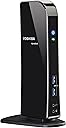
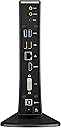
🚀 Elevate your workspace with one dock to rule them all!
The Toshiba Dynadock PA3927U1PRP is a versatile USB 3.0 docking station designed for Windows laptops, enabling connection to dual high-resolution displays (up to 2048 x 1152), delivering 5.1 surround sound, and providing six USB ports including two front 'Sleep & Charge' USB 3.0 ports. It streamlines your workspace with a single cable connection, universal compatibility, and fast data transfer speeds, making it a top choice for professionals seeking seamless multi-device productivity.
| ASIN | B006ZGWJU2 |
| Best Sellers Rank | #56,886 in Computers & Accessories ( See Top 100 in Computers & Accessories ) #1,887 in Laptop Docking Stations |
| Brand | TOSHIBA |
| Color | Pa3927u1prp |
| Customer Reviews | 4.3 4.3 out of 5 stars (494) |
| Date First Available | June 28, 2017 |
| Is Discontinued By Manufacturer | No |
| Item Dimensions LxWxH | 4.5 x 5.1 x 9.3 inches |
| Item Weight | 1.18 pounds |
| Item model number | PA3927U1PRP |
| Manufacturer | Toshiba |
| Number of USB 2.0 Ports | 2 |
| Power Source | AC 100-240V |
| Product Dimensions | 4.5 x 5.1 x 9.3 inches |
G**R
Works perfectly on USB 3.0 - great dock!
Flawless upgrade to my prior USB dock!! Have had a Kensington sd400v dock for several years. I run two screens off the computer (laptop, flat panel) and a third portrait screen off the dock. The Kensington always had issues with video (speed, video errors) but otherwise worked fine. I upgraded to the Toshiba Dynadock hoping the 3.0 speeds would result in error-free video. Was a little apprehensive about the negative reviews here, so I'll comment directly on some of the issues that others have experienced. 1. No problems with installation - ran the CD, the drivers updated themselves twice when the dock was plugged in, and it works with no issues. Toshiba uses a version of the same DisplayLink software that I used with the Kensington, however I note none of the errors I had with the sd400v. For example, the Win 7 drivers for the sd400v were notoriously difficult to get to install correctly. 2. No problems restarting the computer with the USB 3.0 connection. This problem is usually due to the USB 3.0 drivers and chips between the computer and the attached device. For example, I have had problems with a particular USB 3.0 hard drive causing the computer not to boot up. But no problems with this dock. I have a Clevo computer rebranded from Mythlogic with a Radeon graphics card, Win7 64bit (BTW a great company if you want a high-end laptop, much better price/performance than any of the "regular" brands) 3. The video has worked perfectly. No problems with video, response time equal to my other screens. No issues when I move windows back and forth to the screen (which used to cause problems before) 4. All of my USB devices on the dock work with no issues. I do not use either the audio or ethernet ports on the dock, so I can't comment on performance there. All in all, very pleased with this dock!!
M**K
Best option on the market
After researching many option, I decided on this product because it has more features than any other product on the market. I love that there are four USB 3 ports and two USB 2 ports. DVI and HDMI work well. I read the reviews before purchasing and disagree that the item does come with needed drivers for windows 7 and prior. I had to download the Windows 8 driver/package but I received this product 5 days after the release of Windows 8. I didn't expect them to include Windows 8 yet but was impressed they already had the drivers. I had to install twice to get it to work but once installed, everything worked. I have two additional monitors connected to my laptop and it recognized both of them as an independent screen. I simply plug my Lenovo Ultrabook Yoga in and I have internet, monitors, additional keyboard and mouse. I do not see the delay as on review stated. It is not a dock as stated. You still need to connect the power to your Laptop but it is a great option to give you more options and connectivity with ease.
R**.
A nice port expander
I bought the Dynadock (a port expander) to go on my wife's Sony Flip 13 to support a USB hard drive (with confidential information that stays home), a USB keyboard/mouse, and an exernal VGA monitor when working at home.. The Sony has 2 USB 3.0 ports and a single HDMI port. Using the Dynadock means she only has to unplug/plug two connections (Sony power and the USB to the Dynadock) when she travels and returns. Fortunately for me, she decided she didn't like the standup form factor, so I stole it and hooked it up to my little Samsung np300u1a-a01us, which actually has 3 USB 2.0 ports (one with optional sleep power), a VGA output, and an audio jack. Nevertheless, with the Dynadock, I can keep my USB hard drive(s) and USB CD/DVD drive connected to the dock, and I only have to undo two connections to take my PC elsewhere. The vertical, narrow form factor actually works well on my table. Installation was almost straightforward. I installed the software from the included CD, along with an update, and was off and running. I clicked on the notification icon for the displaylink, and saw the "check for updates" item, which I then clicked. The menu went away for about 10 seconds (with no evidence of activity) and then a notification bubble popped up with the message "Cannot Update Displaylink Sofware, Unable to connect to Microsoft Windows Update Server". I Googled "displaylink" and got the pointer to their download page, from which I was able to retrieve and install the latest update. (The notification menu item for update still doesn't work, and the "displaylink manager" item just gives you the current version number.) The audio and video setup items do work. As far as performance goes, I'm quite pleased, given that I'm driving the whole mess via a USB 2.0 port and my PC has an I3 processor. Keyboard/mouse and video response are indistinguishable from direct attachment of the monitor. I tried playing a DVD onto the monitor and separate speakers (all on the Dynadock), and the motion and sound were smooth and synchronized. I leave the Dynadock powered up, and I worried that this would leave the USB hard drives powered on as well (if you plug one into the Dynadock while the PC is not connected, it powers up and seems to stay up.) However, the Dynadock appears to shut down the drives if the PC is shut down while connected. I haven't tried this with either of the sleep/power USB ports on the front. Overall, I'm quite pleased with the device. I'd think it would be essential for some of the windows tablets that only come with a single USB port.
S**C
We have a busy office with multiple monitors and our staff work on site and in the office. It is a quick disconnect and go.
Trustpilot
3 days ago
1 month ago