Desertcart purchases this item on your behalf and handles shipping, customs, and support to Seychelles.
❄️ Stay cool, stay ahead — the ultimate silent powerhouse for your CPU!
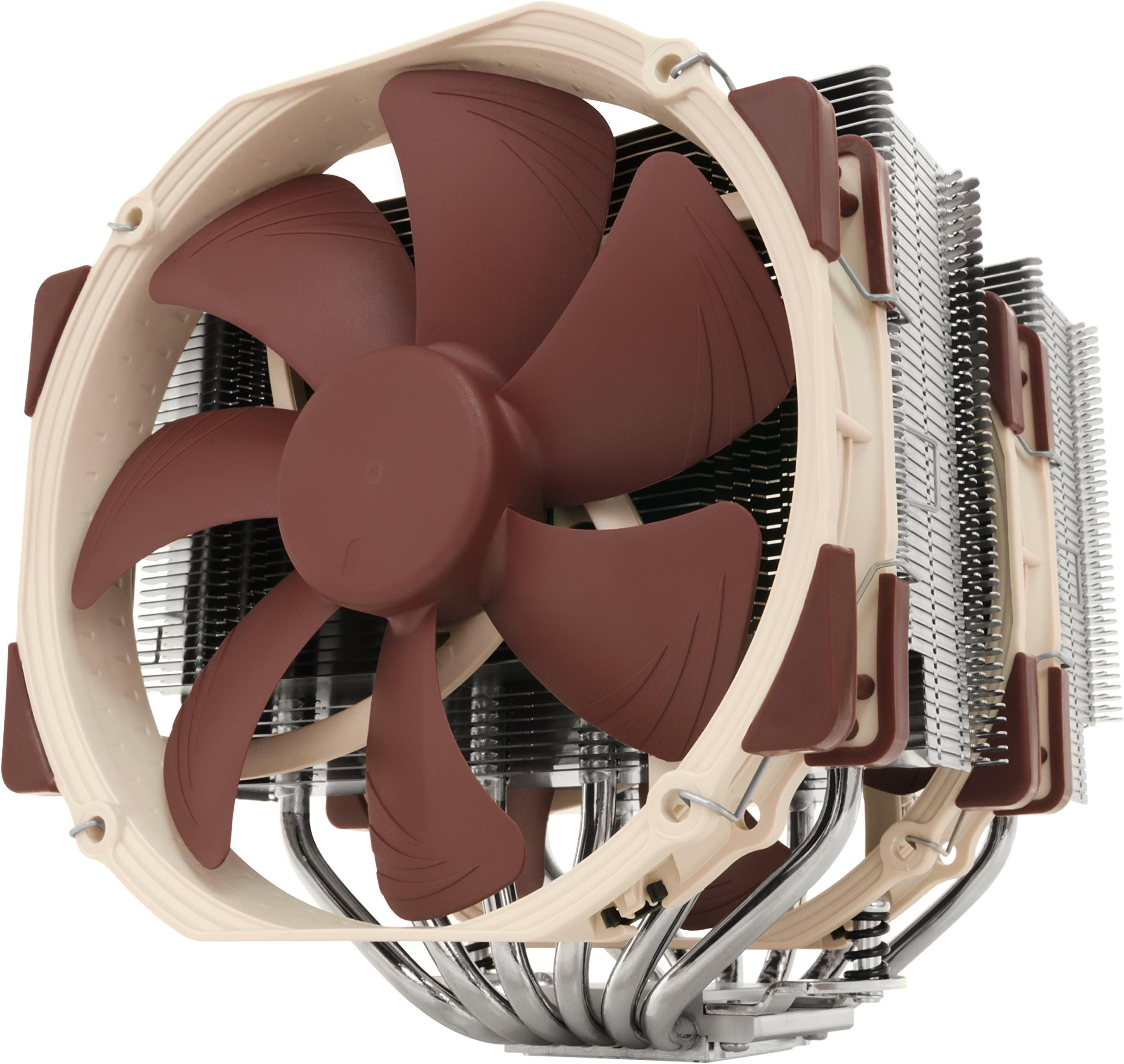
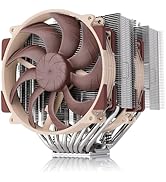
The Noctua NH-D15 is a premium dual-tower air cooler featuring 6 heatpipes and two ultra-quiet 140mm NF-A15 fans with PWM control. Designed for enthusiasts and professionals, it offers class-leading cooling performance for overclocked CPUs while maintaining near-silent operation. Compatible with a wide range of Intel and AMD sockets, it includes the SecuFirm2 mounting system and high-quality NT-H1 thermal paste for easy installation. With over 250 awards and a 6-year warranty, the NH-D15 is the definitive choice for high-performance, reliable CPU cooling.


| ASIN | B00L7UZMAK |
| Air Flow Capacity | 140.2 cubic meter per hour |
| Best Sellers Rank | #58 in Computer CPU Cooling Fans |
| Brand | Noctua |
| Brand Name | Noctua |
| Compatible Devices | Desktop |
| Cooling Method | Air |
| Customer Reviews | 4.8 out of 5 stars 11,588 Reviews |
| Global Trade Identification Number | 00807320186861, 00842431012456, 04716123315360 |
| Included Components | NH-D15 |
| Item Dimensions L x W x H | 9.33"L x 8.62"W x 6.53"H |
| Item Weight | 1.3 kg |
| Manufacturer | Noctua |
| Material Type | Copper (base and heat-pipes), aluminium (cooling fins), soldered joints & nickel plating |
| Maximum Rotational Speed | 1500 rpm |
| Model | NH-D15 |
| Noise Level | 24.6 db |
| Number of Items | 1 |
| Part Number | NH-D15 |
| Power Connector Type | 4-Pin |
| Product Dimensions | 9.33"L x 8.62"W x 6.53"H |
| UPC | 807320186861 803983039766 842431012456 |
| Unit Count | 1 Count |
| Voltage | 12 volts |
| Warranty Description | 6 year manufacturer’s warranty |
| Wattage | 1.56 watts |
B**R
The most powerful, yet quiet, air cooler available today.
I've got two D15s and a D15S for point of reference. I'll compare it here with alternatives like the Silver Arrow IB-E Extreme, NH-U14S, D15S, Cryorig R1 Ultimate and the Dark Rock Pro 3. The D15 deserves its reputation. It is, without any doubt, the most powerful cooler for the real world. It's true that the Reeven Okeanos can keep up with it, and the Silver Arrow IB-E Extreme can even surpass it, but in the real world, owners won't put up with coolers that loud. Those two are leveraging high RPM fans to compensate for inferior efficiency, and as a result, most owners are going to clamp down on fan speed and end up with lower performance coolers. The D15 is so quite, even under full load, that inside a case it might as well be silent. Its full performance range is, thus, accessible in the real world. If you're alright with loud heat sinks, I have to imagine that using two Noctua NF-A14 iPPC 3000s would still defeat all comers. I'm not sure how well those fans would fit given the NF-A15's (stock fan) strange frame. In my view, the Okeanos and Silver Arrow don't offer serious competition for this because of the way they achieve their performance. Far more interesting, for a comparison, are its direct competition from Be Quiet! and Cryorig, namely the Dark Rock Pro 3 and the R1 Ultimate. The R1 Universal, in my opinion, is the direct competitor to the D15S, so I won't get into it much here. The Dark Rock Pro 3, while it is measurably quieter, is simply not in the same league of performance as the D15. On top of this, it's harder to install, and in practical terms, both are virtually silent anyway. The DRP3 has more in common with the outgoing D14 anyway, with its dissimilar front and middle fans for memory clearance. The R1 Ultimate poses a much bigger challenge for the D15. It is ever so slightly behind the D15, and a little louder, but in some ways it's more, and in some ways it's less, compatible. The R1 is significantly taller than the D15, so people with certain case limitations will be left out. However, it's also narrower than the D15, meaning not only is it more friendly to the neighboring PCI-E slot, it's also easier to reach down and unlock the GPU from the motherboard. Furthermore, it overhangs the memory less, although due to the way the fans are mounted, it may still have less clearance than the D15. Perhaps the R1 Ultimate's biggest weakness, relative to the D15, is the fans. The XF140s do look great and are actually quite good fans, but they're still using modified sleeve bearings that will negatively impact noise and longevity, as well as severely limit orientation (not a problem for most builds). Although the D15 is probably the most powerful air cooler ever made, at least in terms of noise levels that normal people would find tolerable, it does have several weaknesses. The first is its extreme width, which I've already discussed. On some of my more poorly spaced motherboards, like my new Crosshair VI Hero, I actually have to remove the middle fan to reach the GPU lock. The other is, I'm sad to say, quality control. I've had many Noctuas before and never found an appreciable scratch. But I've had two D15s and a D15S and all three have had minor blemishes. The first D15 had a small, but deep, scratch on the top plate/fin. The second had other, smaller scratches, although these are not really noticeable. The D15S was the worst, which had a small, but easily recognizable, corrosion spot on it, and it's being returned now. I can only guess that the increased surface area, probably about twice that of the next largest current-generation Noctua cooler, the U14S, makes it that much more likely for a scratch to occur. Still, I've come to expect better from Noctua. That said, you simply cannot find an air cooler that puts out this performance at this volume. There is almost no reason to use anything else in general. That's why it gets 5 stars. Although it's arguably the most powerful, is it the best? Probably not. I'd say that, depending on your needs, the D15S or the U14S is better. The D15S comes with only a single fan, but it moves the heat sink away from the GPU, making it easier to work on the computer and clearing the GPU on smaller motherboards. The U14S has infinite RAM compatibility on both sides, making it easier to work on your computer and allowing you to use any RAM you like. Thus, depending on which compatibility issue concerns you more, I'd go with either a D15S or a U14S. Each gives up between 1 and 2 degrees Celsius in overclocked loads, due almost exclusively to being single fan heat sinks. If you want D15 performance, simply add a second fan to the D15S, and a dual fan U14S will get very, very close to the D15. In many tests, I've ever seen dual fan D15Ses beat D15s, although it's unclear why that would be. Perhaps they're better aligned with the intake and exhaust fans in the case. Perhaps they are less affected by the heat coming off of the GPU. I'm not really sure, but suffice it to say, you can achieve D15 performance without some of the hassles of the D15. I've added photos of the D15 (non-S) with and without the front fan to give you an idea of memory overhang. For compatibility reasons, some people may decide just to go without the front fan altogether, with also works fine.
C**N
Amazing Air-Cooling Performance
==================================== ===Review for 2025 (AMD AM5)=== I'll still recommend this cooler for most CPUs, and for newer gen chips you can even get the NM-AM5/4-MP83 mounting kit for free from Noctua. However, I've moved to the NH-D15 G2 LBC for AM5 and have submitted a review for that model on its product's page. ==================================== ===Review for 2022 (AMD AM4)=== Bought another one of these recently for a new AM4 build, and once more the performance is outstanding. There were minor changes to this model's packaging where they added parts for the AM4 socket. From what I understand you can also request these parts from Noctua directly with proof of purchase on an older model NH-D15. I have a higher core count on this CPU with higher clocks compared to my previous build below, and it's holding the temps between 37-53C from idle to max load. It's also nearly silent with only some very minor wind noise under load. The RAM I'm using on this build is a bit taller than I'd like, but the case does allow the secondary fan to fit just fine with the slightly added height from the fan adjustment above the RAM. I can absolutely recommend pairing this with the Fractal Torrent given its size and the overall purpose of these being air-cooling. Keywords to help searches for fitment: -MSI MAG X570S Tomahawk -Fractal Torrent (full size) -G.SKILL Trident Z Neo ======================================== ===Review for 2017 (Intel LGA1151)=== This air cooler defeated my old Corsair H100i v2 in cooling efficiency, noise, quality, and likely overall space consumption (no tubes or radiators blocking sides of the case). I'm getting at least 8-10C cooler with this thing over water and it's not even running at full speed. Not to say the water cooler was bad, but just weigh your options depending on how you set up your case cooling. Even with the slight offset of the optional fan, using Corsair Vengeance LPX sticks, I had plenty of headroom in the Air 540 even though it stated a 170mm clearance. Keywords to help searches for fitment: -Gigabyte GA-Z170X-Gaming 7 -Corsair Air 540 -Corsair Vengeance LPX ======================== ===Notes for both G1 models=== It's awesome that this thing fits so many different socket types, should I choose to switch to AMD then I don't have to buy a different kit I just change out the mounts. The build quality of the hardware is outstanding, none of the parts feel cheap or of poor manufacturing. Assembly and installation is easy to follow even though it looks way too large to sit on the socket. Some may be concerned about strain on the CPU/socket but I'd say it's comparable to some AIOs in this category, the tubes on some AIOs can absolutely put tension on the socket. If you're not concerned with the interior looks of your case then you should seriously buy this thing. If you *are* concerned with the interior looks of your case then search for the Chromax product line to compliment this hardware. If you're unsure about the optional secondary fan fitting, take a 140mm case fan and set it on top of your RAM (vertically as if it were on the cooler sitting above the RAM). If it still clears the side of your case with a few millimeters to spare then you're likely OK. Both 140mm fans are almost fully adjustable, they move/notch up and down on wire clips using the heat-sink fins as mounting points. The fans are 140mm with 120mm mounts, probably for compatibility to fit a 120mm fan as the optional for those with taller RAM. These do come with thermal paste as well.
B**R
This product is dangerous. Wear gloves when installing.
This one isn't for amateurs. Be careful when handling or moving your fingers around it. The fins on this are razor-sharp enough to seriously lacerate you. Enough to need stitches from a casual graze. Keep your fingers clear of the fins. I recommend getting some ESD-safe Kevlar gloves, or at the very least, rubber dishwashing gloves when handling. You don't need a trip to the ER. This becomes more of a problem in smaller cases, as it is a tight fit on many mid and full-tower cases, and installing around it will become a pain. I can't imagine attempting to install this on any ITX setup that isn't caseless. The pictures are deceptive, this thing is HUGE. Most RAM sizes, due to the slot positioning, will require you to offset the front fan, which will in turn give very little clearance on most mid towers for the side panel. You may have to keep it loose or mod the panel. If you have top-case fans you may need to remove them as this will hang over the top as well. Keep that in mind. Also, it isn't stainless, so sweat and fingerprints may cause corrosion and rust over time. Blood definitely will if you get cut, as blood is corrosive to most metals, especially iron-based. While this isn't the hardest thing to install, it is definitely complicated in a methodical way. Read the instructions and follow them step by step. I recommend unclipping the fan that comes installed in the center of the heatsink first, and putting the extra clips on the second fan before anything else, and plugging both fan power cords onto the motherboard where you want them to be, before installing the heatsink itself, as it is huge enough to block a lot of stuff on the motherboard, including most CPU fan headers on a ATX and mATX motherboard. Clipping the fans on with them plugged in already is easy to do. The included screwdriver tool can be used to apply pressure to any finicky clips. Don't use your fingers in tight spots, you'll get cut. Despite all of this, this beast is a CPU-cooling masterpiece. It's incredibly quiet and will air-cool anything on the planet that isn't a Threadripper or modern Xeon, both of which are too big for the baseplate to adequately cover. I was able to get full overclocks on anywhere from a 8700k to a 13900k with this thing. It performs better than most AIOs I am aware of.
H**N
Perfect for my setup
I've always heard great things about Noctua NH-D15s, and now that I can finally experience one, those claims are all accurate. The Noctua NH-D15 is great for users who want a quiet and cool air cooler. Packaging was super clean and used a lot of recyclable cardboard, which is always great to see over plastics and Styrofoam. The manual was super easy to follow and had pictures to help illustrate the steps you needed to follow. Installation was simple to follow, but I've also built a few PCs before so I already had some knowledge from prior builds. Conveniently, they include a thermal paste syringe so you don't have to worry about buying your own, or trying to find that tube you left somewhere a year or two ago when you last build a PC. Performance is exceptional. My thermals have never been this low or consistent. For reference, I have been using an AIO with a single fan radiator, so I was due for an upgrade. I run a Ryzen 5800x3D, and I haven't seen my temps go higher than 80 degrees, even during my full load stress test. My idle temps are consistently around the 38-50 degree range depending on background tasks. The noise level is also fantastic, considering I can barely hear the fans when they are running at full bore. Overall, if your case has the space for this beast of a cooler, it is worth the investment. Especially considering Noctua has an excellent customer support team who will ship you a new bracket if you upgrade to a system that requires a new one that didn't come with your original box.
D**.
Best air cooler on the market!
I had heard nightmare stories about AIO CPU coolers (All in One- A.K.A. closed loop water coolers), leaks destroying components, short lifespans, loud pumps, and the like. I decided to go with Noctua for all of my case fans as well (I got the 3000RPM Industrial fans for their robustness and quiet perfomance). Needless to say, I am extremely impressed with all of them. I have an i7-6700k under this massive cooler, and boy, does this thing cool. Running Aida 64 (stress tester; maxes CPU) the max Temp was 65° (C), with an average of only 62°, idling around 28°. Seeing these results, I decided to overclock it. I kept the voltage the same, but increased the clock speed to 4.6Ghz (factory "overclock" is 4.2). My Aida 64 Temps were even more impressive, still staying below 70° (YMMV). The average jumped to 67°, with a max of 69°. If you don't know, these Temps are well within the safe range for load Temps. It's performance does come at a price though, both in price, and in size. The saying rings true here: you get what you pay for. I wanted the best performance, but I paid $90 for that. The thing is absolutely massive too. When I took my PC down to college, I decided to lay the PC on its side to minimize the effect bumps would have on the cooler. It arrived without any damage, and works perfectly, but I still got extremely nervous every time I hit a bump. It also comes with an outstanding 6 year warranty, at which point I probably will have replaced many of my components, thankfully, noctua understand this, and send out adapters for new Motherboards/sockets at your request, free of charge. Even at 100% fan speed, they are not very loud, but they never come close to full speed. Under a gaming load they are inaudible, and under Aida 64, they are little more than a whisper. If you can't fit, or don't want to fit this monster in your PC, I'd highly recommend a different Noctua cooler. It seems to me that Noctua practices TQM (total quality management), with their dedication to quality products and customer service. It seems that every day, another big company puts profits over quality, and in the end, lose money, along with customers. Needless to say, it is a breath of fresh air to see a company who genuinely puts customers first. Off the top of my head I can only think of one other company on par with Noctua, and that is Discover (Credit Card company/bank). This is a huge compliment to both companies. When you call, you almost immediately get a real person, that you can easily understand because their employer hasn't moved the support overseas. Noctua, you have acquired a lifelong customer.
T**Y
Quiet, stellar performance, massive
While researching coolers for a new build, AIO solutions intrigued me. But I was worried about the potential for pump failure rendering it useless. After some more research, I found that was actually a problem, also small water pumps are noisy. So I decided to stick to air coolers, as if a fan fails it'll be inconvenient at worst. Noctua and Be Quiet! came up as the two I should look at for quiet operation. Installation was a breeze. The previous build used a Cooler Master 212 EVO, so any improvement over that would be a plus. This went in very smoothly, and feels very well anchored to the board. The only downside is that it is difficult to plug my CPU fan headers in as they are under where the cooler mounts, but that's not on Noctua. The fan clips for the included fans for attachment to the heat sink are silly in how good they are. They don't wobble at all when installed, and are super easy to use one hand to move the fans up and down on the fins. I had to position the second fan a bit higher on the outside edge so it would clear my RAM, but it was so trivial to do that I almost forgot to mention it. I was not prepared for how quiet this cooler is. Sitting in a Be Quiet Dark Base Pro 900 Rev 2, first boot was actually scary; I thought it had failed to boot. But there it sat, fans spinning just enough I can't see the individual blades on them. This big, beefy boy does an extremely good job at cooling. My i9 9900k hasn't exceeded 55C in its lifetime. I wish Noctua made products other than fans and CPU coolers, as I wouldn't hesitate in the slightest purchasing a case or GPU cooler made by them.
M**K
what I mean by that is that it looks like it's made with quality parts by quality people
I came here to rate the Noctua NH-D15 because I received an email asking me to rate it. I've only had the thing a few days, so I can only comment on what I know for sure so far. When I received this thing I couldn't believe how big the box was! I was almost afraid to open it for fear that it might not fit inside my case. I have an ATX mid-tower case, which has always been spacious enough... until this thing came along LOL. Actually, as I was looking through the very well organized set of compartments inside the main box I was VERY impressed by how well-made and well thought out this thing is. At the risk of sounding vague, what I mean by that is that it looks like it's made with quality parts by quality people. The instruction manual was extremely easy to follow, and I was delighted by how, at least for the most part, easy this cooler is to install. Just try to plan ahead with the locations of wires or any plugs that may need to be plugged into a certain spot before it becomes engulfed by this behemoth. However, once the actual installation instructions were over with, I had almost no idea what you were talking about in the rest of the thing. It would have all the laymen out there, including me, in perhaps having a better grasp on how to create the best airflow? However, as far as that goes I'd be happy with moderate skill. I have no dreams or fantasies or obsession concerning having a PC that is so well cooled you could chip ice off it to put into your cola. When you turn your computer on you may do what I did and grab a flashlight to look inside and see if the fans are actually spinning -- that's how quiet they are. So, you got two rather large, rather silent fans, two very large head syncs, and just a little wee processor down there who, I'm guessing, is used to being so hot he's practically on fire... at least until he met the NH-D15 ( I HOPE!!) I still haven't played any particularly resource hungry games since buying the NH-D15, so I really haven't a clue as to how well it works other than seeing all the positive reviews from others, and having confidence in products that the manufacturer obviously takes pride in. My last heat-sync was just one of the many after-market air coolers, like the Coolermaster Hyper (I think it's called) and one other similar one, but my processor was still getting so hot that I'd be touching the very top of the heat sync during a resource hungry game (yes, I had the side off on purpose) and it didn't send me to the hospital with third degree burns or anything, but it certainly felt far to hot to be doing what I'd consider an adequate job. I was thinking of going with a liquid cooling system, but there's no conclusive proof from anyone that it can cool any better than a well-executed fan/air system. You got your anecdotes from guys who swear up and down that their CPU runs 50 degrees cooler on their liquid system, but it's all anecdotal nonsense. This cooler had me sorta attracted on a visual level from the start because of the fact that it's nice and plain looking. I've HAD IT UP TO HERE (!!) with all these computer components being covered top to bottom in lights and other nonsense; my main point there is that you're likely more about practicality than gimmick. So, anyway, the price tag did make me apprehensive but I figured it better dang well keep my CPU nice and chilly for that price, so decided to grab it up. If it doesn't do just that I'll actually be quite surprised considering the massive sizes of the heat syncs and fans. Contrary (probably) to the beliefs of a lot of those guys out there who absolutely obsess about the temperature inside their machine your typical PC can handle a good deal of heat before it has to shut itself off before suffering permanent damage. Me, my problem is that I have a difficult time playing my PC games if I'm worried that my rig might get just hot enough to start shutting off or dropping me out of the games -- and just generally ruining my fun and making me cry like a newborn baby lol. SO, starting later today I'm going to try out the infamously glitched game Kingdom Come: Deliverfance to feel for the heat difference, and I do believe Fallout 4 and GTA5 are in order as well. If after all that it has becoming apparent that your product is great at it's job I'll consider it $90 well spent, a nice thumbing of the nose to the liquid cooler-obsessed, and I'll also up your score from 4 to 5. Well, look at what I did again..pages and pages and pages... probably scare most people off like I always do. Lol.
S**E
Amazingly Cool
First point: Intel makes good processors, and they can take abuse. Your personal mileage may vary, and I’ve built AMD based systems as well. I’ve been running an Intel i7-3770K for 5+ years now. Installed it with the stock fan that ships with the CPU. Never paid any attention to it after installing it, until about 3 weeks ago. I’ve been part of Seti@Home since 1999, and World Community Grid and BOINC since 2012. Set them to run on my computer when I wasn’t using them. I upgraded my video card to a GeForce 1070 from the 760 in late October, and decided to run a few projects that take advantage of the Nvidia GPU. I decided it was time to look at conditions on the mobo and chips and bought CPUID’s Hardware Monitor Pro (they have a free version that is also excellent). What I observed was somewhat shocking, and I’m lucky I didn’t burn up the CPU along the way. I had been running my system full bore on the BOINC projects for the past 5 years, and the GPU intensive projects for the past 7 weeks. GPU temps are fine, even though overclocked, they barely break 60C. My CPU however, was reaching as high as 98C and was averaging around 89C. Like I said, Intel makes a hardy product. See attached photo of the stock heatsink/fan I removed. It’s not pretty. Even after throttling back my system, CPU temps were still peaking into the high 80’s, and at idle would be in the mid to high 60’s. Clearly something was wrong, and I needed to remedy the situation. Figured an upgrade was in order and after some research, decided on the Noctua NH-D15. It’s massive, yes, but it is also quiet, efficient, and it does what it says it will. Running full bore now and temps rarely breach 70C, and at idle it stays in the 40’s. All in all I consider that excellent for an air cooled setup. I have not made any adjustments yet to the fan’s power slope in the BIOS, to see if I can get even lower temps, though I suspect I can drop the temps by a few degrees in doing so. I also bought the NF-S12A case fan and the NF-A8 for the side mount. The fans, all of them, are super quiet compared to before. I think I may now be a Noctua customer for life.
F**N
Good product
Haven't done tempersture tests yet, so this is a review just of visual checks and assembly experience. Solid piece of engineering. Well-designed with loads of fins, included 2 fans that can be fixed in whatever direction you want (depending on your case airflow direction). Came with all accessories, incl long screwdrivers, to be able to uuse for AMD and Intel mobos (last 3 generstions or so as of 2024). Peach-brown fans are Noctua trademarks, but ugly. Came with paste, just enough for 1 application. Overall, pricey, but great quality and well thought-out design.
H**A
Le roi des refroidisseurs, mais attention à sa taille ! ❄️👑
Acheté en août 2024 pour 109,90 €, le Noctua NH-D15 s'est rapidement imposé comme le refroidisseur idéal pour mon PC gamer milieu de gamme, équipé d'un AMD Ryzen 7 7700X et d'une GIGABYTE Radeon RX 7800 XT sur une carte mère MSI Pro B650-S WiFi. Et je dois dire que je suis impressionnée ! Tout d'abord, parlons des performances. Bien que je n'aie pas de point de comparaison directe, mon processeur tourne à environ 70° en session de jeu avec un seul ventilateur de monté (2 possibles), ce qui est très satisfaisant. On peut dire que ce refroidisseur fait son travail avec brio ! Côté bruit, c'est le silence absolu. En fonctionnement normal, le NH-D15 est presque inaudible, et même sous charge, les ventilateurs de ma carte mère sont légèrement plus bruyants. Pour les amateurs de silence, c'est un véritable atout. L'installation a été un jeu d'enfant. Tout le nécessaire était fourni : pâte thermique, outils et adaptateurs. Je n'ai rencontré aucun souci lors du montage, si ce n’est que de me rendre compte que je ne pourrais pas ajouter le second ventilateur faute de place dans mon boitier. Je l'ai donc monté avec un seul ventilateur, car le second touchait ma barrette de RAM. Cela n'a pas posé de problème, car même avec un seul ventilateur, les performances sont déjà excellentes. Donc un conseil pour ceux qui envisagent d'acheter ce refroidisseur : faites bien attention à ses dimensions. Il est massif, et il est essentiel de vérifier que le NH-D15 s'adapte à votre boîtier, tant en profondeur qu'en largeur, surtout si vous prévoyez d'utiliser un second ventilateur avec une config plus gourmande en rafraichissement. En termes de design, le NH-D15 est magnifique. Les lamelles du radiateur sont fines et nombreuses, assurant une excellente dissipation de la chaleur dans le boîtier. J'aurais souhaité une autre couleur pour les ventilateurs pour s'accorder avec mes composants noirs, mais cela ne gâche en rien l'esthétique générale. Les tiges de métal qui ressortent du radiateur sont plutôt élégantes et détournent le regard. Quant au rapport qualité-prix, il est indéniable. Les performances obtenues avec un seul ventilateur, couplées à la réputation de Noctua sur les sites spécialisés, justifient amplement l'investissement. En conclusion, le Noctua NH-D15 est sans conteste le roi des refroidisseurs d'air. Il offre des performances exceptionnelles, un fonctionnement silencieux, et un design soigné. Si vous cherchez à garder votre processeur au frais tout en gardant votre PC silencieux, ne cherchez pas plus loin ! 😄❄️
F**4
Il refroidit super bien mais il est enorme lol
Il est franchement nickel, et facile a monter, le seul truc c’est qu’on doit surélever le 2eme ventilateur a cause des barrettes de mémoire, du coup j’ai mis que le ventilateur du milieu et meme avec un seul ventilateur mon processeur ne chauffe vraiment pas
C**.
So quiet I wasn't sure my computer was turned on! Love it!
Only very minor down sides were: - It's big, the second fan didn't fit into my system, it's running OK without it. - Attaching the fan once the heat sink is attached was quite difficult, you only do it once - so no problem.
寺**井
大きいけど良く冷えます
TDP105WのCPUに3年間使用したが、故障無く良く冷やしてくれた。CPUに負荷をかけるとうるさくなるけど、耐久性や冷却性はとても良いです。 但し大きいのでゆとりのあるケースでしか使用できません。
Trustpilot
2 months ago
1 week ago