Some deliveries may take a little longer than usual due to regional shipping conditions.

DOWNLOAD THE APP


Customer Services
Copyright © 2025 Desertcart Holdings Limited
DOWNLOAD THE APP
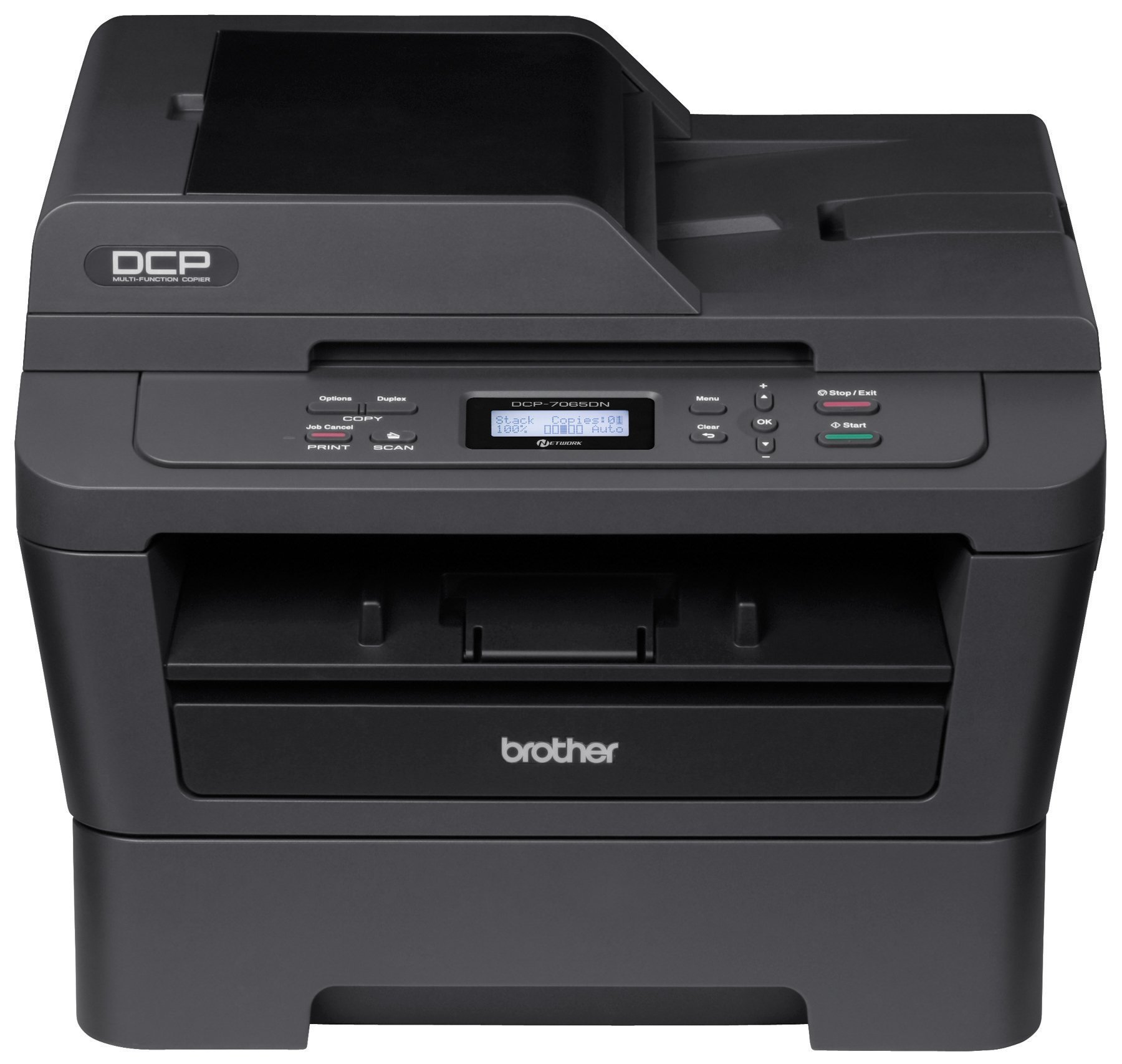


🖨️ Power up your productivity with sleek, speedy, and smart printing!
The Brother DCP-7065DN is a compact monochrome laser multi-function printer designed for small or home offices. It delivers fast 27 ppm printing and copying, automatic duplexing, and built-in Ethernet networking for easy sharing. Featuring a 35-page auto document feeder and high-yield toner cartridges, it balances efficiency, cost-effectiveness, and professional-quality output in a space-saving design.
| ASIN | B004ULP9QA |
| Additional Printer functions | Copy, Scan |
| Best Sellers Rank | #640,837 in Office Products ( See Top 100 in Office Products ) #955 in Laser Computer Printers |
| Compatible Devices | Laptops, PC |
| Control Method | App |
| Customer Reviews | 4.6 4.6 out of 5 stars (1,083) |
| Date First Available | May 15, 2011 |
| Dual-sided printing | Yes |
| Duplex | Yes |
| Global Trade Identification Number | 00012502627128 |
| Hardware Interface | Ethernet |
| Ink Color | Black |
| Is Discontinued By Manufacturer | No |
| Item Weight | 23 pounds |
| Item model number | DCP7065DN |
| Manufacturer | Brother Printer |
| Manufacturer Part Number | DCP7065DN |
| Max Copy Speed (Black & White) | 27 ppm |
| Max Input Sheet Capacity | 260 |
| Max copy resolution black-white | 1200 dpi |
| Max copy resolution color | 1200 dpi |
| Maximum Black and White Print Resolution | 1200 dpi |
| Maximum Color Print Resolution | 2400 x 600 dpi |
| Maximum Media Size | 8.5 x 14 inch |
| Memory Storage Capacity | 32 MB |
| Model Series | 7065 |
| Number of Items | 1 |
| Number of Trays | 2 |
| Number of USB 2 Ports | 1 |
| Print media | Paper (plain) |
| Printer Ink Type | toner |
| Processor Count | 1 |
| Product Dimensions | 15.9 x 15.7 x 12.4 inches |
| Scanner Type | document |
| Series Number | 7065 |
| Sheet Size | 8.5 inch x 14 Inches |
| Specific Uses For Product | home office |
| Supported Media Sizes | Legal (8.5 x 14 inches), Letter (8.5 x 11 inches) |
| Total Ethernet Ports | 1 |
| Total USB Ports | 1 |
| UPC | 012502627128 |
| Warranty Type | Full |
K**Z
An Excellent Home Printer
We bought this as a "Black Friday" special a year ago. Now, almost a year later, would I buy it again? Absolutely, no hesitation. I wanted to give it a bit less than 5 stars - it isn't PERFECT, but it is very good. When I went to click on the stars to give it a rating - the 4 star says "I like it" and the 5 says "I love it" - well, I have to say that I fall closer to loving this product rather than just liking it. A lot has already been said, and I would encourage You to check the other reviews, but a few things from my perspective as a home user. Printing Costs - We are still on the starter cartridge and have printed over 700 pages. Costing this out at the library where I used to do a fair amount of my printing after my ink jet gave up, the cost was $0.15 / page - at this rate, the printer has already 'paid for itself' - but what about going forward? Well, costing out the Brother brand Consumables (Toner and Drum) - the cost works out to $0.02 / page - assuming that the yields are accurate (and I assume they are because the yield on the starter toner that Brother provides is 700 - and we are currently over that). So, we have a printer at home that gives us that convenience and at a cost that is very reasonable. We do have the settings for maximum yield - Toner Saver, Default printing is 300 dpi, and the replace Toner setting to Continue - I just recently (at about the 700 page mark) had to pull the toner out and give it gentle back and forth shake because the print quality was getting pretty flaky - and we are now printing out nice crisp looking page again. We are NOT power users - we use the printer pretty much only when we need (or REALLY want) to print something out - the printer can go days (if not weeks) without being used at all. The problem we ran into with ink jet is that the ink cartridges would often dry out - and we would have to run them through multiple cleaning cycles just to get a legible print. No such problems with this printer. What about energy costs? -- Well, let me say - it is pretty power hungry when it is actually printing - Brother rates it at 445W - which I have confirmed with my Kill-A-Watt. That is a pretty sizable sudden draw of power. BUT - in deep sleep (which it wakes relatively quickly from when a print request is made) - it is using less than $0.10 / month - I thought about just leaving it 'unplugged' when not in use - but the cost savings of at most $1/year versus the incredible convenience of it waking from any network request to print is well worth it. I have some very minor quibbles with it - You have to make sure that Your paper is well fanned before loading it (especially on anything 24lbs and up) because it just doesn't grab it all that well and has to be reset. You DO need considerable rear clearance for using the auxiliary printing (envelopes / card stock / etc). It isn't 'whisper quiet' - but that doesn't really matter to me - though it isn't horribly loud either - It is a laser printer - it makes some noise but not a whole lot. It DOES really draw a lot of power - especially when it first wakes to print in terms of initial power draw, but again, it is a laser printer, so it is going to use more than an inkjet. I don't LOVE the scanner part - it works ok. It works GREAT as a copier and the ADF part for full page copies is great. But, on the fly cropping and scanning doesn't seem available. Overall, my family is very happy with this. I wouldn't hesitate a moment to recommend the DCP7065DN to any home user.
C**R
Nice design, easy to setup and network, quiet, and crisp printing!
I bought the Brother DCP-7065DN Monochrome Laser Multi-Function printer/copier/scanner when the price dropped to $90. At that price, it is an outstanding deal. NICE DESIGN The design is very convenient--very nearly cube shaped, with no protruding parts. That means it can be operated conveniently wherever you have space to set it down. Unlike many other multi-function printers, there is no external paper-output shelf to be bumped and possibly broken, nor any folding bracket to allow your pages to fall onto the floor if you forget to fold it outward before printing. Instead, when you print, the pages come out the front (the slot shown in the product picture, immediately above the integral paper tray and below the control panel). Only the top inch of the printed pages protrudes out the front--making it easy to grab, but keeping the rest of the pages protected inside the machine. That means even a desk or ceiling fan won't blow your printed pages away! I love it! Every other printer I've owned has had an external output tray that leaves the printed pages out in the open where they can be blown off the tray by a fan. I also like the finish of the printer. The charcoal black color looks attractive and should hide wear and tear better than the off-white printers I've had in the past (which tend to show smudges over time from toner and fingerprints). The paper tray slides in and out easily. The front toner/drum access door also pulls open conveniently and feels reassuringly solid, without the violent "thwack" sound that I've experienced with other, flimsier printers. It's not overbuilt or super heavy duty and should still be handled with care, but it feels thoughtfully engineered, not "cheap." Also the buttons on the control panel feel well made and responsive. The only complaint I have about the design is the LCD screen. When I stand directly above the printer and look down, the screen is almost blank. If I take a half step back and view it at a shallower angle, I can suddenly see the liquid crystal readout very clearly. If you crank the screen contrast all the way up, then you'll be able to see a faint readout from directly above the printer (where I think most users will naturally stand when operating the buttons) so that fixes the issue well enough--or you can just train yourself to stand back a bit when operating the buttons. But Brother clearly didn't get the viewing angle quite right, resulting in a minor inconvenience that may annoy some users. EASY SETUP This printer was very nicely packaged and easy to set up. It comes securely packed in a durable box with styrofoam inserts. Lift it up out of the box, remove the styrofoam bumpers, pull off the protective plastic bag, and undo the dozen or so pieces of tape that are holding all the parts (the top cover, the paper tray, the display, etc.) in place. Brother even thoughtfully folds over one end of each piece of packing tape, making it easy to get a fingernail under that edge to pull the tape away. And the tape peels away cleanly, with no residue. I know these are small details, but they really matter, since it would be a real hassle to try to scratch each piece of tape up with your fingernail, or to have to clean away tape residue afterward. Clearly, Brother has tried to focus on making the unpacking experience relatively painless. Once unpacked, set the printer in place, insert the power cord in the back of the printer, plug it in, and turn on the power. Then use the LCD to set up some basic options, like the screen contrast (which I cranked to full, due to the viewing angle problem mentioned above). EASY TO NETWORK In our case, we set up the printer on our home WiFi network. We connected the printer to our WiFi router using an ethernet cable (which is NOT included). I don't mind that Brother doesn't include an ethernet cable, since many folks (including us) already have one. However, if you're planning to network the printer, be aware that you'll need to purchase one. Once the printer is connected to the router (physically, by the ethernet cable), the rest of the install happens on your computer(s). Just insert the installation CD, install the software, then go to the "Devices and Printers" option from the Start bar of Windows. Choose Add a Printer and then select the printer to be added (Brother DCP-7065-DN). When I first tried this, I couldn't find that printer in my list, so I had to click "Windows Update" to update the printer list. Windows told me to wait for a few minutes, and then when I came back, I found the correct printer model listed in the updated list of printer drivers. After selecting it and clicking OK, everything was working. I opened a document in Word, selected the Brother printer, and clicked Print. In about seven seconds, the printer came to life and printed the document. On my wife's computer (a Dell laptop), the included suite of software did not allow the scan to work properly. It kept reporting a corrupted file and asking to reboot the computer. However, when she tried the Windows Fax and Scan software, it worked fine. A few days later, the Brother scan software also started working. I don't know why it initially reported errors and didn't work (we didn't change or reinstall anything), but now that it works, I guess it was just a fluke--possibly a conflict with another program she had running at the time. On my computer (a Lenovo ThinkPad x220), everything works fine as well. We haven't attempted any ultra-high-quality scans (such as scanning pictures of the kids), but the few documents my wife has scanned came out very crisp looking. If you print them, the Brother printer will only print them in black and white or grayscale, but obviously the scanner itself scans the digital file in full color. QUIET OPERATION When the printer is sitting idle (but powered on), it is wholly silent and goes into a power save mode to conserve energy. When you print, it warms up for a few seconds, prints, and then cools for a few moments. Throughout that time, it obviously makes noise, but it's a pleasant and fairly soft "white noise" sound--about comparable to a medium-sized fan. I don't find it bothersome at all, and perhaps more to the point, you could easily continue a phone conversation while the printer is running without feeling like you have to shout or strain to hear over the noise of the printer. I think it's great. CRISP PRINTING So far, I've only printed text-only documents and (just for testing purposes) two scans/copies of a black-and-white brochure with a graphic logo and a photograph. The printing is very crisp. With something that has shades of color and subtler details (such as an image or sophisticated graphic image), you need to change the print quality over to images (instead of text only) to capture those details. If you leave the printer on text-only quality, the images will flatten out and look over-dark, like photocopying an image on a very old photocopier with poor detail reproduction. Since this is a monochrome printer, I doubt anyone will find that to be much of a problem. My guess is most folks will buy this (like I did) for document printing, and possibly the occasional reproduction of an image (such as photocopying your driver's license for insurance purposes, or some such). The copy function works great, too. You don't have to scan to your computer first. Just feed in the document, then press the button and it copies directly, without need to pass through a computer. CONCLUSION This is an outstanding printer, and the only feature it lacks over the higher-priced counterparts in Brother's monochrome multi-function laser line up is the fax machine. If you don't need the fax, get this version. It's ideal for a home office. And laser printers in general are ideal for people who don't print very often, since there's no ink to dry up over time, which tends to make them much cheaper in the long run. I can't confirm the long-term durability of this printer, but given what I've experienced so far, I expect many, many years of trouble-free service! Highly recommended!
C**H
Purchased two of these years ago and they are still running strong. Laser precision with easy and reliable connectivity via ethernet cable. Can't go wrong with this one (unless you need something wireless). I will say that I'm not a fan of the Brother Control Suite software, which I find bloated and unnecessary with intermittent product advertisements popping up in the Windows taskbar. No issues with OSX though.
J**B
I recently bought this Brother DCP7065DN Multifunction Laser Printer. After comparing prices, since I had my eye on it, the Amazon price was the best. I waited for a sale and bought it. I am so pleased with it. It's easy to set up and quick to print and scan. Also, it's not noisy. You do need some room for it, because it does take up some space. I simply put it on an end table and I'm fine with it. I may add that you will have to buy a printer cable, which is under 10$. The one that I bought from Amazon was the 10 foot USB 2.0 Gold A-B Printer Cable for the Brother Printer and can highly recommend it. I bought both the Printer and Cable at the same time, so they arrived together. I must add that delivery couldn't be any faster. I highly recommend this Printer and cable.
S**O
I bought it at $119 (and now it is $99 as of 9/10/2013!), which was really a great deal for its functions. The key features driving the purchase are Auto-duplex, built-in scanner and as a laser printer. Apart from the ordinary toner cartridge, a high yield version is available such that we can save some bucks when we still wanna stick to the genuine supplies. But still there are some short comings affecting me that you may need to pay attention to: -This printer, at the moment, has no support for WIndows Server 2012, that is unfortunately my case where I am using the printer with my workstation. Though if you know how this can be solved easily by getting a virtual machine with W7/8 or any other supported OS. -When it is first turned on, and during operation, it draws considerable amount of current that may set your main supply to fluctuate. My house is kind of old and this becomes something observable. The lights simply flickers a bit, my UPS kicks in, turning on and off a few times during the printing. While this maybe common to all laser printers which are supposed to draw a lot current, but you may need to consider an inkjet if you want to avoid it. -Finally, the default printing contrast is quite low, I tried to print some photos on my computers and it turned out to be a black picture. I am not sure if this can be tuned, but at least you shouldn't expect to print pictures well by default, even black and white only.
A**J
Bang for buck, you won't find a printer that will do what this one will at this price point. There is no competition: this one is it (unless something came out recently I'm not aware of). Duplex scanning? Duplex printing? Laser? True wireless? Compatible with iPhone AirPrint? All awesome features! And for the most part I am very happy with this printer. HOWEVER, they seem to have gone cheap on the memory. I keep getting an "out of memory" error when printing large jobs. (40 pages plus) I am a teacher and sometimes I need to print quite a bit. That's why I got a laser printer! I need to do annoying workarounds such as saving the whole thing as a new document, then printing it again in lower quality. Or else instead of selecting "print document ten times," I need to individually click "print one time" ... "print one time" ... "print one time" ... ten times so that the printer has bite-sized orders to work with. Sometimes it is surprising how few pages it can actually print without "running out of memory." Seriously Brother - how much does memory cost these days anyways? So yeah - great for all of the other features! And I am in communication with Brother and will change my review if they resolve this issue. But for the time being - three stars. That's all you get from me!
A**R
Have had this machine for six years and it's still working great. Print quality is excellent and it's done everything which I've needed it to do. A multifunction copier is the way to go. No more trips to the print shop for photocopies, and it's simple to scan documents to email. It's easy to clear paper jams and changing toner cartridges is a breeze. Very happy with this urchase.
Trustpilot
4 days ago
2 months ago