We remain fully operational. Our teams are working around the clock to ensure your deliveries continue safely.

DOWNLOAD THE APP


Customer Services
Copyright © 2025 Desertcart Holdings Limited
DOWNLOAD THE APP

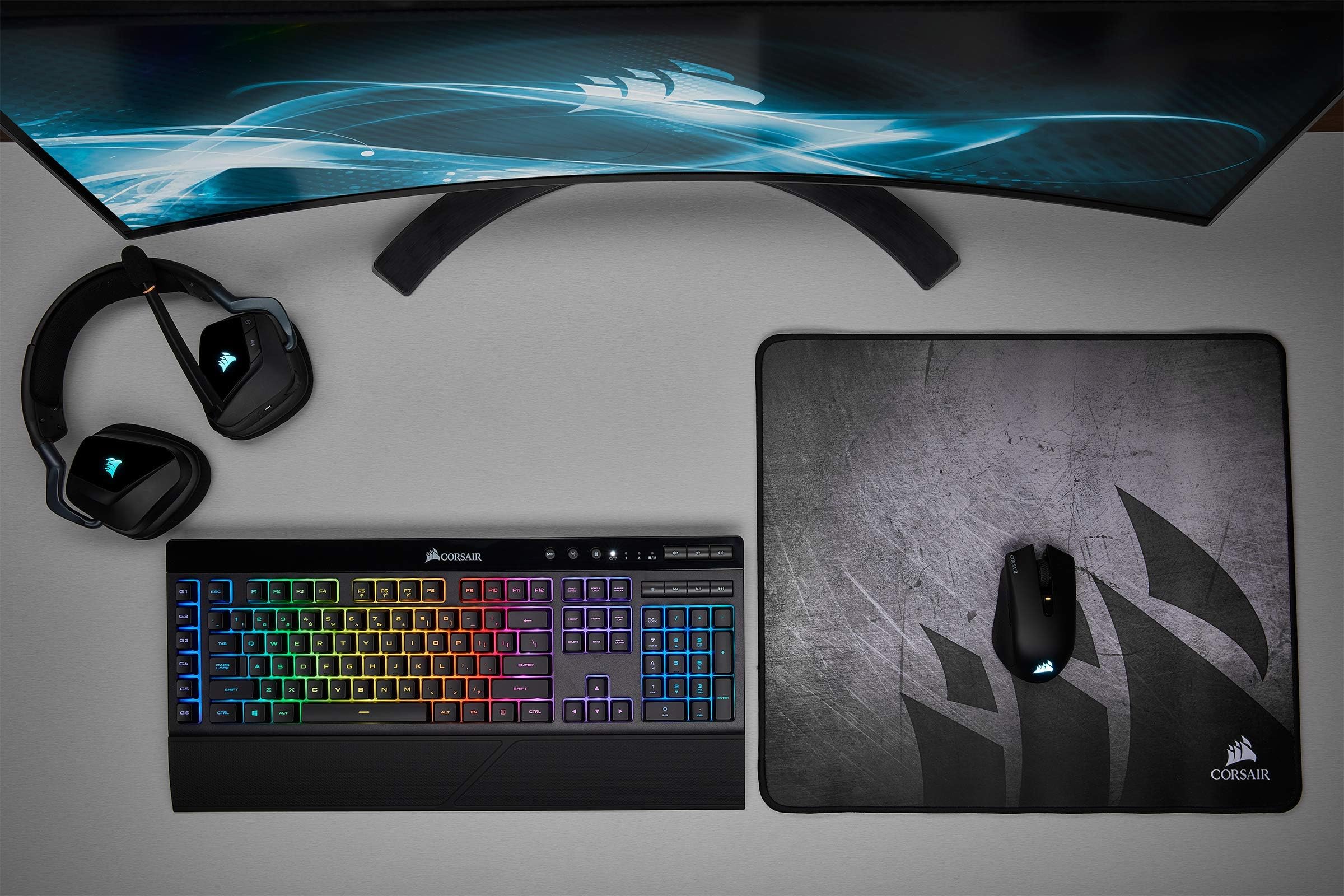


⚡ Dominate wirelessly, shine endlessly.
The Corsair K57 RGB Wireless Gaming Keyboard delivers pro-grade performance with sub-1ms Slipstream wireless latency, vibrant per-key CAPELLIX RGB lighting, and versatile connectivity options including Bluetooth and USB wired. Designed for extended gaming comfort, it features six programmable macro keys, a detachable palm rest, dedicated media controls, and up to 35 hours of battery life with lighting enabled. Compatible with PC and backed by a 2-year warranty, this keyboard combines cutting-edge tech with ergonomic design to keep you ahead in every game.


| ASIN | B07TNRCM1Z |
| Additional Features | Backlit, Ergonomic, Rechargeable, Wrist Rest |
| Antenna Location | Gaming |
| Best Sellers Rank | #26,550 in Video Games ( See Top 100 in Video Games ) #1,387 in PC Gaming Keyboards |
| Brand | Corsair |
| Built-In Media | Keyboard |
| Button Quantity | 110 |
| Color | Black |
| Compatible Devices | Gaming Console |
| Connectivity Technology | wired, wireless |
| Customer Reviews | 4.4 out of 5 stars 3,058 Reviews |
| Enclosure Material | Rubber |
| External Testing Certification | Não Aplicável |
| Global Trade Identification Number | 00840006608752 |
| Hand Orientation | Ambidextrous |
| Is Electric | Yes |
| Item Dimensions L x W x H | 12.08"L x 9.45"W x 8.82"H |
| Item Weight | 950 Grams |
| Keyboard Backlighting Color Support | RGB |
| Keyboard Description | Gaming |
| Keyboard Layout | QWERTY |
| Language | English |
| Manufacturer | Corsair |
| Model Name | CORSAIR K57 RGB WIRELESS |
| Model Number | CH-925C015-NA |
| Number of Keys | 110 |
| Power Source | Battery Powered |
| Recommended Uses For Product | Gaming |
| Special Feature | Backlit, Ergonomic, Rechargeable, Wrist Rest |
| Style Name | RGB Wireless |
| Switch Type | Rubber Dome |
| Theme | Rainbow |
| UPC | 840006608752 |
| Unit Count | 1.0 Count |
| Warranty Description | 2 year manufacturer |
| Water Resistance Level | Not Water Resistant |
S**S
Fantastic keyboard
Love this keyboard. The wireless connection is super fast with no lag at all, even while gaming. Keys feel great, battery lasts a long time, and the RGB looks awesome without being over the top. Easy to set up and feels solid. Definitely recommend if you want a clean, cable-free setup. Great quality for the price.
F**E
Good keyboard that's a bit overpriced.
I use the K100 (Cherry MX Speed Silver variant) at home on my gaming desktop. It's a "high strung" keyboard (for lack of a better term) that's not for everybody, but I'm used to it now. Last year I bought a gaming laptop as a backup/ something I could take with me. Although it does have a full keyboard, I decided that I'd like to have a separate keyboard and mouse for it, but because this was going to be a keyboard and mouse that I was probably only going to use maybe once month or so, I didn't need or want to spend a huge amount of money on these things. But I did want a wireless keyboard and mouse. I ended up getting a wireless G502 for the mouse. The keyboard was harder decision though. I wanted full keyboard, number pad and everything, and there were a few contenders. I ended up going with the K57 wireless as, I'm a fan of Corsair keyboards in general and it checked all the boxes. It's not a mechanical keyboard, so that wasn't particularly great, but getting a high quality mechanical keyboard would've upped the cost by 50%-100%. The RGB...is there if you want it. I typically keep it at a static color. You can connect it via USB, via RF dongle (which I use), or via Bluetooth (which I haven't tried yet) there's no discernable lag that I can tell. . Being a membrane keyboard, it's not particularly heavy at all. As far a design goes, it's a keyboard there's nothing revolutionary going on here, with that said, I would've liked to have had a volume roller instead of the dedicated keys, but that's just some nitpicking on my part. From a value for money perspective, $110 is definitely on the steep side for a wireless membrane keyboard, even if it's a higher end membrane keyboard. On the other hand, $110 would've been an unrealistically low price for a mechanical wireless keyboard. I feel like this should be a $80-$90 product. If you can catch on sale for around that price, it would be a very good value. At the regular $110 price, it's only a mid-ish value.
C**5
Great.
let me start off with this, It is NOT mechanical. That said it is a very solid keyboard, I like the fact that it is Bluetooth. I would not Bluetooth for gaming. I use it primarily for writing on my laptop, It is very nice. It primarily allows me to free up much-needed USB ports. As a writer (moderate to heavy use.), it is very nice to write on, not as clicky as a mechanical keyboard but it sounds nice and feels very well when typing. I forgot how good a nice keyboard feels. The thing I probably like the most, is it is very solid. It flexes a little, but far less than my $40 Logitech keyboard. the second thing I like about it is its battery life, it is really nice. I got it on 12/29, I charged it and its 1/7 and it's still at 49%. I am guessing that the battery life rating is for constant use. It is a huge perk. I use RGB setting 5 which is the keys light up after being pressed. It isn't the most RBG but I use it on the brightest setting. The thing I am mixed about. Is the keyboard goes to stand by mode. It takes a few seconds to wake up. depending on your typing speed I'd say 4-10 keystrokes. It saves on the battery, I just wish it woke up faster. The big drawback is that fully customizable RGB settings, only work when it is plugged in, which doesn't work for me, while I am in bed, the main reason I got it. I can't tell you how the lightspeed adapter works, but I am sure it is fine because it is a corsair product. Five Stars hands down, definitely recommend.
A**E
Good but not worth the price
I ordered mine from Amazon warehouse. It was open box. Got a fair discount on it that way only it didn't come with the wifi receiver so I had to get a refund. But that isn't any fault of the keyboard. I however did test it with the USB cable. Old school micro usb. They don't last. When will these manufacturers start using USB C? Sigh ..... As for the keyboard. It looks fantastic. Larger than full size. This thing is a monster. The backlighting looks great though the Corsair ICUE software is lackluster and a memory hog. Lighting profiles do not save to the keyboard. The software must be running to use them. If you try to use without the software, the keys just flash. It isn't practical so you are forced to run the app. I didn't have issues typing like most reviewers. However the keys are very loose and clunky. I was expecting something firmer at this price. I am very disappointed. The sound and media controls work great and would be a huge help if I could use it wirelessly. I had no issues controlling my soundblasterX G6 with the volume controls. I give it 4 stars but it is likely 3. I feel you can do better. I have an Asus laptop with the Armory crate software and it is much better than the Corsair ICUE software. I might switch out to more Asus products just so everything can be controlled from 1 software. The fact that profiles don't save without the software running is a deal breaker.
D**E
BETTER THAN Mechanical Switches?
Pro: I've been using this keyboard for a couple of months, and it is making me ask myself whether it is possible for switches to be better than popular mechanical switches? It *looks* like a mechanical keyboard. The switches are tall and blocky and widely separated, like the old IBM keyboards that inspired the current trend of mechanical keyboards. The switch action is linear; not clicky. They have long travel and you *can* hear them, although they are quiet. The keystroke is stiff enough that you have to apply distinct pressure in order to activate the key, and the key activates reliably when the threshold is overcome. For me, the experience is, overall, more satisfying than brown switches (my favorites of mechanical switches). Pro: The backlighting is terrific, once you read the manual and override the default settings. Press Fn+0 until you get the color that you want (I chose light blue), and press the brightness key until you get minimum (for longest battery life). The battery lasts a long time, and the keyboard sleeps if you don't use it for ten minutes, which is long enough to not be annoying. A Pro That May Also Be A Con?: The only thing that I have had trouble adapting to is the programmable macro "G" keys on the left side. These are a handy feature if you want/need them, but my fingers simply are not accustomed to finding the corrects keys on this keyboard. Maybe custom caps for WASD keys might help? EDIT: After using for a few weeks, my fingers find the right keys quickly.
S**R
Has a bit of a learning curve
I bought this keyboard on an impulse, so even though I love it, I also have some regrets... Anyway, what I love is: * The dongle (thing that let's it connect wirelessly) can be customized to work with another Corsair products. This is why I impulse bought it in the first place sicne I already had a mouse from Corsair (the Sabre RGB Pro Wireless). * Doesn't require batteries (comes with charging cable). * Is wireless, so you can save some cable management (another reason I bought it, my previous wired keyboard was driving me crazy). * It has a nice design and is extremely customizable with the iCue application from Corsair. * Has a very comfortable numeric keypad. * I am not a hardcore gamer, but on the games I play I notice very little to no delay when playing wirelessly. * It is very quiet and light. It has enough sound and weight to make you feel like you are pressing something. Is not too loud that you can't use it after midnight in fear of waking up your neighbors; and not too heavy you have to destroy the key to press it. * Has a set of 6 customizable keys. Haven't used them yet, but will soon. What I don't like: * It is not USB-C but USB mini-B! This is my main regret as an impulse buy, so not really their fault, I should have read more carefully. My mouse is USB-C, so I cannot really use their charging cables interchangeably. Oh well. * Another issue is that the keyboard doesn't work when turned off and connected by wire (charging). I know that sounds weird, but the mouse I have does work when turned off if it is connected by wire (charging). * Is a bit too big (is bigger than my laptop, which looks really silly), and somehow the keys feel weirdly small. I assume is just me trying to adapt to the new size and key design (they are kinda tall instead of flat, like the ones I am familiar with). * For some reason, the video buttons work abnormally (sometimes they do, sometimes they don't, the backward and forward button usually don't work on youtube, the play/pause and stop button do work). The arm rest is kind of unnecessary, although it does make it look nicer and less squarish (though it does make it bigger). All in all, it served the main function I wanted it for: reduce USB connections and cable space management. But I do have some regrets about some of the features.
A**R
Looks awesome
I haven't used my setup for gaming yet, so this review is basically ergonomics, aesthetics, and setup only. On the first two fronts, it is a great setup. It looks sharp, it feels comfortable after hours of typing/scrolling for school and work, and is small enough to sit comfortably on a height-adjustable stand for when I want to stand and work. As far as setup, the Corsair iCue software is a bit buggy, so I'm not sure if this is a keyboard issue or a software issue. The keyboard firmware won't update - it gives me an "update failed" error every time I try. Everything seems to work fine, except the keyboard is the only RGB item (and ALL of my RGB devices are Corsair only, so I could avoid this exact issue) that won't sync with the rest of the lights. No matter what I try, the keyboard defaults to its own RGB profile...which is never the same thing, so I haven't even been able to figure out if it's some kind of default setting that I'm managing to miss. Sometimes it's just a solid color, sometimes it's one of the "mural" options....no way to predict what it'll be. But one thing is for sure - it will NOT be the option I tell it to be lol. For reference: I have this mouse/keyboard setup, a Corsair gaming mat, the headphone stand, AIO CPU cooler, case, RAM, and some LED strips under/behind my desk. Literally everything except the keyboard will display the RGB profile I set it to. Oh well - it's annoying, but not enough to knock a star off.
M**D
Run as fast as you can.
I recently bought a new computer and with it a new set of peripherals. I had previously disliked using multiple software programs to manage my devices, and so I decided to purchase all my devices through one company. I also wanted to transition to wireless, so that was important too. I decided to exclusively buy Corsair products, as I had perceived them in the past to be a sort-of luxury brand. In the end, I bought the “MM30” mouse pad, the “K63” wireless keyboard, the “Harpoon RGB” wireless mouse, and the “HS70” wireless headset. Within a few days I began to experience issues. The K57 frequently lost connection and my Harpoon mouse constantly registered one click as two. Because I specifically set out to find a wireless mechanical ten-keyless keyboard, I was initially ecstatic to find out that Corsair seemed to make the only one – so I later decided to return my broken K63 for the same model. The same can be said of the Harpoon, which fit perfectly in my hand. I received new keyboard and mouse not too long after, only to encounter the same set of performance issues. For my second attempt, I decided to trade my K63 for the K57. The K57 has so far worked out great, although I’m still very disappointed that I could get my wireless mechanical ten-keyless K63 to work properly. My Harpoon on the other hand happened to be just outside Amazon’s return window, and so I was forced to seek assistance through Corsair directly. After several weeks of waiting for responses, being asked the same questions over and over, and feeling a profound sense of disappointment for my purchase decisions, I lost my patience and called Corsair’s phone service line. Luckily, I was helped quickly and effectively over the phone, and although I was asked to pay the shipping costs myself, I found myself relieved that my new mouse would be mailed in no time. I was being sent the Ironclaw, a more expensive (albeit bigger) model of wireless mouse. When I received my THIRD mouse I was initially shocked to find that the rubber portion of the palm rest seemed to be loose. I forgot about said issue in due time and was more or less satisfied. But then the unthinkable happened - my Ironclaw lost the ability to charge! I was absolutely stunned. The port on the mouse appears to be loose, and no cable seems to fit correctly. For what I hoped was the last time, I called Corsair and reported the issue. Long story short, i repeated the shipping process (they covered the shipping costs this time) and received my new Ironclaw after what i remember to be two weeks or so. The new Ironclaw is fine, although if it's used for too long it begins to act funny. It also constantly interferes with my other corsair devices, and so i must separate them as much as possible. Here's the latest update: my 57 Keyboard is apparentlypossessed by the devil. On occasions that occur more and more often as the days pass, my k57 will do the most unholiest of deeds. It types and on its own, loses connection briefly but repeatedly, and just all around acts completely insane whenever it wants to. This unfortunately is not a minor issue. The computer itself will often become unusable as a result of the keyboard. It's absolutely inconceivable that this could happen again!!! So after all of this I am at a loss for words. I will not being trading my keyboard for another. I am completely and utterly defeated. I can’t express to you enough my profound sense of disappointment. I can’t do it anymore. I can’t waste anymore time. I can't talk to another agent. I can't wait for another keyboard to arrive.I will just move on. I would be insane to peruse this further. To sum up, don't buy Corsair peripherals. I can't speak to the quality of their internal components, but i am without a doubt confident in saying that everything else they sell is just a scam.
Trustpilot
3 days ago
3 weeks ago