

Desert Online General Trading LLC
Dubai, United Arab Emirates
Desert Online General Trading LLC
Dubai, United Arab Emirates

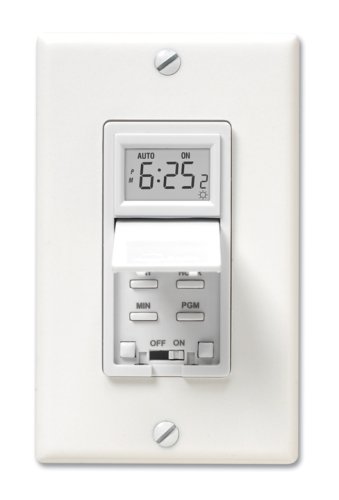

🌞 Light up your life on your terms—smart, sleek, and always on time.
The Aube by Honeywell TI035/U is a programmable solar timer switch designed for seamless lighting automation. Featuring sunrise and sunset-based scheduling, a robust 2400W load capacity, and a built-in rechargeable battery to protect settings during outages, it offers both manual and automatic modes. Its sleek flush-mount design fits standard wall plates, making it an ideal upgrade for smart, energy-efficient home lighting control.
| Color | White |
| Brand | Honeywell Home |
| Product Dimensions | 1.6"D x 1.8"W x 2.7"H |
| Item Weight | 5.6 ounces |
| Number of settings | 3 |
| UPC | 775264303517 |
| Global Trade Identification Number | 00775264303517 |
| Screen Size | 1.5 Inches |
| Manufacturer | Aube by Honeywell |
| Part Number | TI035 |
| Item model number | TI035/U |
| Is Discontinued By Manufacturer | No |
| Wattage | 2400.00 |
| Horsepower | 1 |
| Item Package Quantity | 1 |
| Mounting Type | Flush,Wall |
| Batteries Included? | No |
| Batteries Required? | No |
| Warranty Description | 3-year warranty. |
J**Y
Good controller switch! Very happy so far!
I installed the Aube TI035 a couple of weeks ago. I have had two Intermatic's in the past and was so frustrated with them that I junked them and have been using a wall switch for the past several years. I came across the Aube on Amazon and decided to give the Aube a try after reading the reviews. Installation was a snap. It went right int where the old wall switch was. Note that it is deeper then a wall switch and needs a standard full sized jbox. Setup was straight forward using the longitude and latitude configuration. Read all the instructions FIRST. The whole operation took around a half hour and it has been running like a charm.Other features include:o The ability to program it turn on and off at different times as well.o A daylight savings setting.o Programmable for different on/off times.o Also a manual mode to turn the lights on on the gray days of winter.One thing I would note is that if you are going to purchase this unit is to make sure to get the right one. The one that I have requires to have both hot AND neutral connections available.UPDATE: Bought this switch in 2009 and it is still working great.Still working as of 2016!:Guide is kind of confusing. No verification. So here's a cheat sheet.Initial setup or from reset.=============================Manual or Automatic-> Press one of the four switch door switches for 3 seconds.Results: Toggles between Man. and Auto.12/24 HoursStep 1 in setting the clock.-> Press Hour & Min buttons together briefly. (0:00 24 hr or 12:00 for 12 hr.)Set the time-> Press Hour and Min to set time.Result: Shows time. In 12hr a small PM will appear in the dislay.Daylight savings time-> "Press Code button 4 times, press Min to Ad or Nor"Result: "Nor = std time, Ad = DST."City programming (Lat/Long)Google your city to get Lat/Long.Lattitude programming-> 1. Press code button.-> 2. Press Min button to increment Lattitude.Result: Displays Lattitude.Longitude programming-> 3. Press Code to move to Longitude.-> 4. Press Hour to set to -1 (west)Longitude.-> 5. Press Min to increment and add Longitude" "Ours:Result: Displays Longitude.Days Programming (# days since Jan 1.)Google the number of days since Jan 1.->6. Press Code button to Days.->7. Press Hours for hundreds, Min for days.Result: Should have the number of days.Daylight savings time-> 8. Press the Code button to Nor/AdResult: Should be programmed. See Daylight Savings time/Local Correction Factor-> 9. Press Code to move to LC.-> 10. Press Min to select values (-1,0,1)."Result: Typically 0. Don't know how many minutes LC is corrected.Validate Programming.Shows results from Lat/Long.1. Press PGM to show P1 On setting Show P1 On time (with moon in display).2. Press PGM twice to show P2 On/Off settings Should be --:--3. Press PGM to show P2 Off setting Show P1 Off time.Set the time to a couple of minutes before the ON time. Lights should come on.Set the time to a couple of minutes for the OFF time. Lights should go off.Set the time back to the normal time.Everything should now be set.
N**N
Easy to program but no battery back-up
This unit was much easier to program than the Intermatic timer switch. Unlike the Intermatic, you can simply enter your latitude and longitude which are provided in the instructions. The instructions were MUCH easier than the Intermatic timer. The buttons are easier to press and nicely spaced. It works well w. CFL bulbs w. no flicker when turned off. Corrects for daylight savings time. However, this unit has no battery back-up so if you lose power, you will probably have to reprogram. Can be programmed to turn on at dusk and off at dawn everyday. It can also be programmed to turn on at different times on a day to day basis. It corrects for daylight savings time as well. Wiring was a breeze. Excellent product. Would have given it 5 stars if it had a battery back-up.
J**H
Works OK, clock loses about a minute a week ...
Works OK, clock loses about a minute a week. The device cannot handle surges. The one I received lasted a little over a year. It's priced a little too high to last only a year.
A**R
High Quality Product. Note: 3 Way not same as 3 Wire
We bought this to correct an error we made during new house construction. We have eight outdoor lights on the front of the house that are divided into two circuits. One circuit, by the driveway, is wired to a day/night motion sensor. Don't know what we were thinking at the time, but the other circuit is not. The driveway lights come on automatically at dusk. The other side does not. We've simply been leaving those lights on all the time. Now that the house is finished, it would be too hard to install a day/night motion sensor for those lights.As a work around, an electrician mentioned that The Home Depot sold a timer switch with a micro controller / clock in it that would turn the lights on / off at sunset / sunrise. That's the first I'd ever heard about such a thing. But before going to the store, I decided to see what you all had to say about these. Glad I did.Apparently, the stores sell the Levitron brand, which most of you say fail early. So, based on the reviews, I bought this Aube unit instead.It looks to be a high quality product. The instructions are thorough. This particular unit has a relay in it - more on that later. Presumably Honeywell has tested the relay thoroughly because the unit has a 5 year warranty and that relay has to switch on and off at least two times a day, 365 days, for at least 5 years. (Actually, that's not very many cycles for a relay, so 5 years should be no problem.)Now, don't make the same mistake I did. Aube sells two flavors of this box. This one, for a 3 wire connection, and this one Aube by Honeywell TI034-3W/U Solar Programmable Timer Switch, White for 3 WAY or two wire connections. But this isn't specific enough, and that's were I goofed. (But a happy ending.)See, our electrician wired our lights as a 3 way. Now, right on the Aube package, so you can see it before you open it, Aube warns you that you must have 3 wires going to your existing switch to use this particular unit. (If you don't, they refer you to their other flavor, above.) So I dutifully checked our switch before opening the package.There were indeed 3 wires going to our existing switch. That's because 3 WAY switches use 3 wires too! BUT that's not the same as what this unit expects. As another reviewer found, and as the product description says, this unit requires line, neutral and load. Fortunately for me, I'm an Electrical Engineer and also fortunately, our electrician had brought neutral down to the junction box. So I was able to figure this out and make this unit play in our situation despite the confusion. (I also bypassed the other 3 way switch. Once this timer is installed, there's no need to control the lights from another location.) It turns out I'd rather have this switch anyway, so maybe this was fortuitous.See, this unit uses a relay. The other flavor Aube by Honeywell TI034-3W/U Solar Programmable Timer Switch, White uses a solid state device, a DIAC, instead of a relay. One implication of a relay is that, unlike DIAC's, there is no problem powering fluorescent bulbs (CFL's included) nor any worries about electronic ballasts. No minimum current required to keep the circuit "pulled in" as we say. You see a lot of concerns about this with motion sensors that use DIAC technology. See the 1 star reviews here Heath Zenith SL-6105-WH Motion Activated Wall Switch for example.Also, DIAC's aren't as "short" tolerant as relays. We have a Hunter ceiling fan that uses a DIAC to control the light kit. I've had to replace the unit twice now. Every time an incandescent bulb blows out, the current spike (flash!) burns out the DIAC. I'm not saying this will happen with the Aube, but I've had trouble before. I know it's "old school," but I prefer relay based units. (Unless you use H-MOS.) This unit can handle 2400 Watts, a lot more than its solid state counterpart can handle.So, a little confusion over the package warning about 3 wires, but once past that, I'm happy. The unit has only been installed for a few days now so I can't report on its longevity at this time. But I'm happy so far.[Like the way I write? Maybe you'll hire me? Leave a comment.]
T**4
Way to Complicated to Program
Once you get it set up, which is overly complicated, it works fine. But we lose power a lot in my area so then you have to reset it all over again. I keep the instructions nearby as there is no way you can just figure out how to program this thing without them. Even with the instructions it take several attempts to get it right. So two main complaints are:- it should have a battery back to maintain it's program settings- and it shouldn't take an hour to program the darn thing!
Trustpilot
1 month ago
1 week ago