
DOWNLOAD THE APP


Customer Services
Copyright © 2025 Desertcart Holdings Limited
DOWNLOAD THE APP
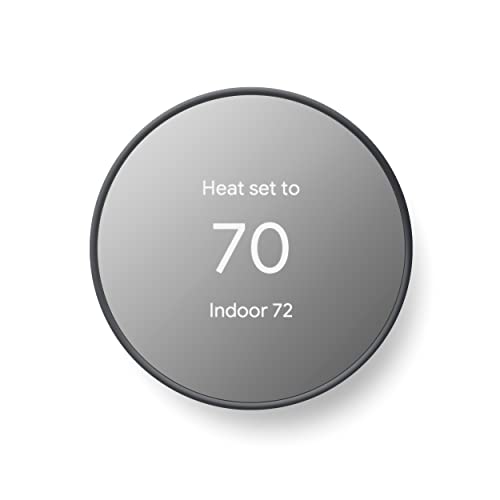


🌍 Stay cozy, save energy, and control your home from anywhere!
The Google Nest Thermostat is an ENERGY STAR certified, programmable smart thermostat featuring dual-band Wi-Fi connectivity and Bluetooth Low Energy. It enables remote temperature control via the Google Home app, offers smart HVAC system monitoring with maintenance alerts, and supports voice commands through Google Assistant and other Matter-certified platforms. Designed for easy DIY installation, it helps busy professionals optimize home comfort while reducing energy costs.



| ASIN | B08HRPDBFF |
| Backlight | Yes |
| Batteries | 2 A batteries required. (included) |
| Batteries required | Yes |
| Best Sellers Rank | #256 in Tools & Home Improvement ( See Top 100 in Tools & Home Improvement ) #1 in Home Programmable Thermostats |
| Brand | |
| Color | Charcoal |
| Connectivity Protocol | Wi-Fi |
| Connectivity Technology | Bluetooth, Wi-Fi |
| Control Method | Voice |
| Control Type | Remote Control, Voice Control |
| Controller Type | Amazon Alexa, Android, Google Assistant, iOS, nest |
| Customer Reviews | 4.0 4.0 out of 5 stars (28,443) |
| Display Type | LCD |
| Included Components | Documentation bundle, Mounting screws, Nest Thermostat, Steel plate |
| Item Weight | 5 ounces |
| Item model number | G4CVZ |
| Manufacturer | |
| Model Name | Google Nest Thermostat |
| Mounting Type | Wall Mount |
| National Stock Number | GA02081-CA |
| Number of Batteries | 2 A batteries required. (included) |
| Power Source | Battery Powered |
| Product Dimensions | 1.21"D x 3.3"W x 3.3"H |
| Screen Size | 2 Inches |
| Shape | Rectangular |
| Special Feature | Programmable |
| Specific Uses For Product | Heat Pump |
| Specification Met | Energy Star |
| Style | Programmable Wifi Thermostat |
| Temperature Control Type | Heating, Cooling |
| UPC | 193575007670 |
| Voltage | 24 Volts |
| Warranty Description | 1 year. |
F**2
Great thermostat and relatively easy to install and use.
When our old Nest thermostats stopped being supported by Google, we had to upgrade because we typically adjust these from our phone while we're away. These are slick looking and easy-to-install replacements. You use the Google Home app for installation (not the Nest app) and if you follow the instructions... line for line... you'll do fine. Make SUPER sure you seat the wires well. In my first installation, I didn't seat the "heat" wire deep enough and I spent the next hour trying to figure out why and ended up having to so a factory reset on the thermostat and start from scratch. Once I figured out what was wrong, it installed easily. The 2nd one was a piece of cake after the first one.
M**T
Works Perfectly
Easy to install if you follow the directions in the Google Home app. Seems to be easy to control but will definately take some time to get used to. Love the fact that we don't have to manually switch between heat and air anymore. The thermostat will automatically do it for you.
J**A
Fancy Set Back Thermometer w/ Horrible Instructions - And Not Expandable
UPDATE: Nest Accuracy Just spent 40 minutes chatting with some at the Google store regarding the accuracy of their Nest thermostat product. Asked what I thought was a pretty straightforward question - how accurate is the temperature and humidity data shown in my Nest app? Just installed a new AprilAire whole house humidifier and wanted to quantify the change. Well, it seems there isn’t much documentation available… Was told that they thought the temperature was accurate to 1% - and the same applied to its humidity setting. Pointed out that 1% was probably not an issue at 50% humidity, but would be miles off at a 10% environment. They did offer to sell me another one, I guess to benchmark it to my existing Nest (which might or might not be refurbished), but I declined. Shame consumer products not getting the support they deserve - especially one that directly impacts household environmental quality. Bottom line: Is this thermostat accurate - don’t know. If you’re like me, and would like to know what you’re getting into before you start a project, Nest thermostat installation will be frustrating. Picking one out to begin with is confusing - C wire, no C wire, etc - hooking up fairly straight forward, the tough part is getting the thing to eventually work… There is literally nothing in the box that helps sort any of this out - you will learn/fail as you go along with the on line set up and thousands of YouTube tutorials. Google saves $1 per unit by not including directions and leaves it up to the Nest “community” to walk you through it. Hopefully. After diagnosing we had a wiring issue (wire broke trying to jockeying it into the baseplate) we ended up with a persistent E294 error code. Again, Google saves money by not having any on line live chat or call center and we ended up getting by with one of the YouTube “experts” advice (disconnect and set up again) which finally worked after a couple hours effort. The most telling sign that Google underplays how easy this is to install is how quickly they route you to an installation company to make your headaches go away. The end result is a fancy set back thermometer (which we already had) that connects to your phone, spies on your activity, and encourages you to let your power company decide how comfortable you are going to be. The only benefit I see in this device is potentially easier programming - and seeing and adjusting comfort levels away from home. Spouse works from home, so setback features fairly minimal during the day, but knowing that system was not running properly (which recently happened when out of town) is nice. UPDATE: Much like the Ring doorbell we recently installed, Nest makes it impossible (so far) to easily add a second user to their account. Trying to add myself as a second user, the Nest said there was something wrong with the thermostat and would require yet another factory reset - which I am not ready to do as it has already taken over two hours just to get it working in the first place. Signing in as my spouse, can finally see the pretty basic control panel for the Nest thermostat. Don’t see any system health features (like battery life) or any programming suggestions (like eco mode) that would add value to this product. Without a sizable rebate from our electric utility, probably would have never purchased this product and waste several hours installing and troubleshooting. Support is nearly nonexistent and/or unreliable sourced. UPDATE 2: After battling with the Nest for a week, decided we had to invest more $$$ in a remote temperature sensor. Our Nest is stationed in corner of dining room and therefore sees little traffic to activate it. Having a warm Summer, was getting tired of Nest going Eco on us and letting house get into the 77-78 degree range, especially since it was set to 74. After fiddling around with the remote sensor, it eventually dawned on us that we had just purchased an early generation Nest, built several years ago, which would not recognize any sensor we tried to pair it with. We, wrongly assumed in this case, a brand new Google Nest would be, brand new (latest generation). Had the pleasure of paying $6 to return this useless accessory.
A**S
Works great, but follow the setup instructions
We recently purchased this thermostat and like how convenient it is to use with our Google Home app. I had some difficulty getting it to work initially but it was my own fault for not following the setup instructions more carefully. I failed to correctly select the HVAC system I use and the thermostat gave me an error message that didn't exactly correspond to the problem. Once I got it figured out with the help of Google Home support representative, Kep, it works very well. So, the bottom line is make sure you carefully follow the setup instructions.
J**E
Not as user friendly as I wish it had been to set up with no C Wire, but, it did get done.
My home has 1960s construction with two-wire thermostat wiring, and it would have been prohibitively expensive and inconvenient to rewire. This had prevented me from buying a smart thermostat for quite some time. The Nest attracted my attention specifically because it advertised itself as not requiring a C-Wire. However, when I got it installed, it immediately started nagging me about not having adequate power, losing wi-fi all the time, and requesting a C-wire or Nest Power Adapter. Gee thanks. I was ready to rip it right back out and go buy another non-smart programmable thermostat like the one I had just replaced. I almost returned the Nest, and bought a different thermostat right away, but I'm glad I didn't, because Google actually emailed me shortly afterward and said they had detected I was running a Nest with no C-wire, and offered to ship me their C-Wire adapter free of charge. I figured why not try it. It was slightly confusing to install, but I sorted it out within a day of mulling it over and searching the Internet for my specific zone controller. After a power test from the setup menu, it detected the new adapter and it seemed to be satisfied with its power situation at that point. (Sheesh, why not just include the adapter in the first place?) As far as using the thing, it's super convenient to be able to request power changes verbally without walking to the wall unit. The physical unit's menu was intuitive enough to figure out. Gently nudge it on the right side and then slide your finger up or down as though it had a dial. A light tap selects the current option. The included instructions could have been better, but luckily I'm young enough to be able to intuit the controls - it seems like the designers were sort of counting on everyone already being familiar with how invisible touch-input controls should operate. As far as function, it's a thermostat. It seems to be doing its job. I verified its temp read the same as the battery-operated unit that it replaced, so, it was temperature-consistent, at least in that moment. It keeps the heat low until I tell it to call for more. That's all I really ever want out of any thermostat. Is it going to save me money? Not really. My dumb thermostats were already programmed to do this, just fine. But it will save me a few trips to the hallway. For now I'm calling that a win. I would probably buy again. I do wish more players in the industry would compete in the "no-C-wire" market space. Surely there are hundreds of thousands of homes that don't have modern wiring in them, like mine. Nobody has time or money to re-run wires through finished walls when a simple wiring hack like Google came up with will suffice. Good on Google for providing this, by the way.
M**Y
Olurda benim gibi Türkiye'den sipariş edenler için yazıyorum bu ürün şu an sadece U.S deki sistemlerle uyumlu. EU ve TR için heat link adında kombiye bağlanan bir sisteme ihtiyaç var GEN 3 ürününde olduğu gibi. Bu üründe heat link çıkmadığı için bizdeki sistemlerde çalışmıyor.
A**R
If you rely on apps, this is for you. Adjusting at the actual stat on the wall in person isn't the most user friendly tho. There's no markings on the side that tell you where to touch to change between heat and cool, warmer cooler etc. If you're intuitive you'll still be fine, if you're not intuitive playing with tech and you don't want to use the app on your phone when you want things warmer or cooler then you'll probably hate it. Be aware. Personally I love the app, find it extremely convenient and user friendly even for people who don't like tech, and in the last year have touched my actual stat zero times. I don't like the look of the other metal ringed nest model but that one does have a typical hands on adjustment style so consider that if you don't like apps and using your phone. I really like this faded rose color in person but biggest complaint is if you have to cover up old screw holes, unpainted area, or over cut hole from old stat and need to use an optional backplate there's no matching backplate color. This rose directly on the wall is very nice, but put it on a white plastic backplate and I find it looks tacky. If you need a backplate then get matching white stat. Compared to any other thermostat option currently available I would still make the same purchase and get this nest version again
O**I
يعمل بشكل جيد سهل التركيب والبرمجة
O**I
سهل التركيب يعمل جيدا
T**M
Can’t use it, missing part
Trustpilot
3 weeks ago
4 days ago