Some deliveries may take a little longer than usual due to regional shipping conditions.

DOWNLOAD THE APP


Customer Services
Copyright © 2025 Desertcart Holdings Limited
DOWNLOAD THE APP


🚀 Upgrade your workflow with speed and stamina that keeps you ahead!
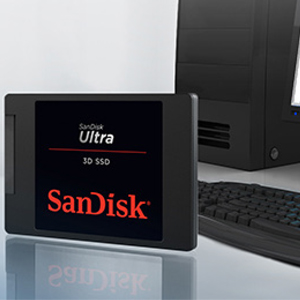
The SanDisk Ultra 3D NAND Internal SSD 1TB delivers rapid sequential read speeds up to 560MB/s and write speeds up to 530MB/s, powered by durable 3D NAND technology and nCache 2.0 for enhanced performance and longevity. Its slim 2.5-inch design fits most PCs, backed by a 5-year limited warranty or 400TBW endurance rating, making it a reliable upgrade for professionals and gamers seeking faster boot times and seamless multitasking.



| ASIN | B071KGRXRG |
| Are Batteries Included | No |
| Best Sellers Rank | #71,099 in Computers ( See Top 100 in Computers ) #572 in Internal Solid State Drives |
| Brand | SanDisk |
| Color | Black |
| Customer Reviews | 4.7 4.7 out of 5 stars (40,327) |
| Date First Available | 1 July 2017 |
| Form Factor | 2.5-inch |
| Hard Disk Description | Solid State Drive |
| Hard Disk Rotational Speed | 1 RPM |
| Hard Drive Interface | Fast SCSI |
| Hard Drive Size | 1 TB |
| Hardware Platform | PC |
| Item Weight | 54.4 g |
| Item model number | SDSSDH3-1T00-G25 |
| Lithium Battery Energy Content | 2 Kilowatt Hours |
| Lithium Battery Packaging | Batteries packed with equipment |
| Lithium Battery Weight | 2 Grams |
| Manufacturer | Western Digital Technologies Inc. |
| Number Of Lithium Ion Cells | 5 |
| Number of Lithium Metal Cells | 5 |
| Product Dimensions | 0.71 x 10.06 x 6.99 cm; 54.43 g |
| RAM Size | 1 TB |
| Series | SDSSDH3-1T00-G25 |
M**X
Original product under official WD 5-year limited warranty.
Only time will show how reliable is this product. Meanwhile: - could register this product on WD website for a 5-year warranty - CrystalDiskMark 8: SEQ Read 461 , SEQ Write 429 (disk half full)
A**R
التوصيل في وقت مناسب
R**Y
Bought for PS4 upgrade
Bought for PS4 (Pro) hard drive replacement. Was just a straight swap. Big difference in the game load time and overall response time of console. Cheap easy upgrade, well worth the money. Very happy with the product.
M**N
The hard drive is very fast and original
The Hard drive perform with 550MB reading and 540MB writing speed when i replace it with my laptop hard drive, although it perform very slow when i test it with USB enclouser. the only negative thing about it that i received open package and not sealed from inside, but i check it with crystal disk info and it shows that it work for 0 hour (means it's new but open box only)
M**Z
Works well
Timely delivered and working well.
M**Z
Great Product.
Product was as expected, and delivered on Time.
A**S
You get what you expect
10/10 as advertised
Z**N
Excellent
Excellent
M**K
Bought this drive to replace the Hitachi HDD in my daughter's old Macbook Pro (15-inch, mid-2009), after having bought and installed the Samsung equivalent SSD in my personal laptop (Toshiba Satellite A665, running Windows 7). The Samsung SSD's are a bit more expensive, because they're built with components that are rated to outlast their closest competitors by about 2 to 1; I wanted the more durable drive for that computer, and my daughter's old Macbook will now be a "backup" device, so total lifespan of the SSD is not as important there. I already reviewed the Samsung drive, and the main reason I'm separately reviewing this one is to assure potential buyers that this drive (and probably all the others now quickly emerging from, e.g., Samsung, Crucial, Toshiba, etc.) WILL work with Macs. However, since Apple does not provide any kind of cloning or optimization support for replacement of "their" drives with third-party alternatives, you just have to follow a bit more cumbersome procedure for putting a third-party SSD like this one into your Mac. First, you'll need a SATA-to-USB connector (I got the Star-Tech one -- worked fine) to connect the bare SSD to a USB port, and your Mac has to be functioning so that you can re-format the SSD using the Mac's "disk utility" feature. Once you've formatted the SSD so that your Mac can "see" and use it, then you'll need to download a third-party cloning software to copy all of the data from your existing HDD to the SSD. I used "Carbon Copy Cloner," which worked great, and produced a perfectly functioning clone of the original HDD, with no boot errors or other problems. Assuming you have no problems swapping out the drives and booting up from the SSD, the last piece of the puzzle is "optimization" ... that is, a program similar to Samsung's "Magician" software, which helps your computer work more efficiently with its new SSD; minimize unnecessary data transfers from/to the drive (e.g., excessive reading/writing from/to the flash memory will shorten the lifespan of the drive), and provide some monitoring and diagnostic tools to measure the performance and "health" of the SSD over time. I obviously don't know, but suspect that many of the sudden failures of these drives reported by a few users in some recent reviews were caused by the users' failure to address "optimization" when they first installed the SSD. If some attention isn't given to this, the drive WILL still work, but it will probably run a bit slower than it should, and be more vulnerable to failure. It's my (admittedly limited) understanding that most recent Windows OS's (e.g., 7, 8, 10), all have some kind of SSD optimization features built into them, and that programs like "Magician" simply provide a few additional tools and a "dashboard view" interface, as an alternative/addition to whatever tools are already present in the Windows OS. Apple, on the other hand, provides no such native support for non-Apple replacements of *their* drives, so you have to get this assistance elsewhere. Good news is, that help isn't hard to find, or to use. "Chameleon SSD Optimizer," for example, is free and reputedly works with a large cross-section of the most popular/widespread Mac OS X variants. I opted for "Trim Enabler" from Cindori Software, at a cost of $10, which gave me all the tools I was interested in, and which, once downloaded and installed, all worked fine with this SSD and the Macbook Pro described above, running OS X.9.5 ("Mavericks"). Following the procedures outlined above, I cloned over 300GB onto this SanDisk drive from the Mac's original HDD, and so far, the new SSD is working flawlessly in this Macbook Pro. It has dramatically decreased startup and shutdown times, and sped up every function that requires reading/writing data from/to the drive ... no more "spinning beachballs." The computer is once again a real pleasure to use. I'll come back and edit this review if I run into any problems, but so far, none to report. This drive deserves every one of its five stars ...
J**É
Funciona correctamente. El portátil ha ganado una velocidad vertiginosa.
R**E
Product review for Sandisk 250GB SSD I love my new Sandisk 250GB SSD because it has extremely fast speed of reading and writing, great duration, fairly huge space, and affordable price. The extreme fast speed of SSD It is wasting that comparing the speed of SSD hard with SATA hard. The reading speed of SSD is 3times faster than SATA, and writing speed is 4times faster. You can experience this speed difference when you turn on your computer; your computer will be completely booted within 10seconds with SSD, while it will take more than few minutes with SATA. You also can feel much smoother operating of graphic program with SSD; the graphic programs requires huge number of reading and writing in short time. The great duration Within the SSD products, the difference of them are duration. There is not big difference for their speed, but the duration has big difference. Unlike SATA hard, the SSD hard has maximum duration of writing. The average possible duration for SSD is about 90,000 times writing; after that it used to have problem of rewriting. However, the Sandisk's SSD has much more duration that can be used for more than 110,000 times of writing; the difference 20,000 writing allows normal users to use about two year more. Fairly huge space Since SSD is hard disk, the size of storage is important. Because the price of 500GB or more are very expensive, most of you will consider buying 120GB or 250GB. I recommend you to buy 250GB SSD. Think about that the actual available size of 250GB SSD is not just double than 120GB. Whether you use Window 7 or 8 or 10, they requires about 30 to 40 GB. Therefore, you will only have 80GB availability with 120GB SSD, and you will have 210GB availability with 250GB SSD. You will have about triple available storage with paying only $20 USD more. Affordable price Many people still guess that SSD is too expansive to purchase. It is true that SSD is expensive than SATA. However, there are much more suppliers for SSD now, and their hard competition made the price of SSD affordable. In addition, if you experience how faster your computer works with SSD, you will know how worthy to have SSD. Conclusion Sandisk 250GB SSD is very good to have: the speed, the duration, and the size of it is very good. Although it is little expensive to buy, I bet you will love it and agree to its worth after experiencing its features.
マ**ー
最近、起動や処理速度が重い感じがするノートパソコンのHDDをSSDに載せ替える為に 購入しました。載せ替え完了後、起動に1分余りかかっていたのが15秒程で起動。 満足です。パナソニック、レッツノート CPUi5
A**D
arrive in specific time speed read 550m speed write 350m not like site 550m
Trustpilot
3 weeks ago
2 weeks ago