Desert Online General Trading LLC
Dubai, United Arab Emirates
Desert Online General Trading LLC
Dubai, United Arab Emirates

📺 Stream Smarter, Live Louder — Don’t Just Watch, Own the Experience!
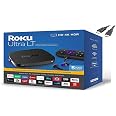
The Roku Ultra LT is a powerhouse 4K UHD streaming media player featuring a quad-core processor, dual-band wireless and Ethernet connectivity, and a microSD slot for extra channel storage. It includes an enhanced voice remote with private listening headphones and supports HDR for vivid, sharp picture quality. Perfect for heavy streamers seeking seamless, high-quality entertainment on their main TV or home theater.
| Brand Name | Roku |
| Item Weight | 1.5 pounds |
| Product Dimensions | 4 x 4 x 0.8 inches |
| Item model number | yun-dong-164 |
| Batteries | 2 AA batteries required. |
| Color Name | Black |
| Special Features | Wireless |
A**T
NOW INCLUDES DOLBY VISION - WATCH OUT!!!
I read a review here [ *** Hate Dolby Vision? This is for YOU! ] on april 2022 that stated this model DOES NOT include Dolby vision but the one I just received does have Dolby Vision. I wanted the one "without" Dolby visionBUT.... the picture seems vary bright. Strange, on my new LG TV setting up the Roku made the TV change to Dolby vision. Says it when ever I switch to HDMI number 1 that this Roku is plugged into. I had to switch it from home cinema to standard, both "cinema" settings on my LG TV makes the picture yellow-ish, yuk.I do wonder if Dolby vision updated and got rid of the problem where the picture is way to dark? Mine looks great on the standard setting on my LG TV.So choosing this Roku ultra LT got me nothing over the regular Roku ultra except a lower price, good! and not having to deal with the dreaded rechargeable remote, good!, Rechargeable remotes and other rechargeable stuff is the worst idea ever. Would you like having your remote go "dead" in your hand just when you wanted to watch something important?On the regular more expensive Roku ultra your in for a treat because that is exactly what it will do, meanwhile, next door, I have the old dinosaur Roku ultra LT version that has replaceable battery remote. My Remote batteries go dead I switch them out for new ones in 30 seconds and I am back in action.This Roku Seems to work well, with the usual circus maximus mind numbing insanity session setting up the LG remote to control the Roku, but I persevered and finally got it working.Hint make sure you have both the TV and the Roku setup on the same wireless on the same router and IP block. After you get the TV remote to control the Roku you can switch back to wired on the connection for the TV and the Roku. On my LG TV I went to the connections and chose remote settings then chose OTT, next chose Roku as the brand.Keep the Roku out and visible so the TV remote IR can directly see the Roku unit line of sight.Why is my LG remote RF [Bluetooth] and my Roku remote RF [Bluetooth] and then when I set the LG remote up to control the Roku it only works via line of site IR from my remote. WTF? Hide the Roku and no LG remote control possible. Who is the genius that decided this?---4K picture is bright and clear though you may have to make adjustments to your smart TV if the thing thinks it is smarter then you and mucks up the settings like my LG TV did for me.The bottom line: Knowing this Roku now has Dolby vision, see my photo, I do recommend this Roku if this is what you want, then get it.~
L**N
A REALLY great user experience! I'm a Roku convert now.
A couple of years ago everyone in our house received Firesticks for Xmas. They constantly lost battery connection and so the batteries had to be switched around so that the Firestick could recognize them again. It also would randomly kick you out of a app. But I recieved this Roku when I moved and it is FANTASTIC!! It's rock solid without any of the terrible and frequent glitches of the old Firestick. The Roku is MUCH faster loading as well. There's even a great feature of providing earbuds and a place to plug them into the remote so you can watch TV without annoying your partner. A REALLY GREAT STREAMING DEVICE!!
T**E
Important thing you need to know that it little time to set .just take your time with it
I have set up with no problemThe Roku lt is working just fine.
T**N
Roku Ultra LT Very Impressive
The Roku Ultra LT streaming device was easy to set up. As a matter of fact, it did most of the work itself. It checked for a software update, auto detected my older LG TV and set the included remote up for it. I am using the ethernet version to my home router. It comes with an array of streaming apps from the Roku online store. Easy to download and setup. I needed to stream from the YouTube TV app, and it was also easy to setup. I am very pleased with the device so far. Roku seemed to think of everything the at home user will need to get going in streaming.
Y**O
wired vs wi-fi
I give this product a five star rating. I always liked the Roku box with ethernet port. There is something about a wired device over wi fi. Wi-Fi for me has always cut out leaving me hi and dry when trying to stream content.
A**A
New Roku user here and it's been alright
Just a note. The Roku model on this is #4662RW released in August 14, 2020. At least this is the one shipped to me so it's the same as another listed Amazon page for Roku that one baring the model number and release date while this one doesn't have it.Another note is the box shows that it does not come with a HDMI cable despite the image showing the HDMI. This is confirmed in the instructions but when my family received this package the HDMI was provided in a separate package thankfully. I am also using a straight connection via ethernet port which is more stable plus you may wanna get a cheap microsd card to load channels faster. I chose Samsung PRO Endurance 32GB 100MB/s (U1) MicroSDXC Memory Card with Adapter (MB-MJ32GA/AM). Make sure the "teeth" on the microsd card during installation on the back of the Roku is facing upwards and not downwards. Make sure the HDMI cable isn't connected or else the installing it will be a annoying.Thus far the Roku has been decent. I got this for my mom but having her use it more than her antenna TV has been drastically slow even when I put shows she is into. Her TV is an oldie from 2007, a Panasonic TH-42PX75U. The HDMI really shows how sharp the picture is compared to the antenna.My gripes with it so far is a limited amount of decent wallpapers. Some bait you view them for a couple seconds (literally) before pushing you to their store to buy it for 99 cents (get lost!). The best savescreen has to be the fish aquarium. I dunno if its real or not but it really looks cool when Roku is not in use and you have savescreen setup under the settings options.You may also want to fiddle around and check mark the box that says "limit advertisement" under privacy otherwise be ready to be spammed the same ads over and over again per episode (or movie). There's also another method which I suggest for those with smart TV's if you do a web search with the following "dns server ad blocking" for those who know what to do with that info.Another bit that I've read is concerning the battery life in the Roky control. Well, on Roku you can view the status of this in real time and the bug (I think I read around the net) about it draining your battery life within 2-4 days does not seem to be so on this model at least. I believe you can turn off voice recognition I'm not 100% positive on this as it was kinda confusing what the message said. Regardless we don't want it. To add channels you can either do it thru the Roku itself via searching key words like "anime" or "news" or better going to the official Roku website and adding them there.Just note that once you add them via web browser the only way to delete them is within the Roku device itself. Another note too that I just found out with the search function within roku is there are some questionable channels that are not what they seem to be or are intentional troll channels. For example, doing a key word search for "anime" brought up a number of apps. However, some using the word "anime" weren't anime whatsoever. Do also note if you have children there is adult adult content if you know what I mean by that. May wanna add parental control and such.Organizing the channels can only be done via the device which sucks if you have a lot of channels. Also, seems you can't make the tiles change sizes like one would on the Desktop of a PC, Mac, Linux. The channels I been able to find to replace those lost from cable has been decent. The other channels are behind pay walls. However, note that some of these channels with a pay wall may have free shows and movies to watch so keep that in mind.Another thing to also know for you new Roku users like me is that Roku will overtime no longer support old models but that seems to be around 8-12 years in time. Thus is the life cycle of technology like this. So by then you'll have your money's worth out of the device instead of having to pay $10 rent on a cable box per month for years which adds up to whole lot more. That beats paying $170 altogether with cable and internet and that's without phone per freaking month. I despise Spectrum aka Charter Communications. They are indeed one of the worst cable providers in the country with Comcast and Cox.
Trustpilot
2 weeks ago
2 days ago
2 months ago
3 days ago