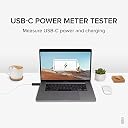
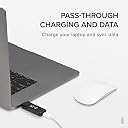
⚡ Empower Your USB-C Setup with Real-Time Power Precision!
The Plugable USB C Power Meter Tester is a compact, driverless digital multimeter designed for professionals to monitor USB-C power delivery from 4V to 22V and 50mA to 6.5A. Featuring a bright OLED display that simultaneously shows voltage, amperage, and current direction, it supports bidirectional connections and broad USB-C compatibility (excluding Thunderbolt 3). Its rugged aluminum build fits most devices without removing protective cases, making it an essential tool for diagnosing and optimizing USB-C charging and data connections.


| ASIN | B01NAWYSVK |
| Best Sellers Rank | #134,802 in Tools & Home Improvement ( See Top 100 in Tools & Home Improvement ) #109 in Voltage Testers |
| Brand | Plugable |
| Brand Name | Plugable |
| Color | Black |
| Customer Reviews | 4.5 out of 5 stars 725 Reviews |
| Global Trade Identification Number | 00819927011415 |
| Item Dimensions | 3.5 x 0.75 x 3.5 inches |
| Item Weight | 0.05 Pounds |
| Item dimensions L x W x H | 3.5 x 0.75 x 3.5 inches |
| Manufacturer | Plugable |
| Measurement Type | Voltmeter and Ammeter |
| Minimum Operating Voltage | 4 Volts |
| Model | USBC-VAMETER |
| Power Source | Usb Powered |
| Specification Met | CE, RoHS |
| Style | Modern |
| Style Name | Modern |
| UPC | 819927011415 |
| Unit Count | 1.0 Count |
| Warranty Description | 2 Year Limited Parts and Labor |
G**G
Works as advertised, latest model has correct display
This updated review is for the second unit sent to me in response to comments about the usability of the item posted in my original review below. The revised edition of this USB-C V/A meter has three notable and visible improvements. (See second and third attached photos, and fourth photo) 1. Display orientation has been reversed, such that the digits read upright when installed on the left side of a laptop. 2. the digits display has been changed to a different font that is a bit smaller but more easily legible. 3. The OLD model had a display that alternated between the V/A and a line indicating power flow. The NEW model has V/A and an arrow all on the same screen, thus no more irritating flipping back and forth between two states. Aside from those three things, which are fairly significant, all else seems to function normally and as expected. This is quite a nice little unit. As some others have remarked, having total mAh transferred would be nice. Further comments on the construction and design. 1. The construction is solid. The shell is an aluminum extrusion. Endplates are hard plastic. 2. Plug and socket are snug and wiggle free. 3. The USB-C plug is offset, closer to the top surface of the device (display side). ************ Original Review Follows ************* Does what it says, nothing more, nothing less. I use this with a 2016 MBP 13" with TouchBar and it shows how much the system is drawing at idle, during typical surfing, writing, as well as maxed out during processor-intensive tasks like gaming. TAKE NOTE: The images of the power meter on the product page you see here are inverted from what the device actually displays. That is, in the images, it looks like the display is upright and readable when plugged into the LEFT side USB-C Thunderbolt ports of your laptop. These images are NOT ACCURATE as I found out in contacting Plugable. See my question above. The display actually is readable when plugged into the RIGHT side of the laptop. This is unfortunate for two reasons. First, on MacBooks and MBP, the ports are on the left or left+right sides. On the 13" MBP, the full-speed ports are on the left. This means users are inclined to make their single-cable connection on the left side. This means the Plugable meter display will be upside down. Second, if you install it on the right side ports, then it interferes with where most folks who are right handed (the majority of the population) keep and use their mouse. I don't know why Plugable flipped the display. It was better for more users as originally depicted in the product images. Unfortunately now I find myself not using it because of the display orientation. I will purchase the Satechi unit since the display is in the better orientation.
T**D
A very useful tool to aid in fixing USB-C products
After seeing this used by repair folks on YouTube to monitor laptop operation, I purchased one when my laptop died. It was very helpful in aiding the diagnosis and will come in handy for other USB inquiries. It is well worth its nominal cost. I also like how the display reverses at the press of a button so it can be seen in either of 2 directions.
R**S
Works nice!
Great tester for USB-C devices. Tells you the important readings you are going to need.
B**Y
Works with alt-mode video, with Power Delivery and regular 5V charging
I've got two cables for USB-C alternate mode video output (to DisplayPort and HDMI) that also pass through USB-C Power Delivery to charge the laptop. Inserting this meter between the cable and the meter didn't interfere with video (including 4K 60hz on the DP cable)! 👍 I've tried this meter both with various chargers: a 20V Power Delivery charger, a 5V 4A oversized projector charger that I assume is using PD spec to negotiate the high current(?), as well as a few "good old" 5V chargers with a type A–type C cable, and it worked for all of them. 👍 One exception where it didn't work: OnePlus's "Dash charger" with its red type A–type C cable. AFAIK the idea of Dash charge is letting the charger do voltage drop directly to what the lithium battery needs (avoiding heating the phone from doing the 5V->3.8V conversion internally, as in usual USB charging). Indeed, I saw the meter briefly display 5V, then some significantly lower voltage (close to 4V), then flicker off and stayed off. I _think_ that didn't interfere with charging — the phone still displayed "charging rapidly" icon. Today I tried this again, and the meter showed 5V, then 3.9V, then stabilized at ~4.3V — and the meter stayed on. => So it seems this meter doesn't work reliably at 4V and lower — but that's very non-standard for USB. Otherwise, perfect, still 5 stars in my book. P.S. It's great that this has C female – C male connectors, allowing directly connecting to charged device, measuring voltable after cable. My previous meters were type-A, so I had to measure before the cable. That meant I couldn't compare the actual voltage drop caused by the cables, could only compare cables indirectly by difference in current. With this meter I can fully compare cables 👍
S**1
Does a good job for the purpose
I have no way to measure how accurate this device is, but the readings are consistent and repeatable for a given configuration. It is quite useful just on this basis. I think it does a really good job at least ball-parking what's going on in a charging situation, and this is invaluable. Have been using it for several weeks for different charging configurations, and repeated configurations for two situations - all with very similar charging profiles. Very sharp, easily readable display that can be inverted. I try to keep the plug ends protected - Saran Wrap currently - I wish there had been a nice-quality small plastic box to pop it into for this purpose, but that's a small issue. So, at this time (3 week mark): Highly recommended.
T**L
Accurate, Easy, Insightful
Extremely easy to use ... just connect it inline with your charging cable. It immediately displays the voltage, amperage, and total watts used as well as an arrow indicating the direction of power flow (charging vs. discharging.) There is a single button on the side that flips the display 180° -- so it doesn't matter if you plug it into the left-side vs. right-side of something. The LCD readout is right up against the edge of the window ... which means that if the voltage or wattage is a 2-digit number (left of the decimal) the leading number *might* be difficult to read unless you lean your head a bit to the right so you can see the left-edge of the display. e.g. is the leading digit a "3" vs. an "8". This is really a minor nit. The device could benefit from having a slightly wider display to accommodate a tiny bit of space in front of the leading digit. It's insightful to see how much power chargers are *really* supplying or how much device are actually consuming -- especially with modern USB "Power Delivery" specs where the power draw can vary considerably. So far I've used this on devices that pull up to ~100 watts (e.g. 96 watts) and it handles them with ease.
R**H
Great Testing Product
This is a fantastic item to see what charging rate you are getting. I have used it to identify which cables to keep and which to donate. I have also been using it on our power banks for the same reason. The measurements have been invaluable in determining which chargers and power banks deliver accurate voltage to maximize charging speeds. I recently had an issue with this item and contacted Plugable. They were very responsive and sent out a replacement promptly. I own several Plugable products, and this is the first issue I have encountered. It is such a pleasure to get excellent customer service from a brand I trust. I highly recommend this product and Plugable! rrh
A**O
It works as a meter, but design-wise leaves to be desired, both the case and the display. (UPDATED)
UPDATE 2017/06/26: A Plugable rep contacted me via email and offered the updated version, which was great. Customer service is excellent with Plugable, and as a brand I trust what they're doing with USB-C. The updated version is more sturdy for sure, and I'm confident they have addressed the construction issue. As shown in the updated picture, the display now doesn't switch between direction and V/A. There are still some problems that haven't been addressed though. The case is the same size, so I'm assuming there is still a lot of empty space inside it. The Satechi meter is a bit longer, but it's much thinner, which means it can be plugged in thinner devices directly, like my Pixel XL, and just place it on the table without having to prop it up. Not so with this Plugable meter, you need to raise a thinner device in order to not put the weight of it on the connector. It even barely just sits flush with my Razer Blade laptop as I mentioned before. The Satechi one also has a bit of an extension in the case, which makes it possible to plug it into my phone with a case on, which is another advantage. As for the display fixes, they switched the orientation, but that's not really what people were asking for. Sure, it now matches how you would plug it on a MacBook (and my Razer), but still ideally it would be switchable by the user. The Satechi has the same shortcoming. ORIGINAL REVIEW: I opted for this instead of the Satechi one because Plugable is at least one known brand that is actually making an effort to push USB-C responsibly (i.e. following spec), and they had experience with the "Twinkie" device for USB-C analysis. Unfortunately I also ran into the same construction issue that a couple other reviewers did. The case came apart, one end pushing out the other end, and the tip of the device became slightly bent. Something that I also observed after it came apart is that the case is much thicker than it needed to be with a lot of empty space inside. The case is thick enough that it is just goes over the bottom of the laptop a tiny tiny bit, and it can't be used with a phone set on a table without having to raise the phone, at least unless you wanna risk bending the connectors. There are a couple minor annoyances, like others have also stated. One is that the display is not flippable, and as it happens, it's upside down on my Razer Stealth laptop, and also with the way I use my phone in the car. Another is that the display switches between the readings and the arrow that shows the direction of the charge, which makes it impossible to get fully continuous readings. Satechi doesn't have the latter issue.
Trustpilot
3 weeks ago
5 days ago