💡 Light up your life—smart, secure, and effortlessly connected!
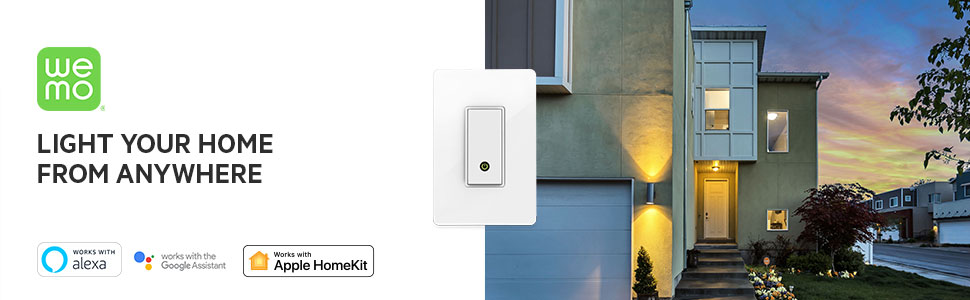
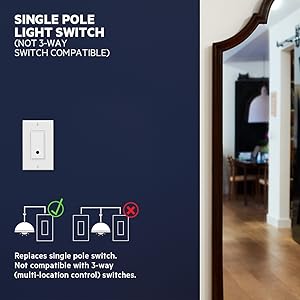
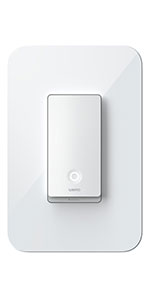
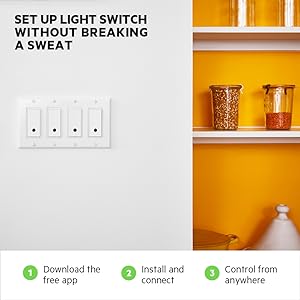
The WeMo Light Switch is a Wi-Fi enabled, single-pole smart switch that lets you control your home lighting remotely via the free Wemo app. Compatible with major voice assistants like Alexa, Google Assistant, and Nest, it supports custom scheduling and an Away Mode for enhanced security. Designed for easy DIY installation with screw terminals, it handles up to 15 Amps and 1800 watts, making it a versatile upgrade for modern smart homes.







| ASIN | B00DGEGJ02 |
| Actuator Type | Push Button |
| Best Sellers Rank | #204,197 in Tools & Home Improvement ( See Top 100 in Tools & Home Improvement ) #622 in Electrical Light Switches |
| Brand Name | WeMo |
| Circuit Type | 1-way |
| Color | White |
| Connectivity Protocol | Wi-Fi |
| Connector Type | Screw Terminals |
| Contact Material | Copper, Brass |
| Contact Type | Normally Open |
| Control Method | App |
| Controller Type | Amazon Alexa, Google Assistant, Nest |
| Current Rating | 15 Amps |
| Customer Reviews | 3.0 out of 5 stars 5,580 Reviews |
| Global Trade Identification Number | 00722868979785 |
| Included Components | WeMo Light Switch |
| Item Dimensions | 5.1 x 3.31 x 1.7 inches |
| Item Height | 1.7 inches |
| Item Type Name | Hard Wire Switch |
| Item Weight | 0.56 Pounds |
| Manufacturer | WeMo |
| Model | F7C030fc |
| Mounting Type | Wall Mount |
| Number of Items | 1 |
| Number of Positions | 1 |
| Operating Voltage | 120 Volts |
| Operation Mode | Off |
| Specification Met | UL |
| Switch Type | Dimmer Switch |
| Terminal | Screw |
| UPC | 722868979785 |
| Unit Count | 1.0 Count |
| Warranty Description | 1 Year |
| Wattage | 1800 watts |
J**R
Satisfied Customer
WeMo Switch Installation I live in a dark rural area and prefer to keep my home well illuminated after dark. For the past 31 years my daily routine has been to turn the outside lights on at sunset and off again at sunrise. Sounds easy except there's one switch on the main floor, two in the basement and one in my garage. One of these switches is for two outdoor outlets that I use for floods lights and holiday lighting. On occasion I would get up later than usual, miss one or two switches because of a distraction or just wasn't at home. It was time to start thinking about the home automation concept. After extensive research I chose Belkin WeMo because of the favorable reviews on Amazon and my own favorable experiences with other Belkin products. The wired switches are designed for the DIY types like me. I had my first light switch wired and functioning in about 20 minutes. The second one in 15 minutes. I was so satisfied with the concept and functionality and the ease of installation until I wanted more so I bought two more light switches and two outlet switches for a grand-total of 6 WeMo devices. Now I can control all my outdoor lighting, with set on and off times, including a couple of indoor lamps and my garage electric heater with my iPhone and iPad from anywhere at anytime. The WeMo App takes a bit of learning and I've had a few mysterious on and off occurrences that have disappeared at the moment. I also should add that a few years ago I upgraded my router from the standard free one provided by my IP provider to a more reliable and secure one that I purchased myself. I mentioned that because there are so many factors that could result in problems unrelated to the switches or the app. Otherwise, a good router, a good mobile device with good reception and the elimination of as much interference as possible should result in none to fewer problems. Think quality! I'm glad I did because I currently have about 20 WiFi devices in by home hogging up my router. Personal Idea: Stuffing your light switch with wires in a single or double gang outlet box can be somewhat difficult, more so if your circuit is wired with 12/2 and double ganged. To cut down on my own stress and frustration I decided to used a non-metallic surface mount outlet box commonly used for surface wiring. Perhaps also by surface mounting interference will be minimal or could be virtually eliminated remembering that no metal face plates are allowed. The box comes with a plate with a knockout rectangular center. You attach the plate to the existing holes of your in-the-wall gang box. You'll see the holes after you remove your old light switch. Snap the 1 3/4 - 2" deep cover on the plate and you're ready start wiring and stuffing with less hassle. The holes in the cover lineup perfectly with the WeMo Light switch. The finished job gives your switch a bit of a commercial look but I don't care about that because I like the fact that it makes it standout giving it a questionable look like ask before touching. Less play from curiosity seekers. Also the plastic boxes are rather cheap from most home supply places and probably Amazon too.
E**K
Worked well for ~2 months
I bought 4 of these light switches about a month after they were released. I had been adding motion detector lights, dusk-to-dawn lights, etc., to both improve energy efficiency and safety in my house. My purchase was designed to move further toward both of these issues, along with a new Kwikset lock and some security cameras. Installation was relatively simple, even for someone who is not an electrician. As long as you have the proper wires and follow instructions, as other reviewers have mentioned, installation should not be too difficult (check before ordering though). Connecting to the WiFi was also not difficult for me. I have a Linksys router in the basement with a Linksys range extender upstairs and WeMo did not have any problems connecting when I followed instructions. The initial firmware update took quite a long time and the initial iPhone app version that I downloaded was *very* slow to detect the switches each time I loaded the app, but they seem to have fixed the latter issue. Once it was all setup, I LOVED it. I used IFTTT to automatically make sure lights were turned off at night and on in the morning, among other things. I really like the look of them and changed out many of my fan switches and other switches to the decorator-style to make it look even nicer. Really, really like the look of them, although I could see it not fitting as well in certain instances (I am definitely not an interior decorator). I do wish that these would work with 3-way lights (where you have two light switches that control the same light) or as dimmers, but unfortunately they don't. Here's the problem: two days ago, the power to the router went out for about 30 seconds, then turned back on. The internet and WiFi loaded fine and all of my devices worked fine - except two of the 4 light switches could no longer connect to WiFi! They would both just blink orange non-stop. I tried all of their support instructions on their website, which was minimal, and included resetting and restarting the device. Of course, now one of the switches started blinking green and I could no longer even turn the lights on manually. So I caved and called their support number (difficult to find, but calling the corporate headquarters 800-number routed me to support). Here is where it got really frustrating because, among other things, the person on the line spoke very poor English. It took about 35 minutes to get through the initial questions around model number, what lights were blinking, when I purchased the product, etc. In between each question, she would tell me to "hold on a second" and mute her line, before often (at least 10 times, no exaggeration) returning and asking me a question I had already answered. Multiple times, she forgot to mute her line and I heard her joking with her friends. But, OK, I only hold Belkin partially accountable for that. After over an hour, and having me try everything I already tried, she finally said she would send me a new one. For now, I have two switches that cannot connect to WiFi and one that cannot even turn the lights on. It is simply not worth all of this hassle just to be able to remotely turn some lights on and off. To make it worse: they only provide (poor) customer service for free for 90 days! After that, you have to pay to talk to someone. Luckily (unluckily?), mine broke after 60 days so I could get someone on the phone. I really wanted to like the product, and I would have if there was some quality control or better customer support, but unfortunately for me it didn't work out.
A**N
Bought one and like it so much I kept buying more.
This light switch and the other outlet style plug has worked reliably for over 3 years. There would be occasional hiccups like power interruptions that cause the switches to restart, but they have never failed on me. However, you are at the mercy of your internet connection and if you happen to be away while the network crashes, you won't be able to communicate with the switches. The daily programs will continue to work regardless. Setting this up properly does require some networking knowledge and how to properly implement security. The switches both work on hidden and broadcasted SSID Wifi networks. Half of my switches work on the hidden SSID and the other half are connected to the broadcasted SSID. They do support security password keys, but if you want an extra layer of protection, turn on your router/basestation's MAC address control to enable only recognized and authorized devices access to your wireless network. I have assigned static IP address to these switches by way of their MAC addresses, to avoid IP conflict when power cycling happens to my router. This is the general rule for all of my stay-at-home devices. Update 2017 My eleventh switch will be arriving tomorrow. The first switch I bought in 2013 is still working to this day. All switches are still working reliably. Works perfectly with NEST thermostat, Amazon Echo and IFTTT. Update Dec 2017 1. The WEMO App first lets you name each switch and then allows you to set up "Rules" for unattended on/off times to a switch or a group of switches. So that a switch or a group of switches will turn on/off at a scheduled time. 2. The Amazon Alexa App allows you to first create intelligent named "Groups" of switches, such as "Exterior Lights", "Interior Lights", "Living Room Lights", so you can use voice control to address them in a meaningful way. "Alexa, turn off Living Room Lights" or "Alexa, turn off All Lights." 3. IFTTT will integrate all the functionality of your smart devices with WEMO and ALEXA (NEST and others too). i.e. The GPS in a smart phone can be used to create an invisible fence that can turn WEMO switches on/off as you pass in/out of its perimeter. My living room lights and exterior lights come on when I'm about half a mile from home. NEST can also sense I'm coming home and start cooling/heating the house. The are thousands of "recipes" ready to use. With these three Apps together, there are thousands of possibilities to automate your home if you are willing to experiment. These are just some of the ways I use mine. Update March 2018 1. Recently purchased the Wemo Mini Smart Plug to make the uplights in the kitchen cabinets smart. Set up was easy but I first had to add the switch's MAC address to my basestation before connecting to one of my home's SSIDs. 2. That makes twelve switches and all are active and functioning as you can see. 3. The Wemo App is very laggy, but luckily with voice activation, I rarely launch the app except to take screenshots. I use Alexa's voice recognition instead. The Mac version of the app needs to support higher resolution displays like the Android one does.
V**T
Easy to Install & Connect but App is the Trouble Maker.
What I needed was a switch that would let me activate my island light - which had only one switch that was located in an inconvenient place. I was hoping the WeMo light switch would allow me to turn on the lights from multiple locations since we ended up using our island lights more than any other light. I read some of the reviews on here & was hesitant NOT about the Wifi Connection setup but about my first time wiring an electrical switch. But WeMo made it a breeze & being in a newerall home, the wires needed including the white neutral was as it was described in the WeMo install video. WeMo even labeled them clearly & the wire nuts were nice to have been included even if they were a bit small. My install took about 30 mins just because I was extra careful working textbook style & being the first time and all for electrical work. Now as for the network connection setup: it went smoothly & followed the video as described. I got connected to my ASUS R68U ac router right away via the Android App + manually selecting my network. My Echo found the WeMo switch right away on its connected home setup. And everything was working perfectly. Even if you got knocked off your network, you can still use the switch like a normal decora type switch. Which leads me to the bad part: what got me in trouble was that the Android App told me a firmware was needed So I proceeded to update the switch's firmware. This locked up the app & knocked the switch off line. The App just hung. I had to uninstall the app since it wouldn't allow me back in even after closing & rebooting the phone. I had to reset & reboot using the 2 buttons at the switch itself. Then I had to reinstall the app, redo the entire setup & new connection again to both my network & Echo & phone. So all in all, the app is the trouble maker. It isn't smooth nor helpful. As of right now: it is a good remote light scheduler & remote light switcher but an awful updater. To this moment I still don't know if my firmware on the switch is updated & it leaves me with an uneasy feeling that my security is exposed somehow. Belkin made a nice network switch that was easy to install & setup but the execution of its app is why I dock it 1 star. *UPDATE1 (09.22.15) : My review to add that the included face plate - while it looks great - doesn't attach to the WeMo switch. I had to buy a 2 piece Lutron hidden screw plate @ Lowes to mimic the look (see pics of these faceplates) **UPDATE2 (09.27.15): Confirm that switching router's channel seem to smooth the WeMo's reset & broadcast protocols making setting up & signal retention more consistent. See here for a similar confirmation in the last post:[...] ***UPDATE3(10.03.15).: Installed my 2nd WeMo switch shortly after my first one above & the App asked me update the firmware for the switches. I noticed this go around the firmware installed as advertised. It appears the router channel adjustment in update2 made instantaneous improvements for WeMo to adapt to my network & now it turns on the light switch consistently as expected!. I noticed this go around the firmware installed as advertised. It appears the router channel adjustment in update2 made instantaneous improvements for WeMo to adapt to my network & now it turns on the light switch consistently as expected!. Everything is working as is advertised now & adding back 1 star. It will be based on Belkin continuously improving this switch & its app that will make its stars go up! ****UPDATE4(06.06.16).: Installed my 3rd WeMo WALL switch along with 3 plug switches & the app has gotten really good @ the plug & play setup procedure. Only problem I have is the app doesn't recognize turning off the light using ON = Sunset + OFF=exact time scenario. But I am sure they will resolve it in the app after they see my feedback. As I stated before, when Belkin updates the App & firmware consistently, this is a very good toe in the water to home automation esp. with Echo voice command.
S**N
Easy first step to home automation
I have to be one of the least DIY able people out there but after installing this, I had this feeling of accomplishment and asked myself what I could do next? The WeMo light switch has been amazing. I installed this switch in the garage to control the outside garage lights. Before installing this switch, we'd turn on our garage lights every night (like the rest of our neighbors) and then "try" and remember to turn them off before you left for work in the morning. After installing the switch, I set the lights on a timer (inside of the WeMo app) so that the lights automatically turn on at sunset and turn off a few minutes before sunrise. I haven't thought about them since because everything works. I went a little further and connected the WeMo light switch with our Amazon Echo. This allows us to control the garage lights using voice commands (which isn't needed because of on/off recipe on the WeMo app). So how easy was all of this? Again, I will repeat that my DIY skills are well below the bare minimum. I know nothing about electricity or tools (I'm a computer nerd, not a DIYer). I watched the YouTube video of the install a couple of times before attempting to start. After that, I gathered the necessary tools (philips, flat head screw driver, wire cutter, wire stripper, electrical tape, and electrical current tester). We just built our house, so our current switches have the wires running into them, that's why I needed the wire cutters, and wire strippers. I cut the power to the garage and used the electrical current tester (looks like a pen that lights up if there is power still running to the switch), like I said, I am not handy and I wasn't about to fry myself. I pulled the face plate off, pulled out the current switch and before cutting the wires, I took a picture of the wires and connections. I matched up the wires and colors to the color visual included in the packaging, and then cut the wires, separating them in different directions so that I knew which to connect. There were two switches in the housing, so according to the video, I pulled the wires and cleared room within the housing. I stripped about 3/4" of wire to attach to the WeMo switch and after all of them were connected, I used the wire nuts (included) and electrical tape (not included). I finessed all of the wires back in and had no issues placing and fitting the new switch inside of the housing with the second switch. I used the original faceplate and it worked out well. The test was to turn back on the power and hope that I didn't burn down the house. Once I flipped the power back on, I tested it again, using the electrical current tester, this way I knew there was power. The switch lit up and using my phone, I logged into the app (I have the app connected to a few previous WeMo plug-ins that I currently have), and followed the steps. It was very simple. I tested it out by hitting the physical switch, next using the app, and lastly, connecting the Amazon Echo and voice activating the lights. Now that we've tested this and have used it for a couple of months, we are evaluating other switches throughout the house (like the front & back porches, the kitchen, and other rooms that we want to remotely control or set on timers). Installing the WeMo light switch was a great experience that allowed me to overcome any intimidation I had towards simple DIY projects. If you're a tech nerd like myself, or you are looking to start simple home automation projects, I would highly recommend this switch.
P**R
A very poorly executed good idea
I needed a switch that would control my outdoor porch and landscaping lights which are operated by two separate switches inside the house. Specifically, I wanted the lights to come on at dusk, but only stay on for a set number of hours. In theory, this device will do that. It tracks the time of dawn/dusk in your area via it's internet connection and will adjust accordingly. Thus I bought two of these switches. Like many in this category (programmable switches) the switch itself is a bulky device and, while the installation was fairly straight forward in terms of wiring etc, it took a significant amount of time getting the two switches to fit into the box with all of the other wiring and the two other switches that were there (it's a "4 gang" box). Once installed, the two switches were found quickly by my Android phone and initial setup was straight forward, per the instructions. It took a few resets that were not expected, but overall setup was about 20 min. Both switches worked as expected the first day. The next day, the first time I opened the WEMO app on my phone, I was notified that a firmware update was needed for the switches (not any update to the app). I did not do it right off the bat, but soon realized that this firmware update screen was going to be there each and every time I opened the app until the update had been done. With electronic devices, a firmware update is not an unreasonable or unexpected eventuality, so I went ahead with it. Both devices failed after the "update." The lights would only flicker on then off if the switch was manually pressed and neither could not be actuated via the app (if the app could even see the switches, which, at this point, was intermittent). In addition, every three to five minutes, the lights the switches were connected to would spontaneously "flicker" on for a second then go off. I tried all of the restarting/resetting options on the Belkin website (none made any difference) and cycled the power at the breaker box. . .all to no avail. I was leaving town, so I switched the power off at the breaker for two days (to prevent the lights from intermittently flickering day and night while we were gone). When I turned the power back on upon our return, both switches reverted to normal function and would work by either manually pressing the switches or by using the Android app. Approximately two to three hours later though (and without any further intervention from me), I noticed that the lights were off when they should have been on), but flickering again. . .same problem as before. I repeated this cycle of cutting the power at the breaker box for two days and had the same results when powered back on. The support experience with Belkin was an abysmal and highly frustrating few hours of my life. Suffice it to say that the website where the "premium support" phone number is supposed to be listed was a broken link. I finally found a different number (through an obscure link on the site). I was able to reach a person but, after 10 minutes of them "verifying my phone number" etc, I was told they don't handle the WEMO devices (despite the fact that the page that had the number I was calling had pictures of all of the wemo devices on it). The person actually gave me a different number to call (instead of transferring me) and told me I'd have to call that number and queue up again. I called that number, using the options he told me and got only a loud tone (no answer, no recording, no human). I tried several times, all with the same result and even stayed on the line for several minutes to see if anything would happen (nothing did). I called the number back and tried different options, this resulted in me being hung up on by the surly woman who answered the phone. I finally called back one last time and actually got the first guy I had spoken to again. I told him what had happened since I had spoken to him last. At this point, he kind of switched gears and began trying to be helpful to me. However, the end of the story is that, as best they could tell, the firmware update had ruined my devices. The technician actually suggested that I only do firmware updates via a hardwire and not using wifi. . .though this is common sense, this is a ridiculous assertion with this particular product as it is a light switch with no traditional input/output options for connection to a computer or router such as USB, LAN, etc. They'd send me replacements, but I WOULD still have to call the WEMO people, go through all of this again, then receive new devices and physically reinstall them. And, for what? To have another firmware update ruin those devices? Not to mention the fact that the number to the WEMO folks results in a loud tone with no human answering. No thanks. I cut my losses and returned the devices. If and when these devices (or devices such as these) fully mature and they are able to function as advertised, they will be a truly great home automation device. These belkin light switches are NOT ready for prime time. And, for my part, I'll be looking to a different manufacturer for any future such products as Belkin, in my experience, are willing to push inferior products to the market and are ENTIRELY unable to support them.
S**N
Success: Notes on my Wemo and Network Setup
I have been on a journey to get these Wemo devices working. I wanted to document my success and setup here for anyone else that will benefit. I am currently running 7 Wemo devices (5 light switches, 2 Wemo Insight plugs) in my house. I additionally have 2 Honeywell 9000 WIFI enabled thermostats, laptops, and 2 Foscam wifi cameras (9821v2 and 9805w). Originally, I had a Cisco Linksys EA2700 dual band router running 2.4Ghz and 5Ghz bands, but I live in a rural area, and I have a house with metal roof and foil OSB inside most of the walls. So, to get good range out into the yard, I have disabled both radios inside the EA2700 and I only use it as a wired router to present to my ISP. To replace the radios I added a TP-Link TL-WA7210N, which is a 2.4GHz high power outdoor access point via ethernet cable to my EA2700 router. I have also attached an external antenna TL-ANT2415D and .5meter pigtail cable TL-ANT200PT to this AP, and it provides a strong signal to my Wemos, Foscams, and Thermostats. I also added the TP-Link TL-WA7510N, which is a 5 GHz high power outdoor access point via ethernet cable to my EA2700 router. This AP is using its internal antenna and provides strong signal to the Apple Iphones and Ipads in the family. Additionally, I purchased a 2nd 2.4Ghz TL-WA7210N for my barn (separate building 100ft away) and have configured it for Repeater mode to connect with the first TL-WA7210N (with a separate SSID) (wished it was in Bridge with AP mode on a separate SSID, but WEMO doesn't do that, YET?). I have 3 Wemos installed and configured in the barn (2 light switches, 1 Insight plug) on the second WA7210N. I had lots of trouble getting the wemos to connect throughout this AP swap process. Here are my notes regarding settings of each device: EA2700 Cisco Linksys Router: (firmware 1.0.14) - WPS, wireless protected setup disabled everywhere - Both radios disabled - No wireless mac filtering in any of the radios Cisco or TP-Link - DHCP enabled in EA2700, be sure to enable enough clients, see Max number of Users (mine is 149). Client lease time set to 1 minute. - NAT is enabled, no dynamic routing, no ipv6, no DDNS, - SPI firewalls enabled for ipv4 and 6 (even though not using ipv6) - All Internet filters are disabled (anonymous internet requests, multicast, nat redirection, IDENT) - VPN passthrough allowed / enabled for IPSEC, PPTP, L2TP - Under Applications and GAming, I am doing single port forwarding for each of my Foscam devices since they are setup for DDNS from the manufacturer. But, DMZ disabled, no port range forwarding. - Under QoS, WMM Support is enabled - Under management, advanced features: CTF is enabled, SIP ALG disabled, UPnP is enabled, as well as 'allow users to configure' is enabled, 'allow users to disable internet' is disabled. - Under DHCP reservations, I have added static IP lease reservations for each of the WEMOs, Foscams, Laptops, and Honeywell thermostats, as well as for the TP-Link Access Points. - Also note that my SSID name is all lower case letters and numbers. My WPA2 password is numbers with all upper case letters, no special characters. TP-Link TL-WA7210N settings: (firmware 3.18.0 Build 131118 Rel. 58328n) - Main unit in house was setup for Access Point (AP) mode (Barn unit is setup for Repeater/Wifi extender mode) - Network is setup for DHCP, IGMP proxy is disabled - Under wireless, I am using channel 1, 802.11 n only, and channel width 40MHz. Earlier, I had channel width set to auto and channel set to 6, and wemos would not connect. Earlier I had some success with 802.11 set to bgn instead of just n, but I wanted to restrict to n only for better performance. Both enable wireless radio (obviously) and broadcast ssid are enabled. - Under wireless security, I have set to WPA2-Personal, AES with Group Key Update Period 0. Earlier, I had some success with set to WPA/WPA2 mixed, but I have no other devices which require WPA, so changed to WPA2. - Again, no Mac filtering since I am using WPA2 and reserved DHCP leases. - Wireless Advanced settings - using External Antenna, Beacon Interval was reduced from 100 to 40. I believe this improved performance. RTS threshold is 2346 default, Fragmentation threshold is defult 2346. DTIM interval is 1. I have Enable WMM and Enable Short GI both enabled. Enable AP Isolation must be disabled. - Distance setting is set to indoor - NOTE IMPORTANT- using these TP-Link outdoor radios will limit you to 15 client connections each, see under wireless statistics that this is fixed (not sure for hardware or software reasons). These are good little radios with very consistent performance that can be bought from Amazon for small money, but remember the client connection limitations. This is the reason why I now own more than one of these. Do note that they are many more times powerful than the regular wifi radios that are purchased in stores. - of course, DHCP must be disabled since we are using it from the EA2700 router. - My other barn 2.4GHz radio and house 5GHz radio are similarly configured but with internal antennas. Notes on WEMO reset and reconfigure: - On the light switch, for reproducible behavior, press the restart / right-most button, then wait to allow the wemo to reboot. It will flash green and then when it first starts to flash amber, press and hold the left-most / reset button. Continue to press and hold the this left-most / reset button while counting the amber flashes (these come once per second). As soon as you see the amber flash turn to green, let off of the button. It will take 30-60 seconds, but if you watch inSSIDer on a laptop, you will see when the WEMO device starts to broadcast and then you can connect to it via your phone/handset. NOTE: the behavior I just described applies to WEMOs that are not connecting/connected. If your WEMO is connecting (particularly for the older firmware versions), but you have some other issues such as router settings, the behavior may be different. In that case, temporarily disable your wifi radio, then follow the above procedure to get the WEMO to start broadcasting, then before connecting to it on your phone, re-enable your router/AP and connect to it first with your phone, and THEN connect to the WEMO to start the configuration process. - It is said that the WEMO devices need UPNP enabled in order to communicate with each other and make router modifications dynamically to port forwarding to get their communication out. When I am configuring the WEMOs, I disable everything else on my network that could interfere with UPNP: turn off all other wifi devices except the WEMOs and your phone. For the laptop that I use running inSSIDer, it is disconnected from the network but wifi enabled to see the signals. - On WEMO insight, similar process: hold reset button, insert into power outlet and continue to hold until the light turns solid green and then release (about 15 seconds). Then, watch for WIFI signal to be broadcast in inSSIDer, then you can connect to the wifi signal using your phone. Also, a program like inSSIDer is important to tell you if you have severe overlap with your neighbors network that can lead to interference. Remember that for 2.4GHz, you need to be on channel 1, 6, or 11 to best avoid your neighbors. - Once connected to the WEMO device, run the App. I have an Iphone 5 with just installed iOS 8.1, and I have app version 1.9 (20015). All of my WEMOs have been updated to WeMo_WW_2.00.7166.PVT. It is important that at the beginning of the reconfigure process, you delete the App from ALL DEVICES on your network that have it installed, including your own. Then re-install it on your own device from the app store and do the reconfigure. Then you can add it back to the other devices in your network after it is all good again. Its also a good idea to completely reset your phone device before beginning--on IOS, this means holding down both buttons until you get the white apple and allowing it to boot from flash. - Also, when connected to the WEMO device, forget using the 'remember WIFI settings' option. Uncheck this so that you need to type in the WPA2 password each time. I suspect some craziness/misbehavior when it is trying to remember WIFI settings.
O**A
So far so good and it was easy to install
Update 4/6/2017: Finally got around to getting that third switch in! Still loving my WeMos. Forget IFTTT. WeMo has so many programming options I do not bother with unreliable IFTTT anymore. Still no issues and I've updated the firmware for the third time. Even my husband loves that we can turn off all the lights without getting out of the warm bed. Planning what switch to change out Next! Update 2/23/2017: I finally got IFTTT connected. Turns out there is no Wemo app for the iPad. I used the iPhone app on my iPad and even though it seemed to work, it would not connect my Wemo devices to IFTTT. Once I switched to the app on my iPhone, I was able to connect to IFTTT. I've also installed two more light switches. No longer do the garage lights get left on all night! Upping to 5 stars! I have had no issues with the switches and I've updated the firmware twice now with no issues. So far the only down side I've seen is the size of the switch itself. I have two switches for the garage lights installed in a 3 ganger. I would love to replace that last light switch with a Wemo but I have no idea where I'd put the wires. As it is I crammed the wires and caps behind the old switch just to get these two into the box. I bought and installed this with little electrical knowledge. The hardest part was getting all the wires back into the electrical box and getting the switch to lay flat. I installed it in the bedroom to control the overhead fan and light. The set up was easy and it works well with Alexa. I am having a hard time writing an IFTTT recipe. I keep ending up in this endless loop when I connect the wemo device to the channel. For this I took off one star. I've never had a problem writing recipes before and I use it to set an entire house schedule. With that said I just want to clarify that the switch cannot control the light and fan separately. It's either on or off. I have a separate remote control that I use to control them separately. It's a little complicated and will take some adjusting to but it works. I mainly wanted it so that my bedroom lights and fan were on a schedule guaranteeing that the would not get left on during the day. I can also turn off my bedroom off all at once with one voice command (nice when you start to fall asleep and don't want to get out of a nice warm bed!). I plan on buying more of these for those other lights that tend to get left on all the time light the garage lights.
Trustpilot
1 month ago
5 days ago