Some deliveries may take a little longer than usual due to regional shipping conditions.

DOWNLOAD THE APP


Customer Services
Copyright © 2025 Desertcart Holdings Limited
DOWNLOAD THE APP
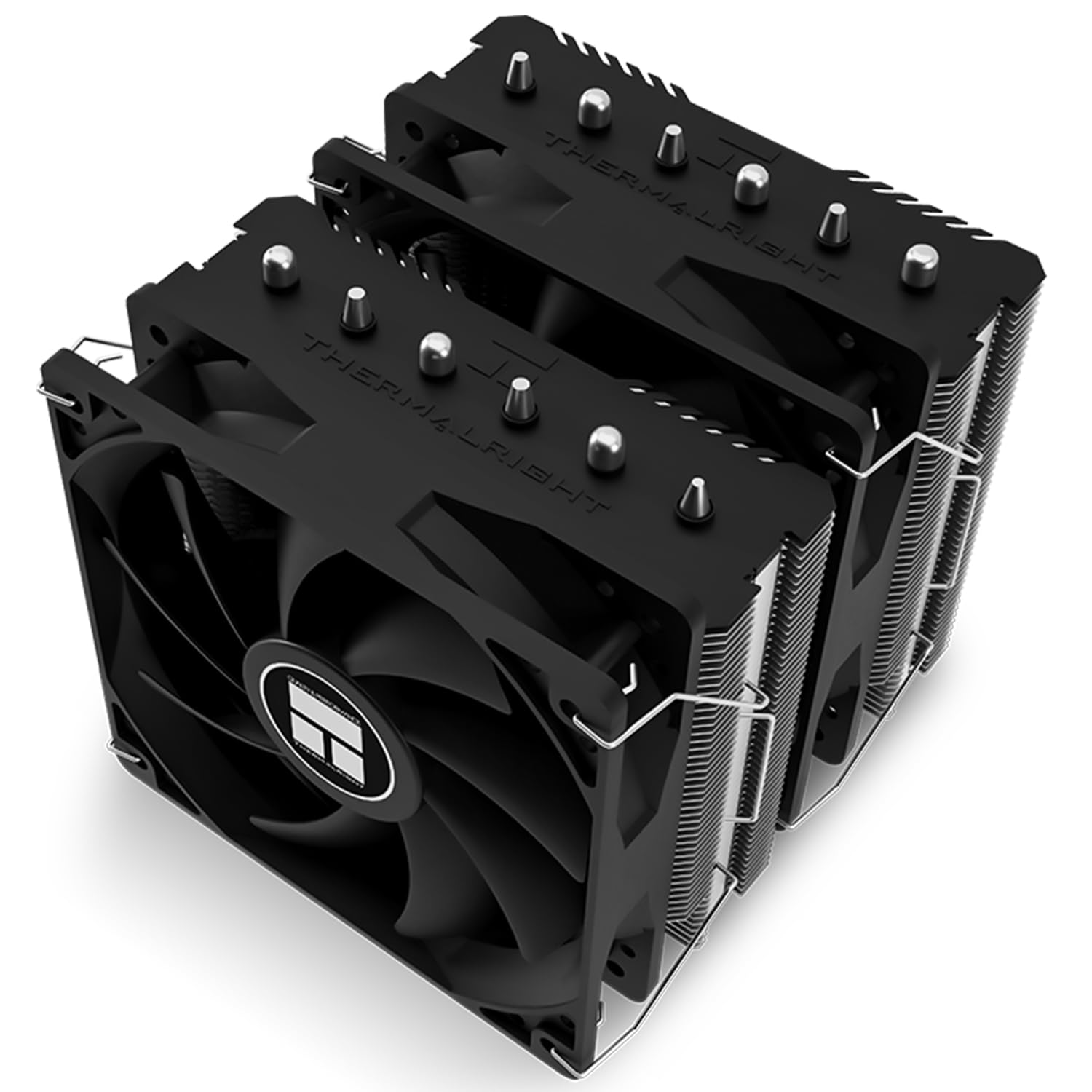


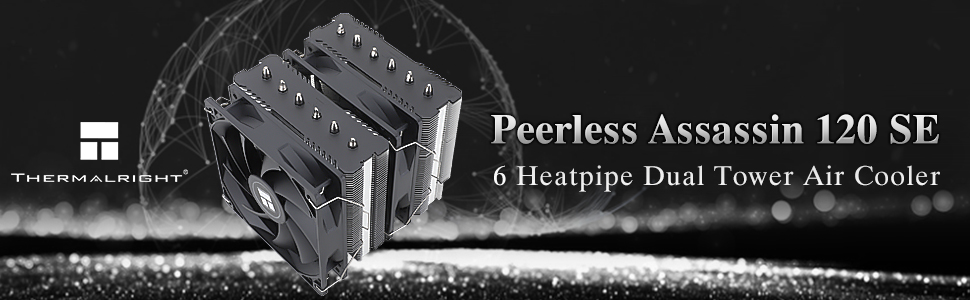
❄️ Dominate your CPU temps with the Peerless Assassin 120 SE — cool, quiet, and built to win.
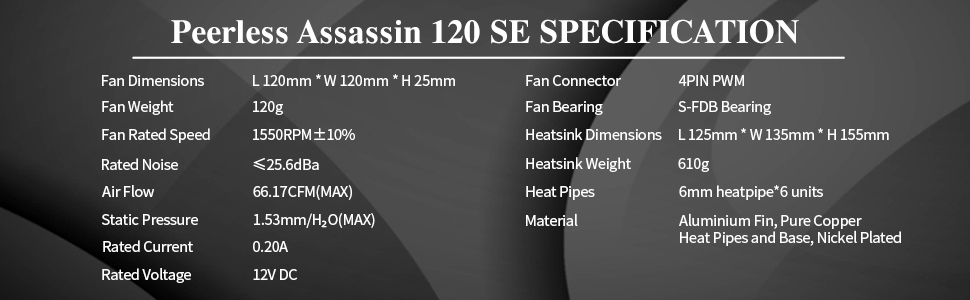
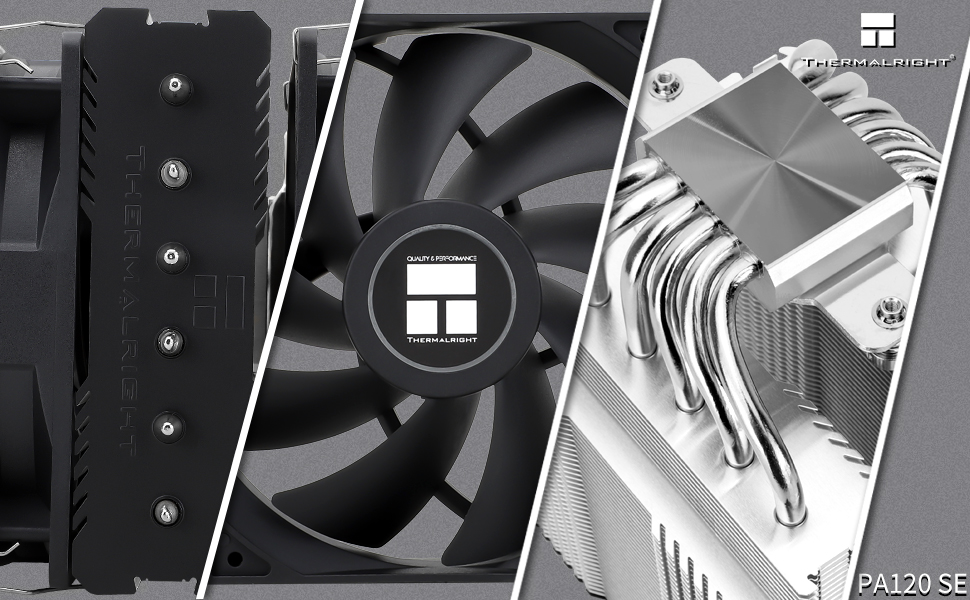
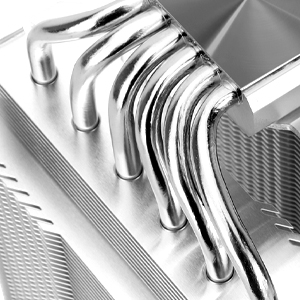
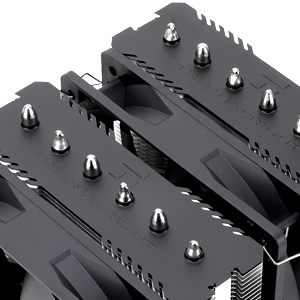
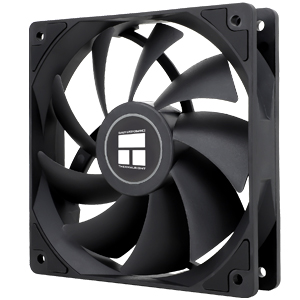
The Thermalright Peerless Assassin 120 SE is a high-performance CPU air cooler featuring 6 pure copper heat pipes with advanced AGHP technology to optimize heat dissipation regardless of orientation. Equipped with dual 120mm PWM fans delivering up to 66.17 CFM airflow at ultra-quiet noise levels (≤25.6 dB), it supports a wide range of Intel and AMD sockets. Its compact design ensures RAM clearance and easy installation, making it a top choice for professionals seeking reliable, whisper-quiet cooling for high-end CPUs.
| ASIN | B09SD44SL1 |
| Air Flow Capacity | 66.17 Cubic Feet Per Minute |
| Best Sellers Rank | #81 in Computer CPU Cooling Fans |
| Brand | Thermalright |
| Brand Name | Thermalright |
| Compatible Devices | Desktop |
| Cooling Method | Air |
| Customer Reviews | 4.7 out of 5 stars 968 Reviews |
| Item Dimensions L x W x H | 6.1"L x 5.31"W x 4.92"H |
| Item Height | 4.92 inches |
| Item Weight | 2.1 Pounds |
| Manufacturer | Thermalright |
| Material Type | Aluminum |
| Maximum Rotational Speed | 1550 RPM |
| Noise Level | 25.6 Decibels |
| Power Connector Type | 4-Pin |
| Product Dimensions | 6.1"L x 5.31"W x 4.92"H |
| Unit Count | 1.0 Count |
| Voltage | 12 Volts |
| Wattage | 7.2 watts |
E**N
Excellent cooler for the money
What's not to like? High quality, cools 3 of my PCs all with Ryzen 9s excellently (much better than my old Corsair dual fan AIO liquid cooler!). Excellent performance. Like I said, I've bought 3 so far and if I suggest anyone a CPU cooler right now for a wallet friendly build, even higher end ones, this one is a no brainer. Install can be slightly more difficult than others but nothing unusual compared to other coolers of this style. In terms of noise it's pretty quiet. My last AIO liquid cooler's 2 radiator fans were louder. Works with my AM4 and AM5 CPUs and my buddy installed one on a newer Gen i7 It's a bit large, so it may not fit in smaller form factor builds. Looks great with the white color option for full whiteout builds, and my other 2 rock the black with RGB. Do yourself a favor and pick up this guy for your next build!
D**Y
Unbelievable
This cooler is an absolute marvel. Best temps I have ever seen. The fans that are included are awesome. I read several reddit threads that argued the SE version was "lower quality" and "more noisy" than the non-SE version because there were no dampeners (rubber feet at the corners) present on the fans and no fin stack covers. But this is only partly true. There ARE dampeners on the side of the fans that mounts to the fin stacks. And the lack of fin stack covers does not take away from the appealing look of this cooler in the slightest. After installing this magnificent beast, I could not get my temps to go above 62c. And I really tried. Plus, my case has mid airflow. I am now idling at 26-29c. Backstory. Built my PC in late 2015 with a 6700k, an R9 390x, and 16gb of 3000hz ddr4. First cooler was a Corsair H55 with the rad sandwiched between two Fractal fans in push/pull. Best stable 24/7 overclock I could achieve was 4.6ghz using 1.305v. The absolute max temps after long stress tests or hours long gaming sessions was 78-80c. Pretty toasty, but I could live with it. My idle temps were great, 28-32c. Having several apps open and a browser with a few tabs temps were always around 45-58. Fast forward all the way to 2022. Same cpu. Now my idle temps were up to 33-36c and my highs were routinely 79-83c. I realized that my cpu was getting a bit long in the tooth and I wanted to extend its life the best I could. By this time I had already upgraded my gpu to a Gaming X 6700XT and my RAM was now 32gb of Corsair 3800hz CL16. I shopped around and found a 240mm AIO that would fit my case, top-mounted. To my surprise, the 240 AIO only lowered my temps by an avg. of 3-5 degrees celcius. Certainly not $130 better than my nearly 7yr old H55. Disappointing. After only 1yr, the pump failed on the 240. I won't trash the manufacturer here. Being under warranty, I let [them] replace it with a brand new one. One year later, same thing happened, pump failed again. I will say this here, imo Corsair may be the only AIO worth spending your money on. I have also heard good things about the Lian li Galahad. The 240 I bought after the H55 was not made by Corsair and I regret it. Decided to give air cooling a shot. After extensive research, I had it down to the Thermalright Peerless Assassin 120 SE and the Scythe Mugen 5 rev. c - Black Edition. I actually ordered the Scythe but it got "lost" in transit and Amazon had to refund me. Immediately ordered the Thermalright and received it in under 48hrs. Taking off the 240 and installing this cooler took just 45min. I am floored by this cooler's performance. Ice cold temps and whisper quiet. I left HWInfo64 running in the background while I opened and ran benchmarks for Cyberpunk, CoD, and GTAV never checking the temps in between. I was shocked when I saw that the highest temp recorded was 60c. Ran AIDA64 for half an hour, highest temp recorded was 62c. If you are on the fence, buy this cooler. IMO, it is hands-down the best air cooler, and maybe the best cooler overall, available on the market. Thermalright ftw.
T**R
AIO Level Performance - Compatible With "Tall" RAM
The pump on my Corsair Hydro Series H100i GTX was failing so I replaced it with this. On a Ryzen 5 5600X, the temps are about the same both idle and under load. Without the risk of pump failure, and at this price point, I'd say it out-performs my previous AIO, easily. The fans are significantly quieter than the stock radiator fans on the H100i under full load. It's a *very* large cooler, well built. I don't have the ARGB hooked up yet but I'm sure it looks great. Installation was simple, just make sure you actually secure the two appropriate brackets *before* setting the heatsink onto the thermal compound - oops lol. It's very compatible with "tall" RAM as well. I have 4 sticks of HP V10 RGB RAM which are extremely tall, I was able to easily nudge the fan closest to the RAM up (towards the outside of the case) about 1/4". Speaking of case, make sure yours is wide enough to install this. The Corsair Carbide Series 175R is just wide enough, around 6.25" - 6.5" from processor to panel, with about 1/8" to spare (keeping in mind I had to raise the fan, so that would normally be 1/4"-ish more).
A**Z
Awesome Air Cooler!
I upgraded to a better processor and wanted a more efficient cooler. Researching the Internet I found this air cooler. It was very well rated by the gaming community on most social networks. I decided to go for this one due to it's accesible price. After installing it, I preformed the typical stress tests (OCCT, Cinebench) The results were amazing! It never went above 85 degrees Celsius (185 Fahrenheit). That is why I really recommend the Thermalright Peerless Assassin 120 SE. Best Bank for the buck and it works so well.
A**S
Great cooling, Marvelous, Incredible price to performance .
Got this so I can tweak my CPU (R5 5600x) and it works great I am getting temps (while tweaked and OC) at 30-40 degrees while idle(browsing web stuff like that) and like 60 while playing games and 69 while using Cinebench(also tweaked and OC). Mind you my temps were even higher before this with no tweaks and OC with 40-50 resting and 75 in Cinebench and WITH the tweaks and OC(a bit less though) I was getting resting temps of 50-70 and temps of 95 while in Cinebench . Installation was easy, pretty cheap, overall a great product in my opinion, so yes I can recommend this especially if you are on a budget or a beginner this can fit for pretty much anyone and would likely be my go too if I ever build a new PC. PS: The screenshot was while I was writing the review, overclocked and tweaked of course, you can tell by the clock speeds.
J**A
Good cooling. Awful fan mounts and not ideal board mounts IMO. Held by two screws not four.
Overall this has very good cooling. I bought this for a 5600x because I'm not comfortable with how high AMD was gleefully allowing these things to run (to the point that Prime95 _guarantees_ thermal cycling...) I upgraded from an old 2600 that ran cool as a cucumber even overclocked so it was a real shocker for me seeing my CPU exceeding 80C temperatures even with good airflow and in a worst case I saw it hit 90 (the thermal throttle limit on this chip and not as far below the absolute max as I'd like it to be) before I hard stopped that test and then clicked buy on this. Prime95 is not a realistic normal usage scenario (even encoding and such generally doesn't push quite as hard) but it does mean the stock cooler just wasn't going to cut it if I want this thing to last a long time (I do.) I never really looked hard at the stock cooler and just sort of mentally thought of them as large -- mostly because of that huge fan mount bracket -- but the actual heatsink of the original cooler is probably actually less than old CPUs used to use. Regardless, what truly concerned me was the thermal throttling even under normal usage. Even outside of Prime95, the temperatures jumped around like crazy. It could be 50C one moment, then 73C in less than a second for a bit and then right back to 50, again in less than a second... If you only care about maximum performance with full intent to throw the CPU out after one or two years this may be ok, but if you want it to last a long time this is wildly unacceptable (this is not a limitation that a CPU can fix by being more modern -- it's a limitation of the silicon dies themselves and really even applies to quite a lot of electronics and even mechanical machines. Extreme thermal throttling in the short term leads to a shorter long term lifetime.) The installation process for this thing is mostly painless. The mount brackets are a bit hard to get into place if you don't want to pull the board out because the bracket can slip a bit once you remove the original heatsink, but if I held the screws and plastic piece together while putting each in it wasn't too painful. I do think it's possible many people may accidentally turn them wrong so they curve outward instead of inward or even upside-down, so the installation process could have its issues there perhaps. The instructions don't really spell it out, but you can see which way to curve them by the pictures and if you're really thinking about it it's obvious the screws go upwards. Unfortunately, the fans are not so simple. I have no idea what they were thinking with those mounting brackets, but they're awful. They're extremely hard to get in -- especially since you have to attach the heatsink itself first (reaching the screws while the middle fan is in place would be extremely hard at best, but really just not something you want to try) so you're reaching around a giant heatsink with very little room around it inside the case to try to snap it into place. And it doesn't even really snap. It basically just sort of hooks in a bit on each side. I'm feeling extremely paranoid that a bracket could slip and one of the fans could come loose or even entirely fall out at some point in the future. I used to have a somewhat similar HSF that used little rubber pieces that fit tightly into the heatsink sleeves themselves on one end and snapped into the fan screw holes on the other and it lasted for years and years with no problems. They should have used those I think, though the middle one would have been hard to get in with those. Sadly the only ones I had would not fit on this because they were designed for different sized components so I had to use the provided brackets. (I recommend working the sides in between sleeves to slightly increase its overall grip.) It takes a fair bit of maneuvering to do this and I had one of the brackets decide to fall out while I was working on it (definitely make sure the system is unplugged while doing this or it could potentially cause a short.) It seems the best procedure is to put one side in first, slide the fan down, and put in the other, then recenter the fan. I'm also a tad concerned about their choice to have it mount to two screw holes instead of four. This gives it a lot more give to actually tilt a bit either way and it may even shake around if there is sufficient vibration. While it's unlikely there would be enough to be dangerous in normal operation, if you carry your case while traveling or, worse, ship it, I don't know that it would be good for the HSF at all. Also, there really is less room over the memory chip side than the description would imply. I had to have the fan sticking up just ever so slightly over the top of the HSF. My bigger concern is not the 0.5% reduction in airflow through the heatsink so much as the possibly more significant decrease in airflow over the RAM itself. However, I am not doing any real overclocking, so hopefully that will never matter. All that said, if you install this correctly and put aside annoyances like the mounts it does work quite well. It has definitely helped a lot to tame this 5600x. Temperatures are still not where I'd truly like them to be coming from my old 2600 and really just the CPUs I've had in the past in general, but it takes Prime95 to hit the maximum and that maximum after heavy load during the hardest parts of the test was quite a lot better and never hit the thermal throttling threshold. I was afraid to mess with settings too much or to do any significant testing with the stock HSF, but after some adjustments and final settings I have it currently maxing out at an absolute max of 76C, but it only hits that rarely and for a relatively short period of time even in Prime95. I'll have to do more game testing, but from the results so far I think I can get it to stay below 60C now during normal usage. (Mind you, the maximums still took some tweaking to reach this point as stock settings just boosted more and went a bit higher overall for longer.) Idle has dropped from mid 40s to mid 20s in Windows and from about 50 or so in this board's BIOS to about 35 or so now. I now can feel a lot more confident that my processor will actually last for many years instead of wearing out after the warranty. Also, thermal throttling is quite a lot better. It can still make some sudden jumps (Prime95 with small FFTs shot fans up to max and hit 77 almost instantly for example) but generally under normal usage the ups and downs aren't extreme. Someday I'd really love to see some sort of mechanism that cools CPUs more or less depending on actual usage to keep temperatures relatively consistent, but neither Intel nor AMD are particularly interested in doing this since the CPU market is heavily focused on performance now rather than a CPU still running a long time from now. (Of note, btw, the CPU maxes out at 115 watts of actual energy usage if Core Temp is to be believed in its calculations. I'm not sure what this works out to in real TDP, but I'm pretty sure it's more than the 65W this thing was supposed to be rated for.)
O**O
Nice budget cooler
I recently upgraded my daughters cooler to the Thermalright Peerless Assassin 120 SE ARGB White, and I couldn’t be happier with my choice! From the moment I opened the box, I was impressed by the sleek and modern design of this cooler. The white finish and ARGB lighting add a fantastic touch to my build, making it not only functional but also visually stunning. Installation was a breeze. The mounting hardware was straightforward, and the instructions were clear, which made it easy for someone like me who isn't a seasoned builder. I had it installed in no time, and it fit perfectly with my AMD AM5 socket. I recently upgraded my CPU cooler to the Thermalright Peerless Assassin 120 SE ARGB White, and I couldn’t be happier with my choice! From the moment I opened the box, I was impressed by the sleek and modern design of this cooler. The white finish and ARGB lighting add a fantastic touch to my build, making it not only functional but also visually stunning. Performance-wise, this cooler is a beast! My CPU temperatures have dropped significantly, even under heavy loads and during gaming sessions. The six heat pipes work wonders, and the dual 120mm fans provide excellent airflow while keeping noise to a minimum. Overall, I highly recommend the Thermalright Peerless Assassin 120 SE ARGB White CPU Air Cooler. It combines style, performance, and ease of installation at a fantastic price point. If you’re looking for a reliable air cooler that looks great and keeps your CPU temperatures in check, this is the one to get!
E**N
P2P king of air coolers
Best price-to-performance air cooler you can buy. Cools my 7800X3D flawlessly. Its pretty big so check your case measurements just to be sure. It will likely cover up your RAM, so if you get RGB RAM you probably wont be able to actually see it, but other than that its perfect. Has mounting for LGA 1200, LGA 1700, AM4, and AM5 and comes with a thermal paste tube (not the best paste and its not very much but it does the job. would probably recommend buying some nice paste for a higher-end build though.)
Trustpilot
2 weeks ago
3 days ago