

🔔 Upgrade your doorstep game—security that’s smart, sharp, and subscription-free!
The Reolink Video Doorbell WiFi Camera delivers stunning 2K HD video with advanced HDR and night vision, supported by dual-band 5G/2.4G WiFi for rock-solid connectivity. Its 180° wide-angle lens ensures comprehensive coverage, while smart detection and local storage eliminate monthly fees. Waterproof and wired for reliable power, it includes a customizable chime and two-way audio, making it a top-tier, cost-effective home security upgrade.








| ASIN | B0B7S3JSG7 |
| Alert Type | Sound Alerts, Chime, Push Notifications, Record |
| Antenna Location | Outdoor Security |
| Are Batteries Required | No |
| Best Sellers Rank | #2,535 in Tools & Home Improvement ( See Top 100 in Tools & Home Improvement ) #18 in Video Doorbells |
| Brand | REOLINK |
| Built-In Media | Reolink Video Doorbell,Reolink Chime |
| Color | Black |
| Compatible Devices | Smartphone |
| Connectivity Protocol | 2.4G/5GHz WiFi |
| Connectivity Technology | Wired WiFi |
| Control Method | App |
| Controller Type | Reolink APP |
| Customer Reviews | 4.2 out of 5 stars 3,014 Reviews |
| Effective Still Resolution | 5 MP |
| Effective Video Resolution | 2 |
| Enclosure Material | Plastic |
| Field Of View | 180 Degrees |
| Focus Type | Auto Focus |
| Form Factor | Box |
| Frame Rate | 20 frames_per_second |
| Indoor Outdoor Usage | Outdoor |
| Indoor/Outdoor Usage | Outdoor |
| Installation Type | Screw In |
| Item Dimensions | 6.5 x 6.5 x 3.35 inches |
| Item Weight | 0.67 Kilograms |
| Light Source | Infrared |
| Manufacturer | Reolink Ditigal |
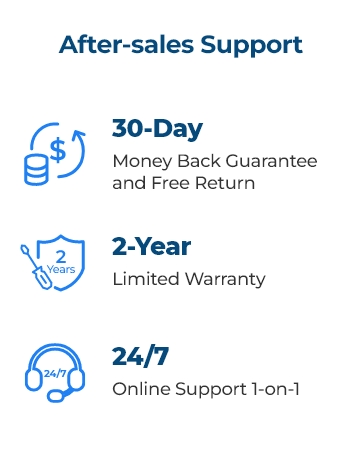
| Manufacturer Warranty Description | 2-year warranty |
| Model Name | Reolink Video Doorbell WiFi |
| Model Number | Reolink Video Doorbell WiFi |
| Mount Type | Wall Mount |
| Night Vision | IR Night color |
| Number of Channels | 2 |
| Number of Items | 1 |
| Other Special Features of the Product | Noise Reduction |
| Photo Sensor Resolution | 5 MP |
| Power Source | Corded Electric |
| Recommended Uses For Product | Outdoor Security |
| Room Type | Hallway, Living Room |
| Shape | Oval |
| Special Feature | Noise Reduction |
| Specific Uses For Product | Outside, Outside; Amateur, Outside; Professional, Smart Doorbell, Surveillance |
| Unit Count | 1.0 Count |
| Video Capture Format | MPEG-4 |
| Video Capture Resolution | 2k |
| Video Encoding | MPEG-4 |
| Viewing Angle | 180 Degrees |
| Voltage | 24 Volts |
| Water Resistance Level | Waterproof |
| Waterproof Rating | IP65 |
| Wattage | 6 watts |
| Wireless Technology | 2.4G/5GHz Dual-Band WiFi |
| Zoom Type | Digital Zoom |
S**Z
An Overlooked Gem
The Reolink WiFi Doorbell Camera is an excellent option for anyone looking for reliable home security without the ongoing cost of subscriptions. Setup is straightforward and user-friendly, making it easy to get up and running even if you’re not very tech-savvy. One of the biggest advantages of this camera is the fact that there are no monthly fees. Unlike many competitors that lock basic features behind a subscription, Reolink allows you to access recordings and alerts without paying extra. With support for a microSD card, local storage is simple and effective. The video quality is good and more than adequate for everyday security needs. While it may not be true high-end HD, it clearly captures people, motion, and activity at your door and gets the job done reliably. For a doorbell camera at this price point, the quality is solid and dependable. Another standout feature is the automatic overwrite function. Once the microSD card is full, the camera seamlessly overwrites older footage, so you never have to worry about manually deleting recordings or running out of storage. This makes it a true “set it and forget it” security solution. Overall, the Reolink WiFi Doorbell Camera is a highly underrated security device. It delivers strong performance, simple setup, dependable recording, and cost savings by eliminating subscriptions. If you’re looking for an affordable, practical, and reliable doorbell camera, this is one I would definitely recommend.
J**Z
1 week in works great!
Probably one of the best of the bunch as far as local storage, minimal setup, and device expansion goes. I got this up and running within a few hours wired to replace our old 1950s home doorbell. The instructions were straight forward and worked without an issue. Been running for a little over a week and we're super happy with it. Image and sound quality is stellar. Wi-Fi connection is stable, even with supposedly only 1 wifi bar on the app. And the stream has always worked quickly. The app just works. Notifications can be modified, local storage was easy to set up Didn't need to create any account or anything, just password protect my home within the app. Funny enough, the specs say it only can handle a 256GB card, but I threw a 400GB one in there anyway and it shows up accordingly with all 400gb. Neat! Things yet to be determined... We get cold up here during the winter, like down to -10°F over a few days. Hopefully this can handle that. I've heard great things about this particular brand being able to handle extreme weather,so I got my fingers crossed. Also, my house is south facing and this thing gets full sun exposure within the video frame for 3-5 hours a day depending on cloud coverage. We'll see how well it holds up. I did get one of those little shade covers for it, and it blocks about half of the sun at its highest, so maybe that will help? Not sure. Time will tell. Either way, I'm super happy with it and if it holds out by next year, we'll probably upgrade our aging Swann cameras to Reolink ones to integrate all of this together with local storage. Excited about that! So far, definitely recommended.
J**R
Edit: Support Made Things Right | OG: Everything except the camera sucks
Edit: Reolink support reached out to me to make things right. And so far, they have. They offered to send out a replacement unit even after acknowledging that I had willingly thrown my old unit out. They persisted in this request for 2-3 months before I finally said, as long as it's free of charge, be my guest. And my guest they became, as they shipped it out at no cost to me. Now, I don't know if the updated software or they updated the camera to cause this, but I would call this newest version they sent me OK, not great. Initial difference, my router immediately detected it as "Roku", which routers can get things wrong so it's not that big of a deal, but I thought I remembered it being picked up as something else initially. The camera itself also seems to be different. It still has some good clarity, but it seems suddenly plagued by intense smearing. The image around movement is clear and sharp, but when things start moving it's smeared incredibly poorly. I've tried several of the settings to fix this but nothing appears to be working so far. The chime itself actually works with this unit, as do push notifications, and the connection itself seems much more reliable than before. However, I still greatly wish they'd just enable the use of your home's built in chime over using a wirelessly connected one. Original Review: I've had enough trying to get this piece of junk to work. It's supposed to connect to my router through wifi, ring when someone presses the button, and alert me on the app when it happens. I connected it to my NVR and even gave it an SD Card. I've never been more frustrated with a machine than I have with this one. Don't get me wrong, the camera on it is great, clear and really usable. But that's it. The software in it sucks so bad that after 2-ish months of owning it I'm just throwing it away, it's not worth the hassle anymore. First, it refuses to keep a steady connection to my router. I'd have to put my router basically on the other side of my door for it to stay connected reliably, and I do not have a weak router. When it works it works great, but it's almost constantly disconnecting. Second, the push notifications are spotty at best, and non-existent at worst. I don't know how many times I've had to reset this camera because of something stupid, but it's more than I can count on one hand. Third, the chime. The awful, terrible, forced to be used chime. They REALLY need to make it so that you can just use your built-in chime if it exists because that sorry excuse for a piece of technology deserves less than the landfill it's going to rot in. When I first received the doorbell, the chime paired right up and worked exactly like expected. However, for some reason unknown to me, the chime unpaired itself and I had to try and re-pair it. But, the chime just don't do it. It beeps like it pairs, but the doorbell says the pairing failed. Right before I started typing this review I was trying to pair it for the last time, and I actually got it to pair, to my surprise. Only for the software to say that the chime wasn't connected. Are you kidding me? Not connected? While I was troubleshooting they were plugged in less than a foot from each other, and the chime can't connect to the doorbell? After what totals up to several hours trying to get it to pair over the course of me owning it? Nah, that's cool, I'm just going to smash it to pieces and throw it in the trash. I've never had the displeasure of working with something this frustrating before. I'm in IT and networking, none of the issues I've encountered with this doorbell should exist. It's just a waste of money and a terribly executed product. Being forced to use that sucky chime was really the kick in the teeth I needed to decide I'm never going to buy another Reolink product again.
R**N
Get this doorbell and ditch the others
I recently upgraded my home security system with the REOLINK Doorbell WiFi Camera, and I must say, it has exceeded all my expectations. This innovative doorbell camera not only provides top-notch surveillance but also offers the added advantage of local storage, making it stand out among its competitors. First and foremost, installation was a breeze. The package came with everything I needed, and the setup process was incredibly straightforward. Within minutes, I had the doorbell camera up and running, connecting it to my home WiFi network effortlessly. The camera's sleek design adds a touch of modernity to my front entrance, and the build quality feels robust and durable. The camera's video quality is outstanding. It boasts 1080p Full HD resolution, delivering crisp and clear footage of anyone approaching my front door. Whether it's daytime or nighttime, the camera's advanced night vision technology captures detailed images without any distortion or blurriness. This level of clarity has given me peace of mind knowing that I won't miss any important details, regardless of the time of day. One of the standout features of the REOLINK Doorbell WiFi Camera is its local storage capability. Unlike many other doorbell cameras that solely rely on cloud storage, this camera allows me to record and store footage locally using a microSD card. This feature is a game-changer for me as it offers several key advantages: Privacy and Security: With local storage, I have complete control over my data. I don't have to worry about my footage being stored on remote servers, ensuring my privacy and reducing any security concerns. No Subscription Fees: Cloud storage often comes with monthly or annual subscription fees, which can add up over time. With local storage, I save money in the long run, as there are no recurring costs. No Internet Dependency: Since the footage is stored locally, I can access it even if there are internet connectivity issues. This is especially important during power outages or internet disruptions. The REOLINK mobile app is user-friendly and provides easy access to the camera's live feed and stored footage. I receive instant push notifications whenever the doorbell detects motion or someone rings it, allowing me to quickly check who's at the door, whether I'm at home or away. Additionally, the camera integrates seamlessly with my other smart home devices, allowing me to create custom automation routines. For instance, I have set up an automation that turns on specific smart lights whenever the camera detects motion during nighttime, further enhancing my home security. In terms of reliability, the REOLINK Doorbell WiFi Camera has been outstanding. It consistently delivers real-time alerts and has not experienced any glitches or malfunctions since I installed it. In conclusion, the REOLINK Doorbell WiFi Camera with local storage is a fantastic investment for anyone seeking a top-tier doorbell camera with advanced features and total control over their data. Its exceptional video quality, easy installation, and local storage option make it a clear winner in its category. I highly recommend this camera to anyone looking to enhance their home security and enjoy the convenience of local video storage.
L**E
Unusable. Badly designed junk. Cannot answer rings.
After months of testing, this device is useless. They provided me an "RMA" to replace the device, but I've already replaced a prior device, so I do not expect a change. I've removed reolink connection to the Amazon service to see if doorbell rings could be answered, but they cannot. The device immediately dicsonnects after attempting to answer the call. I can watch footage as they are waiting but once I hit accept the doorbell goes off wifi and will not reconnect until I reboot my routers. Further update: After 2 weeks the memory card is unreadable and I cannot View my recordings. It was a 256Gb Amazon basics memory card. I swapped the same card to a Reolink PTZ wifi camera and it works just fine for over a month then I put a 128GB sandisk in the doorbell and it's been working just fine. Their support claim of 256GB is unwarranted. Second issue is that I have it connected to Alexa so that the Alexa Hub can theoretically display the doorbell. I tried to answer a ring in coming onto my phone but when I do it says that the connection is already in use or the speaker is already in use. So I was unable to communicate with the person at the door. I believe it's because Reolink is trying to establish the connection to the hub and then will not let my phone connect. After attempting to connect the device then went offline and I couldn't view the doorbell at all as stated below there's all kinds of strange connectivity issues. Basically rendering the doorbell not a doorbell. Guests ring and I cannot answer. If I try in person, I notice the device actually loses connection and flashes white light. The engineering on this device is so bad maybe you get lucky with it working but I highly do not recommend these unless you have a direct ethernet connection because the Wi-Fi radio on this is garbage (see video). Their support is useless people over in China trying to use ChatGPT responses that don't even make sense. Then if they can't help you (they never can) they just suggest a discount or replacement. My goodness it's torture. Update: After using this device for a few weeks, I found it randomly goes offline. I set up the device to have a priority connection to my TP-Link Wi-Fi 6 router mesh Network, and the signal is very strong. I've been back and forth with Reolink support, which is basically non-existent because they don't speak English and have some weird interpreting where they don't read my responses, asking the same questions over and over again. They tell me to put the device closer to my router and reset it a million times - they even said that I shouldn't mount it against a wall LOL. I reminded them that it is a doorbell. From other Wi-Fi Reolink devices that I have I also observe a similar problem with their connectivity issues. Periodically and I have to go reset the Wi-Fi or reboot the power to the router. I had the ring doorbell and the same location for 4 years straight with zero connectivity issues so I may just have to return back to ring unfortunately. If they can figure out how to design proper Wi-Fi receiver transmitter in their devices I would consider purchasing but for now I would not recommend. Setup An undesirable design choice for all Reolink cameras is connecting to your wifi by the camera reading a QR code from your phone. You have to play this game with the phone in front of the camera, moving it in and out, but the cameras struggle to read the code. Most other devices use Bluetooth or a temporary wifi hotspot to connect. The key is to set up the camera right next to your router so it has a great signal and is indoors before mounting so the lighting is just right. I had a hell of a time connecting to my AT&T Wifi 6 router just about 10 feet away through the exterior wall and into the attic. The Wi-Fi reception is excellent from the street, so it has nothing to do with my router. The Doorbell would connect on and off sporadically, making it difficult to complete the setup process. I had to keep resetting the device maybe six times. I noticed that the wifi signal was weak once connected, according to the doorbell (2 of the 3 bars). The only explanation is that Reolink could have done a better job designing their antennas for the doorbell. My Ring doorbell had no issues for 5 years. I thought the doorbell was an instant return because I could not connect until I changed the configuration to the "Use 5GHz band only" option, and then it's been solid for the last few days. I appreciate that the cameras are dual-band, but they don't seem to be designed to use both bands. All of my other Reolink cameras have connectivity issues if left on Dual Band mode, and I had to set my router to only use the 5GHz band for the camera specifically, on top of the camera being set to use 5GHz; otherwise, the camera would be inaccessible. Mounting: The mount is unsuitable for walls, and there is no place to fit their large electrical connectors. I changed to a smaller connector, which the Ring doorbell came with, and was able to shove it into the wall. They do not have a vertical angle mounting plate for hardie-board siding with a vertical tilt, so your camera will be pointing up towards the roof. They only provide a left/right angled bracket. Field of View: I don't like the field of view of this device as it appears to be designed to view vertically instead of horizontally. I do not need to view my porch roof but do want to see traffic across my front lawn to the driveway. The ring doorbell had a 360 fish eye, allowing me to see almost across my whole front lawn. The Reolink doorbell probably has a 90-degree FOV horizontally, which is unacceptable. You should plan to have other cameras to cover your property as this is meant just to cover your porch area. You cannot even see a person directly in front of your door knocking on your door, but don't worry they designed it so you could see the sky. Video: The quality is on par with Ring doorbell. I appreciate being able to select the quality mode to save on bandwidth while viewing over the phone. Detection: Like all Reolink devices, they can detect any motion (light changes or movement, vehicle, etc) and humans and allow you to filter on the event when viewing the timeline. This is a key differentiator from so many cameras that made me select Reolink (that and the on-board storage with free viewing). Like Ring, Reolink also has a Package detection. At first the package detection was going off repeatedly thinking my porch chair was a package. I turned down the package detection setting and it stopped the false detection and successfully captured an envelope dropped on the porch. Like all Reolink cameras I appreciate the detailed configuration options in smart detections. There is overall Motion Detection setting from 0-100 and then on top of that you can adjust whatever smart detection (pet, human, package) the device supports. It takes a few days of monitoring and tweaking those settings to get things optimal for your environment. For the most part it's pretty good and I opt to increase the false detections with more recording vs miss an important event. The great thing is that you can playback only the filtered events you wish to see and when you receive a phone alert, selecting the alert will load up that event directly. Ring doesn't do any of that. Motion event recording at detection of the event. You can set the post-motion recording time before it stops with 15, 30, 60 seconds, but not pre-event marking. Their cameras record before human detection to ensure you get the full footage even before detection. Ring doorbell would show me an event recording only when a person was basically at the door and turning away already unless they were walking slowly. Storage and Playback: The seller of Reolink devices is the subscription-free on-board device storage. Now, you can purchase a cloud storage plan if you like, but these devices also support FTP and standard NVR streams, so you can always back up your NVR. I used a 256GB SD card and so far I'm using 1GB/day which means I'll have 9 months of storage. That's insane. Bye-bye Ring subscription plan for $4/mo to see 10 days worth of "events". Playback allows you to pick a date, filter by Visitor, Any Motion, Person, and Package, which will remove all other detections in the timeline so your playback only shows those events. There is a "tile view" option showing you a sampled preview of frames for each tile and it has an icon on each tile as to which types of motions were detected (motion, person, package, etc). You don't have to scan through and watch endlessly each video (like Ring), you can quick scroll through the tiles to get a view of what occurred without watching. Playback speeds of 0.25, 0.5, 1, 2, 4, 8, and 16x are available saving time reviewing footage. Audio Quality: There is less background noise than Ring. Ring had so much background noise it was hard to hear almost, however, it could detect whispering at the edge of my property almost. This device picks up audio clearly. Chime: The doorbell comes with a chime that is configurable for different tones, unlike Ring, which makes you purchase a chime. Alexa Compatibility: This is compatible with Alexa, and all the supported motion alerts can be announced on your Alexa device. When pressed, the doorbell ring will also be announced on your Alexa hub/echo, and the live video will be shown. On the Echo/Hub doorbell tile, Amazon leaves their Ring device with the additional feature of displaying the last image but no image for Reolink, unfortunately. It would be nice to have the tile preview the last image on your Echo/Hub. My most significant issues are the field of view and the device setup difficulties.
N**M
I'm a fan
I finally got around to getting this installed. It replaced my Google Nest Hello Doorbell... and all I have to say is "good riddance" to that old doorbell. I got delayed notifications consistently with the Google. Sometimes delayed by hours. This one is spot on with them occurring within seconds. The integration with Home Assistant is really good. I've got a Reolink Home Hub and it does a good job supporting both this camera and my indoor E1 Pro. My only complaint is the app is clunky. Sometimes you tap the notification of someone triggering the camera and it doesn't take you to the video clip. It would be really nice if it would send a snapshot of what triggered the notification. Also, when you go into the app to find triggering events, it seems to sort by time, which is ok, but I want to see the most recent ones on top, not the oldest ones. If I could configure that, it would be very helpful. Tuning the app was great and easy. I was able to block out the alerts from cars driving by; however there's some difficulty assigning squares on my pixel 9 when they're right at the edge of the camera's view. Enlarging the display didn't really help because you can't scroll past the edge of the view. In the past I've found their support really good, especially when I bought the Home Hub and had some issues with it. I may upgrade to the Home Hub Pro someday or perhaps get one of their NVRs. But all-in-all I'm very fond of the products I've purchased so far. The price was fine and the motion detection is great, app is not as user friendly as it should be.
M**E
The Doorbell I've been looking for, for years!
Came close twice to buying a Ring but the Ring pro was just to much to justify. That and they all tend to hold you hostage with services when it comes to recording features. ReoLink apparently saw the need and opportunity and have created a great package at an affordable price that you can interface with your own network, email, ftp, HTTP/S, & NVR with a PC and Android app. Bought two of them for an extra chime in the bedroom and a spare when eventually needed. The camera optics are great and night vision surprisingly effective, it's not to fisheye to look distorted but just enough to cover the area. The ability to differentiate between just any motion and a Person is critical to only getting notified when needed. I have a chime for Person which will usually be package delivery and a chime for someone actually ringing the doorbell. Both trigger emails with video. With a 256GB microSD I have no need to maintain an NVR or service, it's built in with enough storage to last for months without overwriting. About the only wish I would have are more options or more to the point the ability to upload custom auto-responses and chimes. There's also a white version thats 3:4 aspect for a better view in corridor situations and packages although while you may not be able to see the package with the black 4:3 aspect you will know it's been delivered. This doorbell is also a great gateway to adding Reolinks wide range of security cameras, I've since added two Trackmix WIFI PTZ cameras. The software just works and is easy to install & configure. You can even easily setup remote viewing thanks to UID on your mobile device to view over your mobile data 4/5G cconnection. With regards to their security cameras about the only wish I'd have are even more features (patrol mode, wifi7, chimes support) and better optical zoom & tracking and although what you get for the prices is quite fair. One final note, Reolinks Support is also very good and has been able to resolve and answer any questions I'd had in a timely manner.
J**T
Perfect little camera
I've had Nest and Wyze cameras before this one. Those other cameras were tied to a monthly or yearly plan and were cloud dependent. This camera does not need the cloud though it's an option if you want it. You can either use an SD-Card to store locally or use Frigate or ReoLinks own NVR to store your videos locally. I had this camera integrated with Frigate and Home Assistant in minutes and am very happy with the performance. Make sure on install that you pull the blue tape off the mount as this covers the heat paste as the camera uses the base and door frame as a heat sink. Install went perfectly and paired to my 5Ghz wireless easily. Frigate code: Front_Door: enabled: true onvif: host: 172.17.30.182 port: 8000 user: admin password: password ffmpeg: inputs: - path: rtsp://admin:[email protected]/Preview_01_main roles: - record - audio - path: rtsp://admin:[email protected]/Preview_01_sub roles: - detect record: enabled: true retain: days: 7 mode: all events: pre_capture: 10 post_capture: 20 retain: default: 30 mode: motion snapshots: enabled: true detect: enabled: true width: 480 height: 640 fps: 10 stationary: interval: 20 threshold: 50 objects: track: - person - package Home Assistant picked the camera up after I installed the reolink integration and I just needed to enter the user/pass for it. The Reolink app works great and you can access the streams with VLC or a web browser. There are two streams, fluent is low res for monitoring and detection and main for high res. In the app it defaults to fluent for low res and at first I was thinking that my Wyze V3 cams were outperforming the Reolink but after changing to the main feed I could tell the difference. I use the balanced feed in the app if I even need to use it. I added the cameras in HA for automations but the HA feed is from a Frigate card integration so that I don't have two streams from the cameras. One stream to Frigate and that duplicates to HA if needed.
Trustpilot
1 month ago
2 months ago


