We remain fully operational. Our teams are working around the clock to ensure your deliveries continue safely.

DOWNLOAD THE APP


Customer Services
Copyright © 2025 Desertcart Holdings Limited
DOWNLOAD THE APP
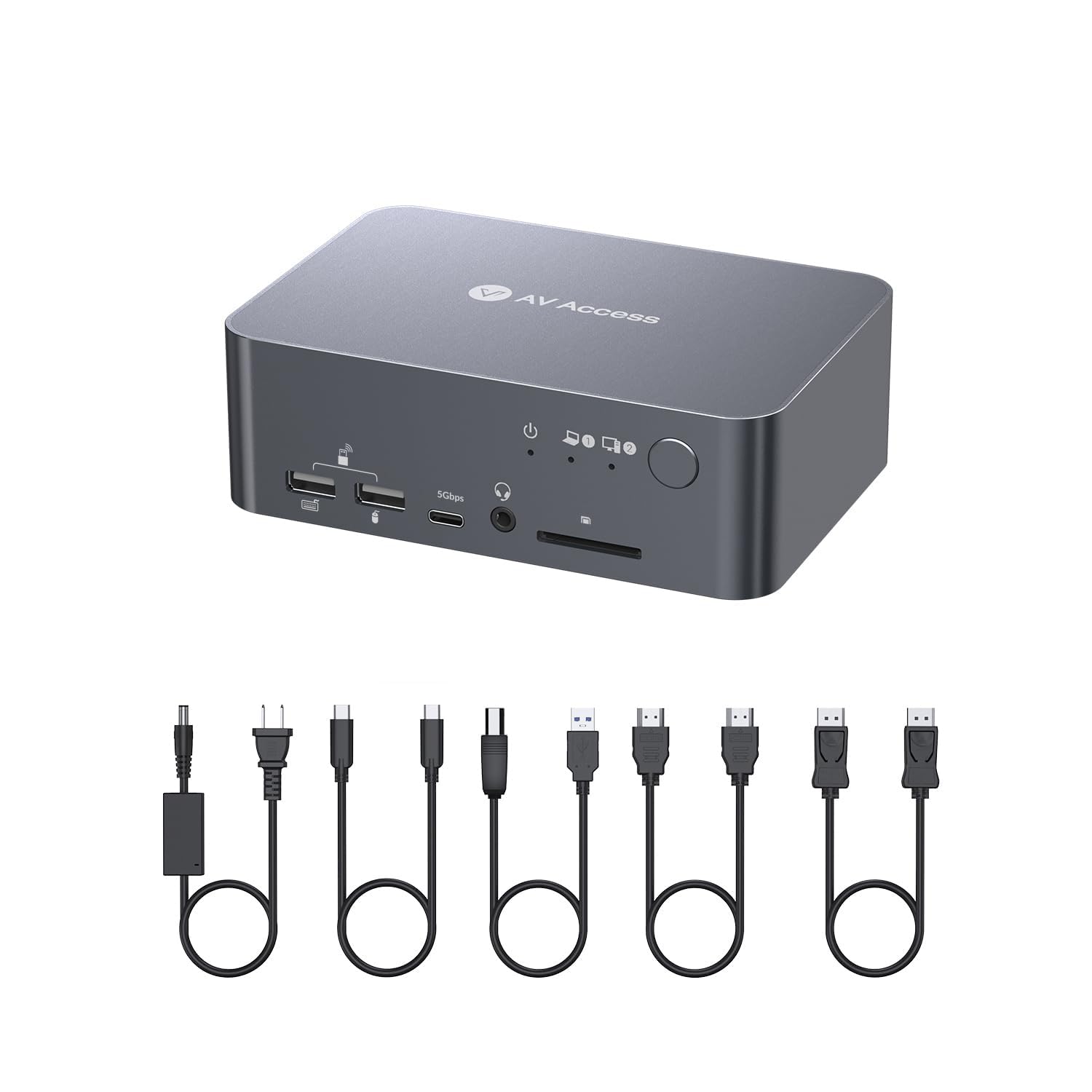
⚡ Elevate your dual-screen game with lightning-fast switching and powerhouse ports!
The AV Access Docking Station Dual Monitor KVM Switch is a robust 12-in-1 workstation hub designed for professionals juggling laptop and desktop setups. It supports dual 4K@60Hz HDMI outputs, delivers up to 120W USB-C charging, and enables ultra-fast 2-3 second switching between two computers. Crafted from durable aluminum, it offers extensive connectivity including USB 3.0/2.0, Ethernet, SD card, and audio ports, all with plug-and-play ease and included premium cables for a seamless, clutter-free experience.


| ASIN | B0BXSL127K |
| Best Sellers Rank | #1,050 in Computers & Accessories ( See Top 100 in Computers & Accessories ) #112 in Laptop Docking Stations |
| Brand | v AV Access |
| Brand Name | v AV Access |
| Circuit Type | 2-way |
| Color | Grey |
| Connectivity Protocol | Ethernet |
| Connector Type | Displayport, Hdmi, Type-c |
| Contact Material | Copper |
| Contact Type | Hdmi Type-a 19-pin |
| Control Method | Touch |
| Current Rating | 6 Amps |
| Customer Reviews | 4.0 out of 5 stars 195 Reviews |
| International Protection Rating | IP00 |
| Item Dimensions | 5.5 x 3.7 x 1.9 inches |
| Item Weight | 1 Kilograms |
| Manufacturer | AV ACCESS |
| Material Type | Aluminum |
| Model | iDock C10 |
| Mounting Type | Surface Mount |
| Number of Positions | 2 |
| Operating Voltage | 20 Volts (DC) |
| Operation Mode | KVM Switch |
| Specification Met | Ce Fcc |
| Switch Type | Button Switch |
| Terminal | Pc, Laptop |
| Unit Count | 1.0 Count |
| Wattage | 120 |
A**U
Commercial-Grade Docking Station at Personal Pricing
I’ve been using this AV Access docking station/KVM for over a year, and it’s been rock solid. It feels commercial grade. the kind of gear you’d expect in an office setup but at a price that makes sense for home use. Switching between my laptop and desktop is instant, and it drives dual 4K monitors with zero flicker or lag. Gaming runs smooth, work apps are stable, and the 120W power supply keeps everything powered without breaking a sweat. Plenty of ports (USB-C, Ethernet, USBs, audio, SD) so everything stays plugged in — no dongle mess. Reliable, versatile, and no glitches in a full year of daily use. Commercial quality, personal pricing.
D**N
Works Amazing! Cables included
Awesome! It works well including EDID which means your monitors don't change positions as you switch back and forth between computers. A huge plus is they include all the necessary cable to connect everything together. Depending on your physical arrangement, you might want physically shorter or longer cables than they provide for a tidier setup. As a reference point, I bought two different cheaper ones $55, $85 and neither one would show any video.
S**E
KVM Switch never worked even after buying a second one
PROS: Don’t know it never worked. Trying to give them a benefit of the doubt I bought a second thinking the first might have been a fluke. When I tried to get a refund for one of them support never helped me. See CONS: CONS: I can switch from one computer to another; however, when I switch it back, I get snow on the screen (Like the old analog TV snow). I have to restart everything. The switching then failed. I called support and they treated me horribly. The KVM switch would also get really hot and acted like it was trying to pull data from the inactive computer even when I was not switched to it. I called support for help. When support answered the phone, I calmly described my issues. The guy responded by saying "Oh such a shame you are having trouble...have you tried plugging it in. It won't work if you don't plug it in". One might assume he was trying to help by starting at the basics; however, the issues I described could only exist if I had power to it and was using it. I went ahead and calmly answered the question and told him everything is plugged in correctly. I then proceeded to restate the symptoms. He then responded. "Oh well, I guess there is nothing you can do, what do you want me to do about it?". I was taken aback by this response. I explained that I just paid $259 for this switch…I even purchased it a second time thinking the first one was bad then planned on returning it. The second one did the exact same thing only to fail a few months later. I told him that I was replacing a generic brand KVM switch that only cost $79 that lasted me for years of good use. I asked him why he wasn’t helpful…with what I paid for the switch AV Access should be able to assist me. He responded by saying “Sorry about your bad luck, looks like you are out of money…why don’t you just go buy the generic brand then”. Based on this experience, I will never purchase from AV Access again, even if they are the only ones to offer switches in the future, I would look for another alternative. You took advantage of me and got your money, but it is a one-time deal. You won’t fool me again. AV Access is a garbage company that sells garbage and provides garbage support.
J**N
Does the job with minor inconveniences
I've been using this for 3 months now daily for work. I wanted to give it some time before leaving a review and run it through it's paces. The Good 1. Love that it charges the laptop when hooked up. 2. Easy setup and connections without having to use all kinds of adapters. 3. Clean desktop space and easy to switch between computers. The not so Good 1. Sometimes it doesn't recognize the dual monitors and only one registers. You have to shut off the monitor it doesn't recognize and turn it back on, then it works. 2. If the other computer you're not using is on and then goes to sleep, it causes both monitors to black out for about 3 seconds. They then turn right back on with the signal with the computer you are using.
A**X
Works very well with my Macbook and PC Desktop
Works very seamless and well with my macbook pro and pc desktop setup. Very easy to setup and switches between them very fast.
C**M
Laptop port works fine with Macbook Pro, but PC port would not work with Mac Mini
I bought this to see if it would work better than the "AV Access KVM Switch Dock 2 Monitors 2 Laptops" by the same company, which draws more power and runs pretty hot. The laptop side works fine with my Macbook Pro (note: make sure you have a legit thunderbolt 3+ cable - knockoffs or plain USB-C won't work), but I could not get the PC side to work with my Mac Mini. When switching to the PC port, the HDMI would go dark and the LAN cable would not be available to the Mini. I tried multiple 4k and 8k HDMI cables, and multiple USB-C to USB-B 3 chords, but the problem persisted. If I directly connected the monitor to the Mac Mini but kept the KVM switch connected via USB, the rest of the USB peripherals connected through the KVM worked fine. Hard to say if this is an issue due to broken/flawed hardware versus incompatibility with macOS versus data throughput/fidelity loss when going from Thunderbolt to USB-B despite trying both USB-B 3.0 and 3.1 cables with USB-C connectors that claimed to be Thunderbolt compatible. Unfortunately there's no official Thunderbolt adapter for USB-B. If they offered a Mac-specific switch, like the Elgato Thunderbolt hubs, then I'd consider giving that a try. For now, I'll go back to the 2x USB-C switch. Generally speaking, it is well constructed. The toggle switch does not feel flimsy, and the ports had tight connections, so I'm still giving it 3 stars. It just didn't work for my use case. My only complaint beyond the compatibility issue would be that it could use more USB-C inputs and fewer USB-A.
D**S
This dock is awesome
Absolutely love this dock! The usb c cable that comes with it is too short for my use case. So, i purchased a 6ft usb c 4 cable from cable works. Thia dock is only compatible with usb c 4 cables. Works great with playing games. I have a laptop and a nuc8 desktop. The desktop died on me a couple of weeks ago. I'm still using this dock with my laptop. I wish the company had a single laptop dock with the same connections as this one. I would get that too!
R**S
Impressive and Compact Performer
Compact size. 100-240v power supply - great for those of us that move from country to country. Nice and compact. Long power cable for easy reach. Comes with USB cables, 2 HDMI, and 1 DP. The USB-C to USB-C is a little short for one of my laptops, but works great for my HP. It can't be too long due to the standard for video transmission. It works great. I'm really impressed. I use a mouse for gaming and a trackball for everything else. No problem. Running games through it I was still at 265FPS on my 4090. Very convenient. USB devices automatically move to the system you are using. Also convenient. And I can't say how random SD cards just show in my life (usually from family). I don't have to dig through things to find a card reader now. Thank you for that little extra.
Trustpilot
2 weeks ago
3 weeks ago