
DOWNLOAD THE APP


Customer Services
Copyright © 2025 Desertcart Holdings Limited
DOWNLOAD THE APP
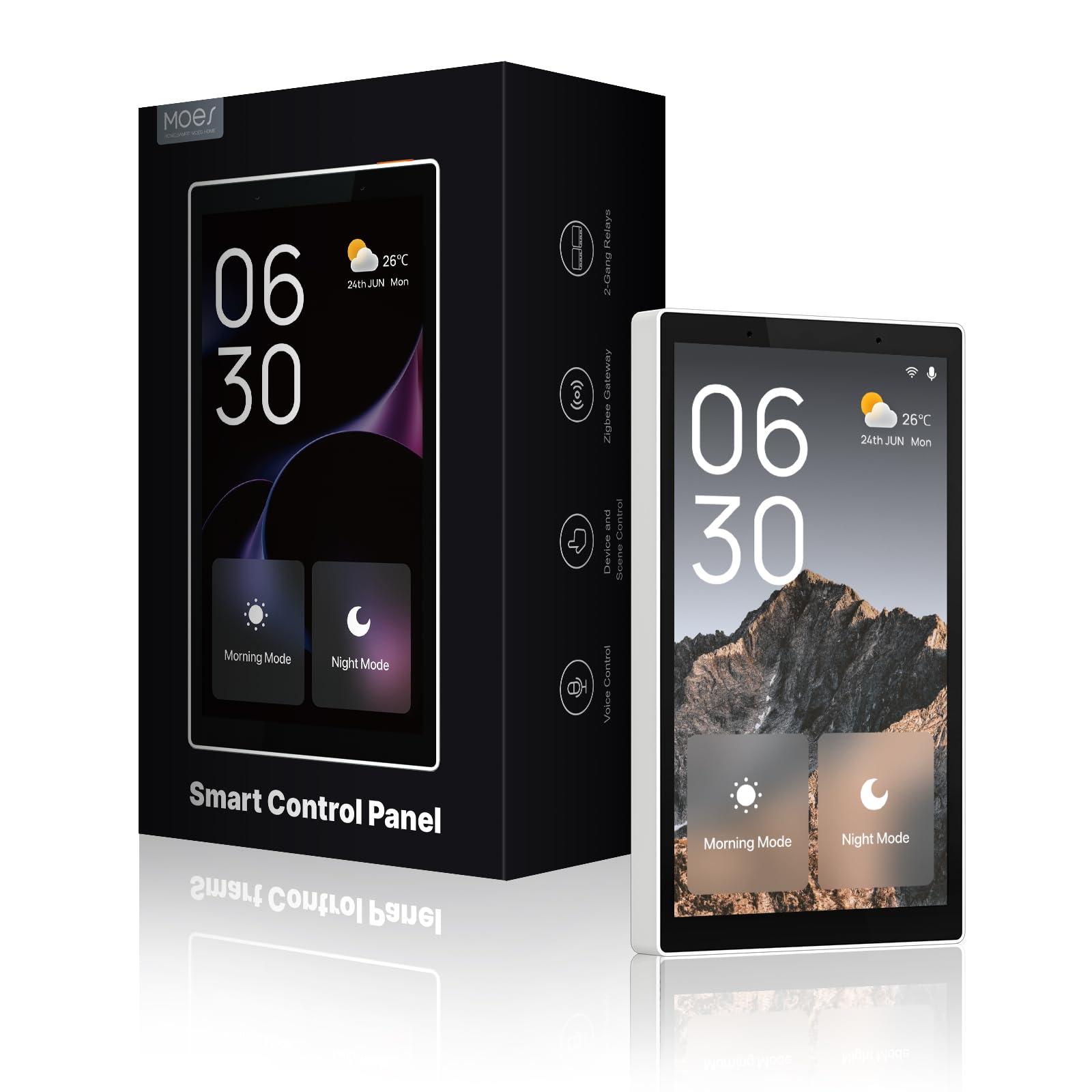
🏠 Transform your wall into a smart command center—touch, talk, and take control!
The MOES Smart Home Touchscreen Control is a 5-inch in-wall panel featuring built-in Alexa and an integrated Zigbee gateway, designed to unify and simplify management of Smart Life devices. Compatible with a wide range of smart home products, it offers both touch and voice control, supports wired and wireless networks, and eliminates the need for separate hubs, making it an elegant and efficient centerpiece for modern smart homes.




| ASIN | B0CSJMX31K |
| Batteries Included? | No |
| Batteries Required? | No |
| Best Sellers Rank | #191,108 in Tools & Home Improvement ( See Top 100 in Tools & Home Improvement ) #573 in Electrical Light Switches |
| Color | Black |
| Customer Reviews | 3.9 3.9 out of 5 stars (27) |
| Date First Available | January 17, 2024 |
| Included Components | Smart Home Touchscreen Control |
| Item Weight | 13.1 ounces |
| Item model number | CCP-US-MS |
| Manufacturer | WENZHOU NOVA NEW ENERGY CO.,LTD |
| Product Dimensions | 1 x 1 x 1 inches |
P**N
So far complete success
Once installed and firmware upgraded it has done everything I've asked of it. The "buttons" for the two built-in switches have a very nice tactile feedback when pressed. It integrated with Alex seamlessly and takes/executes Alex commands on its own. It also looks really nice in place which, while not totally necessary, is a great bonus. It was easy to install as I've installed a lot of switches in my life. Having said that the instructions could be clearer with better diagrams. There was only one very general diagram that wasn't helpful.
D**9
Very well made product, with some drawbacks
If you have a houseful of Tuya/SmartLife products (and not much else), this is like a (permanently mounted, in an electrical box in the wall) publicly accessible - high quality Visual - 'phone-app' of your Tuya system. Plus - it has Alexa! (Which cross-references to a ton of other systems.) I got this as an easy interface for Others in the household who are baffled by techie stuff and have no interest in learning, yet want to control a few lights etc that affect them. This fills that bill beautifully, as long as you're content using Alexa for almost everything, but the lovely display is limited to Tuya devices only. In my situation, where I mostly have Tuya/SL outlets and bulbs (not much in terms of variety in my system), this doesn't display output from other systems I would like to 'see', like camera feeds, state of O/C sensors, lock status, changing security mode etc etc. It only shows Tuya devices. Being a fully Alexa-enabled device, you can still access all your other systems by voice (once you cross them into Alexa, a separate app), but you can't "see" them on the control panel (like you can with the Alexa Hub. "Hub" in Alexa-ese means "control panel" in Moes-ese.) The other problem I had with this control panel is it is remarkably lacking in documentation. You get a user guide about installation and initial setup, but nothing about actually using the device. It makes a mention of how to add Tuya devices to Alexa, but none of the details to understand what this system, even limited to Tuya, can do - which is a Lot! I had a bunch of back and forth with the vendor and finally got the Settings screen explained (with it's dozen icons and myriad sub settings), but what and how to do things with this actually quite sophisticated device is anyone's trial and error. I had never used Alexa before and had zero experience, and I was totally amazed how easy it is to set up and add your systems to (through the separate Alexa app, your Amazon and other device app/account permissions etc etc - actually pretty complicated behind the scenes but Alexa is actually quite easy to learn if you're a nerd, and Very sophisticated in what it can do! Groups from multiple systems instead of just Rooms in other systems is just a start!) So, overall: build quality, visual output, smart design for Tuya devices, easily 5 stars. Alexa enabled, 5 stars. Limited to Tuya visual output, 3-4 stars (compared to Alexa Hub). Poor documentation, 4 stars (even though the vendor is trying now that I pointed this out.) I got this on a good sale, and had I not found out about the Alexa Hub 3 days before the return window closed, I would be happy enough, mostly because you can access most other systems you have via in-built Alexa, which works Very Well (says Alexa newbie.) But for only $15 more on prime days I can get the Alexa Hub and See and talk to every one of my systems, incl Tuya. So I will be returning this tomorrow. I just hope the Alexa Hub display is as good as this control panel, because this one is really good. Moes customer service is very responsive and concerned about a good customer result. This won't be the first Tuya device you get (though it should be if you want to use the more sophisticated Moes app, rather than SmartLife or Tuya app you probably have your things added to, but it works fine with those apps.) Tuya is a very good platform, I've used it for some years now. The devices made for this system have all been up to speed and Tuya has been an innovator in smart homes on some fronts. My issue is a really smart home, with security and cameras and locks and sensors (Tuya doesn't make, especially long distance ones), aren't in the Tuya system (yet.) And I've already had these other half a dozen systems for years also, as they each filled niches at the time (and like Tuya, most have gotten even better over time.) So it's Alexa that can tie all these together for ya, and it looks like I'm going with an Alexa Hub. If that's disappointing, and on balance no better (maybe worse?) than this Moes control panel, I will happily come back to this Moes panel and wait for technology to evolve...
A**E
Smart home time
I had a totes that’s gonna be really difficult to change your home on smart control but all depends what equipment you using after ordering small smart control panel and connect with my Google Assistant. Everything become much more easier and smarter. I don’t need to have a background to set up every single listed just follow step-by-step.
T**S
Not what it could be
After a few months of use, I am disappointed in this switch, but am hopeful for a future firmware fix.. 1. The backlight / UI screen shuts off even if you set the always active option. It does wake up when you approach, but I don't want this unit to turn off, as I it shows the clock and remote device status. 2. I only have 2 switches configured yet it scrolls to other pages if you swipe, which is too easy to do for a wall switch. 3. The clock display is great, but the exterior temperature is too small to be useful. 1. An always on display that stays on all the time. The clock is great, and can work as a night light. 2. A few more options on how the time and temperature are displayed. 3. Add an option to disable the screen swipe or provide a different way to change pages. Swiping is too confusing for a wall mounted device. 4. The microphone is way too sensitive on this device. Alexa is triggered too easy. I don't see a way to adjust.
S**R
Good idea, terrible software and hardware
I want to like this but it has many issues. 1. I have 12hr clock set in the app but will only ever display 24 clock 2. It has no power state memory so if it reboots or lose power, the default is to have power off 3. This thing constantly reboots. For no reason whatsoever it will just power cycle which by itself is very annoying. But during the power cycle it turns off all switches, so out of nowhere all the lights go out. It then has a voice boot up message that is super annoying, especially if it happens multiple times a day. 4. Lastly I reported this issue to the company and they never got back to me and Amazon will not return it as im outside my return window.
J**N
Still needs some improvements.
- Lockscreen with password. - Allow for more tiles in homescreen - Display cameras without pretending a phone call
S**Z
Buenisimos, he puesto uno en cada habitación de la casa y tiene llamadas entre cuartos. Adicionalmente si lo configuras correctamente puedes controlar toda la casa desde ahí o hacer que Alexa lo haga x ti.
Trustpilot
4 days ago
1 day ago