Desert Online General Trading LLC
Dubai, United Arab Emirates
Desert Online General Trading LLC
Dubai, United Arab Emirates


🔋 Power up smartly, live worry-free!
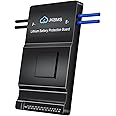
The JKBMSSmart BMS 8S-24S is a high-performance battery management system supporting 24V-72V Li-ion, LiFePO4, and LTO batteries with 150A current capacity. Featuring built-in Bluetooth and RS485 connectivity, it offers real-time monitoring and control via a dedicated mobile app. Its active balancing technology enhances battery longevity and safety by protecting against overcharge, overdischarge, overcurrent, short circuits, and temperature extremes. Compact and easy to install, it’s ideal for electric vehicles, scooters, and power banks.


| Item Dimensions | 6.38 x 4.02 x 0.81 inches |
| Item Weight | 0.95 Pounds |
| Output Voltage | 72 Volts |
| Input Voltage | 72 Volts |
| Color | LiFePO4 BMS |
N**.
Easy to install, operate, and understand.
Update 2024-12-14:Actually looking like top balancing will recover 20% capacity.Heater puzzle solved. See below for info from JK BMS.The scene:After 6 years, converting two (24v) 8S 200Ah bottom balanced LFP cells to a single 16S 200Ah 52.1V battery. Installed BMS 6 days ago.The good:Super simple install.Connected to app immediately.Clear and easy to read manual (yes, really!)The great:Chugging away at top balancing the pack.At 2A, and as poorly balanced at the top these cells are, it’s made decent progress. Looking like I’ll be able to reclaim an easy 10% MORE capacity from these cells than I’ve ever had.The “Meh”:Can’t figure out WHEN the heater port will activate.CAN cable was missing.Only JK protocol supported CAN menu.Over All Grade: A+Would I buy it again? Yep, as a matter I already have.If I figure out how to trigger the heater, I’ll update this.If I figure out how to get this to talk to my Victron gear, I’ll update this.I’ve played with pretty every setting. It works as documented.2024-12-17 JK BMS sent info:Heating Function Activation Conditions:The heating function for charging will be activated when Condition 1 is met, along with Condition 2 or Condition 3.Condition 1: The battery temperature is below the charging low-temperature protection threshold.Condition 2: Heating is manually activated via the APP, without checking the charger status. Once the low-temperature condition is met, heating will begin, which will consume battery power.Condition 3: The charger is detected as being plugged in. This function is related to the hardware of the protection board and the charger, so please confirm the technical specifications before ordering.Heating Film Selection:Step 1: Determine the maximum battery pack voltage. For example, a 20-series LiFePO4 battery has a maximum voltage of 20 × 3.6V = 72V, while a 24-series LiFePO4 battery has a maximum voltage of 24 × 3.6V = 86.4V.Step 2: Calculate the resistance value of the heating film. The resistance value is calculated by dividing the maximum total voltage by the current:Resistance (Ω) = Maximum Total Voltage ÷ 3A.For example, 72V ÷ 3A = 24Ω. Based on this, select a heating film with a resistance close to this value.A suitable heating film specification would be 72V/24Ω/216W.Key Notes for Understanding:Condition 1 (Low-Temperature Protection): The heating function will only be triggered if the battery temperature drops below a certain threshold (often around 0°C to 5°C) to prevent damage to the battery and ensure it remains functional during cold weather conditions.Condition 2 (Manual Activation via APP): This condition allows the user to manually activate the heating function through an app, which will begin heating as soon as the low-temperature condition is met. However, this will drain battery power, which is important to consider in terms of overall efficiency.Condition 3 (Charger Detection): The heating function is also dependent on detecting whether the charger is plugged in. This ensures that the battery is being charged during the heating process, avoiding unnecessary power drain when not connected to a power source.Heating Film Specifications: The heating element (heating film) needs to be carefully selected based on the battery's total voltage and required current. The resistance of the heating film plays a key role in determining how efficiently the heat is generated without exceeding the system's power limits.
O**C
JK far superior than Daly
This is used in my camper in a 12v system. It replaces a Daly BMS that I have never been happy with. With this BMS, I now am able to fully charge my battery, and in fact, I have probably 40% more battery power available. Second, the active balancing of this BMS is far superior. Third, the Daly BMS app always asked for permissions from my phone that I did not feel comfortable giving. This app has no such problems. In summary, Daly is prettier, but the JK functions much better. I wish I bought it a couple of years ago.
R**U
Easy to medium on the setup/install difficulty scale with minimal knowledge.
The installation was straightforward and hassle-free. As my first experience with a Battery Management System (BMS) like this, I found it surprisingly simple to set up despite my AC/DC electrical background, tweaking the parameters was intuitive. My engine ECM expertise helped me grasp it faster than most, aligning perfectly with my off-grid goals.This JK BMS (8S-24S 100A with 0.6A active balancing) excels in lithium setups, supporting 8-24 series cells (24V-72V) and 100A charge/discharge in a common-port design. It offers robust protections against overcharge, over-discharge, overcurrent, short circuits, and temperature issues (via NTC). The 0.6A active balancer efficiently equalizes cells for ~95% utilization. Bluetooth app monitoring tracks voltage, current, temp, SOC, SOH, and capacity in real-time, with RS485 for inverter integration. Compatible with LiFePO4, Li-ion, and LTO for solar, RV, or EV use.
B**S
Don't buy
The android app is spyware. It will not work unless it can report your location to the company in China as long as you have installed. You have to order a special USB to RJ 45 cable. I played all this money and I don't own this BMS.
D**D
Gps Port is the serial/UART data out
Seems to be a very nice BMS, but the documentation is lacking. FYI anyone trying to communicate to this with data should be aware that if you buy the CAN version, it doesn't mean that you'll be able to connect to victron or other equipment over can. It means that JK BMS has its own one or two can protocols that are then included... Which was completely useless for me. Also keep in mind when you're connecting to this, it can do TTL which is sometimes called rs-485, and it does this out of what they call the GPS port. Do not connect the ground for the hot wire which are the outer two, only use the middle two wires, of which the one that is closer to the cell monitor wires is the TX, and the one that is farther away is the RX; I recommend getting an FTD adapter for serial communications, and be sure to use 3.3 volts, not five.... Yet an adapter that has lights on the TX and RX so you know that the adapter is actually working... I had two adapters that were bad which caused me to waste half a day because I thought my connections and other settings were bad, but they were not. In the JK BMS app for these serial communications you will need to go to the advanced settings and under the option for the uart you will select GPS.... Which is JK's way of saying that you will do uart or serial using the GPS port, middle two wires. Good luck out there, and remember to do your due diligence first if you are even thinking of using victron equipment because it is a huge mess of one thing leads to the next and over complicating your life.
H**R
Works perfectly for my custom 4P4S LiFePo4 battery
Well engineered BMS, it functions perfectly and was easy to configure through the app. Worth every penny.
L**E
Great unit with a ton of features
I have 3 of these and find that they work well. Lots of features. The only minor.issue is SOC drift. But I don't use the BMS to monitor this.
J**G
Discharge protection failed.
Worked pretty great for a few months but then the output fet shorted closed and causing the pack to over-discharge.
Trustpilot
3 weeks ago
1 week ago