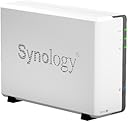
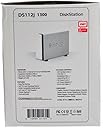


Synology DiskStation DS112j 1300 1-Bay 3TB 1.0 GHz Network Attached Storage
Product ID: 6713794
🌙12.1W Power
💾3TB Storage
🔒Hardware Encryption
🌐 Your Data, Your Way - Anytime, Anywhere!
The Synology DiskStation DS112j is a powerful 1-bay network-attached storage solution featuring 3TB of storage, hardware encryption for enhanced security, and an energy-efficient design that operates at just 12.1 watts. Perfect for professionals seeking reliable and quiet personal cloud storage.
M**P
Great Entry Level NAS
I'm enjoying this NAS.The hardware install was simple. The software install wasn't as simple but was fairly intuitive.You install the Synology DiskStation OS via a CD from a networked computer. From there it isn't as clear what you need to do but it doesn't take much to figure it out.You then need to decide which 'components' or 'packages' you want to download and install. You find these packages in the 'Package Center' within the DiskStation interface.At this point, I'm running a few basic packages: Media Server, for DLNA: media serving to networked devices, Cloud Station which sets up synchronized collaborative file sharing between your NAS, your computers and mobile phone, Download Station for stand alone Bit Torrent downloading, Audio Station for an enhanced library type interface to access your music, and File Station which provides an alternate way to access your files/folders of the NAS. (as opposed to Windows).I tried using their Photo Station which is an online 'Picassa type' of photo catalog. However, it really never worked right for me. It would take forever to load and to display pictures. This is why I deducted a star from my review.DiskStation offers a slew of other optional packages found in the following package categories; Backup, Multimedia, Business and Security and Utilities. Some examples across these categories are Glacier Backup, Logitech Media Server. Mail Station, Surveillance Station and VPN Server.Many of the 'bread and butter' Synology Packages have complimentary mobile apps. DS Photo, DS File, DS Audio, DS Cloud and DS Download are some examples. These apps give you remote access to all these NAS features and they for the most part work very well. Sometimes my DS Cloud app disconnects and I need to restart my phone to get it back 'online'.You can also remotely access your Synology NAS DiskStation via the internet. You actually set up a private web site for it (for free). It becomes accessible, of course, only with the proper log in credentials. Figuring out how to do this is not clearly spelled out. If you're lucky and 'EZ Internet' works for you through the Synology DiskStation interface then great. Otherwise, you'll need to manually open up the applicable ports in your router for the packages which you choose to install.My primary reason to purchase this device was for the media server functionality and it hasn't disappointed me. It's been solid in this regard; serving to the PS3 and to the Samsung BD-C5500 Blu-ray player. Be prepared to wait a few weeks for your thumbnails to be generated in the background of the NAS. For example as of this review, which is two weeks post install it has generated 64.7% of my pictures thumbnails. This is for about 20,000 pictures. For more reading about that just Google "thumbnails and Synology".I purchased and installed the WD Red 2 TB NAS Hard Drive (recommended by amazon) and so far there haven't been any problems.I recommend this Synology NAS and WD drive combo.
M**.
Great NAS, but horrible, painfully slow photo uploading
I looked all around for different NAS devices for use at my home. Of all the reviews I read, it seemed that the Synology brand offered the best device and the most features for a home NAS. And the only thing I noticed for complaints was the consistent report of how slow the NAS is for loading and then thumbnailing photos for use by its photo browsing software, or via its Media Server software. Once I got the device, I validated this is a big pain with the device, but I was able to setup a process to work around the issue for me. This work around is ok for me, since it will enable me to keep the photo service and media server service active, which my family really likes.Now that I have the device and I have loaded it with most of the content from my home PCs, I can now comfortably say that I am happy that I bought this device. I ended up buying this drive for it: Western Digital Caviar Green 2 TB Desktop Hard Drive WD20EARX . I still have more to play with it, and more things to setup and explore, but I've used it enough that I think I can comfortably write a review about it now.I have so far, been able to use the NAS from all 3 of our PCs, and all of our Android and iOS devices. For Android, you can use either the Synology DSFile app, or can just use any file browser with Samba mount support. I was able to have the kids write a document on the laptop, and then I could read the document on my tablet, make comments on it, and put it back on the share so that they could see my comments and make another pass at it. Then when they were all done, I could go to our other PC which is hooked up to the printer and could print the document right from there. And if I tried to edit a document that someone else had opened, I was told which PC had it open, and could ask then to close the document so I could edit it. It worked exactly the way I wanted it to.PROS- nice and quiet. I cannot hear the fan or the hard drive in this thing.- nice looking device- it has a lot of functional components to it. I wanted a Media Server, FTP server, and a Windows mountable share. I got that plus a whole lot more.- Photo browsing software is actually quite nice. It seems to have a lot of functionality for photo browsing. I am still playing with the features that are available so I haven't mastered everything that it can do.- Nice application support for iOS and Android platforms. I installed the DSPhoto+ software on my wife and kids devices and they can all browse our photo library and digital camera video library with ease now. Although I have had the ability to view photos via the PS3 using Media Server on my PC, it works so much nicer with this software. This was a huge win for my family. I also installed all the other DS Android apps on my tablet, and I am quite happy with what it enables.- Lots of account options for it.- I really like how they don't install every option that it offers upon initial installation. It actually lets you chose which modules you want installed.CONS- the biggest downfall for this device is the slow thumbnail process for photos that get uploaded to the photo share. I will detail this issue below.- the provided software was outdated and I should have just went online and obtained a new version from there. The version I initially tried ended up messing up the date/time of the photos that I originally loaded. Luckily I can just write a shell script to fix them all, instead of copying all the files over again.- the speed doesn't seem as quick as I was hoping it would be for file transfers, but I need to do a lot more testing of my home network to make sure it is not a network infrastructure issue. I have a Linksys E3200 router and a gigabit network card in my PC, and I was not able to get what I thought was fast transfer speeds as I transferred files to the NAS. So I did some testing with a 1GB movie file to see the actual speed numbers of the NAS. Here is what I noticed:(NOTE: "Windows D" = my D Drive on my Windows box, and "Windows C" is my C drive)Source......Target......Time...MB/s...ApproachWindows D...NAS.........52s....19MB...Mapped Drive CopyNAS.........Windows D...42s....24MB...Mapped Drive CopyWindows D...NAS.........45s....22MB...FTPNAS.........Windows D...42s....24MB...FTPNAS.........NAS.........37s....27MB...Shell Command Single Drive CopyWindows D...Windows D...54s....18MB...Windows Explorer Single Drive CopyWindows C...Windows D...19s....53MB...Windows Explorer Multi Drive CopySo as shown above, the write speed of my Windows Drive can achieve up to 53MB/s when using 2 internal drives, and that speed slows down to about half that speed when the NAS is used, since the network adds overhead. I expected the NAS to be slower than an internal drive would be, and after I went through the above test, I guess I am not as disappointed with the speed of the NAS. After all, the NAS outperforms a single drive copy, so I think that is not all that bad.AREAS FOR IMPROVEMENT- Improve upon the photo upload software and also the photo thumbnailing process to not be so slow. This could be achieved by providing options to the user on the quality of the thumbnails. Although its nice that the NAS wants to create 5 different sized thumbnails for each photo, this process takes a long time to achieve, even if using the provided upload software.INTERESTING THINGS I HAVE DONE WITH IT- I have been able use the PS3 Media Server to view photos stored on it.- I have used their Android and iOS apps to browse files and photos- I have been able to run those apps from outside the home network (once I opened the ports for it) so that I have my own cloud storage option no matter where I am- explored the shell scripting capabilities that it has. I find it to be a little limited with options and commands but it is able to do most things that any Linux OS should be able to do. (I wish it had cron though)HOW I FIXED THE PHOTO UPLOAD SPEED ISSUEMy first attempt at loading my 11,000 photos was do just do a copy of the files from my PC to the NAS. This took a few hours to do, but once it was done, I then noticed the thumbnail status in the admin website, and it was going to take a while. I let it run for several hours, and its performance was absolutely horrible. I am talking about over a minute per photo.So I then re-uploaded the photos using what Synology suggests we use - the Synology Assistant Photo Uploader. That process was certainly faster because it could use my PC's CPU to do the thumbnail process, but I still thought the performance was a bit too slow. It was about 3 photos per minute (source photo size about 1MB). At that rate, it would have completed in about 4 days, since my newer photos average about 3MB in size, it would take longer once it hit those larger photos.So, I did a little research and found that they use a product called ImageMagicK to create 5 thumbnails of different sizes. (1280x, 800x, 640x, 320x, and 120x) So I installed the same on my PC, and then wrote some CygWin scripts to go through my photo directory, and create the thumbnails on my PC. I was able to choose a lower quality of the thumbnails to a much more reasonable number, which also saved me a bit of space on the NAS as well. I was able to run 4 simultaneous processes, each thumbnailing different directories using the above process, and was able to generate my thumbnails in a matter of 6 hours. Once that was done, I then zipped the thumbnails (with no compression to help with the speed of unzipping on the NAS), and then transferred a single zip per year of photos over to the NAS. This sped up the transfer time greatly as it is much faster to transfer a few large files, than to send over 55,000 smaller files.Once the zips were on the NAS, I then wrote another shell script that I run on the NAS to unzip the file, rename each file to the proper filename (the thumbnails have a : in the filename which Windows can't handle), and then I copy the files into the proper location of the photo share.I then un-paused the thumbnail process on the NAS, and it quickly updated its count of files that needed to be processed.So given the above process, here is what I think Synology should do to improve their upload tool.1. Allow the user to chose the compression/quality rating for each of the thumbnail sizes they create.2. Allow the user to opt out of creating some of the thumbnails. It creates 1280x, 800x, 640x, 320x, and 120x thumbnails. I assume each is used for a different purpose. Maybe we should be allowed to skip one or two of the 3 larger files, and have the NAS use the closest available match if the desired size is missing.3. Rename the thumbnail files so that a : is not part of the filename to make life a little easier for people who want to get the files there via other means.4. Provide the ability to do multi threaded processing when using the upload tool.If anyone is interesting in doing a similar process, here are the options I found to be good for me for the ImageMagicK software. Of course, adjust as you see fit:convert "$filename" -resize 1280 -quality 60 -auto-orient "@eaDir/$filename/THUMB_XL.jpg"convert "@eaDir/$filename/THUMB_XL.jpg" -resize 800 -quality 60 "@eaDir/$filename/THUMB_L.jpg"convert "@eaDir/$filename/THUMB_L.jpg" -resize 640 -quality 60 "@eaDir/$filename/THUMB_B.jpg"convert "@eaDir/$filename/THUMB_B.jpg" -resize 320 -quality 60 "@eaDir/$filename/THUMB_M.jpg"convert "@eaDir/$filename/THUMB_M.jpg" -resize 120 -quality 60 "@eaDir/$filename/THUMB_S.jpg"(Once the files get on the NAS, they need to be named like: SYNOPHOTO:THUMB_XL.jpg )So is the above process something that everyone will want to do? Most likely not. But it is something that was important for me to be able to do, so I was glad to see that the NAS offered a Linux shell which I could run some commands through, to do this type of processing. I will most likely still use their software upload process for converting my camera movie files, but for all large photo uploads, I will now use the scripts I wrote for my initial photo upload process.UPDATE 06/12/2012I have found one usability issue with my experience with this device so far. I wanted to move all my music to the NAS, and then have iTunes use the mapped drive to the NAS for its storage of its library. This did not work well at all. If you forget the fact that I didn't find an easy way to move my existing iTunes library to another drive, the big issue I had was that when I tried to download new music from iTunes, the downloads did not work. It failed while it tried to download and process the files. I was left with a bunch of download.m4a audio files, non of which were able to be moved to the proper directory once the download completed, and non of which were playable. So I had to abandon this option. Instead, I now have to continue storing the Music on my PC, and then copy it to the NAS after it is downloaded. I am a bit disappointed with this. I don't know whether this issue is common to all Windows network mapped drives, or is unique to this one. Maybe its a fault of Windows and not the drive but I won't be trying it again.
S**E
Maybe Better Than OK
This storage device may be the best piece of NAS hardware around (I don't know for sure yet), but I had so much trouble installing and getting this unit up and running that I needlessly returned both a WD Red 2TB hard drive and this Synology DiskStation to Amazon (and received phenomenal support from them). I say needlessly because all the while the problem was that the installation documentation was so vague and general that none of the steps during installation matched my indications, and the flashing yellow light on the DiskStation (and the documentation's LED indicator explanation) led me to first believe my disk was bad, then after the second disk, that the DiskStation itself was bad. I admit I'm not an IT professional, but I have cobbled together computers, added a variety of hardware, loaded all my own software, and have never had to take a computer into a repair facility. I wasn't expecting such a struggle setting up an NAS device particularly when others have apparently had no trouble. So what resolved my issues?There was no technical support line given with the installation that I could find, and even the detailed user guide did not lead me to any answers, so I went to the Synology website and finally found a North America telephone number. When I called, I spent less than 30 seconds on hold and was quickly connected to a knowledgeable person who immediately determined what I needed to do, led me through several steps to get me started and in less than 5 minutes I was up and running. Wow. If only the documentation had led me to the same place!
G**6
Beautifully built, easy to set up and maintain
Fabulous network storage and server device. Beautifully built, easy to set up and maintain. Full of features, and the Synology OS is well maintained and developed.The one small point - and I did buy a low end model I know - is that the processor/memory cannot really cope with creating a large photo gallery well. The processor sat maxed out for over a week when I copied my photo collection to it - this OS didn't allow it to make the device unusable ever, but it struggled. So, if you have a large media collection I would probably edge towards a higher end model with more grunt.
J**R
Good product
Its a good device to store stuff as a nas drive, mind you, hard drive is not included.
P**N
Great NAS easy to use and setup
Quick, intuitive, NAS enclosure, great for home office /media server use. Good interface and software which can easily be customised.
C**L
Good little addition to my networked world
At the moment I have given it a 4* rating, not because it isn't worth 5, but because I have yet to fully explore its features.Why I bought it:I use mac, my wife uses Windows. We need to share media - photos/music/documentsBacking up our PC'sAccess to all my media on the fly - i travel a lot with my work and I prefer to take an ipad with me rather than a laptop.What I think:Setting up is straight forward. I separately bought a 3TB WD HDD OEM Red for it (cheaper than buying it as a complete unit). It's as simple as inserting the HDD, connecting it to the router and switching it on; it does the rest of the formatting and setup from the supplied disc. Easy.I recommend taking the time to install the user manual and identify those utilities you would initially find most useful. For me this was photo sharing, backups, music, file sharing and remote access.Usefullness:All our media is now stored in one place and accessible from all laptops and even portable devices from wherever we are, via downloadable apps.As photos and music are probably the greatest drain on disc space this has now freed up our laptops again.Being able to access photos, music or documents from my phone or iPad when I'm out is a great plus.I still need to investigate the usefulness of other utilities and when I do I have no doubt this will merit 5*.
J**E
Superó ampliamente mis expectativas
Le puse este disco duro: http://www.amazon.es/gp/product/B004RORMF6?psc=1&redirect=true&ref_=oh_aui_detailpage_o01_s00,de 3 TB de capacidad comprado también a través de Amazon. Un producto fantástico, el primer NAS que he adquirido y tras usarlo durante un largo periodo de tiempo estoy convencido de que no podía haber escogido otra marca mejor (el modelo de tu elección ya es según tus necesidades). El sistema operativo que lleva, DSM, es lo que lo convierte en un producto sobresaliente. Lo compré sabiendo en qué consistía un NAS y lo que me iba a aportar, pero es que a parte de ser un NAS es muchas cosas más.Hazte a la idea de que es un servidor que lo configuras activando y desactivando funcionalidades para que te ofrezca lo que tú quieras, aquí puedes probar cómo es su sistema de gestión: [......]Insisto, brillante.
Trustpilot
3 weeks ago
3 days ago