❄️ Cool performance meets infinite style — your CPU’s new best friend!
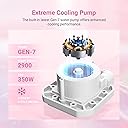
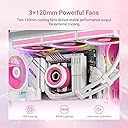
The ID-COOLING FX360 INF Pink Edition is a premium 360mm all-in-one liquid CPU cooler featuring a high-density radiator with 12 waterways for 37% improved heat dissipation. It includes three ultra-quiet 120mm fans operating at a max noise level of 29.9dB(A) and a GEN 7 pump running at 2900 RPM for efficient cooling. The ARGB infinity mirror pump adds a visually striking customizable lighting effect, while daisy-chained fan connectors simplify cable management. Compatible with a wide range of Intel and AMD sockets, this cooler blends high performance, quiet operation, and eye-catching aesthetics for professional-grade PC builds.
| ASIN | B0DPWWT7YZ |
| Air Flow Capacity | 78 Cubic Feet Per Minute |
| Best Sellers Rank | #35 in Water Cooling Systems |
| Brand Name | ID-COOLING |
| Compatible Devices | Desktop |
| Cooling Method | Water |
| Customer Reviews | 4.5 out of 5 stars 340 Reviews |
| Included Components | radiator, cooling fan, mounting hardware |
| Manufacturer | ID-COOLING |
| Maximum Rotational Speed | 2900 RPM |
| Noise Level | 29.9 Decibels |
| Power Connector Type | 7-Pin |
J**Y
Excellent Cooling, Beautiful Lighting, Zero Hassle
This water cooling setup has exceeded all my expectations. It works flawlessly—keeps my CPU running at the perfect temperature even under heavy load, and it’s whisper quiet while doing it. Installation was straightforward, and the build quality feels solid and reliable. One of the standout features is the LED customization. The fan lighting patterns are fully customizable, and the software makes it super easy to set everything up just the way you want. Best of all, the configuration actually saves and loads correctly—even across different operating systems—which is a rare and very welcome surprise. No complaints at all so far. If you’re looking for a high-quality water cooling solution with awesome lighting and zero hassle, this one’s a great choice. Great value for the money.
L**1
Excellent Cooling Performance with Stunning ARGB Effects
I recently installed the ID-COOLING FX360 INF 360mm AIO liquid cooler in my new build, and it’s been a fantastic upgrade. First off, the cooling performance is top-notch — it keeps my Ryzen/Intel CPU running cool even under heavy load, with temperatures staying impressively low. The included 3x120mm fans are quiet, even at high speeds, with a max noise level of just 27.2dB(A), which is great for a near-silent setup. What really sets this cooler apart is the ARGB infinity mirror on the pump — it looks absolutely stunning in a tempered glass case. The lighting is vibrant, smooth, and syncs easily with my motherboard’s ARGB header. The daisy-chained fans also simplify cable management, making the installation much cleaner and easier. Mounting was straightforward, with clear instructions and wide compatibility across both Intel (LGA1851/1700/1200/115X) and AMD (AM5/AM4) sockets. The build quality feels solid throughout. Overall, this cooler combines performance, aesthetics, and ease of installation in one great package. Highly recommended for gamers and PC builders who want both form and function.
T**.
ID-Cooling FX360 INF - Great Price & Performance!
I built a computer for an arcade I was building and didn’t know what I needed to run the emulators. So I used an i9 14900k with an Asus ROG Strix 4090 OC because no one would tell me what would work. So, I used the motto go big or go home. Needless to say it was overkill and then I find out that the i9 runs hot and my DeepCool AK620 worked for the emulator games, but not for AAA Steam games. My CPU kept thermal throttling. I purchased an Artic Liquid Freezer III 420, but was unable to get it to fit into my Lian Li Lancool III case. So I purchased this ID-Cooling FX360 INF since it got great reviews from those who do PC content. I’ve had this now for about 2 months and I’ve never had an issue with thermal throttling since. The highest temps I’ve seen is 70C-75C and that was during a CPU-Z stress test. Idling I’m around 30C-32C and playing 2 AAA games (Indian Jones & Hogwarts), at 4k, the highest I’ve seen is around 60C. This AIO has worked flawlessly and like a lot of people have said, it was really easy to install. Because it’s inside my arcade pedestal (and fears of my CPU over heating) mines set to run at 100% all the time and the fan noise isn’t bad at all. Those that complain the fans are loud or the pump is loud, I wish they were around in the 80’s and 90’s when fans were extremely loud!! They’d think twice about calling these loud. Only time will tell as to how well it holds up.
J**S
Well made, runs quiet and cool, but be careful about pump noise
Cools my 9800x3d nicely, very quiet fans. Quality workmanship and design. However, the first one I received had a loud pump. I liked this enough that I tried another one and the 2nd one is a keeper. What's was up with the pump noise? With the one I returned, it almost seemed like it was a little low on cooling fluid. That's just a guess on my end, based on how it sounded and acted. I set a fan curve to 50% pump speed when the CPU was cool in order to get the pump to be quiet and generally acceptable, but after a Cinebench 23 stress test where the fluid would warm up fully, the pump remained loud for a few min even after the fans and pump speed slowed down to the my no-load fan curves. Kind of like a gurgle that lasted a few minutes before slowly disappearing, all while at 50% speed. This gurgle was annoying and concerning, even though it kept the CPU cool. The second cooler did not exhibit this strange behavior, and is perhaps even slightly quieter at all pump speeds than the first one. I do start to hear the pump when it ramps up to over 60-70% speed, but the sound is hidden by other fans at that point. The fans on this have a quiet hum, and not a mild roar that I found when trying the Thermalright Frozen Notte 360. Comparing the two, the FX360 fans are a more of a polite "whir" than a "roar" from the point where both fans speed up to become audible, all the way to high fan speeds. I believe the Thermalright fans max out faster than the ID-Cooling fans, but the ID Cooling fans seem quieter even with both at 50-60% fan speed because the "whir" is much more pleasant than a "roar". I set my fan curve to max out these fans at only 70%. After a 30 minute Cinebench 23 test I had a max temp of 83 degrees. This gives me plenty of extra room if I need, as I can lower that by 3 degrees if I max the AIO fans. Overall, the workmanship of this AIO is actually quite nice and was definitely a step above the Thermalright. With a glass panel you can see the sides/edge of the fans, and these fan sides are smooth and uniform - not so on the Thermalright. I'm not bashing Thermalright here, but since these two are ballpark in price and both have similar infinity mirrors and overall design, the FX360 simply seems like it was made with higher quality as a whole. Just make sure the pump isn't noisy. The mounting system is pretty standard, which is good. I don't like the mounting system on the Thermalright, so that's another win in my book for the FX360. I'm glad I chose to give this a second chance and I'm happy with it.
C**.
Does its job and looks nice in a white case
Got this for a new build and it works great so far. About the same noise level as my previous AIO (an EK 240, which was pretty quiet), perhaps even a bit quieter during heavy loads/doesn't ramp up as much. It does seem AMD runs a bit warmer (always been an Intel guy), but this cooler keeps my Ryzen 7800X3D at around 40°C idle, which seems to be the average temp for others with a similar setup. Only minor complaint is that it was a bit hard to line up the screws of the pump with the brackets on the motherboard to mount it. The spring-like things on each screw give a bit of resistance when you're screwing them down, so it takes some steady hands. Other than that, it was pretty straight forward, and the included instructions were clear. Also worth mentioning there's no pre-applied thermal paste - a tube of generic thermal paste is included to manually apply (still need to make sure to remove the sticker on the bottom of the pump) The logo on the AIO can be rotated, so it's designed to be mounted with the tubes facing any direction you want.
S**E
Great cooler, great price
I grabbed the ID-COOLING FX360 INF as a replacement when my NZXT Kraken cooler failed and my CPU temps were hitting the 90°C range. At just $70 compared to $250 for a new Kraken, I figured it was worth a shot — and I’m glad I did. Installation was quick and easy, and it even fit right into the same mounting setup I had from the Kraken, which made the swap hassle-free. Now my CPU is idling around 34°C, and the cooler runs quietly with a nice ARGB infinity mirror effect that looks great in the case. For the price, this cooler seriously overdelivers and I’m very happy with the performance so far.
D**C
Hot Pink, Cool Vibes
I love this cooler! I got it for my wife for their new PC build. It lowered the temps to 60-70 degrees and works perfectly with the look we were going for. The infinity mirror effect is GOREGOUS.
S**K
Good value for the money, runs super quiet
I tested out the Cooler Master 240 Elite Liquid prior to trying this one and this cooler is indisputably better when comparing the price points. Cooler Master's Elite Liquid fans were an extreme letdown after using their ML240L V2 for years prior. They ran extremely loud and especially in the case of AMD's thermals and high clock speeds, an AIO with fans that run efficiently and quietly are a must. Needless to say, I am very pleased with this cooler. It runs super quiet even at standard fan curve through the BIOS and it doesn't ramp up super loud either as my AMD CPU increases in utilization. The color of the AIO (White) is pretty nice and I like the way the fans sit flush with the radiator. Installation was hit or miss. For the most part, there weren't any issues with installing the AIO (even in my mini-ITX case) albeit, the 400mm in length of tubing was a bit too long for my small case. The only main issue was the CPU mounting mechanism. The mounting brackets were fine but actually placing the AIO pump on the CPU and tightening the screws was challenging as it wasn't easy to find where the mount was relative to the screws.
Trustpilot
2 weeks ago
4 days ago